

How to adjust the display brightness of the Mijia Air Conditioner using the Xiaomi Home App?
You can adjust the display brightness of the Mijia Air Conditioner using the Xiaomi Home App. This feature allows for a more comfortable viewing experience, reduces glare at night, and helps create a pleasant atmosphere in the room.
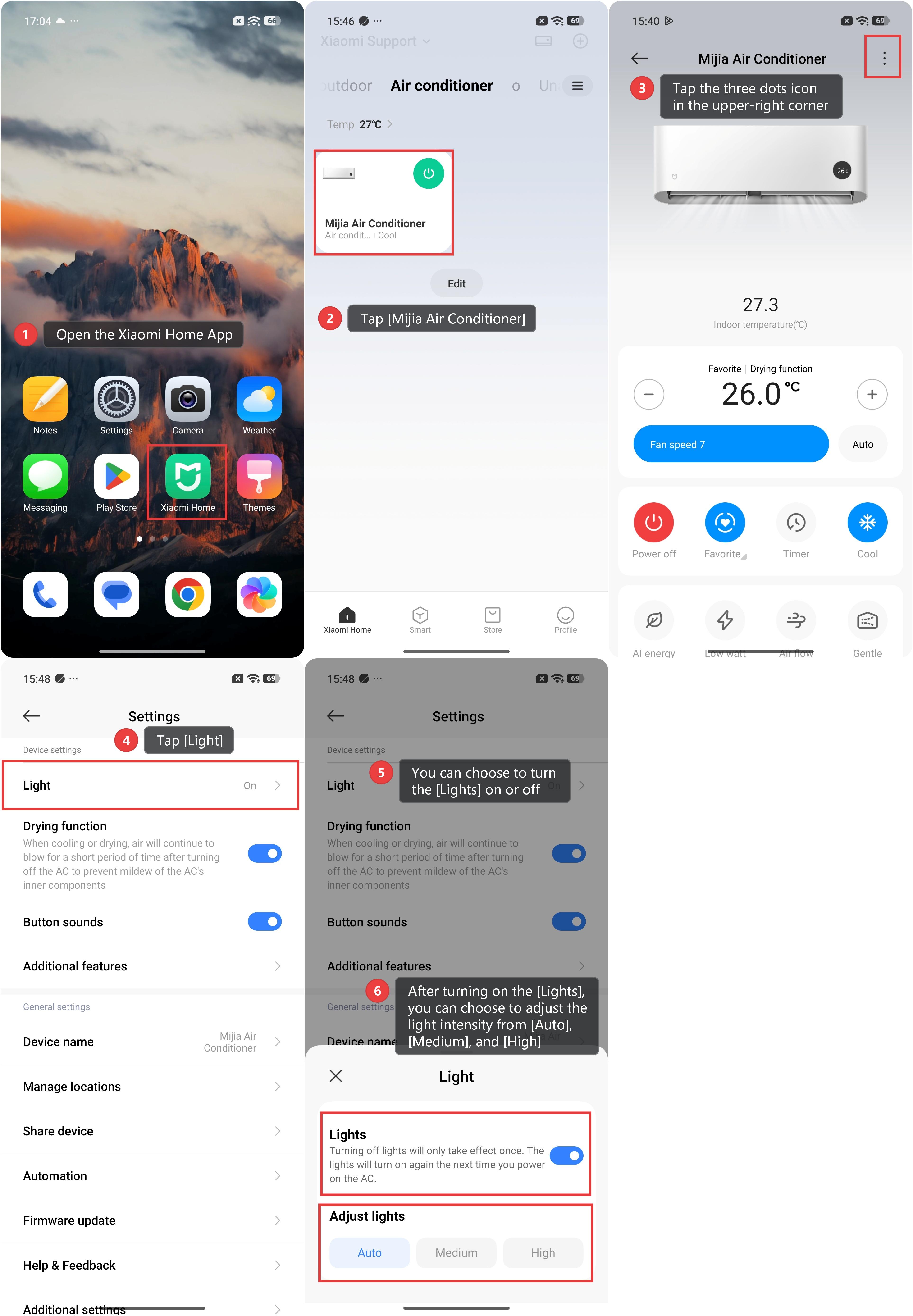
To adjust the display brightness of the Mijia Air Conditioner using the Xiaomi Home App, please refer to the following steps:
1. Open the Xiaomi Home App.
2. Tap [Mijia Air Conditioner].
3. Tap the three dots icon in the upper-right corner.
4. Tap [Light].
5. You can choose to turn the [Lights] on or off. Turning off [Lights] will only take effect once. The lights will turn on again the next time you power on the AC.
6. After turning on the [Lights], you can choose to adjust the light intensity from [Auto], [Medium], and [High].
Does it help?
Yes
No