

How to enable the Reduce condensation and water dripping on the air deflector function for the Mijia Air Conditioner?
Enabling the Reduce condensation and water dripping on the air deflector function for the Mijia Air Conditioner will help reduce potential condensation and water dripping from the panel or air vents during prolonged cooling in high-humidity environments.
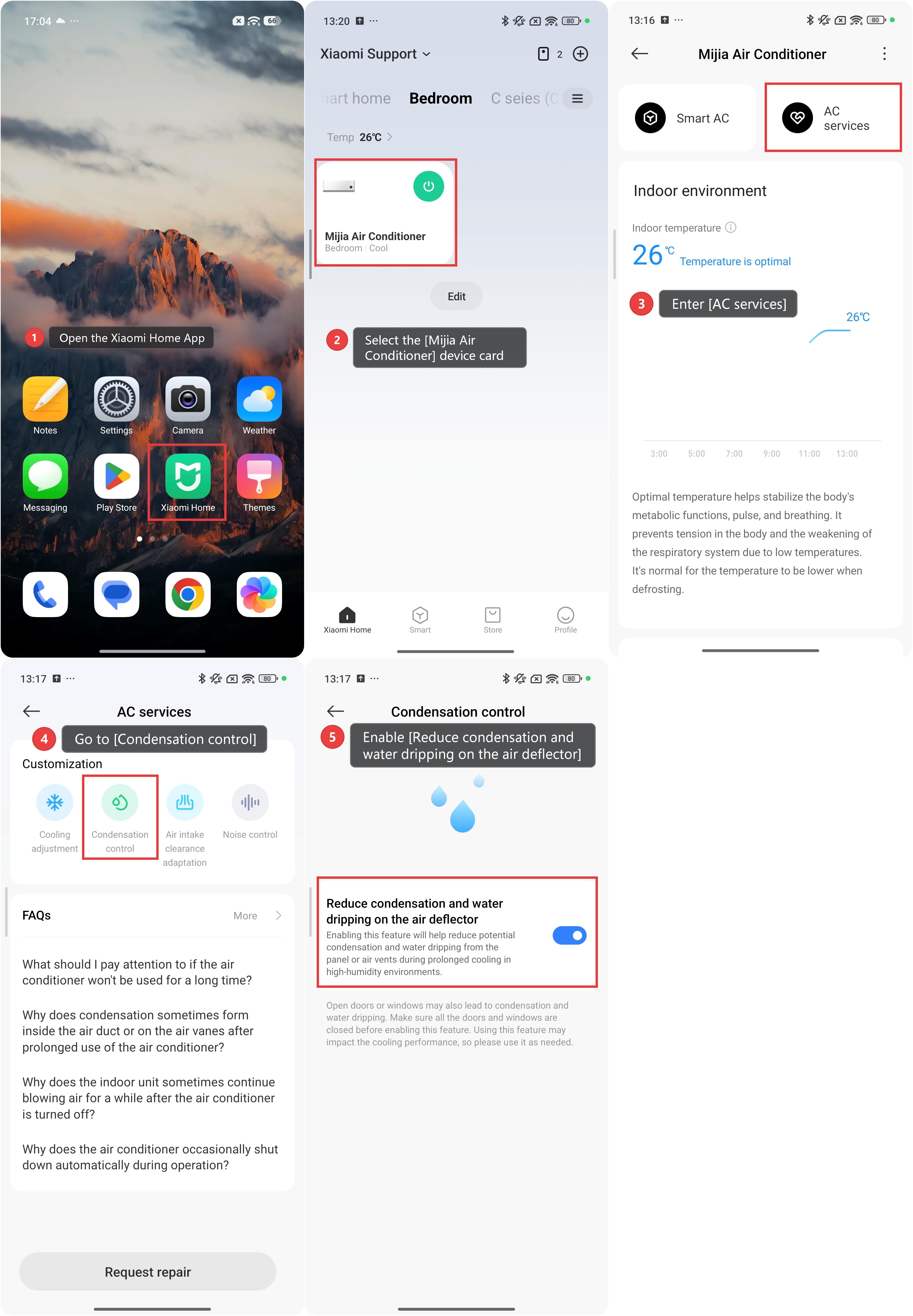
To enable the Reduce condensation and water dripping on the air deflector function for the Mijia Air Conditioner, please refer to the following steps:
1. Open the Xiaomi Home App on your phone.
2. Select the [Mijia Air Conditioner] device card.
3. Scroll down to find and enter [AC services].
4. Go to [Condensation control].
5. Enable [Reduce condensation and water dripping on the air deflector].
Note:
1. Open doors or windows may also lead to condensation and water dripping. Make sure all the doors and windows are closed before enabling this feature.
2. Using this feature may impact the cooling performance, so please use it as needed.
Does it help?
Yes
No