

Mijia Smart Audio Glasses FAQ
Product Information
Q1: Can the Mijia Smart Audio Glasses have interchangeable frames?
A: Whether the Mijia Smart Audio Glasses can have their frames interchanged differs in editions as follows:
1. The Deep Space Titanium Edition of the Mijia Smart Audio Glasses does not support frame replacement. The overall waterproof rating of the glasses is IP54, so caution should be exercised when using them in water.
Note:
The flathead screw at the frame connection of the Mijia Smart Audio Glasses is the part that secures the frame to the external spring hinge. It cannot be rotated or disassembled; otherwise, it will be impossible to manually reinstall and restore the product, affecting its use.
2. The Metal Aviator Edition and the Hybrid Browline Edition use a patented hinge design, allowing easy switching between different frame styles by inserting and removing the temples.
Note:
1. Please gently apply force along the temple direction to remove them with the temples open when changing frames.
2. Please refer to the insertion and removal method as instructed in the manual.
3. Please avoid pulling out at too large an angle, as this will increase disassembly resistance.
4. Please avoid gripping the frame too tightly, as this will deform the frame.
Q2: Can the battery in the Mijia Smart Audio Glasses be replaced?
A: The Mijia Smart Audio Glasses have an integrated built-in battery, which cannot be replaced.
Q3: Are the Mijia Smart Audio Glasses waterproof? Can they be used on rainy days?
A: The Mijia Smart Audio Glasses support IP54 waterproof, which can prevent problems caused by splashes to a certain extent.
Note:
Do not expose the product directly to water in rainy or other wet conditions.
Q4: Can the Mijia Smart Audio Glasses be used while charging?
A: The Mijia Smart Audio Glasses do not support charging and use at the same time.
Q5: Will wearing the Mijia Smart Audio Glasses for extended periods cause ear damage?
A: The Mijia Smart Audio Glasses utilize open sound field technology, achieving better sound quality while minimizing ear damage.
Q6: Do the Mijia Smart Audio Glasses support wet-hand operation?
A: The Mijia Smart Audio Glasses do not support operation with wet hands. Operating the glasses with wet hands may cause the touch screen to become unresponsive, so please ensure your hands are dry when touching the frame.
Q7: What are the safety precautions for the Mijia Smart Audio Glasses?
A: The safety precautions for the Mijia Smart Audio Glasses are as follows:
1. To prevent potential hearing damage, do not use high volume for extended periods.
2. This device cannot be used for direct sun observation. It cannot be used to protect against artificial light sources such as sunbathing. It cannot be used to protect the eyes from mechanical damage.
3. Do not use this product during strenuous exercise to avoid accidental personal injury.
4. The Metal Aviator Edition is not suitable for driving or walking in low-light conditions.
5. For the Metal Aviator Edition, please use with caution in tunnels, dark places, and at night, or in environments that affect vision.
6. Please comply with the relevant regulations of your region or country and use this device with caution while driving.
7. The standard transparent lens included with the product is a display lens, without prescription, and only provides temporary protection at the time of shipment. It is not recommended to wear the display lens for extended periods. It is recommended that you replace it with lenses of the appropriate prescription or plano lenses promptly after purchasing glasses.
8. If you need to replace the lenses, it is recommended to have it done by a professional optician to avoid damage to the device due to improper handling.
9. If you need to adjust the nose pads, please have them adjusted by a professional optician to avoid damaging the nose pads.
10. Do not clean the lenses with warm or hot water.
11. Please avoid storing with metal items that are prone to scratching.
12. The plastic material and lenses are not heat-resistant. Please avoid using (such as in saunas) or storing (such as on vehicle dashboards) in high-temperature environments to prevent deformation or cracking.
Q8: How to use the touch area on the Mijia Smart Audio Glasses?
A: To use the touch area on the Mijia Smart Audio Glasses, please refer to the following methods:
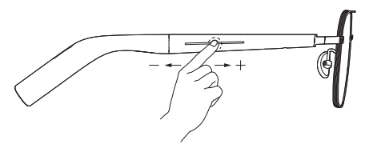
1. Swipe forward/back on the right temple touch area to increase/decrease volume.
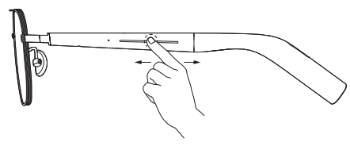
2. Swipe forward/back on the left temple touch area for next/previous track.
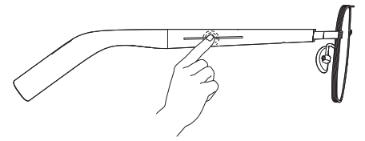
3. With music/video, double-tap either touch area to play/pause. When there's an incoming call/during a call, double-tap to answer/end.
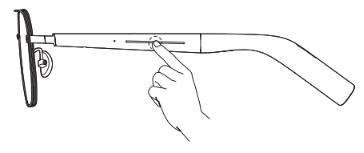
4. During a call, press and hold any touch area and release after the tone to start call recording. When not on a call, the same action starts ambient recording.
Note:
1. Please start audio recording in the Xiaomi Glasses App when using audio media.
2. All touch gestures can be customized in the Xiaomi Glasses App.
Q9: What devices can the Mijia Smart Audio Glasses connect to via Bluetooth?
A: It can connect to common hardware devices such as mobile phones and laptops. The Mijia Smart Audio Glasses support Bluetooth 5.4, meeting your daily connectivity needs.
Q10: Are the Mijia Smart Audio Glasses suitable for people with nearsightedness? How to get the correct lenses?
A: The Mijia Smart Audio Glasses can be fitted with prescription glasses (excluding sunglasses). You can choose a suitable online/offline optical shop to get your glasses fitted.
Q11: Are there any restrictions on the lens thickness that the Mijia Smart Audio Glasses frames can accommodate?
A: The Mijia Smart Audio Glasses can accommodate the same lens thicknesses as regular glasses. For specific fitting information, please consult a reputable offline optical shop.
Q12: Do the Mijia Smart Audio Glasses use bone conduction technology?
A: The Mijia Smart Audio Glasses use an open sound field solution, which can achieve better sound quality compared to bone conduction technology.
Q13: Do the Mijia Smart Audio Glasses support connecting to iPhones?
A: The Mijia Smart Audio Glasses connect to smart devices via Bluetooth, supporting not only iPhones and Android phones, but also laptops and other hardware devices. You can also install the Xiaomi Glasses App for more feature settings.
Q14: Why are the frames on the pop-up window different from the actual frames of the Mijia Smart Audio Glasses when connecting to the Xiaomi Glasses App?
A: The Xiaomi Glasses App pop-up animations are for illustrative purposes only and are not matched to the purchased glasses model.
Q15: What is the recording mode after pressing and holding the temple of the Mijia Smart Audio Glasses?
A: Press and hold the temple for a few seconds until you hear "Recording started," indicating that recording has begun. When there's an incoming call/during a call, it will enter "Call Recording"; if you are not in a call, it will enter live recording.
Note:
Whether call recording is available varies by country/region and depends on whether the phone itself supports the call recording function.
Q16: Are there any recording time limits for the Mijia Smart Audio Glasses?
A: There are no time limits for recordings uploaded directly to the Xiaomi Glasses App, but it is recommended that the recording time not exceed 2 hours. Recordings stored locally on the glasses have a maximum duration of approximately 2 hours, but this can vary depending on the storage size of the recording content.
Q17: Under what circumstances will the Mijia Smart Audio Glasses automatically stop recording?
A: The Mijia Smart Audio Glasses will automatically stop recording in the following situations:
1. Hanging up during a call recording.
2. Bluetooth disconnection during recording.
3. Answering or making a call or activating the phone's voice assistant while recording audio/video or on-site.
4. Using the glasses to store recordings until storage is exhausted.
5. No audio stream detected after 10 minutes of audio/video recording.
6. The glasses are powered on and restarted.
7. The glasses shut down due to battery depletion.
8. If the device running the Xiaomi Glasses App is recording audio/video, pausing the music on that device and then playing music on another device will terminate the recording.
Q18: Why can't the Mijia Smart Audio Glasses be used to start audio and video recording?
A: Starting audio and video recording requires detecting the audio stream. In many cases, the phone will send an audio stream, but there is actually no audio. To avoid misjudging the recording mode, you need to manually start audio and video recording in the Xiaomi Glasses App.
Q19: When do the Mijia Smart Audio Glasses save recordings inside the glasses, and when to the Xiaomi Glasses App directly?
A: The recording is saved directly to the Xiaomi Glasses App as follows:
1. Recording on-site via the Xiaomi Glasses App.
2. When two devices are connected, if recording is started on the Xiaomi Glasses App, and the Xiaomi Glasses App's call and audio/video recordings are made on the phone where the Xiaomi Glasses App is located.
The recording is saved inside the glasses as follows:
1. Call and on-site recording started via the temples.
2. When two devices are connected, if recording calls and audio/video recordings are made on a device other than the Xiaomi Glasses App, only local storage is supported.
Note:
1. In the case of direct recording and transfer, the recording file can be viewed/shared directly in the Xiaomi Glasses App after recording.
2. In the case of local storage, the recording file cannot be viewed directly after recording; the file needs to be exported from the glasses to the Xiaomi Glasses App first.
Q20: Where do the recording files go after unbinding the Mijia Smart Audio Glasses from the Xiaomi Glasses App?
A: After unbinding the glasses, as long as you don't uninstall the Xiaomi Glasses App, you can view the recording files following the steps below:
1. Tap the icon in the top left corner of the homepage to enter [Mine].
2. Select [Manage Historical Files].
Note:
Because the recording files are stored in the Xiaomi Glasses App, uninstalling the app will delete all recording files, making them unrecoverable.
Q21: How to find the serial number (SN) on the Mijia Smart Audio Glasses?
A:
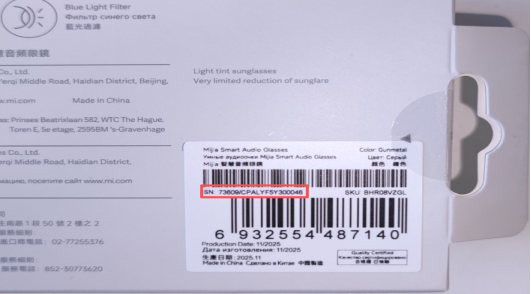
1. The SN on the Mijia Smart Audio Glasses is located on the back of the packaging box.
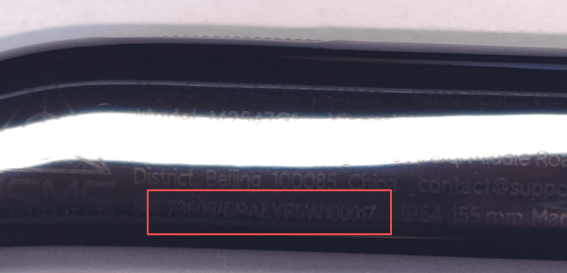
2. Also, you can see the SN information on the inside of the right temple using a light source.
3. The serial number (SN) of the device can be seen at Device Info in the Xiaomi Glasses App after connecting the product to the App.
Functions
Q1: How to restore the Mijia Smart Audio Glasses to factory settings?
A: While charging, press and hold the touch area on both temples for 7 seconds. You will hear the corresponding prompt tone, indicating that the factory reset is complete.
Q2: What to do if the Mijia Smart Audio Glasses have unsatisfactory standby battery life?
A: If your Mijia Smart Audio Glasses have unsatisfactory standby battery life, please refer to the following methods:
1. Please check if the Find glasses function is enabled or if the Wear detection function is disabled. If the corresponding function is enabled, the glasses will be in working mode by default and cannot enter the low-power standby mode.
2. If the voice wake-up function for the phone assistant is enabled, it will also increase power consumption while wearing the glasses. If the battery is low, consider turning off the corresponding switch to improve the device's battery life.
Q3: Why can't the Mijia Smart Audio Glasses connect via Bluetooth?
A: Please ensure the glasses have sufficient battery power. If the battery is low, please charge it for at least 10 minutes. If the device is not paired, please pair it first.
The specific pairing method is as follows:
1. Wear the glasses (the first sound after wearing them is the wearing recognition sound, not the pairing sound).
2. Press and hold the touch area on the left and right temples for 3 seconds. After the corresponding sound is heard, the glasses enter pairing mode.
3. Turn on the Bluetooth of your device (such as your mobile phone), search for and connect to the [Mijia Smart Audio Glasses]. After connecting successfully, the corresponding sound will be heard in the glasses.
Q4: What to do if the Mijia Smart Audio Glasses cannot be paired with the Xiaomi Glasses App?
A: If your Mijia Smart Audio Glasses cannot be paired with the Xiaomi Glasses App, please refer to the following steps:
1. Pair the glasses with your phone via Bluetooth.
2. Open the Xiaomi Glasses App and tap [Add Device].
3. Select the corresponding device and tap [Go to Connect].
4. Wait 3 seconds for the pairing to complete and you will be automatically redirected to the device's homepage.
Q5: How to check the battery level of the Mijia Smart Audio Glasses?
A: To check the battery level of the Mijia Smart Audio Glasses, please refer to the following methods:
Method 1:
For MIUI (MIUI 13 and above) and HyperOS, after updating the Bluetooth version, you can check the battery level through the Bluetooth settings.
Method 2:
For both Android and iOS phones, you can check the battery level through the Xiaomi Glasses App.
Q6: Can others hear the Mijia Smart Audio Glasses as they are loud?
A: Unlike typical closed-back headphones, the Mijia Smart Audio Glasses use an open-ear design. They utilize a reverse sound field to attenuate the far field, ensuring clear sound for the wearer while minimizing sound leakage. In relatively quiet environments, adjusting the volume to a suitable level can reduce sound leakage. You can also reduce sound leakage by opening [Xiaomi Glasses] >> [More features] >> enable [Privacy mode].
Q7: What to do if the Mijia Smart Audio Glasses don't make a prompt when worn?
A: If the Mijia Smart Audio Glasses don't make a prompt when worn, please refer to the following methods to solve:
1. Ensure the glasses have sufficient battery power. If low, charge for at least 10 minutes.
2. Ensure the Mijia Smart Audio Glasses are worn correctly, with the inside of the temples against your skin.
3. Check if the Wear detection function is disabled in the Xiaomi Glasses App. If disabled, there will be no prompt.
Q8: What to do if the temples of the Mijia Smart Audio Glasses become loose?
A: After a period of use, the temples of the Mijia Smart Audio Glasses may become slightly loose. This can be resolved by tightening the screws connecting the temples to the frame.
Q9: What to do if my ears or nose hurt after wearing the Mijia Smart Audio Glasses for a long time?
A: The overall weight of the Mijia Smart Audio Glasses is slightly heavier than that of ordinary glasses, and you can usually get used to it after 7 to 15 days. If the style or size of the glasses is not suitable, it can cause discomfort or pain. We recommend visiting a flagship store or experience store to try them on before purchasing.
If you have already purchased them, you can use the following methods to reduce pain or discomfort:
1. Choose thinner lenses with a suitable refractive index, as thick lenses will increase the overall weight of the glasses, causing discomfort or pain.
2. Adjusting the nose pads to a suitable angle by a professional offline optician can reduce discomfort.
Q10: How to replace the lenses in the Mijia Smart Audio Glasses?
A: Replacing the optical lenses in the Mijia Smart Audio Glasses is the same as disassembling traditional glasses.
Note:
1. Please go to a professional offline optical shop for replacement to avoid damage to the glasses due to improper operation.
2. If you damage the product by replacing it yourself, you will not be entitled to warranty service.
Q11: How to replace the nose pads on the Mijia Smart Audio Glasses?
A: The Mijia Smart Audio Glasses can be fitted with the same model of nose pads.
Note:
Please go to a professional offline optical shop for replacement to avoid damage to the glasses due to improper operation.
Q12: How to turn off the Mijia Smart Audio Glasses?
A: The Mijia Smart Audio Glasses do not have a button/interaction for manually turning off. The Mijia Smart Audio Glasses will automatically enter standby mode 3 minutes after being removed. In standby mode, power consumption is reduced, and a full charge can last for more than 12 days.
Note:
1. The Mijia Smart Audio Glasses' battery life is: 12 hours of music playback and 9 hours of voice calls at 50% volume, enough for a full day's use.
2. If the Find glasses function is not enabled and the Wear detection function is not disabled, it will automatically enter standby mode after being removed, allowing for even longer battery life.
Q13: How to adjust the volume on the Mijia Smart Audio Glasses?
A: To adjust the volume on the Mijia Smart Audio Glasses, please refer to the following methods:
Method 1:
Once the glasses are connected to your phone, you can adjust the volume on your phone, and the volume on the glasses will automatically adjust in sync.
Method 2:
Slide the touch area on the right temple to increase/decrease the volume. Please refer to the instruction manual for specific operation methods. You can customize the operation of the touch area in the Xiaomi Glasses App.
Q14: How to switch music on the Mijia Smart Audio Glasses?
A: To switch music on the Mijia Smart Audio Glasses, please refer to the following methods:
Method 1:
Once the glasses are connected to your phone, you can switch music on your phone.
Method 2:
Swipe forward or backward on the touch area of the left temple to switch to the next/previous song. Please refer to the instruction manual for specific instructions. You can customize the touch area operation in the Xiaomi Glasses App.
Q15: How to answer calls on the Mijia Smart Audio Glasses?
A: To answer calls on the Mijia Smart Audio Glasses, please refer to the following methods:
Method 1:
Once the glasses are connected to your phone, you can answer calls on your phone, and the audio will be transmitted to the glasses, allowing you to answer the call using your glasses.
Method 2:
When a call comes in, you can also answer it by double-tapping the touch area on either temple of the glasses. Please refer to the instruction manual for specific instructions. You can customize the operation of the touch area in the Xiaomi Glasses App.
Q16: How to confirm that the Mijia Smart Audio Glasses are fully charged?
A: After connecting the glasses, charging cable, and power source as shown in the instruction manual, the battery status of the Mijia Smart Audio Glasses is as follows:
1. If the charging indicator is not turned off, a lack of response from the charging cable indicator indicates an abnormal charging situation. Please reconnect the charging cable and temples.
2. A flashing white indicator on the charging cable indicates normal charging.
3. After charging, the charging cable indicator will turn off, indicating that the glasses are fully charged.
4. The indicator only flashes 3 times after power-on and then remains off. You can only check if the glasses are fully charged via the Xiaomi Glasses App.
Q17: Why does the sound of the Mijia Smart Audio Glasses become quieter or inconsistent between the left and right sides after a period of use?
A: The Mijia Smart Audio Glasses use open sound field technology, with sound outlets located in front of the ear loops on the temples. Prolonged wear can introduce dirt, causing these outlets to become blocked and reducing sound volume. You can use a computer cleaning kit and a fine brush or cleaning putty to clean the sound outlets regularly.
Q18: What to do if there is abnormal crosstalk between the left and right ears during use of the Mijia Smart Audio Glasses?
A: The Mijia Smart Audio Glasses use a TWS solution. Abnormal sounds can occur due to strong ambient signals or electromagnetic interference during use. You can try charging the device to resolve the issue.
Q19: Will the Mijia Smart Audio Glasses have difficulty hearing sounds in the subway?
A: The Mijia Smart Audio Glasses use open-field sound technology, which can effectively alleviate discomfort caused by wearing headphones for a long time. Due to the product's form factor, it does not have noise cancellation, so you will experience difficulty hearing in noisy environments like the subway.
Q20: Can the Mijia Smart Audio Glasses get prescription glasses? Where to get them?
A: Yes, you can get prescription glasses from the Mijia Smart Audio Glasses. You can choose a suitable offline optical shop to get your glasses fitted.
Q21: What lenses come with the Mijia Smart Audio Glasses packaging?
A: The Mijia Smart Audio Glasses come with acrylic display lenses, which are for display purposes only and should not be worn for extended periods.
Note:
If you need other lenses (such as blue light blocking lenses, myopia lenses, hyperopia lenses, and sunglasses), you can go to a suitable offline optical shop to get them fitted.
Q22: Are there any environmental requirements for using the Mijia Smart Audio Glasses?
A: The Mijia Smart Audio Glasses operate within a temperature range of 0-45 ℃. Temperatures that are too high or too low can cause the product to malfunction. When charging, please charge in an environment between 15 ℃ and 35 ℃. Temperatures that are too low or too high can result in slow charging or abnormal operation.
Q23: How to locate the touch area on the Mijia Smart Audio Glasses?
A: The Mijia Smart Audio Glasses have raised touch indicator strips on the touch areas of both temples. Touch operations must be performed within these indicator areas.
Q24: What to do if the Mijia Smart Audio Glasses are malfunctioning with wear detection, failing to recognize wear or constantly playing a wear prompt tone after wearing?
A: The Mijia Smart Audio Glasses automatically perform wear detection calibration each time they are powered on. When charging, try to avoid contact between the ear loop area of the temples and other objects to prevent wear detection calibration malfunctions.
If wear detection malfunctions occur, please refer to the following methods to troubleshoot the device:
1. Please wipe the temples to keep them clean. If the temples are dirty, it may affect the glasses' ability to read the eyes.
2. Open [Xiaomi Glasses] >> go to [More features] >> select [Wear detection] >> enter [Wear detection calibration].
3. Please connect the glasses and the charging cable to put the glasses into charging mode. After about 30 seconds, the glasses will automatically complete the wearing detection and calibration process.
Q25: Why does Bluetooth disconnect after wearing Mijia Smart Audio Glasses?
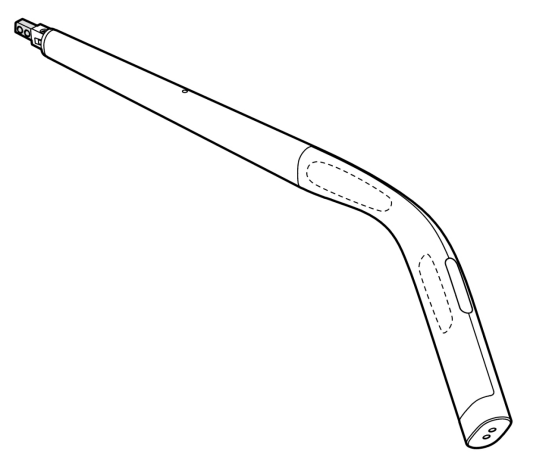
A: During use, dirt can accumulate on the temples of the glasses. This dirt can be mistaken for wearing or removing the glasses, causing the Bluetooth connection to drop. Please simply remove and put the glasses back on to reconnect to the device. Remember to clean the temples regularly.
The wearing detection area is shown in the image below:
Q26: What to do if the Xiaomi Glasses App indicates that the storage is full on the Mijia Smart Audio Glasses?
A: By default, the device is set to start recording by pressing and holding either the left or right temple. Accidental activation of the recording will occur due to certain actions. If recording is not stopped promptly, it can consume all the temple storage space without your active input. It is recommended to set the temple for recording in the Xiaomi Glasses App to avoid accidental activation.
To delete the recording files inside the glasses, please refer to the steps as follows:
1. Open the [Xiaomi Glasses] App.
2. Access [Recordings].
3. Tap the icon at the upper right corner of the interface.
4. Select [Glasses storage].
5. Tap the icon at the upper right corner of the interface.
6. Select the file you want to delete.
Note:
Restoring the device to factory settings will erase all recorded files stored on the device by default.
Q27: Can the Mijia Smart Audio Glasses be used normally without installing the Xiaomi Glasses App?
A: The Mijia Smart Audio Glasses can be used normally without installing the Xiaomi Glasses App. However, the Xiaomi Glasses App enables more smart functions. You can download it by scanning the QR code below (requires Android 10.0 or iOS 14.0 and above).

Q28: Are the frames, temples, and hinges of the Mijia Smart Audio Glasses compatible with the Xiaomi Smart Audio Glasses?
A: The Mijia Smart Audio Glasses use a new generation of patented quick-release technology and are not compatible with the frames, temples, and hinges of the Xiaomi Smart Audio Glasses.
Q29: Why does the Bluetooth connection of the Mijia Smart Audio Glasses frequently drop after wearing them?
A: Frequent Bluetooth disconnections after wearing the Mijia Smart Audio Glasses may be due to a small head circumference or an improper fit. The device has its wear detection function enabled by default. If the glasses are not worn properly, the device may mistakenly determine that the glasses have been removed, thus disconnecting the Bluetooth connection. Please try disabling the wear detection function and then try again.
Note:
Turning off the Wear detection function prevents the glasses from entering standby mode after removal, which will reduce battery life.
Q30: Do the fitted lenses need to be removed when the Mijia Smart Audio Glasses are returned for repair?
A: Due to the special nature of the lenses, to prevent damage during transportation, please remove and store the lenses yourself before returning the frame for after-sales repair.
Q31: Why is the widget of the Xiaomi Glasses App on the phone not working?
A: Due to version compatibility issues, the latest version of the Xiaomi Glasses App temporarily does not support the widget function. The Android widget will automatically disappear after the Xiaomi Glasses App update. The iOS widget will remain after an update, but will be unusable and need to be manually removed. If you restart your phone without removing the widget, the widget will become a white frame.
Q32: Why can't the Xiaomi Glasses App obtain notification permissions on Android phones?
A: If the system refuses to grant access to the Xiaomi Glasses App, please refer to the following steps:
1. Open [Settings].
2. Go to [Apps].
3. Select [Xiaomi Glasses].
4. Navigate to [App permissions].
5. Tap [Notifications], and then you can grant notification permissions.
Note:
Different phone brands have different operating system versions, so the example operation path can differ slightly from your device's interface. It is recommended to adjust the settings according to your actual system version.
Q33: What should I pay attention to when using a newly purchased Mijia Smart Audio Glasses for the first time?
A: Before first use, you need to connect the charging cable and power to the glasses. The white indicator on the temple flashes to indicate normal charging. After that, you can pair the glasses and upgrade the Xiaomi Glasses App to the latest version before use.
Q34: How to upgrade the firmware of the Mijia Smart Audio Glasses?
A: Due to some product characteristics, the glasses need to be removed for charging and upgrading at the same time.
The steps to upgrade the Mijia Smart Audio Glasses are as follows:
1. Ensure the glasses' battery level is ≥30%, then remove the glasses.
2. Connect the charging cable.
3. Open your phone's Bluetooth settings and reconnect the glasses' Bluetooth, as the glasses will automatically restart after connecting to the charging cable.
4. Open the [Xiaomi Glasses] App and connect it to the glasses >> tap the three-dot icon at the upper right corner of the screen to enter the device >> tap [Settings] >> select [Firmware updates], and check for firmware updates.
5. After the update is complete, you can disconnect the power and wear the glasses.
Q35: Why don't the Mijia Smart Audio Glasses ring when receiving a call?
A: If the Mijia Smart Audio Glasses don't ring when receiving a call, please refer to the following methods:
1. When the phone ringtone is louder than the glasses' ringtone, it will cover the glasses' ringtone. Try sliding the right temple from back to front to increase the volume while moving away from the phone during a call.
2. If you have a Xiaomi/REDMI phone: Open [Settings] >> go to [Bluetooth] >> enter [Additional settings] at the bottom >> enable [Allow in-band ringtones].
Q36: Why do the temples of the Mijia Smart Audio Glasses wobble?
A: To facilitate quick and easy disassembly, a certain gap is left between the temples and the frame of the Mijia Smart Audio Glasses. This is normal, and there will be no wobbling at the hinges between the frame and the temples, which will not affect your use.
Q37: Why is there a color difference between the front and back seams of the Mijia Smart Audio Glasses?
A: The temples use NCVM coating technology, giving them a metallic sheen. Due to differences in the front and back surface shapes, light refraction varies, resulting in slight color differences under different angles and light sources (less noticeable in sunlight). The product does not completely meet your expectations in terms of appearance, but this is a normal occurrence and does not impact its functionality or use. It conforms to the appearance control standards of the mobile phone industry.
If you still have concerns or experience any abnormalities, please contact customer service and provide photos taken under natural light. We will inspect and resolve the issue for you as soon as possible. Thank you for your feedback, understanding, and support!
Q38: Why are the seams on the Mijia Smart Audio Glasses uneven?
A: The temples use NCVM coating technology, giving them an overall metallic sheen. Due to differences in the front and back surface shapes, light refraction varies, and slight color differences can appear under different angles and light sources (less noticeable in sunlight). The product does not completely meet your expectations in terms of appearance, but this is a normal occurrence and does not impact its functionality or use. It is consistent with the appearance control standards of the mobile phone industry.
If you still have concerns or experience any abnormalities, please contact customer service and provide a photo taken in natural light. We will inspect and resolve the issue for you as soon as possible. Thank you for your feedback, understanding, and support!
Q39: Do the Mijia Smart Audio Glasses have significant sound leakage?
A: The product features an open-ear design, balancing wearing comfort and natural listening experience. Therefore, slight sound leakage will occur in quiet environments (similar to the principle of a speaker). We recommend adjusting the volume according to ambient noise (e.g., 10%-30% for nighttime use). In office environments, keeping the volume below 50% will significantly improve the sound leakage issue.
We also offer Privacy mode that can be flexibly selected based on actual usage scenarios. It optimizes the frequency bands prone to sound leakage based on the principle of sound wave cancellation, resulting in more prominent low-frequency performance in Privacy mode. The low-frequency effect at maximum volume in privacy mode provides you with a good experience.
Q40: Why do audio recordings from the Mijia Smart Audio Glasses sometimes exhibit popping sounds?
A: When there are loud external sounds (such as loud talking, close-range talking, or strong ambient noise), popping sounds may occur in the recording. We will continue to optimize the recording quality and ensure that your device firmware is up to date.
Q41: Why do Bluetooth settings show the Mijia Smart Audio Glasses are connected via Bluetooth, but the Xiaomi Glasses App shows they are disconnected?
A: The Mijia Smart Audio Glasses connect to the Xiaomi Glasses App via classic Bluetooth. The Xiaomi Glasses App needs to receive connection status feedback from the phone's system to display the connection status.
Please refer to the solution steps as follows:
1. Turn off Bluetooth: Go to [Settings] >> select [Bluetooth] >> tap the connected glasses' name >> select [OK] when asked "Disconnect device?"
2. Reconnect: Wait 10 seconds and tap the glasses' name again to complete the pairing connection.
3. Refresh the Xiaomi Glasses App status: Return to the Xiaomi Glasses App and refresh the connection status on the homepage.
Q42: What to do if the Mijia Smart Audio Glasses accidentally start recording after being taken off?
A: Offline recording does not rely on a Bluetooth connection. If wear detection is turned off, the glasses will not enter standby mode after being removed. If you accidentally start recording, you can press and hold the temple of the glasses for 3 seconds to stop recording, or wait 3 minutes for automatic standby to end recording. To prevent accidental touches, please turn on wear detection. When enabled, the glasses will automatically enter standby mode if they detect that the glasses have been removed.
Q43: Why does Bluetooth keep connecting after taking off the Mijia Smart Audio Glasses?
A: If the Bluetooth connection remains active after the Mijia Smart Audio Glasses are removed, it may be because the Wear detection function is turned off or the Find glasses function is turned on. Please turn off the Find glasses function or turn on the Wear detection function, and do not set an automatic standby time.
Note:
If Bluetooth keeps connecting after removing the glasses, the glasses cannot enter low-power standby mode.
Q44: Why does one device play music aloud when both are connected to the Mijia Smart Audio Glasses via Bluetooth?
A: When two devices are connected, the glasses do not support simultaneous playback. So the following situations will occur:
1. If one device is connected to the glasses and is on a call, the other device will play incoming calls aloud.
2. If one device is connected to the glasses and playing music, the other device will play music aloud.
Note:
If neither device is playing audio, but one device is playing music aloud, it means the other device is occupying audio focus and can be playing silent audio. Once the Bluetooth connection is disconnected or the audio ends, the playback will switch to the glasses.
Q45: Why do the Mijia Smart Audio Glasses fail to connect to the phone via Bluetooth after being paired, and can't be found after unpairing?
A: Please try toggling your phone's Bluetooth on and off, then reconnect to the glasses and try again.
Q46: Why can't the computer detect the microphone when the Mijia Smart Audio Glasses are connected to both a mobile phone and a computer at the same time?
A: This is an intermittent issue with Windows and Mac computers, related to computer compatibility. If you encounter this problem, please simply disconnect and reconnect the glasses to the computer via Bluetooth.
Q47: Why do the Mijia Smart Audio Glasses and the car audio play randomly after entering the car when the phone connects to both the car and the glasses via Bluetooth?
A: When both the glasses and the car audio are connected to the phone, they are both Bluetooth peripherals. And when A2DP (audio playback) and HFP (call) are enabled, the audio focus is randomly assigned by the system, which the Xiaomi Glasses App cannot control. You can manually disconnect unwanted Bluetooth devices from your phone's Bluetooth list.
Q48: Why are the Mijia Smart Audio Glasses not charging, or the charging indicator is off?
A: If the Mijia Smart Audio Glasses are not charging, or the charging indicator is off, please refer to the following methods to troubleshoot:
1. Before charging the Mijia Smart Audio Glasses, please wipe the metal contacts at the charging port with a cleaning cloth to remove dust or oxides, preventing poor contact that can cause the indicator to not illuminate.
2. Please check if the charging cable and adapter you are using are original or meet the output specifications of 5 V (0.5 A) or higher. Non-original accessories will cause charging abnormalities due to an unstable power supply.
3. Please try reconnecting the glasses to the charging cable, ensuring a tight fit, and try a different power interface (such as a computer USB port).
4. If the Mijia Smart Audio Glasses are over-discharged, the indicator will not illuminate. Please charge the glasses promptly when the battery is low to keep the device powered and avoid over-discharging the battery.
5. Please check the firmware version in the Xiaomi Glasses App. If it is not the latest version, please upgrade to the latest version in the Xiaomi Glasses App before use.
6. If the above operations are ineffective, please contact Xiaomi's official customer service or go to an authorized service center for inspection to rule out the possibility of hardware failure.
Does it help?