

Mijia Smart Evaporative Humidifier Pro FAQ
Overview
Q1: What is the Mijia Smart Evaporative Humidifier Pro?
A: The Mijia Smart Evaporative Humidifier Pro comes with a removable 3D antibacterial filter that is machine washable. The removable pump impeller facilitates cleaning and maintenance, and the water tank is made of silver-ion antibacterial material.
Q2: What's the difference between the Mijia Smart Evaporative Humidifier Pro and a misting humidifier?
A: The Mijia Smart Evaporative Humidifier Pro uses cold evaporative humidifier technology. Its working principle is that the motor inside the humidifier drives the fan at high speed. The high-speed air flows through the evaporative filter, causing the water on the filter to evaporate rapidly while increasing air flow. The high-speed airflow then carries the water back into the outside air, increasing the moisture content and achieving the desired humidification effect.
For your reference, here is some information on the differences from misting humidifiers:
Evaporative humidifiers do not produce white mist and provide a more uniform humidification range. Mistless evaporative humidifiers have lower water quality requirements and can be used with clean tap water or purified water.
Misting humidifiers humidify faster, but with less uniformity than mistless humidifiers. Humidity is higher where the humidifier emits mist, while it is lower farther away from the humidifier. Furthermore, misting humidifiers produce white mist.
Introduction&Usage
Q1: What are the functions of the Mijia Smart Evaporative Humidifier Pro's buttons?
A: The Mijia Smart Evaporative Humidifier Pro has three buttons: the Standby Button, Mode Button, and Scheduled Turn-off Button.
- Standby Button: Turns the device on and off.
When connecting to power, press the Standby button to turn it on. During the humidification process, pressing the Standby button will automatically switch to standby.
- Mode Button: Changes modes.
Press the Mode button to cycle through: Constant humidity mode, Sleep mode, Turbo mode, and Drying mode.
(1). Constant Humidity mode: The humidifier automatically adjusts the air volume based on the target humidity to maintain a constant humidity level in the room. The default setting for humidity is 55% RH, which can be changed through the Xiaomi Home App.
(2). Sleep mode: The humidifier delivers continuous humidification with minimum airflow and low noise.
(3). Strong mode: The humidifier delivers continuous humidification with maximum airflow.
(4). Air-dry mode: The humidifier enters the filter drying state for approximately 15 minutes. It automatically switches to standby upon completion. During the drying process, press the Standby button to switch back to standby mode.
- Turn-off delay Button: Timer Function.
Press the Turn-off delay button to cycle through the delay standby time: 1 hour, 2 hours, 4 hours, 8 hours, and cancel.
After selecting a delay time, press the Scheduled Turn-off Button again within 3 seconds to switch the delay time. If no operation is performed within 3 seconds, the display returns to the main interface.
Q2: What is the recommended area for the Mijia Smart Evaporative Humidifier Pro?
A: The Mijia Smart Evaporative Humidifier Pro is suitable for rooms of 20-30 square meters.
Q3: Why is the Mijia Smart Evaporative Humidifier Pro not humidifying effectively?
A: Please select the appropriate operating mode for the Mijia Smart Evaporative Humidifier Pro based on your room conditions. The actual humidification effect will also be affected by factors such as the ambient temperature, humidity, and ventilation conditions.
Q4: Where is the humidity sensor located on the Mijia Smart Evaporative Humidifier Pro?
A: The humidity sensor on the Mijia Smart Evaporative Humidifier Pro is located 50 mm above the power socket on the back of the humidifier.
Q5: Are the filters in the Mijia Smart Evaporative Humidifier Pro compatible with filters in other humidifiers?
A: No, the filter in the Mijia Smart Evaporative Humidifier Pro is a unique model and is not compatible with other products.
Q6: Does the Mijia Smart Evaporative Humidifier Pro have any operating temperature requirements?
A: The Mijia Smart Evaporative Humidifier Pro is designed to operate in an ambient temperature between 5 °C and 40 °C.
Q7: What is the lifespan of the Mijia Smart Evaporative Humidifier Pro filter?
A: The lifespan of the Mijia Smart Evaporative Humidifier Pro filter is calculated based on the humidifier's operating hours. We recommend cleaning the filter weekly and removing and cleaning the water tank to maintain optimal performance. Generally, we recommend replacing the filter every 6-12 months.
Note:
If the Mijia Smart Evaporative Humidifier Pro is used 24 hours a day, the actual filter replacement time will depend on the actual usage.
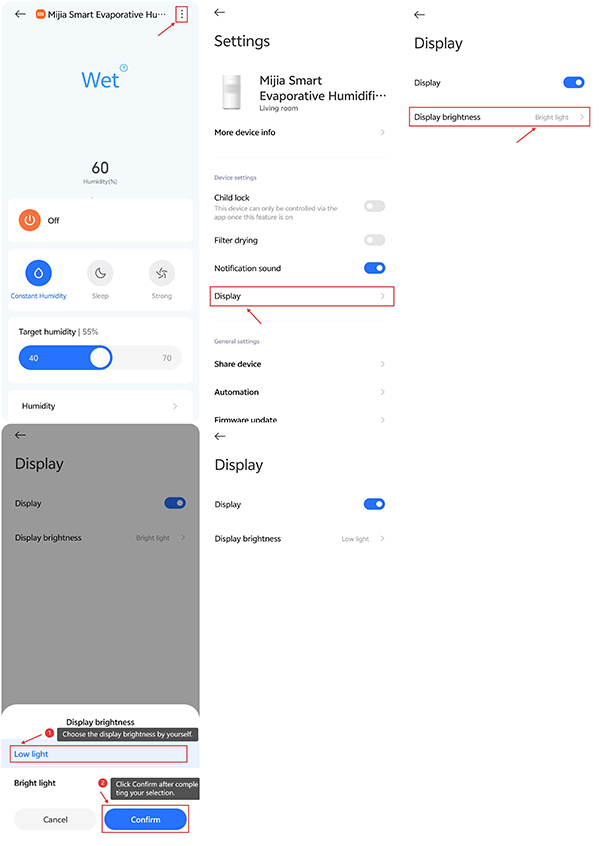
Q8: How to turn off the display on the Mijia Smart Evaporative Humidifier Pro?
A: You can turn off the display on the Mijia Smart Evaporative Humidifier Pro in the Xiaomi Home App. Tap the three dots in the upper-right corner to access Settings. Scroll down and tap [Display] to turn it on or off.
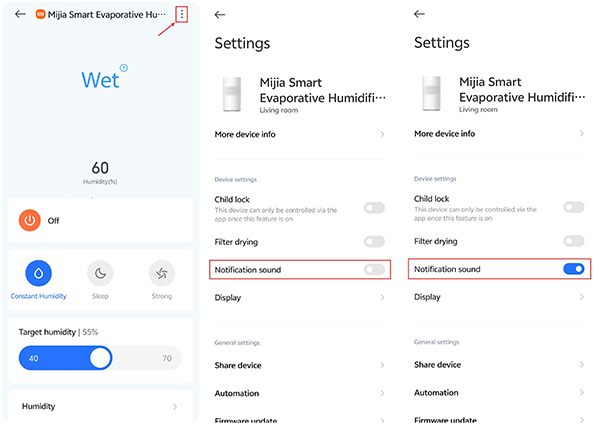
Q9: How to turn off the Mijia Smart Evaporative Humidifier Pro's notification sound?
A: You can turn off the Mijia Smart Evaporative Humidifier Pro's notification sound in the Xiaomi Home App. Tap the three dots in the upper right corner, go to Settings, swipe down, and tap [Notification sound] to turn it on or off.
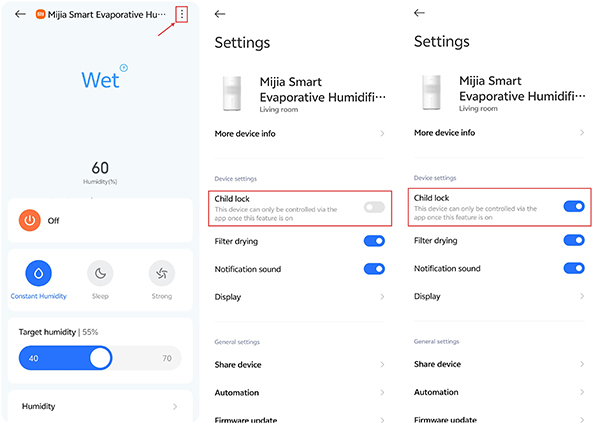
Q10: How to set up the child lock on the Mijia Smart Evaporative Humidifier Pro?
A: When child lock is enabled, press any button, and the humidifier will not respond but rather beep twice with the child lock indicator blinking twice.
For your reference, here's how to set up the child lock on the Mijia Smart Evaporative Humidifier Pro:
- In the Xiaomi Home app, tap the three dots in the upper-right corner to access Settings. Tap [Child lock] to turn it on or off.
- Disabled by re-plugging and restarting the humidifier after unplugging it.
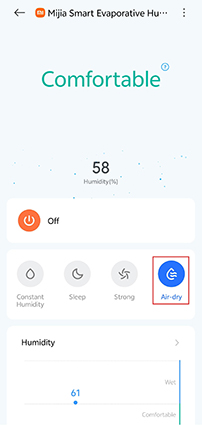
Q11: How to set up the air drying function on the Mijia Smart Evaporative Humidifier Pro?
A: The Mijia Smart Evaporative Humidifier Pro supports Air-dry mode. You can manually enable Air-dry mode by tapping the Mode Button on the device. You can also enable Air-dry mode in the Xiaomi Home App.
App Related
Q1: How to connect the Mijia Smart Evaporative Humidifier Pro to the Xiaomi Home App?
A: Open the Xiaomi Home App on your phone. If you haven't downloaded the Xiaomi Home App yet, scan the Xiaomi Home App QR code in the manual or search for it in the Play Store.
After downloading, tap [Sign in]. Once logged in, enable Wi-Fi, Bluetooth, and location tracking on your phone and grant the Xiaomi Home app access to these three permissions.
For your reference, here are the steps for connecting the Mijia Smart Evaporative Humidifier Pro to the Xiaomi Home App:
- Open the Xiaomi Home App.
- Tap the [+] icon in the upper-right corner.
- Tap [Add device].
- Select the [Mijia Smart Evaporative Humidifier Pro].
- Select a Wi-Fi network and enter the Wi-Fi password.
- Tap [Next].
- Select a room and tap [Next].
- Set a name for the device and tap [Next].
- Choose [Share this home] or [Do not share from now].
- You can see the Mijia Smart Evaporative Humidifier Pro card in the interface of the Xiaomi Home App.
Q2: What are the network requirements for the Mijia Smart Evaporative Humidifier Pro?
A: The Mijia Smart Evaporative Humidifier Pro supports network control and is compatible with most personal routers on the market.
For your reference, please note that the following wireless network requirements apply to the router:
- Before connecting to the network, you must enable Bluetooth and the phone's location function.
- The Mijia Smart Evaporative Humidifier Pro can only connect to 2.4 GHz Wi-Fi networks. 5 GHz Wi-Fi networks are not currently supported (some 5 GHz and 2.4 GHz networks may not work when mixed).
- Wi-Fi encryption must be WPA or WPA2; WEP is not supported.
- DHCP must be enabled on the router. Specifying a static IP address, web authentication, or enterprise-specific 802.1X is not supported.
Note:
To remotely control the Mijia Smart Evaporative Humidifier Pro, you must download the Xiaomi Home App.
Q3: Why can't the Mijia Smart Evaporative Humidifier Pro connect to Wi-Fi?
A: First, confirm that the Wi-Fi network your phone is connected to is the same as the one the Mijia Smart Evaporative Humidifier Pro is connecting to. Also, confirm that the Wi-Fi network you are connecting to is 2.4 GHz (the device doesn't support 5 GHz networks). Also, confirm that the Wi-Fi network selected in the Xiaomi Home App is correct, and that the password is correct.
Note:
For example, on Android phones, go to [Settings], tap [WLAN], find Wi-Fi, and then find the Wi-Fi network your phone is currently connected to. Check the Wi-Fi network to display the Wi-Fi information.
Q4: What is the Xiaomi Home App interface for the Mijia Smart Evaporative Humidifier Pro?
A: The Xiaomi Home App interface for the Mijia Smart Evaporative Humidifier Pro offers four modes.
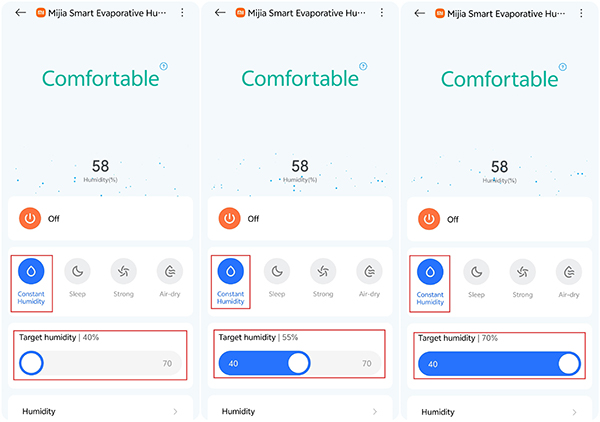
Constant humidity mode: The default setting for humidity is 55% RH, and can be set within a range of 40%-70% RH.
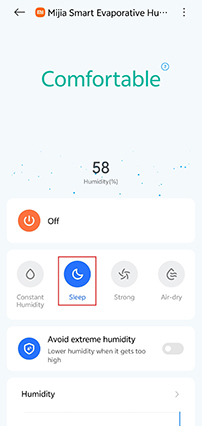
Sleep mode: The lowest setting provides continuous humidification with low noise.
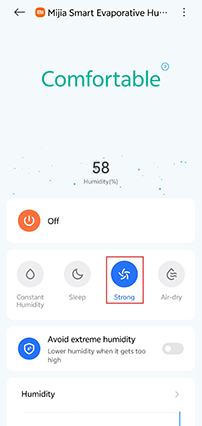
Strong mode: The highest setting provides continuous humidification.
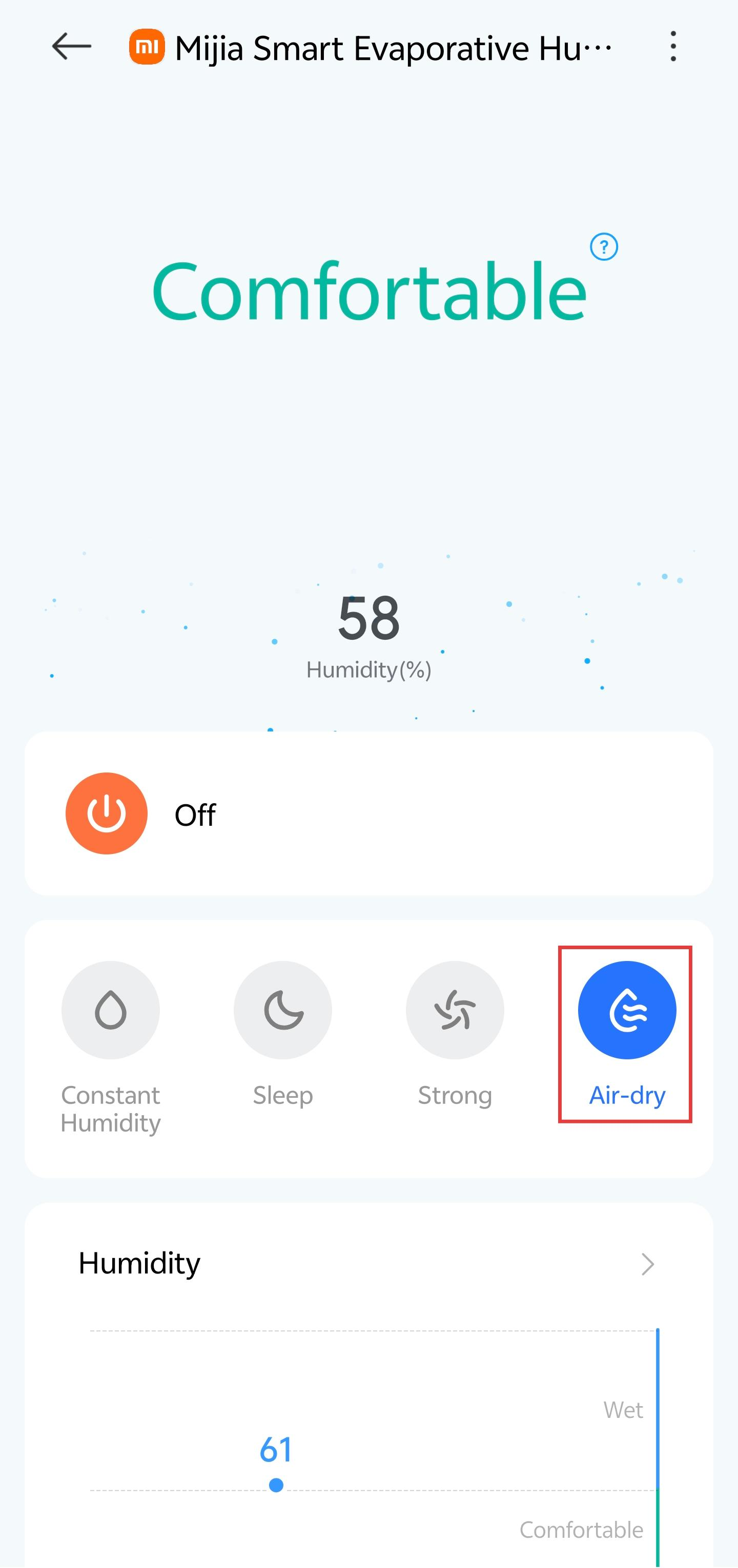
Air-dry mode: The humidifier enters the filter drying state, which lasts approximately 15 minutes, after which it automatically switches to standby. During the drying process, briefly press the mode button again to switch to standby mode.
There are also Scheduled Turn-off functions, auxiliary cleaning functions, and smart scene functions.
Constant humidity mode:
Sleep mode:
Strong mode:
Air-dry mode:
Q5: How to set the scheduled turn-off on the Mijia Smart Evaporative Humidifier Pro?
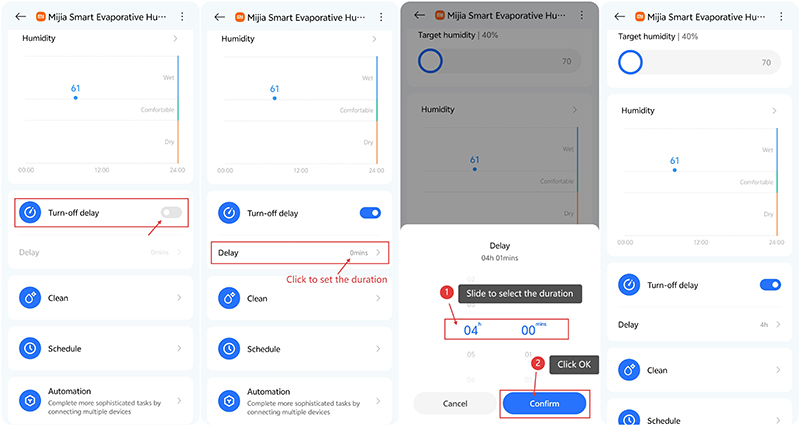
A: You can set a delay of up to 8 hours using the Mijia Smart Evaporative Humidifier Pro's Scheduled Turn-off button or the Xiaomi Home App's Turn-off delay settings.
Note:
It supports 7 x 24 timed power on/off in Xiaomi Home App smart scenarios.
Q6: How to change the device name of the Mijia Smart Evaporative Humidifier Pro?
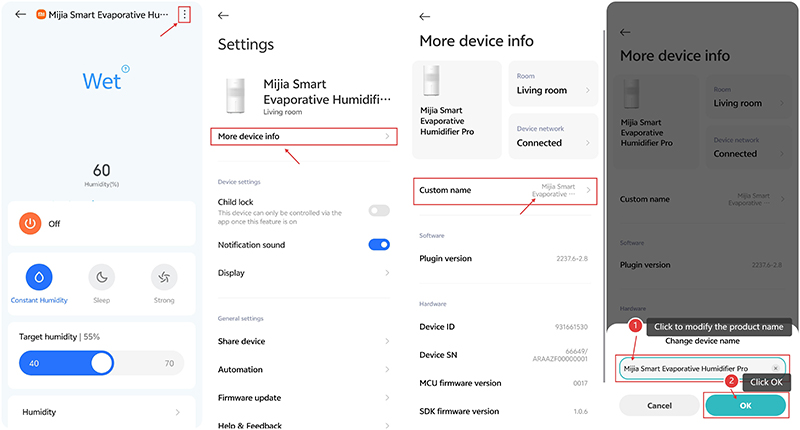
A: In the Xiaomi Home App, select the "Mijia Smart Evaporative Humidifier Pro" card, tap the three dots in the upper-right corner to access [Settings]. Tap [More device info], select [Custom name], and the edit page will appear. Once the [Change device name] is complete, tap [OK] to complete the setup.
Q7: How to share device permissions for the Mijia Smart Evaporative Humidifier Pro?
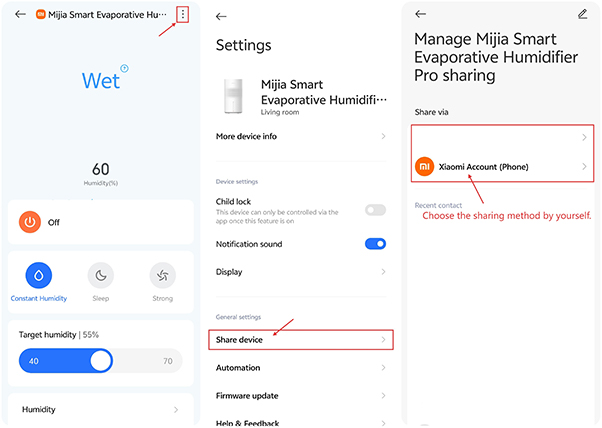
A: In the Xiaomi Home App, select the "Mijia Smart Evaporative Humidifier Pro" card, tap the three dots in the upper-right corner to access [Settings]. Scroll down and tap [Share device] to access the [Manage Mijia Smart Evaporative Humidifier Pro sharing]. Tap [Xiaomi Account], enter your Xiaomi account, and tap OK to share.
FAQ
Q1: Can children put their fingers through the top grille of the Mijia Smart Evaporative Humidifier Pro?
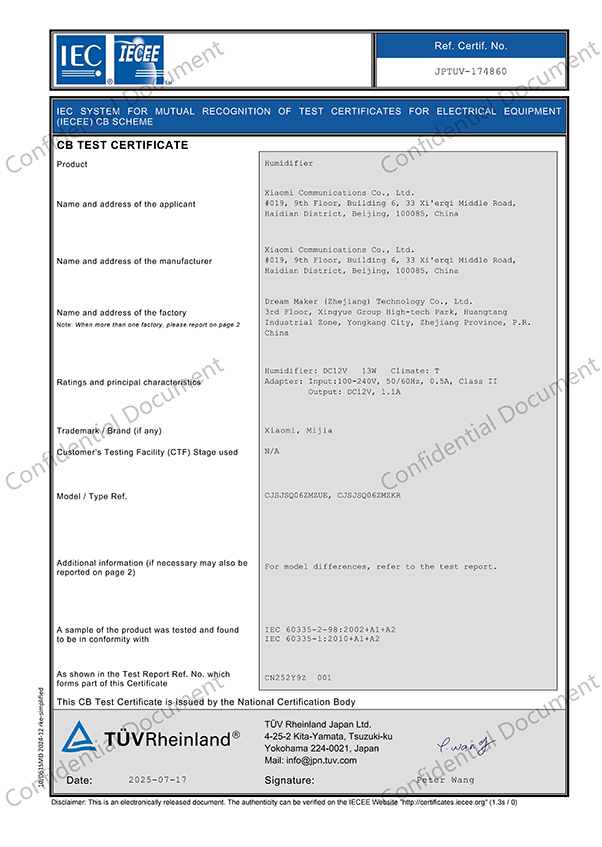
A: The Mijia Smart Evaporative Humidifier Pro meets the CB child finger test requirements. Please feel free to use it. However, guardians are required to warn children not to engage in such dangerous behaviors.
2. Q: Why are there noticeable glue marks on the water tank housing of the Mijia Smart Evaporative Humidifier Pro?
A: The yellow sticker on the Mijia Smart Evaporative Humidifier Pro uses removable adhesive. Due to the high temperatures during recent transportation, some adhesive may remain after removal. Please use alcohol wipes to remove any glue marks; this will not affect normal use. Do not use solvents such as makeup removers.
Q3: Why is the filter in the Mijia Smart Evaporative Humidifier Pro still damp after air drying?
A: The core purpose of the Drying mode of the Mijia Smart Evaporative Humidifier Pro is to reduce excess moisture on the filter surface and prevent dripping after shutdown. Ambient temperature and humidity also affect the drying effect. For example, high humidity and low temperature will slow the filter drying process. Therefore, it is normal for the filter to still feel damp after a single run. To dry the filter further, we recommend running the Drying mode 2-3 times in a row.
Q4: What is the water level in the Mijia Smart Evaporative Humidifier Pro's water tank before it indicates a water shortage?
A: The water shortage alarm is triggered when the water level in the Mijia Smart Evaporative Humidifier Pro's water tank drops below approximately 650 ml.
Q5: Is the filter in the Mijia Smart Evaporative Humidifier Pro packaged?
A: The Mijia Smart Evaporative Humidifier Pro comes with filter packaging. Before use, remove the filter packaging bag and warning sticker.
Q6: Why do the humidity readings on multiple Mijia Smart Evaporative Humidifier Pro devices differ?
A: Different products have slightly different humidity detection principles and operating methods. Humidity readings vary depending on factors such as air flow and ambient temperature. Measured values may vary depending on location and device. The Mijia Smart Evaporative Humidifier Pro has been tested in a laboratory environment, and the error in readings compared to standard instruments is no more than ±5% RH.
Q7: Why does the humidity reading on the Mijia Smart Evaporative Humidifier Pro differ from that on other hygrometers?
A: The Mijia Smart Evaporative Humidifier Pro has a humidity sensor. The sensor is located on the back of the device. Please ensure that the back is clear of obstructions and heat sources. If the humidity readings on different devices differ, please refer to the following methods to determine if they differ:
Hygrometer measurements can vary significantly depending on the location of the indoor environment. Therefore, place the hygrometer near the humidity sensor on the back of the humidifier and wait for 10 minutes for the reading to stabilize before checking.
Q8: Why does the filter on the Mijia Smart Evaporative Humidifier Pro shrink after cleaning?
A: Using water above 40 ℃ to clean the filter on the Mijia Smart Evaporative Humidifier Pro element may cause it to be scalded and shrink. After cleaning the filter element, using the drying function will also make the filter element smaller.
Q9: Does the Mijia Smart Evaporative Humidifier Pro support Apple's HomeKit?
A: The Mijia Smart Evaporative Humidifier Pro does not support Apple's HomeKit. It only supports the Xiaomi Home App.
Q10: What motor does the Mijia Smart Evaporative Humidifier Pro use?
A: The Mijia Smart Evaporative Humidifier Pro uses a brushless DC motor with a maximum power of 11 W.
Q11: Can the Mijia Smart Evaporative Humidifier Pro's air outlet be directed to the body for extended periods of time?
A: It is not recommended to directly face the Mijia Smart Evaporative Humidifier Pro's air outlet for extended periods of time. This product is a cold evaporative humidifier with a relatively low air outlet temperature. Prolonged direct airflow may cause respiratory or skin discomfort to sensitive individuals (such as the elderly and children). It is recommended that the humidifier be placed at least 1-2 meters away from you to avoid direct airflow to the face or body.
Q12: Is the filter element of the Mijia Smart Evaporative Humidifier Pro an immersion type or a suspended spray type?
A: The filter element of the Mijia Smart Evaporative Humidifier Pro is a suspended spray type.
Q13: What kind of water can be used with the Mijia Smart Evaporative Humidifier Pro?
A: The Mijia Smart Evaporative Humidifier Pro uses natural evaporation to humidify and can be used with either clean tap water or purified water.
Q14: What to do if the water in the Mijia Smart Evaporative Humidifier Pro turns yellow?
A: This is caused by impurities in the air and water trapped by the filter in the Mijia Smart Evaporative Humidifier Pro being carried into the water tank by the circulating water. This is normal and can be simply cleaned without affecting your use.
For your reference, here is some information as follows:
- We recommend cleaning the water tank once a week, depending on your needs.
- After pouring out any remaining water in the water tank, rinse the water tank one to two times with clean water.
Q15: What to do if the filter of the Mijia Smart Evaporative Humidifier Pro has an odor?
A: Odors or foul smells from the filter of the Mijia Smart Evaporative Humidifier Pro are caused by not cleaning the filter and water tank for a long time.
For your reference, here is some information to clean your water tank and filter as follows:
- After draining the remaining water in the water tank, rinse the water tank with clean water at least twice, or use citric acid if necessary. However, do not use hot water above 40 °C or cleaning chemicals (such as fragrances, essential oils, disinfectants, etc.).
- Remove the filter as shown below:
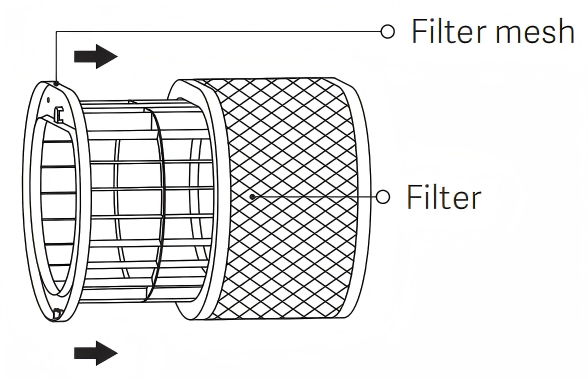
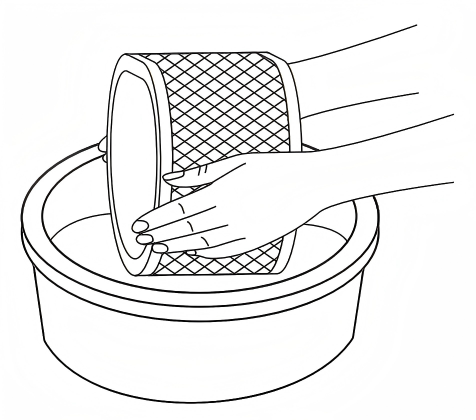
- Wash the filter with clean water or a standard laundry detergent, either by hand or in a washing machine. Do not use water above 40 °C or tumble dry.
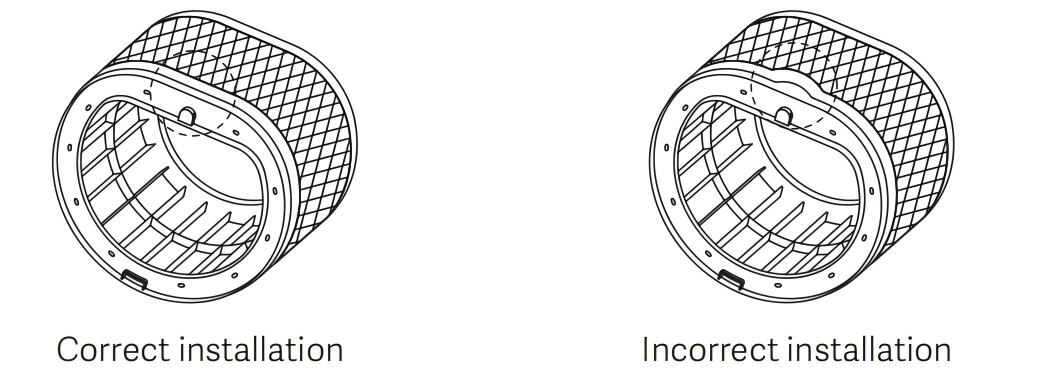
- After cleaning, reinstall the humidifier filter into the filter holder, ensuring proper installation.
- If cleaning does not remove any abnormalities such as blackening or odor, the filter needs to be replaced.
Q16: How long does it take to air-dry the filter in the Mijia Smart Evaporative Humidifier Pro?
A: The air drying time for the Mijia Smart Evaporative Humidifier Pro is 15 minutes.
Q17: Why does the filter in the Mijia Smart Evaporative Humidifier Pro turn yellow after use?
A: This is due to the Mijia Smart Evaporative Humidifier Pro filter, which filters impurities from the air and water. This is normal and will not affect your use.
Note:
If the filter is severely yellowed, it is recommended that you replace it.
Q18: Why are there insects in the water tank of the Mijia Smart Evaporative Humidifier Pro?
A: Foreign objects in the water tank of the Mijia Smart Evaporative Humidifier Pro are generally caused by the high-speed rotation of the impeller, which generates a small amount of suction at the air inlet. This can draw light objects such as paper scraps, small insects, wool, and hair into the machine, which may eventually enter the water tank. This is normal. Simply turn off the power to the machine and then open the water tank to clean it.
Q19: Why does the iPhone/iOS often fail to connect to the Mijia Smart Evaporative Humidifier Pro?
A: Please check that the Xiaomi Home App is running the latest version. Bluetooth interference or signal issues on your phone may prevent the device from being found and may also cause connection failures. You can try manually adding the Mijia Smart Evaporative Humidifier Pro to bind the device.
Q20: Is it normal to see a small amount of water in the water tank of the Mijia Smart Evaporative Humidifier Pro after receiving it?
A: The Mijia Smart Evaporative Humidifier Pro has a small amount of water droplets because it is inspected at the factory. A small number of water droplets inside the device is normal and does not affect the hygiene and safety of the product. As long as the product is sold through official channels, it is a new product and will not be used. Please do not worry, and feel free to use it.
Q21: Why is there still water in the water tank of the Mijia Smart Evaporative Humidifier Pro after air drying?
A: The air drying function of the Mijia Smart Evaporative Humidifier Pro only dries the filter element, not the water tank.
Q22: Why is there a small amount of water at the bottom of the filter element of the Mijia Smart Evaporative Humidifier Pro after air drying?
A: Since the air cannot reach the bottom of the filter element of the Mijia Smart Evaporative Humidifier Pro, a small amount of water is normal.
Q23: Why is there foam in the water tank of the Mijia Smart Evaporative Humidifier Pro?
A: This is caused by impurities in the air or water mixed into the water tank of the Mijia Smart Evaporative Humidifier Pro. This is normal. After pouring out the remaining water, rinse the water tank with clean water once or twice.
Q24: Why does the wall of the water tank of the Mijia Smart Evaporative Humidifier Pro become sticky and slippery?
A: This is because the Mijia Smart Evaporative Humidifier Pro's water tank has not been cleaned for a long time, and impurities have accumulated in the water and adhered to the tank walls. This is normal. Use a soft brush to clean it, then rinse it with clean water 2-3 times.
Q25: Why does the Mijia Smart Evaporative Humidifier Pro's water tank make unusual noises when shaken?
A: The water level float in the Mijia Smart Evaporative Humidifier Pro's water tank makes a knocking noise due to shaking of the tank or the entire unit. This is normal, and you can feel free to use it.
Q26: Is there a risk of respiratory infection if the water tank and filter of the Mijia Smart Evaporative Humidifier Pro are not cleaned for a long time?
A: The Mijia Smart Evaporative Humidifier Pro itself does not cause any health problems. However, if the humidifier is used for a long time without cleaning the water tank and filter, odors may be released into the air. We recommend cleaning the water tank and filter at least once a week.
Q27: Why does the Mijia Smart Evaporative Humidifier Pro not shut down after reaching the set humidity?
A: The Mijia Smart Evaporative Humidifier Pro automatically adjusts the humidity based on the measured humidity after reaching the set humidity.
For your reference, here is some information as follows:
- When the current ambient humidity exceeds the set humidity by 3%, the machine will continuously monitor the humidity value for 1 minute. If the humidity remains above 3% for 1 minute, the machine will stop. If the humidity falls below 3% within the 1-minute monitoring period, the monitoring timer will be reset.
- When the humidity detects that it is below the set humidity, the machine will immediately start operating.
Q28: What are the placement requirements for the Mijia Smart Evaporative Humidifier Pro?
A: The humidifier should be placed on a level, stable surface, at least 2 meters away from furniture, electronic products, and people. The back of the device should be at least 25 cm away from a wall to avoid affecting the humidity sensor inside the device. It is not recommended to place it near easily damp objects, electronic products, areas with excessive cooking fumes, or areas with strong bathroom odors.
Q29: Why does the coupler connector on the Mijia Smart Evaporative Humidifier Pro turn yellow??
A: The yellowing of the coupler connector on the Mijia Smart Evaporative Humidifier Pro occurs because water drips onto the connector during filling. If the connector is not wiped clean immediately, the yellowing may occur over time. We recommend that users wipe the connector thoroughly after each filling before use.
Q30: Why doesn't the base of the Mijia Smart Evaporative Humidifier Pro have a drainage hole?
A: Due to its unique design, the Mijia Smart Evaporative Humidifier Pro lacks a circuit board or chassis underneath, and only has a single bucket structure. Therefore, it is not subject to regulations regarding drainage holes.
Q31: Why doesn't the Mijia Smart Evaporative Humidifier Pro stop when you place your hand on the top casing?
A: The Mijia Smart Evaporative Humidifier Pro does not have a built-in fan stall protection function.
Q32: Can the Mijia Smart Evaporative Humidifier Pro be used to add fragrance?
A: The Mijia Smart Evaporative Humidifier Pro does not support the aromatherapy function, nor does it support adding chemicals to the water tank.
Q33: Is there a safety hazard if the Mijia Smart Evaporative Humidifier Pro is left plugged in?
A: No. The Mijia Smart Evaporative Humidifier Pro has a water shortage protection device. When it is low on water, it will enter standby mode or stop humidifying.
Q34: Why isn't the Mijia Smart Evaporative Humidifier Pro misting?
A: The Mijia Smart Evaporative Humidifier Pro is a mist-free model and does not mist.
Q35: Why doesn't the Sleep mode indicator on the Mijia Smart Evaporative Humidifier Pro turn off?
A: When the Mijia Smart Evaporative Humidifier Pro is in sleep mode, except for the Sleep mode indicator light, all other indicators will turn off after 5 seconds. When there is a water shortage, the water shortage warning sound will turn off, and the water shortage indicator will flash for 3 seconds and then stay on.
Q36: Why does the Mijia Smart Evaporative Humidifier Pro report a water shortage after being filled with water?
A: It is possible that the water flow was too fast when adding water, causing air to be trapped in the water pump. Pour out the excess water to maintain the water level at the pump level, and gently shake the water tank several times to try.
Q37: Can the Mijia Smart Evaporative Humidifier Pro relieve dry throat and dry, flaky skin?
A: It can effectively do so. Natural evaporation increases air humidity, moisturizing the respiratory tract and relieving dry throat, while also reducing skin moisture loss and improving dryness and flaking.
Note:
The water tank, base, and filter must be cleaned regularly according to the manual to prevent bacterial and mold growth!
Q38: Does the Mijia Smart Evaporative Humidifier Pro automatically air-dry the filter when turned off?
A: The filter does not automatically air-dry when the humidifier is turned off by default. You need to manually switch to air drying mode by tapping the mode switch. After air drying, the device automatically enters standby mode.
Q39: What is the filter material for the Mijia Smart Evaporative Humidifier Pro?
A: The Mijia Smart Evaporative Humidifier Pro uses a white 3D mesh ring evaporator filter, which will not fade and is safe to use.
Q40: What is the energy efficiency rating for the Mijia Smart Evaporative Humidifier Pro?
A: The Mijia Smart Evaporative Humidifier Pro does not have an energy efficiency rating.
Q41: If the float inside the base of the Mijia Smart Evaporative Humidifier Pro is missing, will it affect normal use?
A: The float inside the base of the Mijia Smart Evaporative Humidifier Pro is used to easily monitor the water level in the water tank. Missing the float does not affect normal use, except that the water level cannot be directly monitored.
Q42: Can the Mijia Smart Evaporative Humidifier Pro be used near home appliances?
A: No. The Mijia Smart Evaporative Humidifier Pro should be placed away from home appliances when in use.
Q43: How long does the Mijia Smart Evaporative Humidifier Pro's self-cleaning mode last?
A: The Mijia Smart Evaporative Humidifier Pro's water pump operates continuously for 30 minutes, but the fan does not operate.
Q44: Why does the Mijia Smart Evaporative Humidifier Pro not operate in Constant humidity mode?
A: In Constant humidity mode, the Mijia Smart Evaporative Humidifier Pro will run continuously for 1 minute after being turned on to detect the ambient humidity. If the ambient humidity is 3% higher than the set humidity, the fan will stop running; when the ambient humidity is lower than the set humidity, the fan will start running again.
Troubleshooting
Q1: What to do if the Mijia Smart Evaporative Humidifier Pro doesn't turn on?
A: For your reference, here is some information as follows:
- After reinstalling the humidifier, connect the power adapter and plug it into a compatible outlet. The humidifier will beep and enter standby mode.
- Press the standby button on the top of the humidifier. The humidifier will start operating with a beep. (If there is no beep, first verify that the beep function is disabled in the Xiaomi Home App.)
- Check to see if the screen display is turned off in the Xiaomi Home App, mistaking it for a powered device. Access the Xiaomi Home App and adjust the display brightness in the upper-right corner.
- If the above problem persists, please contact our official after-sales service center.
Q2: What should you do if the water level float on the Mijia Smart Evaporative Humidifier Pro doesn't rise?
A: Remove the upper housing of the Mijia Smart Evaporative Humidifier Pro. Then, remove the filter holder and filter from the base. Pull the float cover upwards and out. After removing the device, clean the float and cover to check for foreign objects or scales that could block the float from rising. After cleaning, replace the float and the cover.
Q3: What should you do if the Mijia Smart Evaporative Humidifier Pro water tank is leaking?
A: If the Mijia Smart Evaporative Humidifier Pro water tank is leaking, please refer to the following information:
- Check to see if the water tank is overflowing due to overfilling.
- Check to see if water drips onto the top components of the device while filling, causing water to spray or leak after turning it on.
- Check to see if the water tank has been impacted by other objects, causing it to crack and leak.
- After the water tank is full, do not move the device. Moving or shaking the device may cause water to leak out, which is normal.
- Check to see if the filter is installed correctly.
Q4: What are the troubleshooting tips and solutions for the Mijia Smart Evaporative Humidifier Pro?
A: The fault codes and solutions for the Mijia Smart Evaporative Humidifier Pro are as follows:
- [E0]: Water pump is blocked - Please clean the water path and try again.
- [E1]: The water path and water level sensor need to be cleaned.
- [E2]: Foreign objects in the air outlet will trigger fan protection - Contact after-sales service.
- [Water shortage warning when full]: Please clean the water tank and water pump.
Xiaomi Home App reminder:
[Water shortage protection]: Please fill the water tank between the upper and lower water levels and restart the device. If the problem persists, you can follow the instructions to clean the water tank and try again.
Does it help?
Yes
No