

Xiaomi Vacuum Cleaner G30 Max FAQ
Product information
Q1: What are the selling points of the Xiaomi Vacuum Cleaner G30 Max?
A: Xiaomi Vacuum Cleaner G30 Max has the following selling points:
1. 280AW super suction power, 90 minutes of ultra-long battery life.
2. LED digital display for easy battery status.
3. Dust sensor for automatic suction adjustment.
4. 1+7 accessories upgrade for whole-home cleaning, covering more scenarios.
5. Equipped with 14-cone cyclone separator technology for enhanced dust and air separation.
6. Features a five-stage filtration system that efficiently filters 99.98%* of fine dust.
Q2: How to install the wall mount for Xiaomi Vacuum Cleaner G30 Max?
A: Please follow the steps below to install the wall mount for Xiaomi Vacuum Cleaner G30 Max:
1. Select the Installation Location:
Find a cool, dry area with a nearby power outlet and no obstructions from wires or pipes in the wall. Ensure that both the vacuum cleaner wall mount and the accessory wall mount are installed at a height of 120 cm from the floor, maintaining the recommended 15 cm spacing between the two wall mounts.
2. Drilling:
Mark the wall for the hole locations for each wall mount. Use an electric drill with a 5 mm drill bit to drill a hole approximately 40 mm deep at each marked location. Insert the expansion tube into the hole.
3. Install the Wall Mount:
Align the wall mount holes with the drilled holes in the wall and secure the wall mount to the wall with self-tapping screws.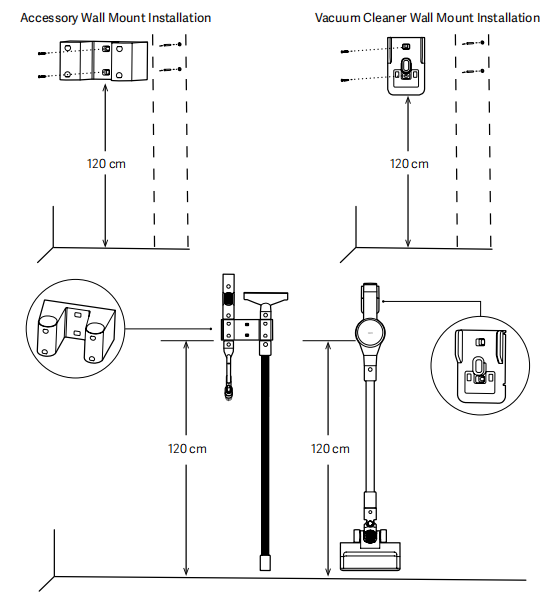
Note:
When installing two wall mounts, please strictly adhere to the height requirements shown in the diagram to avoid compromising storage functionality.
Q3: How many modes does the Xiaomi Vacuum Cleaner G30 Max have, and what is the power of each mode?
A: The machine has three modes: turbo mode, auto mode (default when powered on), and eco mode. The power of the host machine will vary depending on the mode.
Please refer to the power information for each mode below:
1. Main Unit Power:
(1) Floor Brush:
Turbo mode: 450 W.
Auto mode: 120 W-250 W.
Eco mode: 70 W. (Constant power: 70 W for the first 30 minutes, then linearly decreasing to 60 W)
(2) Handheld:
Turbo mode: 700 W. (Constant power for the first 5 minutes and 30 seconds, then linearly decreasing to 60 W)
Auto mode: 120 W-250 W.
Eco mode: 70 W. (Constant power: 70 W for the first 30 minutes, then linearly decreasing to 60 W)
(3) Mite Removal Brush (Mini Electric Brush):
Turbo mode: 350 W.
Auto mode: 120 W-250 W.
Eco mode: 70 W. (Constant power: 70 W for the first 30 minutes, then linearly decreasing to 60 W)
2. Intake Power:
(1) Turbo mode: 280 AW.
(2) Auto mode: 30 AW-90 AW.
(3) Eco mode: 20 AW.
Q4: What are the functions of the buttons on the Xiaomi Vacuum Cleaner G30 Max?
A: There are three main buttons on the machine, two of which are on the screen: the power button and the mode button. there is a dust release button at the bottom of the dust cup.
Please refer to the following information for the function of each button:
1. Power button (on the screen): Press to turn the device on/off.
2. Mode button (on the screen): Press to switch between Turbo, Auto, and Eco modes.
3. Dust release button (at the bottom of the dust cup): Press to empty the dust cup.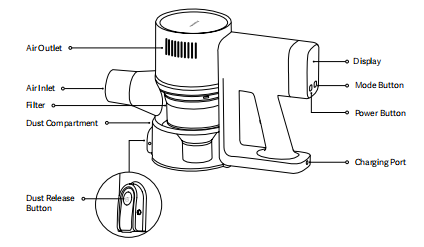
Q5: What are the standard features of the Xiaomi Vacuum Cleaner G30 Max?
A: Package Includes:
Vacuum cleaner × 1 (including dust cup).
Electric brush bar (Equipped with Headlight) × 1.
Connecting rod × 1.
Extension hose × 1.
2-in-1 crevice brush × 1.
2-in-1 wide brush × 1.
Sofa brush × 1.
Mini electric brush × 1.
Pet brush × 1.
Bendable tube × 1.
Instruction manual × 1.
Power supply × 1.
Vacuum cleaner wall mount (rechargeable) × 1.
Accessory wall mount (holds 4 accessories) × 1.
Self-tapping screw × 4.
Wall plug × 4.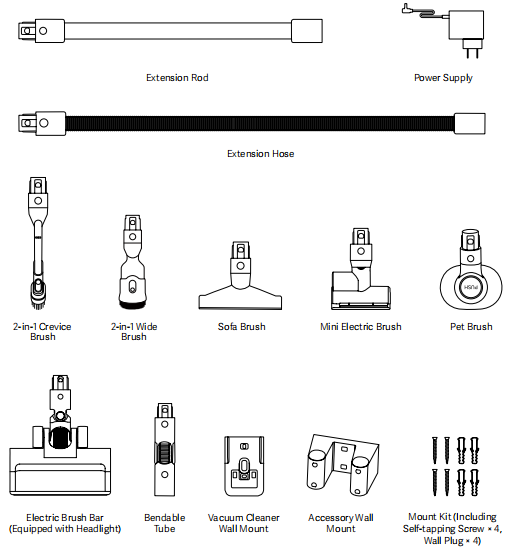
Q6: Does the Xiaomi Vacuum Cleaner G30 Max support both wet and dry use?
A: No. This is a dry vacuum cleaner. Sucking up liquids or wet waste will damage the machine.
If liquid is accidentally sucked up, immediately:
1. Turn off the machine and disassemble the main unit.
2. Remove the dust cup, filter assembly, pre-filter, and post-filter.
3. Allow the dust cup, filter assembly, and main unit to air dry in a cool, well-ventilated area.
4. Rinse the pre-filter and post-filter with clean water, allow them to dry thoroughly, and then reinstall.
Q7: What does the MAX logo on the dust cup of the Xiaomi Vacuum Cleaner G30 Max mean?
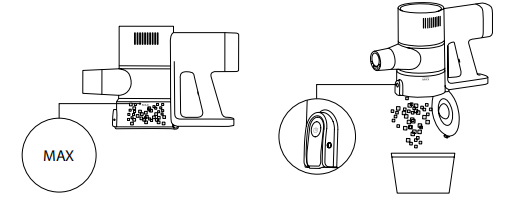
A: The dust cup has a maximum capacity of 0.5 L and a maximum dust collection capacity of 0.8 L. When the dust cup reaches the "MAX" line, suction power will be affected and must be cleaned promptly.
Q8: What are the three holes in the dust cup suction port on the main unit of the Xiaomi Vacuum Cleaner G30 Max for?
A: This area is the power connector for the electric brush head. Keep it dry and clean to prevent liquids or dirt from entering, which could cause power problems or other risks.
Q9: How to empty the Xiaomi Vacuum Cleaner G30 Max's dust cup?
A: Please refer to the following steps:
1. Make sure the machine is turned off.
2. Remove the connecting rod and brush head.
3. Place the dust cup over the trash can.
4. Press the bottom dust collection button to empty the dust collection system.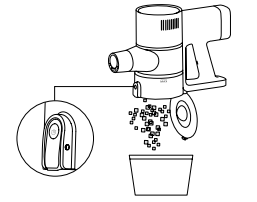
Q10: What do the on-screen indicators on the Xiaomi Vacuum Cleaner G30 Max mean?
A: Depending on the display module on the screen, the display varies depending on the operating status:
1. Dirt Ring Color Logic:
Dirtness Indicator:
This indicator is only displayed in Auto mode. The dirt level in the other two modes does not display the ambient dirt level.
Green: Clean.
Yellow: Lightly Dirty.
Orange: Heavily Dirty.
Red: error.
2. Battery Level Indicator:
Percentage Display when operating.
Red Display when ≤5%.
Charging Status Display.
No display during standby/discharging.
Low/Exhausted: Displays red when the battery level is 5% or less.
3. Mode Icon Logic:
Power on/operating: The corresponding mode icon is always lit, and the other mode icons are half-lit.
Fault code status (not resolved): All mode icons are off.
Fault warning status (resolved): The current mode icon is always lit.
Charging status: All mode icons are off.
Power off: All icons are off.
4. Battery level display logic:
Power on/operating: Displays the current battery level.
Fault code status (not resolved): Displays the fault code instead of the current battery level.
Fault warning status (resolved): Displays the current battery level.
Charging status: Displays the battery level within 10 seconds after connecting to a charger, and then turns off after 10 seconds. Displays 100% battery level within 10 seconds after full charge, and then turns off after 10 seconds.
Power off: Turn off.
5. Lightning Icon Logic:
Power On: The lightning icon is solid.
Discharging Status: When the battery level is >= 5%, the icon is solid. When the battery level is > 0 and <= 5%, the icon is solid red. When the battery level is depleted, the icon flashes red for 6 seconds and then turns off.
Charging Status: When connected to a charger, the icon flashes red when the battery level is <= 5%. When the battery level is > 5%, the icon flashes white. When fully charged, the icon flashes white for 20 seconds and then turns off.
Fault Code Status (Not Solved): Not Displayed.
Fault Warning Status (Solved): Displayed.
Power Off: Off.
6. Error Icon Logic:
Normally, the icon is not displayed. When a fault occurs:
If air duct obstruction, brush entanglement/jam, or other fault types occur, the machine stops operation, and the corresponding error icon flashes red for 6 seconds and then turns off.
Reminder for Cleaning the Dirt Sensor: The machine continues operation, and the corresponding error icon flashes red for 6 seconds and then turns solid.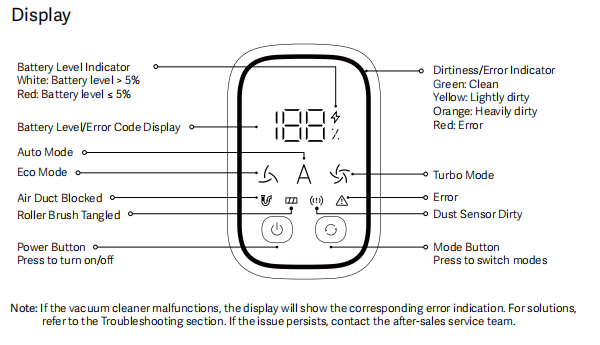
Q11: Is the Xiaomi Vacuum Cleaner G30 Max suitable for cleaning under beds?
A: It's suitable for cleaning under raised furniture like beds and sofas. Recommended setup: Bendable tube + extended hose + Electric brush bar (Equipped with Headlight).
Note:
Do not use the extension hose to connect the brush head to prevent the main unit from contacting the floor and scratching it.
Q12: What is the battery capacity of the Xiaomi Vacuum Cleaner G30 Max?
A: Soft-pack lithium battery pack, rated capacity 3500 mAh, nominal capacity 4000 mAh.
Q13: What is the battery life of the Xiaomi Vacuum Cleaner G30 Max in different operating modes?
A: Battery life varies depending on usage and power settings:
1. Floor Brush
In Eco mode, the runtime is approximately 70 minutes.
In Auto mode, the runtime ranges from 20 to 35 minutes.
In Turbo mode, the runtime is 12 minutes.
2. Handheld
In Eco mode, the runtime is approximately 90 minutes.
In Auto mode, the runtime ranges from 25 to 40 minutes.
In Turbo mode, the runtime is 8 minutes.
3. Mite Removal Brush
In Eco mode, the runtime is approximately 75 minutes.
In Auto mode, the runtime ranges from 20 to 45 minutes.
In Turbo mode, the runtime is 12 minutes.
| Usage Mode | Eco mode | Auto mode | Turbo mode |
| Floor Brush | Approximately 70 minutes | 20-35 minutes | 12 minutes |
| Handheld | Approximately 90 minutes | 25-40 minutes | 8 minutes |
| Mite Removal Brush | Approximately 75 minutes | 20-45 minutes | 12 minutes |
Q14: What should be noted when charging the Xiaomi Vacuum Cleaner G30 Max?
A: Here are the precautions for charging the Xiaomi Vacuum Cleaner G30 Max:
1. Please fully charge the vacuum cleaner before first use. This process takes approximately 3.5 hours.
2. The vacuum cleaner cannot be turned on while charging. If you try to turn it on while charging, it will not start. You must unplug the power cord before turning it on.
3. After fully charging, the machine will automatically shut down to prevent overcharging, and the battery indicator will turn off.
4. Extended use in high-power mode will cause the battery to heat up and will extend the charging time. It is recommended to cool the vacuum cleaner for 60 minutes before charging.
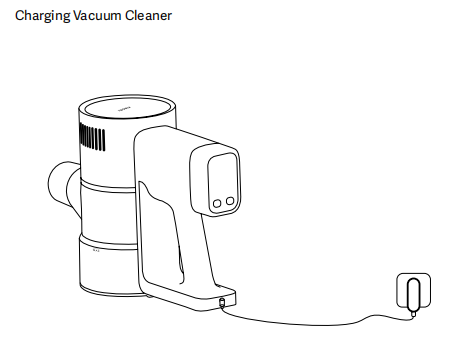
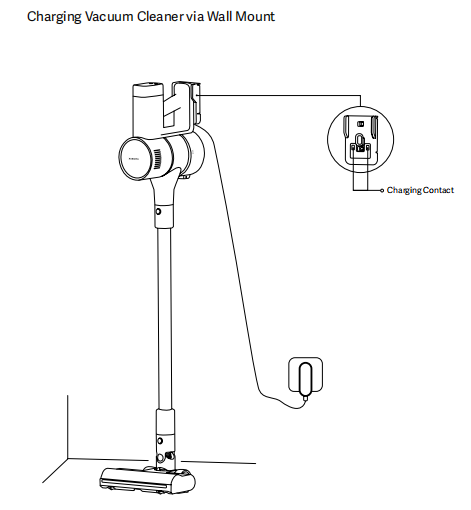
5. The machine supports both standalone charging and wall-mounted charging. When charging the standalone unit, it must be placed on a stable surface to prevent accidental injury from tipping over.
Q15: Can the Xiaomi Vacuum Cleaner G30 Max remain connected to the power cord when not in use?
A: The Xiaomi Vacuum Cleaner G30 Max has an overcharge protection mechanism. Once fully charged, the internal charging circuit will automatically disconnect, preventing continued charging. However, for safety reasons, it is recommended that you disconnect the power cord immediately after charging is complete and avoid leaving it connected to a power source.
Q16: Does the Xiaomi Vacuum Cleaner G30 Max support connecting to the Xiaomi Home App?
A: This product does not have internet connectivity and does not support connecting to the Xiaomi Home App.
Q17: Does the Xiaomi Vacuum Cleaner G30 Max need to be charged if not used for an extended period?
A: Yes. Before long-term storage, please refer to the following steps:
1. Unplug the power cord after fully charging.
2. Store in a cool, dry place.
3. Charge the battery at least every three months.
Q18: How to assemble, disassemble, and recycle the various accessories for the Xiaomi Vacuum Cleaner G30 Max?
A: The Xiaomi Vacuum Cleaner G30 Max can be combined with different brush heads, bendable tubes, extension rods, and extension hoses to suit different cleaning environments and needs. Please note that the extension hose cannot be connected to the Electric Brush Bar (Equipped with Headlight) or the Mini Electric Brush. Since both of these floor brushes require a power supply, they can only be connected to an extension rod with a power supply. Improper use will prevent the electric brush from functioning properly.
Directly connect the brush head to the main unit:
1. Assembly:
Align the two protrusions on the brush head connector with the two grooves in the main unit connector, with the brand logo facing up. Insert until you hear a click.
2. Disassembly:
Ensure the main unit is turned off, then press the button on the brush head to remove it.
3. Recycling:
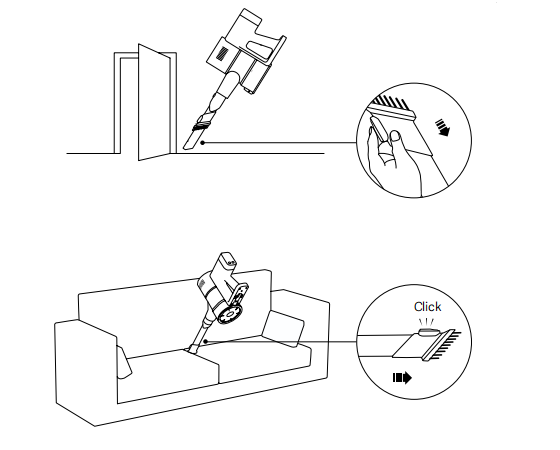
The 2-in-1 brush head can be converted between two different configurations: tube and bristle. After use, it is recommended to restore the brush head to the tube configuration to protect the bristles from deformation. To switch from tube to bristle configuration, press and hold the button on the front of the brush head and pull the bristles out toward the brush head. Release the button to ensure the bristles do not return. To switch from bristle to tube configuration, press and hold the button on the front of the brush head and pull the bristles back toward the brush head until you hear a clear click.
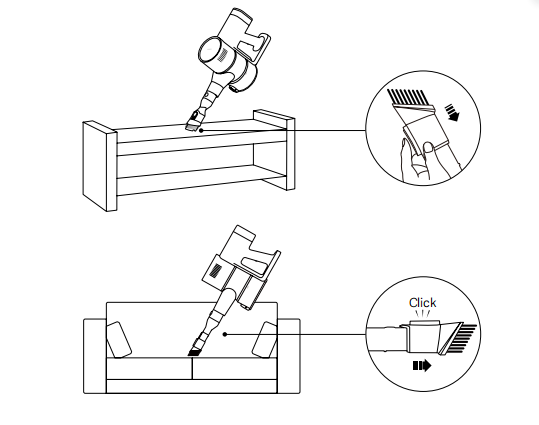
The brush head connects via the connecting rod/hose:
1. Assembly: Connect the button-mounted end to the main unit and the button-less end to the brush head. Align and insert until they click.
2. Disassembly: Ensure the main unit is turned off, then press the buttons on the brush head and extension rod to remove them.
Note:
The extension hose cannot be connected to an electric brush bar (Equipped with a Headlight) or a mini electric brush.
Q19: What are the different brush heads for the Xiaomi Vacuum Cleaner G30 Max suitable for?
A: The following are the usage scenarios for the different brush heads:
1. Electric Brush Bar (Equipped with Headlight): For marble floors, wood floors, and short-pile carpets.
2. 2-in-1 Crevice Brush: For corners, sofa crevices, car interiors, etc.
3. 2-in-1 Wide Brush: For keyboards, curtains, sofas, ceilings, corners, car interiors, etc.
4. Sofa Brush: For sofas, mattresses, and other fabrics.
5. Mini Electric Brush: For removing pet hair and stubborn stains on sofas, mattresses, and other fabrics.
6. Pet Brush: For cleaning pet hair.
Q20: Can the Xiaomi Vacuum Cleaner G30 Max be used without the filter installed?
A: No. Failure to install the filter will allow dust to enter the motor, affecting operation or even causing damage. Ensure the filter is dry and properly installed.
Q21: Where is the SN on the Xiaomi Vacuum Cleaner G30 Max?
A: It's located on the handle, marked as the long code after "SN".
Usage issues
Q1: What are the precautions for using the Xiaomi Vacuum Cleaner G30 Max?
A: When using the Xiaomi Vacuum Cleaner G30 Max, please note the following precautions:
1. Children and People with Limited Abilities:
This device can be used by children aged 8 years and above, and persons with reduced physical, sensory, or intellectual abilities, or a lack of experience and knowledge, provided that they have been given supervision or instruction to operate the device in a safe manner and understand the hazards involved. Children should not play with the device as a toy. Cleaning and maintenance should not be performed by children without supervision.
2. Power Supply:
This device should only be operated with the power supply unit provided with the device.
3. Environment of Use:
This vacuum cleaner is for indoor use only. Do not use or install it in outdoor, industrial, or commercial environments.
4. Storage:
Do not charge or store the vacuum cleaner near heat sources or in humid areas, such as near radiators, in kitchens, or bathrooms.
5. Battery Safety:
Be careful not to short-circuit the terminals of battery-powered devices or batteries with metal objects.
6. Prevention of Electric Shock:
Do not touch the plug or any electrical components with wet hands.
7. Accessories:
Use only Xiaomi approved replacement parts.
8. Maintenance Safety:
Before installing, removing, or replacing any parts, or cleaning or maintaining the vacuum cleaner, always disconnect the power cord to prevent personal injury.
9. Power Cord Inspection:
To reduce the risk of fire, explosion, or personal injury, check the power cord before use to ensure it is intact. Do not use the vacuum cleaner if the power cord is damaged.
10. Ventilation:
Do not block the air intake or outlet to prevent overheating and damage.
11. Suction Inlet:
Do not allow the suction inlet of the vacuum cleaner to be blocked.
12. Installation:
Do not use the vacuum cleaner if it is improperly installed (if it is damaged or not properly installed).
13. Transportation:
When lifting or transporting the vacuum cleaner, make sure it is turned off. Failure to do so will result in personal injury.
14. Use Caution:
When using the vacuum cleaner, keep moving parts (such as the brush head) away from people and pets.
15. Stair Cleaning: Always pay attention to personal safety when vacuuming stairs.
16. Do Not Vacuum-Dust:
Do not vacuum construction dust (such as drywall plaster dust/ash) or fireplace embers.
17. Do Not Vacuum-Hot/Burning Materials:
Do not vacuum soot/hot accumulations such as charcoal, cigarette butts, or matches.
18. Do Not Vacuum-Hard Objects:
Do not vacuum hard or sharp objects such as glass, nails, screws, or coins.
19. Do Not Vacuum-Grease/Pigment:
Do not vacuum highly greasy, sticky, or strongly colored stains such as shoe polish, paint, or pigment.
20. Do Not Vacuum-Hazardous Liquids:
Do not vacuum flammable or explosive liquids (such as gasoline) or any toxic solutions (such as bleach, ammonia, or drain cleaner).
21. Do Not Vacuum-Toner:
Do not vacuum toner in laser printers or copiers. Doing so could cause a fire or explosion.
22. Placement:
Do not place the vacuum cleaner on unstable surfaces (such as chairs or tables) to prevent it from tipping over and causing damage or injury.
23. Cleaning and Maintenance:
Do not immerse the vacuum cleaner or any parts in water or other liquids for cleaning. After cleaning or maintaining the vacuum cleaner, remove debris from the dust collection bin and dry all parts. If the system becomes clogged, stop using the vacuum cleaner. Clean the interior of the vacuum cleaner regularly to keep it free of dust, lint, hair, or other debris that could affect airflow. Use a soft brush to remove debris.
24. Troubleshooting:
If the vacuum cleaner overheats, experiences unusual noises, odors, or reduced suction power, contact customer service. If the air filter is clogged, clean it.
25. Accessory Restrictions:
Do not use any third-party batteries or power supplies.
26. Temperature Restrictions:
Do not expose the device or battery to excessive temperatures.
27. Power Supply Damage:
If the power cord is damaged, it must be replaced by the manufacturer, customer service, or similarly qualified personnel to avoid safety hazards.
Q2: What to do if the bristles of the Xiaomi Vacuum Cleaner G30 Max's 2-in-1 crevice brush are deformed?
A: The bristles are made of a special material with a certain degree of self-healing ability. If they are squeezed during use or transportation, they will deform slightly. Minor deformation will recover after a period of rest. If deformation is severe and affects use, please contact after-sales service.
Q3: Can the Xiaomi Vacuum Cleaner G30 Max be stored in a car?
A: Keep it out of direct sunlight and avoid leaving it in a car during high temperatures in summer to avoid safety hazards.
Q4: How to choose the appropriate power mode for the Xiaomi Vacuum Cleaner G30 Max?
A: For daily use, you can freely select the power mode according to your needs. The following are recommended usage scenarios:
1. Auto mode (default): Daily cleaning, automatically adjusts suction power.
2. Eco mode: Simple cleaning of loose hair, obvious dust, etc.
3. Turbo mode: Stubborn stains, but this will shorten battery life.
Q5: Does the Xiaomi Vacuum Cleaner G30 Max have a blockage protection function?
A: Yes, the Xiaomi Vacuum Cleaner G30 Max has a blockage protection function, which protects the motor from overload. If foreign matter or a serious blockage occurs, the machine will stop, and the corresponding error icon on the display will flash red for 6 seconds.
Please clean the corresponding parts according to the instructions and try again:
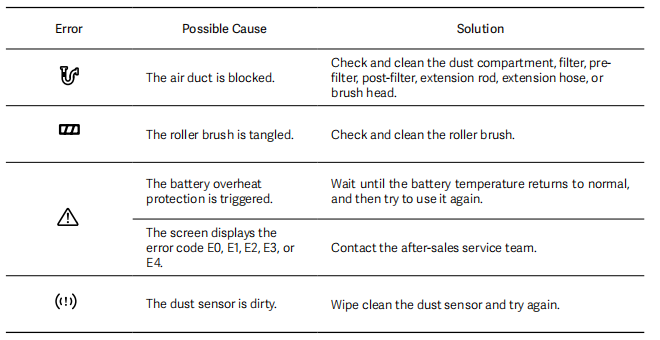
1. When the device shows the airflow blockage icon
The possible cause is that the air duct is blocked. The solution is to check and clean the dust compartment, filter, pre-filter, post-filter, extension rod, extension hose, or brush head.
2. When the device shows the roller brush tangle icon
The possible cause is that the roller brush is tangled. The solution is to check and clean the roller brush.
3. When the device shows the triangle warning icon
One possible cause is that the battery's overheat protection is triggered. The solution is to wait until the battery temperature returns to normal, and then try to use it again.
Another possible cause is that the screen displays the error code E0, E1, E2, E3, or E4. The solution is to contact the after-sales service team.
4. When the device shows the dust sensor icon
The possible cause is that the dust sensor is dirty. The solution is to wipe the dust sensor and try again.
Q6: Why is the suction power of the Xiaomi Vacuum Cleaner G30 Max weak when turning on for the first time?
A: The default setting is Auto mode, which provides moderate suction for daily use. If you need stronger suction, you can manually switch to Turbo mode. If you experience abnormal suction, please check for blockages or cleaning.
Q7: Why does the screen of the Xiaomi Vacuum Cleaner G30 Max turn off after charging?
A: This is a normal design. It automatically shuts off and stops charging when fully charged to prevent overcharging and reduce standby power consumption.
Q8: Why is the floor brush of the Xiaomi Vacuum Cleaner G30 Max tilted when placed on a wall mount?
A: Because the internal components of the floor brush are primarily concentrated on one side, the center of gravity shifts when it is hung. This can cause tilting, which is normal. Ensure it is securely mounted and safe to use.
Q9: Is it normal to see vertical lines on some parts of the Xiaomi Vacuum Cleaner G30 Max?
A: The vertical lines on the handle, charging port, dust cup, and so on are mold parting lines. They do not affect strength or usability and are not cracks. If a genuine crack develops during use, please contact customer service.
Q10: What to do if dust falls out of the Xiaomi Vacuum Cleaner G30 Max after it stops working?
A: We recommend leaving the machine running for a few seconds after vacuuming to completely draw any remaining dust into the dust cup. Falling dust is usually residue from the pipe that wasn't completely drawn in.
Q11: Is it normal for the Xiaomi Vacuum Cleaner G30 Max accessories to vibrate at the connection to the main unit?
A: This is normal. The product design leaves reasonable clearance to ensure smooth insertion and removal, and even a small amount of dust will not affect operation. Please ensure that all connectors are securely locked.
Q12: Is it normal for the Xiaomi Vacuum Cleaner G30 Max to make a shaking noise inside the main unit?
A: The shaking noise when the machine is turned off comes from the dust cup shield and is normal. It will disappear once air pressure is built up. If you are unsure of the source of the noise, please stop using the machine and contact customer service.
Q13: Which accessories of the Xiaomi Vacuum Cleaner G30 Max are washable?
A: The dust cup, filter assembly, pre-filter, and post-filter are washable. Always separate the dust cup from the main unit or components before rinsing and allowing it to dry for at least 24 hours before reassembling. The main unit is not washable.
Q14: Does the Xiaomi Vacuum Cleaner G30 Max support car charging?
A: We currently do not have a car charger. For safety reasons, we recommend charging in a normal charging environment.
Q15: Does the Xiaomi Vacuum Cleaner G30 Max support replaceable batteries?
A: If you need to replace the battery, please contact our after-sales service team, and we will replace it with genuine parts. Do not replace the battery yourself.
Q16: Does the Xiaomi Vacuum Cleaner G30 Max need to be fully charged before first use?
A: It needs to be fully charged before first use, which takes approximately 3.5 hours.
Q17: Can the Xiaomi Vacuum Cleaner G30 Max be used while charging?
A: No, this product has a protection mechanism during charging and will not start while charging.
Q18: What kind of debris can the Xiaomi Vacuum Cleaner G30 Max clean?
A: The Xiaomi Vacuum Cleaner G30 Max is intended for use in the following environments and on the following cleaning objects:
1. Use on dry surfaces only.
2. Do not use the product to absorb flammable or explosive liquids such as water, gasoline, or other toxic solutions such as chlorine bleach, ammonia, drain cleaners, or other liquids.
3. Do not use the product to vacuum drywall dust, fireplace dust, or embers. Do not inhale smoking or burning materials such as embers, cigarette butts, or matches.
4. Do not use the product to vacuum sharp objects such as glass, nails, screws, or coins, as this will damage the vacuum cleaner.
Q19: Can the Xiaomi Vacuum Cleaner G30 Max be placed against a wall during or after use?
A: Due to the concentrated weight of the main unit, placing it against a wall is not recommended. Place it on a stable surface or hang it on a wall shelf to prevent it from tipping over.
Q20: What should be noted when using the Xiaomi Vacuum Cleaner G30 Max pet brush?
A: The Xiaomi Vacuum Cleaner G30 Max has a pet brush design. Please note the following when using it:
1. Gently brush your pet's hair, following the direction of hair growth.
2. To increase operating space, use an extension hose to connect the brush head and main unit. Avoid placing the main unit too close to your pet during operation, as this will cause noise and startle the pet.
3. If pet hair accumulates on the bristles of the pet brush, remove the brush from the pet and press the "PUSH" button to remove the hair.
4. Use eco or auto modes, and avoid using turbo mode if possible.
5. If your pet shows signs of displeasure or discomfort, stop brushing immediately.
6. Ensure the safety of both you and your pet while brushing to avoid any danger.
Q21: Can the Xiaomi Vacuum Cleaner G30 Max switch between different power frequencies?
A: The Xiaomi Vacuum Cleaner G30 Max automatically adapts to both 50 Hz and 60 Hz power frequencies, without requiring any intervention.
Q22: Does the Xiaomi Vacuum Cleaner G30 Max mini electric brush feel a lot of resistance when using it?
A: This is normal. The mini electric brush is designed specifically for fabric surfaces and uses negative pressure to enhance cleaning power. The strong suction you feel during use will not affect normal use.
Q23: Does the Xiaomi Vacuum Cleaner G30 Max not completely clean dust around the edges?
A: The design of a machine floor brush doesn't allow for perfect edge contact, but using the side of the brush head against the edges of walls and furniture can achieve a thorough cleaning effect. Please try using the side of the brush head for cleaning. If the brush head isn't long enough, you can use an extension rod in combination.
Q24: Does Xiaomi Vacuum Cleaner G30 Max have dedicated accessory storage bags?
A: Currently, there is no dedicated storage bag. We recommend placing frequently used accessories in the accessory holder and storing infrequently used accessories appropriately.
Q25: Can the Xiaomi Vacuum Cleaner G30 Max be used to clean large debris?
A: We do not recommend this. Large debris, such as leather or paper balls, will be pushed by the floor brush and not be sucked up, or the machine will become blocked. It is recommended to clean up obvious large pieces of garbage directly or use a pipe brush head to collect them.
Cleaning and maintenance
Q1: How to clean and maintain the Xiaomi Vacuum Cleaner G30 Max?
A: The cleaning and maintenance instructions for the Xiaomi Vacuum Cleaner G30 Max are as follows:
1. Filter Assembly: Remove the dust cup, remove the pre-filter, filter, and post-filter, rinse, and air dry for at least 24 hours. Reassemble in reverse order.
2. Electric Brush Bar (Equipped with Headlight) and Mini Electric Brush: Turn off the power, detach the assembly, remove the roller brush, wipe the suction port and transparent cover, clean hair and dirt from the duct, and reinstall the roller brush.
3. Dust Sensor: Turn off the power, remove the assembly, and wipe with a dry cloth or paper towel.
4. 2-in-1 Wide Brush and Crevice Brush Assembly: Turn off the power, detach the brush head, and clean the bristles and dirt from the duct.
5. Dust Cup: Before emptying the dust cup, turn off the power, remove the lever, and press the button to empty the dust cup.
Note:
Please note that for daily cleaning, use tap water to clean the filter assembly. Do not use detergents or disinfectants, and do not rinse components containing critical components.
Q2: What precautions should be taken for daily cleaning and maintenance of the Xiaomi Vacuum Cleaner G30 Max?
A: The following precautions should be taken for daily cleaning and maintenance of the Xiaomi Vacuum Cleaner G30 Max:
1. Before cleaning and maintenance, unplug the power cord and ensure the vacuum cleaner is completely turned off.
2. Use genuine parts to ensure proper operation of the vacuum cleaner and maintain the warranty.
3. If the filter, pre-filter, post-filter, extension rod, bendable tube, extension hose, 2-in-1 crevice brush, 2-in-1 wide brush, sofa brush, or pet brush becomes clogged, the vacuum cleaner will stop. Please turn off and clean the vacuum cleaner before use.
4. If the electric brush or mini electric brush becomes clogged, the vacuum cleaner itself will not stop, but the electric brush bar or mini electric brush will. Please turn off the vacuum cleaner and clean the electric brush bar or mini electric brush before use.
5. Before cleaning, remove the brush head from the vacuum cleaner to prevent accidental startup and injury.
6. If you will not be using the vacuum cleaner for an extended period, fully charge it and disconnect it from the power source. Store it in a cool, dry environment away from direct sunlight.
7. To prevent battery overdischarge, it is recommended to charge the device at least once every three months.
Q3: How to clean the main unit of the Xiaomi Vacuum Cleaner G30 Max?
A: Before cleaning, make sure the device is turned off, and its components are separated. Wipe only the exterior of the main unit with a soft, dry cloth.
Q4: How to clean the dust cup of the Xiaomi Vacuum Cleaner G30 Max?
A: When the dust cup reaches the "MAX" line, clean it:
1. Turn off the device.
2. Remove the extension rod or brush head.
3. Place it over a trash can.
4. Press the empty dust button to empty the trash.
Q5: How to clean the filter assembly of the Xiaomi Vacuum Cleaner G30 Max?
A: The filter assembly is located inside the dust cup. To clean the filter assembly, you must first remove the dust cup to expose the internal structure.
To clean the filter assembly, please follow these steps:
1. Release the dust cup latch and pull the dust cup and internal components outward.
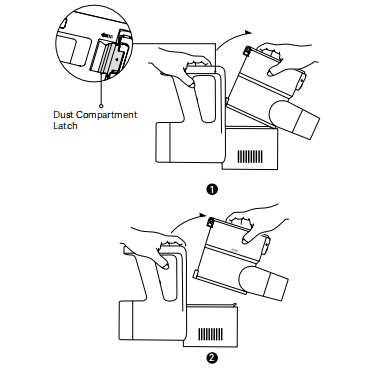
2. Remove the pre-filter, lift the filter assembly handle, and twist the filter assembly handle to remove it.
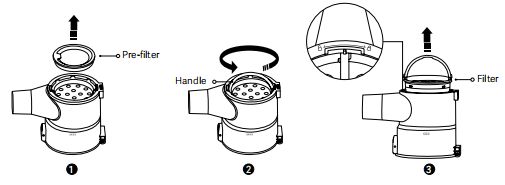
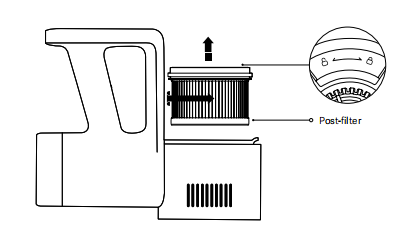
3. Turn the rear filter counterclockwise until it unlocks and can be lifted out.
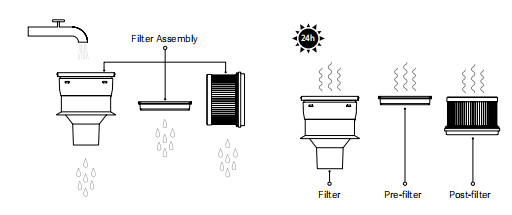
4. Rinse the pre-filter, filter assembly, and rear filter, then place them in a dry place to air dry for at least 24 hours.
Note:
1. Do not soak the pre-filter and rear filter for extended periods of time. Do not use detergents or disinfectants to clean them.
2. When cleaning the rear filter, rinse and tap the edges repeatedly to remove dust and debris until it is completely clean.
3. Do not use your hands, brushes, or sharp objects to clean the pre-filter, filter assembly, and rear filter to avoid damage.
4. If suction power is still significantly reduced after cleaning, it is recommended to purchase and replace the filter assembly and cartridge with genuine, original products.
Q6: How to reassemble the Xiaomi Vacuum Cleaner G30 Max filter assembly after cleaning?
A: After cleaning, ensure all rinsed components are completely dry before reassembling. Failure to do so will affect performance and, in severe cases, could cause liquid to enter the main unit, damaging critical components.
To reassemble the filter assembly, please refer to the following steps:
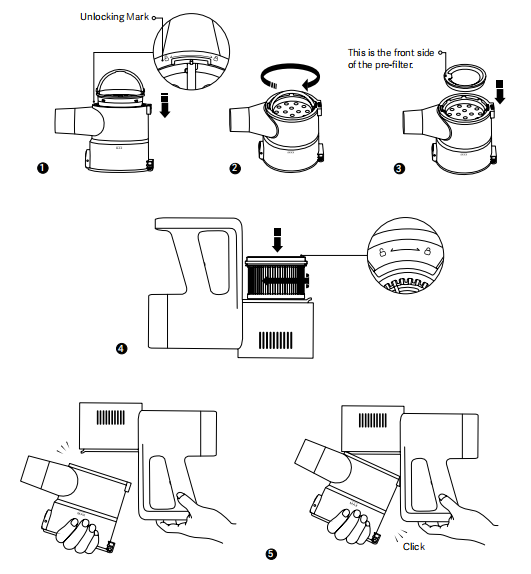
1. Align the filter assembly handles and place the filter assembly vertically into the dust cup.
2. Hold the filter assembly handle and turn it clockwise to lock the filter assembly, then lower the handle.
3. Install the pre-filter, ensuring it faces up.
4. Place the post-filter into the vacuum cleaner and turn it clockwise until it locks.
5. Reinstall the dust cup and internal components, ensuring they are securely in place.
Q7: How to clean the Electric Brush Bar (Equipped with Headlight) on the Xiaomi Vacuum Cleaner G30 Max?
A: Before cleaning, ensure the machine is stopped, and the brush assembly is separated from the extension rod or main unit to avoid accidental activation and possible danger.
Please follow the steps below to clean the Electric Brush Bar (Equipped with Headlight):
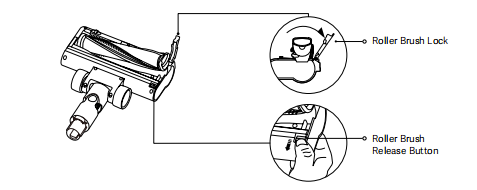
1. Place the Electric Brush Bar (Equipped with Headlight) upside down, press the roller release button, and remove the roller brush.
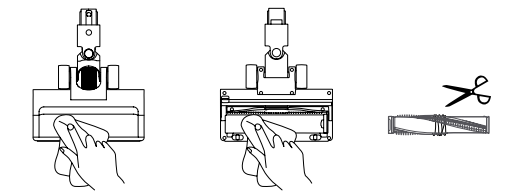
2. Wipe the suction port and transparent cover with a dry cloth or paper towel. If there is hair tangled in the roller brush, cut it with scissors or another tool before cleaning. There will be residue or debris clogged in the floor brush duct. Gently tap or use a long object to remove the dirt, but be careful not to damage the hose.
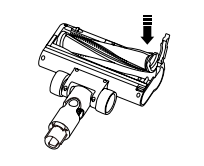
3. After cleaning, replace the roller brush and press the roller lock to secure it in place.
Note:
The floor brush contains a motor. Do not wash it with water.
Q8: How to clean the mini electric brush on the Xiaomi Vacuum Cleaner G30 Max?
A: Before cleaning, make sure the machine is stopped and the floor brush assembly is separated from the extension rod or main unit to avoid accidental activation and danger.
Please follow the steps below to clean the mini electric brush:
1. Place the mini electric brush upside down and use a suitable tool to rotate the side latch of the roller to unlock and remove the roller brush.
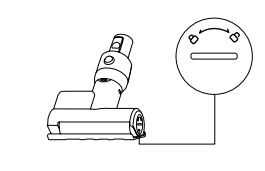
2. Wipe the suction port and transparent cover with a dry cloth or paper towel. If hair is tangled in the roller brush, cut it with a tool such as scissors before cleaning. There will be residual or clogged dirt in the brush head duct. Gently tap or use a long object to remove the dirt.
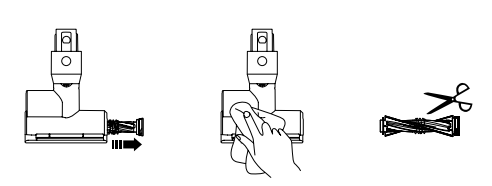
3. After cleaning, replace the roller brush and use an appropriate tool to rotate the side of the roller until it locks and secures the roller brush in place.
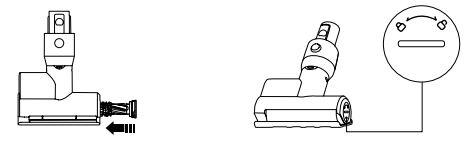
Note:
The floor brush contains a motor. Do not wash it with water.
Q9: How to clean the dust sensor on the Xiaomi Vacuum Cleaner G30 Max?
A: After turning off the device, remove the extension rod or brush head and wipe the sensor area with a dry cloth or paper towel.
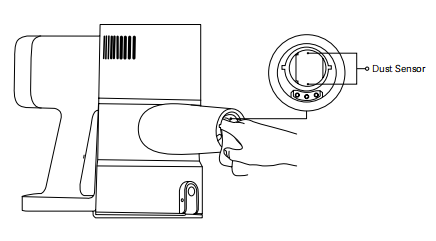
Note:
Do not rinse with water.
Q10: How to clean the 2-in-1 wide brush and crevice brush assembly on the Xiaomi Vacuum Cleaner G30 Max?
A: After turning off the device and detaching the brush head:
1. Clean any hair and debris tangled in the bristles.
2. Gently tap or use a tool to clear any blockages in the pipe.
Q11: How to clean the pet brush assembly of the Xiaomi Vacuum Cleaner G30 Max?
A: After turning off the device and detaching the brush head, press the "Push" button to separate the pet hair from the bristles, collect and discard.
Q12: Can detergent or disinfectant be used for daily cleaning of the Xiaomi Vacuum Cleaner G30 Max?
A: No. Use tap water to clean the filter. Do not rinse critical components such as the body, main unit, and floor brush. Some detergents and disinfectants will affect the seals within the device.
Common abnormalities
Q1: Why does the Xiaomi Vacuum Cleaner G30 Max smell sour after unboxing?
A: The paper and plastic tray used in the machine packaging has been processed. The smell comes from the reagents used in the process and is normal.
Q2: What does the error icon on Xiaomi Vacuum Cleaner G30 Max mean?
A: The machine uses sensors and other functional components to detect and indicate common, resolvable faults. These faults will display a preset error icon on the screen to alert you to the type of fault.
If you want to know more about the error icon, please refer to the following information:
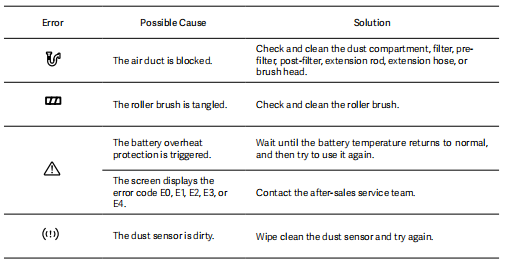
1. Air duct blockage:
When this fault occurs, the main unit will stop operating. The error icon will flash red for 6 seconds and then go off. To correct this, check and clean the dust box, pre-filter, filter assembly, post-filter, extension rod, hose, or brush head. After cleaning, try restarting the machine.
2. Brush entanglement/jamming:
When this fault occurs, the main unit will stop operating. The error icon will flash red for 6 seconds and then go off. To correct this, check and clean the brush. After cleaning, try restarting the machine.
3. Other Faults:
This fault is primarily caused by the usage environment or prolonged use, which will cause the battery to overheat and trigger protection. When this fault occurs, the console will stop operating, and the error icon will flash red for 6 seconds before the screen goes off. To resolve, turn off the console, wait for the battery temperature to return to normal, and then try restarting it.
4. Dirty Dust Sensor:
When this fault occurs, the console will continue to operate, but the corresponding error icon will flash red for 6 seconds and then remain on. Because the dust sensor is not working properly, the dirt light ring on the screen will also remain on in red. To resolve, wipe the dust sensor with a dry cloth or tissue, then try restarting the console.
Q3: Why does the area on the Xiaomi Vacuum Cleaner G30 Max display change to an error code?
A: If the LED area on the display that originally displayed the battery level changes to an error code, it indicates a malfunction that cannot be resolved through maintenance and cleaning. In this case, please contact the after-sales service for a professional engineer to troubleshoot and repair the problem.
Q4: Why is the Xiaomi Vacuum Cleaner G30 Max not working?
A: Possible causes and solutions are as follows:
1. Battery depleted: Please fully charge before use.
2. Clogged suction port/air duct/filter: Clean and try restarting the device.
3. Battery temperature protection: If you have been using the device for extended periods at high speed or in a high-temperature environment, wait for the device to cool down before use.
4. Filter assembly not installed: Reinstall the device and try restarting it.
5. Device malfunction: If the device still does not turn on after following the above inspection or cleaning procedures, please contact customer service.
Q5: Why is the suction power of the Xiaomi Vacuum Cleaner G30 Max reduced?
A: Possible causes and solutions are as follows:
1. Power setting: The device is in Eco mode. You can switch to turbo mode.
2. Clogged suction port: The suction port, air duct, or filter is clogged. Please clean the suction port/air duct/filter.
3. Brush head entanglement: The brush head is entangled with dirt. Please clean the brush head.
4. Motor problem: If the suction power does not improve after following the above instructions, please contact customer service. Do not disassemble the device yourself.
Q6: Why is the battery life of the Xiaomi Vacuum Cleaner G30 Max short?
A: Possible causes and solutions are as follows:
1. Normal Battery Life: If the battery life is within the range or close to the upper and lower limits, the device is functioning normally.
| Usage Mode | Eco mode | Auto mode | Turbo mode |
| Floor Brush | Approximately 70 minutes | 20-35 minutes | 12 minutes |
| Handheld | Approximately 90 minutes | 25-40 minutes | 8 minutes |
| Mite Removal Brush | Approximately 75 minutes | 20-45 minutes | 12 minutes |
2. Not Fully Charged: Use after fully charging
3. Dust Cup/Filter: If the dust cup is full or the filter is clogged, please clean it promptly.
4. Clogged Brush Head: Please clean the brush head.
5. Turbo Mode: Using Turbo Mode will result in shorter battery life than other modes. This is normal.
6. Faulty Device: If the battery life does not improve after following the above instructions, please contact customer service.
Q7: Why is the Xiaomi Vacuum Cleaner G30 Max so noisy?
A: The following are possible causes and solutions for loud noise:
1. Normal noises from the motor are normal, not a malfunction. The machine can function normally.
2. The suction port, air duct, or filter is clogged, causing abnormal noises. Please clean the suction port, air duct, or filter promptly.
3. The pre-filter or post-filter is not installed. Please ensure that the filter assembly is properly installed.
4. The machine is faulty or damaged. Please contact the after-sales service for professional technicians to diagnose and resolve the issue.
Q8: Why does the Xiaomi Vacuum Cleaner G30 Max heat up very high after using it for a while?
A: The following are possible causes and solutions for the high temperature after using it for a while:
1. Used in a high-temperature environment. Please pay attention to the operating environment to avoid any hazards.
2. Overheating during long-term operation at high speeds is normal and does not affect normal operation.
3. The suction port, air duct, or filter is clogged, causing the machine to heat up. Please clean the suction port, air duct, or filter promptly.
4. The device is malfunctioning or damaged. Please contact the after-sales service for a professional engineer to diagnose and resolve the issue.
Q9: Why hasn't the Xiaomi Vacuum Cleaner G30 Max been fully charged for a long time?
A: The device has been charging for a long time, but hasn't been fully charged.
There are the following possible reasons and solutions:
1. The battery pack will be overheating after prolonged use. The device has a temperature protection function. For safety reasons, charging will be slow in this situation. Please wait for the device to cool down before recharging.
2. The power cord is not plugged in tightly, indicating poor contact. Please ensure it is plugged in securely.
3. The power adapter is incompatible. Please use the original adapter that came with the device.
4. The device will be malfunctioning or damaged. Please contact the after-sales service for a professional engineer to diagnose and resolve the issue.
Q10: Why is there an odor coming from the air outlet of the Xiaomi Vacuum Cleaner G30 Max?
A: There are possible causes and solutions for an odor from the machine's air outlet:
1. The vacuum cleaner's materials contain rubber. A new machine will initially have an odor, but it's not harmful. With normal use, the odor will gradually fade and disappear, and will not affect normal use.
2. If there's an odor from the air outlet, it will be due to residual dirt that hasn't been cleaned for a long time. Please clean the machine carefully.
3. If there's a burning smell from the air outlet, stop using the machine and check for flammable dirt. Check that the filter assembly is properly installed. Clean the machine and try again. If the burning smell persists, please contact our after-sales service team for a professional diagnosis and resolution.
4. The machine will be malfunctioning or damaged. Please contact our after-sales service team for professional diagnosis and resolution.
Q11: Why doesn't the display on the Xiaomi Vacuum Cleaner G30 Max light up while charging?
A: If the display doesn't light up while charging, there are the following possible reasons and solutions:
1. The device has finished charging. The battery overcharge protection design stops charging and turns off the screen after 20 seconds. Please briefly press the power button to observe. If the device is working normally, the battery indicator is full, and the lightning icon is solid white, charging is complete.
2. The adapter is not properly connected to the device. Please use the original adapter to charge. If it is not properly connected, reconnect it and plug it in tightly. If it still does not charge, please contact official customer service for a professional diagnosis and solution.
3. The device will be malfunctioning or damaged. Please contact official customer service for a professional diagnosis and solution.
Q12: Why is the Xiaomi Vacuum Cleaner G30 Max not vacuuming completely?
A: There are the following possible reasons and solutions for the device not vacuuming completely:
If you turn off the device immediately after use, dust will remain in the brush head duct or connecting duct and has not yet entered the dust cup. Please wait a few seconds after use to turn off the device, and wait for dust to enter the dust cup before turning it off.
Q13: Why does the Xiaomi Vacuum Cleaner G30 Max make louder noises after being turned off?
A: This is a design feature. To prevent dirt or dust from remaining in the brush head or connecting pipes after the machine is stopped, the machine increases power to suck this remaining dust and dirt into the dust cup to prevent it from falling back into the machine. This is not a malfunction.
Q14: Why does Xiaomi Vacuum Cleaner G30 Max seem to be malfunctioning when vacuuming?
A: Possible causes and solutions for difficult control, slipping, or rolling of the floor brush during use include:
1. The surface being cleaned is too smooth. Check the floor brush wheels for caked-on dirt that reduces friction, or for tangled hair that prevents the wheels from turning smoothly. Clean them promptly.
2. The floor brush will have sucked in large debris and become stuck, preventing it from contacting the surface. Turn the machine off, check for any blockages, and remove them promptly.
3. Please note that the electric brush bar (Equipped with a Headlight) and the mini electric brush cannot be used with an extension hose. Firstly, the extension hose will not transmit power to the brush, and the motor inside the brush will not operate. Secondly, the hose cannot properly control the brush's direction of movement.
Q15: Is it normal for the Xiaomi Vacuum Cleaner G30 Max floor brush light to remain on?
A: The floor brush light remains on as a product design. It is used in dark corners such as crevices and under furniture. It is normal for the light to remain on and cannot be turned off.
Does it help?