

How to use Android auto on the Xiaomi 15?
The Xiaomi 15 features Android auto that allows your phone to connect with your car's entertainment system. It mirrors APPs, navigation, music, and communication functions from your device to the car's display, promoting safer driving. You can use this feature in compatible cars for easier access. With Android Auto, you can make calls, send messages, use navigation APPs like Google Maps, and play music using voice commands, minimizing distractions and enhancing safety.
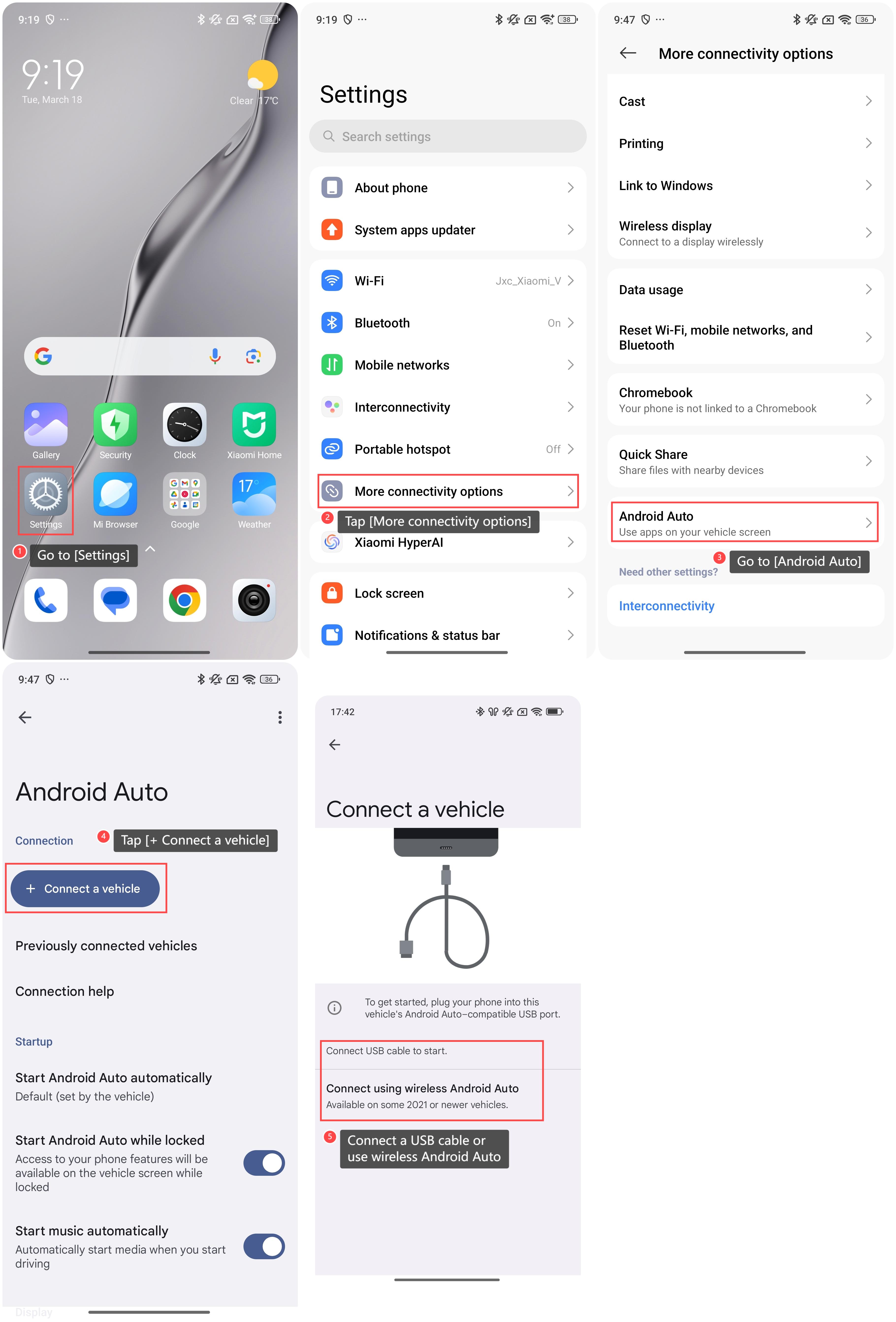
To use Android auto on the phone, please refer to the following steps:
1. Go to [Settings];
2. Tap [More connectivity options];
3. Go to [Android Auto];
4. Tap [+ Connect a vehicle];
5. You can connect a USB cable to start or connect using wireless Android Auto according to your needs.
To use Android auto on the phone, please refer to the following steps:
1. Go to [Settings];
2. Tap [More connectivity options];
3. Go to [Android Auto];
4. Tap [+ Connect a vehicle];
5. You can connect a USB cable to start or connect using wireless Android Auto according to your needs.
Does it help?
Yes
No