

How to use the buttons on the Xiaomi Robot Vacuum X20 Pro?
For your reference, here are the usages of the buttons:
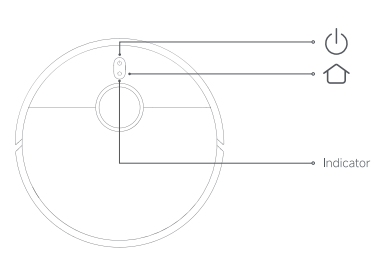
1. Turning On/Off
(1). Press and hold the power button for 3 seconds to turn it on or off. When the indicator on the robot vacuum lights up, it means the robot vacuum enters the standby mode. When the robot vacuum is paused and not being charged, press and hold the power button for three seconds to turn it off.
(2). Press it to start cleaning or pause while turned on.
Note:
When the robot vacuum is charging, it will automatically turn on and cannot be turned off.
2. Resetting Wi-Fi
2. Resetting Wi-Fi
Take the following steps if the robot vacuum cannot be connected to the network because the router is reset, the password is forgotten, or for other reasons:
(1) Open the cover of the robot vacuum so that you can see the Wi-Fi indicator.
(2) Simultaneously press and hold the power button and recharge button for 7 seconds until you hear a voice prompt to indicate that the robot vacuum is waiting for the network configuration.
(3) When the Wi-Fi indicator blinks, the Wi-Fi connection has been reset successfully.
Note:
When the robot vacuum is charging, it will automatically turn on and cannot be turned off.
And here are the functions of the recharging button:
(1). Press it to pause while running.
(2). Press it while paused to return the robot vacuum to the omni station for charging.
(3). Press it to stop docking while returning to the omni station.
(4). Press and hold it for three seconds to enable or disable the child lock.
(1). Press it to pause while running.
(2). Press it while paused to return the robot vacuum to the omni station for charging.
(3). Press it to stop docking while returning to the omni station.
(4). Press and hold it for three seconds to enable or disable the child lock.
Does it help?
Yes
No