
Xiaomi Smart Electric Toothbrush T501 FAQ
Product Introduction and Use
1. Q: How can people use the Xiaomi Smart Electric Toothbrush T501?
A: How to brush your teeth:
1. Insert the brush head into the rotating shaft and leave a certain gap which is required for normal vibration;
2. Squeeze a small amount of toothpaste on the brush head;
3. Wet the brush head, put it in your mouth, and then start the toothbrush;
4. You can slowly move the toothbrush when the bristles and gums are at an angle of 45 degrees;
5. The toothbrush pauses every 30 seconds to prompt you to change the brushing position;
6. After brushing your teeth, rinse your mouth with clear water;
Toothbrush Maintenance: After brushing your teeth, wash your toothbrush underwater and air dry it in a ventilated place.
2. Q: When the Xiaomi Smart Electric Toothbrush T501 leaves the factory, Bluetooth is turned off. Do I need to turn on Bluetooth before connecting to Mi Home app?
A: When the Xiaomi Smart Electric Toothbrush T501 leaves the factory, Bluetooth is turned off. You need to turn it on before the Mi Home app can search for the device and connect to it.
How to turn on Bluetooth radio: When the product is turned off, press the mode button for more than 7 seconds, and the colorful smart indicator on the top of the electric toothbrush will slowly breathe and blink orange, indicating that Bluetooth radio is turned on, and can be connected to Mi Home app normally at this time.
3. Q: Introduction to the appearance of the Xiaomi Smart Electric Toothbrush T501
A: The appearance and accessories of the Xiaomi Smart Electric Toothbrush T501 are introduced as follows:
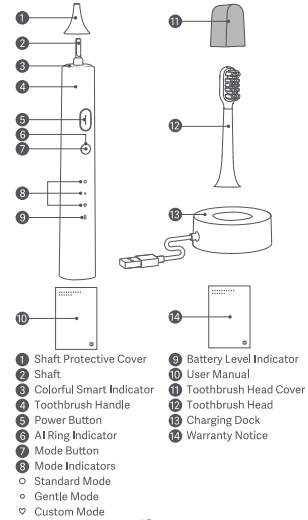
4. Q: Does the Xiaomi Smart Electric Toothbrush T501 cause bleeding or itch when used?
A: Since our toothbrush vibrates at a high frequency, when you use it for the first time, you will have itching or slight gum bleeding, because the gums are not accustomed to this efficient cleaning, and this phenomenon usually stops within 1 to 2 weeks; if the phenomenon still exists for more than 2 weeks, it is likely that your gums are abnormal. It is recommended that you stop using it and consult your dentist.
Remarks: The standard brush head is suitable for strong cleaning and whitening. If you have oral sensitivity, please prioritize the Gentle Mode.
5. Q: Is the Xiaomi Smart Electric Toothbrush T501 noisy?
A: Please rest assured that the sound comes from the vibration of the motor, which does not affect normal use. Our products are shipped after a full inspection of the noise, and the sound is below 55DB (the noise is tested at a distance of 1 meter according to the method specified in the national standard GB/T 4214.1).
6. Q: Is the body of the Xiaomi Smart Electric Toothbrush T501 waterproof?
A: The Xiaomi Smart Electric Toothbrush T501 supports IPX8 waterproof (IPX8 waterproofness: the toothbrush can be soaked 2 meters underwater for 60 minutes) and can be washed all over the body, but the high temperature during bathing will affect the life of the movement and battery life of the toothbrush, so it is recommended that you should not use it during bathing.
Note:
The charging dock is not waterproof.
7. Q: Description of colorful smart indicator, AI ring indicator, battery level indicator and mode indicator status of the Xiaomi Smart Electric Toothbrush T501:
Colorful smart indicator status description:
When Pick-up-to-wake is enabled, the colorful smart indicator breathes for nine seconds before turning off (the default color is sky blue, which can be customized in the app); when the toothbrush is in Paused mode, the breathing blue light will flash; when there is over-pressure alert, the colorful smart indicator will keep red.
AI ring indicator status descriptions:
Smart AI adjustment disabled: When the toothbrush is turned on and in use, the AI ring indicator keeps off;
Smart AI adjustment enabled: When the toothbrush is turned on and in use, the AI ring indicator keeps blue.
Battery level indicator status description:
While using the toothbrush, when the battery level is 20%-100%, battery level indicator status is off; when the battery level is 10%-20%, the breathing orange light will flash; when the battery level is below 10%, the orange light will blink three times (the toothbrush cannot be turned on).
During Charging the toothbrush, when the battery level is 100%, battery level indicator status is off; when the battery level is 20%-100%, the breathing white light will flash; when the battery level is below 20%, the breathing orange light will flash.
8. Q: Is the voltage for the Xiaomi Smart Electric Toothbrush T501 universal?
A: The charging dock features a USB charging port. As long as the adapter matches the local voltage, it can be used all over the world.
9. Q: What is the battery and battery capacity of the Xiaomi Smart Electric Toothbrush T501?
A: The toothbrush is equipped with a 2550mAh lithium battery.
10. Q: Does the Xiaomi Smart Electric Toothbrush T501 have a mode memory feature?
A: The toothbrush has a mode memory feature. The next time you turn it on, it is in the same mode as the last time it was used.
11. Q: Does the Xiaomi Smart Electric Toothbrush T501 work for 2 minutes by default and have a 30-second transposition reminder?
A: The toothbrush defaults to work for 2 minutes and to pause every 30 seconds to remind you to change the brushing position.
12. Q: Are the bristles of the Xiaomi Smart Electric Toothbrush T501 planted in a copper-free pattern?
A: Copper-free hair planting technology has been adopted to fix all the bristles of the toothbrush. The bottom of the bristles forms a whole through hot-melt technology, and then the bristles are fixed on the brush head with the upper part of the brush head.
13. Q: When the Xiaomi Smart Electric Toothbrush T501 is turned on, turned off and paused, what state will the toothbrush show?
A: 1. Startup state: The motor vibrates, the corresponding mode indicator keeps on, and the battery level indicator is off when the battery level is above 20%, the battery level indicator breathes orange when the battery level is 10-20%, the battery level indicator goes out after quickly breathing orange three times when the battery level is below 10% (the toothbrush cannot be turned on);
2. Pause state: The motor stops, the mode indicator is always on, and the top Colorful smart indicator breathes and blinks (if the startup state is not resumed within 30 seconds, the indicator will go out and the toothbrush will be shut down);
3. Shutdown state: The motor stops, the mode indicator and the battery level indicator go out.
14. Q: How shall I operate the button of the Xiaomi Smart Electric Toothbrush T501?
A: 1. Short press the power button (<1 second) to start/shut down the product;
2. Short press the power button to start it up in shutdown or wake-up state;
3. In the shutdown state, short press the mode button to enter into the wake-up state;
4. In the startup state, short press the power button to enter into the pause mode when the startup time is more than 10 seconds;
5. In the pause state, the toothbrush will be shut down directly after the pause time is more than 30 seconds; press the power button again within 30 seconds to restart it, and continue the last brushing timing;
6. In the startup/wake-up/pause state, short press the mode button to switch over gears, and cycle from the first gear "Standard Mode" to the second gear "Gentle Mode" and the third gear "Custom Mode"; after switching to Gear 3, short press the mode button again will make the toothbrush return to Gear 1 and cycle between modes;
7. When the startup time is no more than 10 seconds, short press the mode button to shift gears and restart the 2-minute timer; when the startup time is more than 10 seconds, short press the mode button to shift gears and it will not time again if it does not work for 2 minutes.
15. Q: Why is there a gap between the brush handle and the brush head of the Xiaomi Smart Electric Toothbrush T501?
A: To transmit the power from the motor to the brush head better, there will be a gap of 0.4-1.0mm between the brush head and the brush handle.
16. Q: Does the Xiaomi Smart Electric Toothbrush T501 have a charging disabled feature?
A: The Xiaomi Smart Electric Toothbrush T501 has a charging disabled feature. If you plug in the charging dock for charging in the startup state, the toothbrush will be forcibly turned off and switched to the charging state. It cannot be turned on when it is charged.
17. Q: Can the Xiaomi Smart Electric Toothbrush T501 be taken onto the plane?
A: All of the toothbrushes can be taken onto the plane.
A: Reset: Press the power button for more than 12 seconds, the toothbrush will return to the default settings and the app settings will be cleared, but the app connection will be retained.
Resetting: Press the power button and the mode button for more than 7 seconds at the same time, and the toothbrush will return to the default settings, and both the app connection and app settings will be cleared.
19. Q: Packaging list of the Xiaomi Smart Electric Toothbrush T501:
A: Brush head, charging dock, the handle of the electric toothbrush, instruction manual and warranty card.
20. Q: What is the weight and size of the Xiaomi Smart Electric Toothbrush T501?
A: The product pack is about 384g in gross weight, and the length, height and width of the packing box are 216.5mm, 134mm, and 38.5mm respectively.
21. Q: How long will the Xiaomi Smart Electric Toothbrush T501 last after it is fully charged?
A: If it is used twice a day for 2 minutes each time after being fully charged, it can be used for about 60 days in the Standard Mode and it can be used for about 150 days in the Gentle Mode.
22. Q: Charging Port of the Xiaomi Smart Electric Toothbrush T501?
A: The Xiaomi Smart Electric Toothbrush T501 is equipped with inductive wireless charging technology. Just put the toothbrush into the charging dock (The groove of the charging dock is elliptical. Please align the direction when it is put in.) and it can be charged when an adapter and the charging port are connected.
23. Q: What is the net weight of the Xiaomi Smart Electric Toothbrush T501?
A: Toothbrush head (with a brush head cover): about 6.5g, handle: about 144g, charging dock: about 91g.
24. Q: How long is the wire of the charging dock for the Xiaomi Smart Electric Toothbrush T501?
A: The charging wire of the charging dock is 100mm long.
25. Q: What is the battery type, model, charging and discharging temperature range of the Xiaomi Smart Electric Toothbrush T501?
A: The battery type and model: rechargeable lithium battery 18650; charging temperature range: 0 to 45 ℃ and discharging temperature range: -20 to 60 ℃.
26. Q: What is the material of the handle of the Xiaomi Smart Electric Toothbrush T501?
A: The handle of the Xiaomi Smart Electric Toothbrush T501 is made of ABS plastic.
27. Q: What is the material of the charging dock for the Xiaomi Smart Electric Toothbrush T501?
A: The charging dock of the Xiaomi Smart Electric Toothbrush T501 is made of ABS plastic.
28. Q: What is the “Shake” function of the Xiaomi Smart Electric Toothbrush T501?
A: In the wake-up state of the Xiaomi Smart Electric Toothbrush T501, the color of the top ring indicator can be changed by shaking the toothbrush, which is convenient for family members to distinguish multiple brush heads. (The function “shake” is turned off by default and it is necessary to connect to the app and enter the settings to turn on it).
29. Q: What is the over-pressure protection function of the Xiaomi Smart Electric Toothbrush T501?
A: The toothbrush is equipped with an over-pressure protection system that detects excess pressure in real time. When the toothbrush detects your brushes are too hard, the smart ring indicator on the top of the toothbrush will keep red, and the vibration of the toothbrush will be weakened accompanied by a vibration reminder, prompting that you shall timely reduce pressure and care for your teeth.

30. Q: How many sets of brushing data can the Xiaomi Smart Electric Toothbrush T501 save?
A: The toothbrush can store 60 sets of data, and if there are more than 60 sets of data, the new data will cover the previous data; therefore, you need to synchronize data to the mobile app in time.
31. Q: How the Xiaomi Smart Electric Toothbrush T501 can be customized?
A: Enter the Mi Home app >> select [Xiaomi Smart Electric Toothbrush T501] >> tap [Personalized Customization], you can customize and intelligently customize the Custom Mode in the app.
32. Q: How can I update the firmware of the Xiaomi Smart Electric Toothbrush T501?
A: Enter the Mi Home app >> select [Xiaomi Smart Electric Toothbrush T501] >> tap the three-dot icon at the upper right corner >> tap [Upgrade Firmware]. If there is a new firmware version, please tap [Upgrade].
33. Q: How can I connect the Xiaomi Smart Electric Toothbrush T501 to Mi Home app?
1. Download Mi Home app:
Scan the QR code to download and install the app. You will be directed to the connection setup page if the app is installed already. Or search for “Mi Home” in the app store to download and install it.
2. Turn on Bluetooth:
Bluetooth of the Xiaomi Smart Electric Toothbrush T501 is turned off, so it is necessary to turn on Bluetooth first.
How to turn on Bluetooth: When the product is turned off, press the mode button for 7 seconds, and the colorful smart indicator will slowly breathe and blink orange to indicate that Bluetooth is turned on.
3. Connect to Mi Home app:
Open Mi Home app >> tap [+] at the upper right corner to add a new device >> search for [Xiaomi Smart Electric Toothbrush T501] >> follow the on-screen prompts >> wait for the binding process to complete.
Note:
During the binding process, please do not start the toothbrush. Once the toothbrush is started, Bluetooth will be disconnected immediately and cannot be bound successfully.
If you start up the toothbrush carelessly, please go through the binding steps again.
34. Q: What's the usage of AI function of the Xiaomi Smart Electric Toothbrush T501?
A: After the electric toothbrush is connected to the Mi Home app via Bluetooth, the AI function can only be used when the AI button is turned on first.
Introduction of AI function:
Continuously analyze and predict plaque and gums; count data records of each brushing and implement a comprehensive evaluation of oral risks.
AI continuously monitors the toothbrush, implements a comprehensive evaluation of health, and adjusts the toothbrush when the cleaning effect is not good. (adjust the brushing time and power of the toothbrush).
35. Q: Why is the connection disconnected when the Xiaomi Smart Electric Toothbrush T501 is connected to Mi Home app and turned on?
A: This is not a product failure. The product is set up like this. When the toothbrush is turned on, it cannot be connected to the app. When the toothbrush is turned on after it is connected to the app, the connection will be automatically disconnected.
Troubleshooting
1. Q: What can I do if the battery level indicator of the Xiaomi Smart Electric Toothbrush T501 has been blinking orange?
A: The battery level indicator has been blinking orange after pressing the power button to boot up, reminding me that the toothbrush is at a low battery level and needs to be charged.
2. Q: What can I do if the Xiaomi Smart Electric Toothbrush T501 is unresponsive when I press its button or charge it?
A. You can try to charge the toothbrush and see if the battery level indicator will be on. It takes about 6.5 hours to fully charge the battery. After fully charging the battery, please see if the toothbrush can be turned on normally. If there is no response, please press and hold the power button for over 12 seconds. After the three mode indicators blink in sequence and press the button again to see if the toothbrush can be turned on normally.
3. Q: What can I do if the Xiaomi Smart Electric Toothbrush T501 cannot be used in the charging process?
A: The toothbrush cannot be powered on in the charging process. Remove the toothbrush from the wireless charging dock before powering it on.
4. Q: What can I do if the Xiaomi Smart Electric Toothbrush T501 can only be used for a few days or about a week (2 minutes each time and twice a day) after being fully charged?
A: Under normal circumstances, when it is in the Standard Mode after being fully charged, it can be used for about 60 days for 2 minutes each time and 2 times a day (the toothbrush can be automatically turned off after brushing), and when it’s is in the gentle mode, it can be used for about 150 days. The battery life can be affected by the mode and environment in which the toothbrush is used, and the actual use process will be different.
5. Q: What can I do if the brush head and the bristles of the Xiaomi Smart Electric Toothbrush T501 received just now were bifurcated?
A: The bristles of our toothbrushes are copper-free and the bristles are first polished and then planted. In the process of hair planting, the bristles are stressed when absorbing hair and slight bifurcation may occur, but it will not affect the brushing effect, so please use the toothbrush normally.
6. Q: What can I do if the Xiaomi Smart Electric Toothbrush T501 still cannot be turned on normally even after it is turned on and its mode indicator blinks for a moment?
A: The product can't be turned on if it is out of power. Please charge it fully. Remove it from the charging dock and turn it on to see whether it has returned to normal.
7. Q: What can I do if there is an abnormal vibration/sound when I start up the Xiaomi Smart Electric Toothbrush T501?
A: The motor will produce noise when it works. Our products are all shipped after full inspection for noise, and the noise standard is below 55 decibels (the noise is tested at a distance of 1 meter according to the method specified in the national standard GB/T 4214.1).
8. Q: What can I do if the Xiaomi Smart Electric Toothbrush T501 has weak vibration in the process of brushing teeth and teeth cannot be cleaned completely?
A: The pressure of brushing teeth should not be too strong. There is the feature of an over-pressure reminder (with the indicator on the top keeping red) for vibration frequency attenuation.
The Gentle Mode, with weak vibration, is suitable for novice. The Standard Mode is optional. In addition, you can connect the toothbrush to the Mi Home app, and then the Custom Mode can be used to customize the cleaning power.
9. Q: What can I do if the bristles of the Xiaomi Smart Electric Toothbrush T501 are a little hard?
A: The standard brush head is for brightening, with strong cleaning power. If you have oral sensitivity, please prioritize the Gentle Mode.
Don't press too much when brushing your teeth, because excessive strength will affect the brushing effect and experience.
10. Q: What is the difference between the three modes of the Xiaomi Smart Electric Toothbrush T501?
A: The frequency and duty cycle of motors in the three modes are different.
Standard Mode: It can meet the daily cleaning needs and is suitable for orally healthy;
Gentle Mode: Soft brushing experience can protect novice and sensitive individuals;
Custom Mode: The novice mode is set to work for two minutes by default. You can also connect the toothbrush to the Mi Home app to customize more brushing modes.
11. Q: What can I do if the Xiaomi Smart Electric Toothbrush T501 cannot connect to Bluetooth after being turned on?
A: The toothbrush can’t be connected to the Bluetooth when in the startup mode. It needs to be in the shutdown mode to connect to the Bluetooth.
12. Q: What can I do if the Xiaomi Smart Electric Toothbrush T501 vibrates greatly?
A: The standard brush head is for brightening, with strong cleaning power. Priority can be given to the Gentle Mode (or you can connect your toothbrush to Mi Home app, and then cleaning power can be customized in the Custom Mode), and other modes can be adopted when you are accustomed to the cleaning power.
13. Q: Why does the Xiaomi Smart Electric Toothbrush T501 have indicators lighting up without being held and turned on?
A: The toothbrush has the Pick-up-to-Wake feature (the indicator will be off automatically after 10 seconds).
14. Q: Why do the indicators are always on after the Xiaomi Smart Electric Toothbrush T501 is turned off?
A: The electric toothbrush has the always-on indicators (The electric toothbrush is always connected to the app) because you don’t quit the Mi Home app connected to the electric toothbrush.
In addition, the indicator will be on in shutdown mode because of the Pick-up-to-Wake feature (the indicator will be off after 10 seconds).
15. Q: Why is the actual color of the ring indicator on the top of the Xiaomi Smart Electric Toothbrush T501 different from the set color?
A: The set color for the indicator on the top is for the Pick-up-to-Wake feature (the indicator will be off after 10 seconds).
For normal brushing, it is the sky blue. For an over-pressure reminder, the red indicator will be on.
16. Q: Is the Xiaomi Smart Electric Toothbrush T501 not provided with a power-on vibrating feature?
A: The power-on vibrating feature is turned off in the factory default state and can be turned on after the toothbrush is connected to Mi Home app.
Operating Steps: Enter the Mi Home app >> select [Xiaomi Smart Electric Toothbrush T501] >> tap the three-dot icon at the upper right corner >> tap [Auxiliary Functions] >> turn on [Splash-Proof Function].
17. Q: Why does the Xiaomi Smart Electric Toothbrush T501 vibrate automatically when disconnecting or connecting to Mi Home app?
A: The Xiaomi Smart Electric Toothbrush T501 is provided with a vibration reminder when connecting or disconnecting to Bluetooth. Therefore, the automatic vibration upon disconnecting or connecting to Mi Home app is a reminder of disconnecting or connecting to the Bluetooth.
18. Q: Why doesn’t the Xiaomi Smart Electric Toothbrush T501 trigger the over-pressure sensing feature?
A: The Xiaomi Smart Electric Toothbrush T501 is provided with the feature of an over-pressure sensing reminder, which will not be triggered if you brush your teeth with normal force.
The smart ring indicator on the top will keep red when the brushing force is too great.
19. Q: Why is it easy to trigger the Xiaomi Smart Electric Toothbrush T501’s pressure sensing feature (with red indicator always on)?
A: Xiaomi Smart Electric Toothbrush T501 is provided with the feature of an over-pressure reminder, so excessive brushing force will trigger the over-pressure sensing feature.
(The smart ring indicator on the top will go red, and the motor undergoes frequency conversion in vibration). It reminds you to reduce the pressing force in order to protect the gum.
20. Q: Why can’t the Xiaomi Smart Electric Toothbrush T501 be connected to Mi Home app normally?
A: According to feedback, in cases where the Xiaomi Smart Electric Toothbrush T501 is unable to connect to Mi Home app, troubleshooting should be conducted as follows:
1. The Bluetooth of the mobile phone is not turned on: Turn on the Bluetooth of the mobile phone and reconnect.
The Bluetooth radio of the electric toothbrush is turned off in the factory default state, so please turn on the Bluetooth radio and reconnect;
2. Methods for turning on the Bluetooth radio: When the product is turned off, press and hold the mode button for more than seven seconds. The colorful smart indicator on the top of the electric toothbrush will blink orange, indicating that the Bluetooth radio is turned on. At this time, the toothbrush can be connected to Mi Home app normally;
3. The toothbrush is not placed close to the mobile phone: Place the mobile phone close to the toothbrush;
4. The toothbrush is turned on: Turn it off and try to connect again (The electric toothbrush cannot be connected to the app when it is turned on);
5. Mi Home app is lagging: Exit the Mi Home app, open it and reconnect;
6. Electric toothbrush crashes: Restore the factory settings (press and hold the toothbrush’s power button for 12 seconds and then release the button, and the mode indicators will light up in sequence to indicate that the setting is successful).
21. Q: Why does the Xiaomi Smart Electric Toothbrush T501 have short standby time?
A: Xiaomi Smart Electric Toothbrush T501 can be used for 60 days in the Standard Mode and 150 days in the Gentle Mode (for 2 minutes each time and 2 times a day). The above is the data tested in the laboratory under the condition of full charge. The actual service time will be different due to the influence of the environment and the brushing force.
22. Q: Why are the Xiaomi Smart Electric Toothbrush T501 and Mi Home app disconnected automatically?
A: The Xiaomi Smart Electric Toothbrush T501 will be disconnected from the app automatically after being turned on before it is connected to the app. After the toothbrush is turned off, it will be connected to the Mi Home app automatically (Mi Home app should be opened). Therefore, it is a normal phenomenon (according to the product setting), and it is not an unstable connection to the app.
23. Q: Why does the Xiaomi Smart Electric Toothbrush T501 have an indicator that is always on?
A: When the Xiaomi Smart Electric Toothbrush T501 is connected to the Mi Home app, the indicator will be on, and it will be off when you exit the app for disconnection (If you don’t exit the app, the indicator will be always on. This is the normal feature of the product, not the malfunction).
1. Q: How can people use the Xiaomi Smart Electric Toothbrush T501?
A: How to brush your teeth:
1. Insert the brush head into the rotating shaft and leave a certain gap which is required for normal vibration;
2. Squeeze a small amount of toothpaste on the brush head;
3. Wet the brush head, put it in your mouth, and then start the toothbrush;
4. You can slowly move the toothbrush when the bristles and gums are at an angle of 45 degrees;
5. The toothbrush pauses every 30 seconds to prompt you to change the brushing position;
6. After brushing your teeth, rinse your mouth with clear water;
Toothbrush Maintenance: After brushing your teeth, wash your toothbrush underwater and air dry it in a ventilated place.
2. Q: When the Xiaomi Smart Electric Toothbrush T501 leaves the factory, Bluetooth is turned off. Do I need to turn on Bluetooth before connecting to Mi Home app?
A: When the Xiaomi Smart Electric Toothbrush T501 leaves the factory, Bluetooth is turned off. You need to turn it on before the Mi Home app can search for the device and connect to it.
How to turn on Bluetooth radio: When the product is turned off, press the mode button for more than 7 seconds, and the colorful smart indicator on the top of the electric toothbrush will slowly breathe and blink orange, indicating that Bluetooth radio is turned on, and can be connected to Mi Home app normally at this time.
3. Q: Introduction to the appearance of the Xiaomi Smart Electric Toothbrush T501
A: The appearance and accessories of the Xiaomi Smart Electric Toothbrush T501 are introduced as follows:
- Shaft Protective Cover;
- Shaft;
- Colorful Smart Indicator;
- Toothbrush Handle;
- Power Button;
- AI Ring Indicator;
- Mode Button;
- Mode Indicators (From top to bottom: Standard Mode, Gentle Mode and Custom Mode);
- Battery Level Indicator;
- User Manual;
- Toothbrush Head Cover;
- Toothbrush Head;
- Charging Dock;
4. Q: Does the Xiaomi Smart Electric Toothbrush T501 cause bleeding or itch when used?
A: Since our toothbrush vibrates at a high frequency, when you use it for the first time, you will have itching or slight gum bleeding, because the gums are not accustomed to this efficient cleaning, and this phenomenon usually stops within 1 to 2 weeks; if the phenomenon still exists for more than 2 weeks, it is likely that your gums are abnormal. It is recommended that you stop using it and consult your dentist.
Remarks: The standard brush head is suitable for strong cleaning and whitening. If you have oral sensitivity, please prioritize the Gentle Mode.
5. Q: Is the Xiaomi Smart Electric Toothbrush T501 noisy?
A: Please rest assured that the sound comes from the vibration of the motor, which does not affect normal use. Our products are shipped after a full inspection of the noise, and the sound is below 55DB (the noise is tested at a distance of 1 meter according to the method specified in the national standard GB/T 4214.1).
6. Q: Is the body of the Xiaomi Smart Electric Toothbrush T501 waterproof?
A: The Xiaomi Smart Electric Toothbrush T501 supports IPX8 waterproof (IPX8 waterproofness: the toothbrush can be soaked 2 meters underwater for 60 minutes) and can be washed all over the body, but the high temperature during bathing will affect the life of the movement and battery life of the toothbrush, so it is recommended that you should not use it during bathing.
Note:
The charging dock is not waterproof.
7. Q: Description of colorful smart indicator, AI ring indicator, battery level indicator and mode indicator status of the Xiaomi Smart Electric Toothbrush T501:
Colorful smart indicator status description:
When Pick-up-to-wake is enabled, the colorful smart indicator breathes for nine seconds before turning off (the default color is sky blue, which can be customized in the app); when the toothbrush is in Paused mode, the breathing blue light will flash; when there is over-pressure alert, the colorful smart indicator will keep red.
AI ring indicator status descriptions:
Smart AI adjustment disabled: When the toothbrush is turned on and in use, the AI ring indicator keeps off;
Smart AI adjustment enabled: When the toothbrush is turned on and in use, the AI ring indicator keeps blue.
Battery level indicator status description:
While using the toothbrush, when the battery level is 20%-100%, battery level indicator status is off; when the battery level is 10%-20%, the breathing orange light will flash; when the battery level is below 10%, the orange light will blink three times (the toothbrush cannot be turned on).
During Charging the toothbrush, when the battery level is 100%, battery level indicator status is off; when the battery level is 20%-100%, the breathing white light will flash; when the battery level is below 20%, the breathing orange light will flash.
8. Q: Is the voltage for the Xiaomi Smart Electric Toothbrush T501 universal?
A: The charging dock features a USB charging port. As long as the adapter matches the local voltage, it can be used all over the world.
9. Q: What is the battery and battery capacity of the Xiaomi Smart Electric Toothbrush T501?
A: The toothbrush is equipped with a 2550mAh lithium battery.
10. Q: Does the Xiaomi Smart Electric Toothbrush T501 have a mode memory feature?
A: The toothbrush has a mode memory feature. The next time you turn it on, it is in the same mode as the last time it was used.
11. Q: Does the Xiaomi Smart Electric Toothbrush T501 work for 2 minutes by default and have a 30-second transposition reminder?
A: The toothbrush defaults to work for 2 minutes and to pause every 30 seconds to remind you to change the brushing position.
12. Q: Are the bristles of the Xiaomi Smart Electric Toothbrush T501 planted in a copper-free pattern?
A: Copper-free hair planting technology has been adopted to fix all the bristles of the toothbrush. The bottom of the bristles forms a whole through hot-melt technology, and then the bristles are fixed on the brush head with the upper part of the brush head.
13. Q: When the Xiaomi Smart Electric Toothbrush T501 is turned on, turned off and paused, what state will the toothbrush show?
A: 1. Startup state: The motor vibrates, the corresponding mode indicator keeps on, and the battery level indicator is off when the battery level is above 20%, the battery level indicator breathes orange when the battery level is 10-20%, the battery level indicator goes out after quickly breathing orange three times when the battery level is below 10% (the toothbrush cannot be turned on);
2. Pause state: The motor stops, the mode indicator is always on, and the top Colorful smart indicator breathes and blinks (if the startup state is not resumed within 30 seconds, the indicator will go out and the toothbrush will be shut down);
3. Shutdown state: The motor stops, the mode indicator and the battery level indicator go out.
14. Q: How shall I operate the button of the Xiaomi Smart Electric Toothbrush T501?
A: 1. Short press the power button (<1 second) to start/shut down the product;
2. Short press the power button to start it up in shutdown or wake-up state;
3. In the shutdown state, short press the mode button to enter into the wake-up state;
4. In the startup state, short press the power button to enter into the pause mode when the startup time is more than 10 seconds;
5. In the pause state, the toothbrush will be shut down directly after the pause time is more than 30 seconds; press the power button again within 30 seconds to restart it, and continue the last brushing timing;
6. In the startup/wake-up/pause state, short press the mode button to switch over gears, and cycle from the first gear "Standard Mode" to the second gear "Gentle Mode" and the third gear "Custom Mode"; after switching to Gear 3, short press the mode button again will make the toothbrush return to Gear 1 and cycle between modes;
7. When the startup time is no more than 10 seconds, short press the mode button to shift gears and restart the 2-minute timer; when the startup time is more than 10 seconds, short press the mode button to shift gears and it will not time again if it does not work for 2 minutes.
15. Q: Why is there a gap between the brush handle and the brush head of the Xiaomi Smart Electric Toothbrush T501?
A: To transmit the power from the motor to the brush head better, there will be a gap of 0.4-1.0mm between the brush head and the brush handle.
16. Q: Does the Xiaomi Smart Electric Toothbrush T501 have a charging disabled feature?
A: The Xiaomi Smart Electric Toothbrush T501 has a charging disabled feature. If you plug in the charging dock for charging in the startup state, the toothbrush will be forcibly turned off and switched to the charging state. It cannot be turned on when it is charged.
17. Q: Can the Xiaomi Smart Electric Toothbrush T501 be taken onto the plane?
A: All of the toothbrushes can be taken onto the plane.
18. Q: How can the Xiaomi Smart Electric Toothbrush T501 be reset manually and how can settings be set up again?
A: Reset: Press the power button for more than 12 seconds, the toothbrush will return to the default settings and the app settings will be cleared, but the app connection will be retained.
Resetting: Press the power button and the mode button for more than 7 seconds at the same time, and the toothbrush will return to the default settings, and both the app connection and app settings will be cleared.
19. Q: Packaging list of the Xiaomi Smart Electric Toothbrush T501:
A: Brush head, charging dock, the handle of the electric toothbrush, instruction manual and warranty card.
20. Q: What is the weight and size of the Xiaomi Smart Electric Toothbrush T501?
A: The product pack is about 384g in gross weight, and the length, height and width of the packing box are 216.5mm, 134mm, and 38.5mm respectively.
21. Q: How long will the Xiaomi Smart Electric Toothbrush T501 last after it is fully charged?
A: If it is used twice a day for 2 minutes each time after being fully charged, it can be used for about 60 days in the Standard Mode and it can be used for about 150 days in the Gentle Mode.
22. Q: Charging Port of the Xiaomi Smart Electric Toothbrush T501?
A: The Xiaomi Smart Electric Toothbrush T501 is equipped with inductive wireless charging technology. Just put the toothbrush into the charging dock (The groove of the charging dock is elliptical. Please align the direction when it is put in.) and it can be charged when an adapter and the charging port are connected.
23. Q: What is the net weight of the Xiaomi Smart Electric Toothbrush T501?
A: Toothbrush head (with a brush head cover): about 6.5g, handle: about 144g, charging dock: about 91g.
24. Q: How long is the wire of the charging dock for the Xiaomi Smart Electric Toothbrush T501?
A: The charging wire of the charging dock is 100mm long.
25. Q: What is the battery type, model, charging and discharging temperature range of the Xiaomi Smart Electric Toothbrush T501?
A: The battery type and model: rechargeable lithium battery 18650; charging temperature range: 0 to 45 ℃ and discharging temperature range: -20 to 60 ℃.
26. Q: What is the material of the handle of the Xiaomi Smart Electric Toothbrush T501?
A: The handle of the Xiaomi Smart Electric Toothbrush T501 is made of ABS plastic.
27. Q: What is the material of the charging dock for the Xiaomi Smart Electric Toothbrush T501?
A: The charging dock of the Xiaomi Smart Electric Toothbrush T501 is made of ABS plastic.
28. Q: What is the “Shake” function of the Xiaomi Smart Electric Toothbrush T501?
A: In the wake-up state of the Xiaomi Smart Electric Toothbrush T501, the color of the top ring indicator can be changed by shaking the toothbrush, which is convenient for family members to distinguish multiple brush heads. (The function “shake” is turned off by default and it is necessary to connect to the app and enter the settings to turn on it).
29. Q: What is the over-pressure protection function of the Xiaomi Smart Electric Toothbrush T501?
A: The toothbrush is equipped with an over-pressure protection system that detects excess pressure in real time. When the toothbrush detects your brushes are too hard, the smart ring indicator on the top of the toothbrush will keep red, and the vibration of the toothbrush will be weakened accompanied by a vibration reminder, prompting that you shall timely reduce pressure and care for your teeth.
30. Q: How many sets of brushing data can the Xiaomi Smart Electric Toothbrush T501 save?
A: The toothbrush can store 60 sets of data, and if there are more than 60 sets of data, the new data will cover the previous data; therefore, you need to synchronize data to the mobile app in time.
31. Q: How the Xiaomi Smart Electric Toothbrush T501 can be customized?
A: Enter the Mi Home app >> select [Xiaomi Smart Electric Toothbrush T501] >> tap [Personalized Customization], you can customize and intelligently customize the Custom Mode in the app.
32. Q: How can I update the firmware of the Xiaomi Smart Electric Toothbrush T501?
A: Enter the Mi Home app >> select [Xiaomi Smart Electric Toothbrush T501] >> tap the three-dot icon at the upper right corner >> tap [Upgrade Firmware]. If there is a new firmware version, please tap [Upgrade].
33. Q: How can I connect the Xiaomi Smart Electric Toothbrush T501 to Mi Home app?
1. Download Mi Home app:
Scan the QR code to download and install the app. You will be directed to the connection setup page if the app is installed already. Or search for “Mi Home” in the app store to download and install it.
2. Turn on Bluetooth:
Bluetooth of the Xiaomi Smart Electric Toothbrush T501 is turned off, so it is necessary to turn on Bluetooth first.
How to turn on Bluetooth: When the product is turned off, press the mode button for 7 seconds, and the colorful smart indicator will slowly breathe and blink orange to indicate that Bluetooth is turned on.
3. Connect to Mi Home app:
Open Mi Home app >> tap [+] at the upper right corner to add a new device >> search for [Xiaomi Smart Electric Toothbrush T501] >> follow the on-screen prompts >> wait for the binding process to complete.
Note:
During the binding process, please do not start the toothbrush. Once the toothbrush is started, Bluetooth will be disconnected immediately and cannot be bound successfully.
If you start up the toothbrush carelessly, please go through the binding steps again.
34. Q: What's the usage of AI function of the Xiaomi Smart Electric Toothbrush T501?
A: After the electric toothbrush is connected to the Mi Home app via Bluetooth, the AI function can only be used when the AI button is turned on first.
Introduction of AI function:
Continuously analyze and predict plaque and gums; count data records of each brushing and implement a comprehensive evaluation of oral risks.
AI continuously monitors the toothbrush, implements a comprehensive evaluation of health, and adjusts the toothbrush when the cleaning effect is not good. (adjust the brushing time and power of the toothbrush).
35. Q: Why is the connection disconnected when the Xiaomi Smart Electric Toothbrush T501 is connected to Mi Home app and turned on?
A: This is not a product failure. The product is set up like this. When the toothbrush is turned on, it cannot be connected to the app. When the toothbrush is turned on after it is connected to the app, the connection will be automatically disconnected.
Troubleshooting
1. Q: What can I do if the battery level indicator of the Xiaomi Smart Electric Toothbrush T501 has been blinking orange?
A: The battery level indicator has been blinking orange after pressing the power button to boot up, reminding me that the toothbrush is at a low battery level and needs to be charged.
2. Q: What can I do if the Xiaomi Smart Electric Toothbrush T501 is unresponsive when I press its button or charge it?
A. You can try to charge the toothbrush and see if the battery level indicator will be on. It takes about 6.5 hours to fully charge the battery. After fully charging the battery, please see if the toothbrush can be turned on normally. If there is no response, please press and hold the power button for over 12 seconds. After the three mode indicators blink in sequence and press the button again to see if the toothbrush can be turned on normally.
3. Q: What can I do if the Xiaomi Smart Electric Toothbrush T501 cannot be used in the charging process?
A: The toothbrush cannot be powered on in the charging process. Remove the toothbrush from the wireless charging dock before powering it on.
4. Q: What can I do if the Xiaomi Smart Electric Toothbrush T501 can only be used for a few days or about a week (2 minutes each time and twice a day) after being fully charged?
A: Under normal circumstances, when it is in the Standard Mode after being fully charged, it can be used for about 60 days for 2 minutes each time and 2 times a day (the toothbrush can be automatically turned off after brushing), and when it’s is in the gentle mode, it can be used for about 150 days. The battery life can be affected by the mode and environment in which the toothbrush is used, and the actual use process will be different.
5. Q: What can I do if the brush head and the bristles of the Xiaomi Smart Electric Toothbrush T501 received just now were bifurcated?
A: The bristles of our toothbrushes are copper-free and the bristles are first polished and then planted. In the process of hair planting, the bristles are stressed when absorbing hair and slight bifurcation may occur, but it will not affect the brushing effect, so please use the toothbrush normally.
6. Q: What can I do if the Xiaomi Smart Electric Toothbrush T501 still cannot be turned on normally even after it is turned on and its mode indicator blinks for a moment?
A: The product can't be turned on if it is out of power. Please charge it fully. Remove it from the charging dock and turn it on to see whether it has returned to normal.
7. Q: What can I do if there is an abnormal vibration/sound when I start up the Xiaomi Smart Electric Toothbrush T501?
A: The motor will produce noise when it works. Our products are all shipped after full inspection for noise, and the noise standard is below 55 decibels (the noise is tested at a distance of 1 meter according to the method specified in the national standard GB/T 4214.1).
8. Q: What can I do if the Xiaomi Smart Electric Toothbrush T501 has weak vibration in the process of brushing teeth and teeth cannot be cleaned completely?
A: The pressure of brushing teeth should not be too strong. There is the feature of an over-pressure reminder (with the indicator on the top keeping red) for vibration frequency attenuation.
The Gentle Mode, with weak vibration, is suitable for novice. The Standard Mode is optional. In addition, you can connect the toothbrush to the Mi Home app, and then the Custom Mode can be used to customize the cleaning power.
9. Q: What can I do if the bristles of the Xiaomi Smart Electric Toothbrush T501 are a little hard?
A: The standard brush head is for brightening, with strong cleaning power. If you have oral sensitivity, please prioritize the Gentle Mode.
Don't press too much when brushing your teeth, because excessive strength will affect the brushing effect and experience.
10. Q: What is the difference between the three modes of the Xiaomi Smart Electric Toothbrush T501?
A: The frequency and duty cycle of motors in the three modes are different.
Standard Mode: It can meet the daily cleaning needs and is suitable for orally healthy;
Gentle Mode: Soft brushing experience can protect novice and sensitive individuals;
Custom Mode: The novice mode is set to work for two minutes by default. You can also connect the toothbrush to the Mi Home app to customize more brushing modes.
11. Q: What can I do if the Xiaomi Smart Electric Toothbrush T501 cannot connect to Bluetooth after being turned on?
A: The toothbrush can’t be connected to the Bluetooth when in the startup mode. It needs to be in the shutdown mode to connect to the Bluetooth.
12. Q: What can I do if the Xiaomi Smart Electric Toothbrush T501 vibrates greatly?
A: The standard brush head is for brightening, with strong cleaning power. Priority can be given to the Gentle Mode (or you can connect your toothbrush to Mi Home app, and then cleaning power can be customized in the Custom Mode), and other modes can be adopted when you are accustomed to the cleaning power.
13. Q: Why does the Xiaomi Smart Electric Toothbrush T501 have indicators lighting up without being held and turned on?
A: The toothbrush has the Pick-up-to-Wake feature (the indicator will be off automatically after 10 seconds).
14. Q: Why do the indicators are always on after the Xiaomi Smart Electric Toothbrush T501 is turned off?
A: The electric toothbrush has the always-on indicators (The electric toothbrush is always connected to the app) because you don’t quit the Mi Home app connected to the electric toothbrush.
In addition, the indicator will be on in shutdown mode because of the Pick-up-to-Wake feature (the indicator will be off after 10 seconds).
15. Q: Why is the actual color of the ring indicator on the top of the Xiaomi Smart Electric Toothbrush T501 different from the set color?
A: The set color for the indicator on the top is for the Pick-up-to-Wake feature (the indicator will be off after 10 seconds).
For normal brushing, it is the sky blue. For an over-pressure reminder, the red indicator will be on.
16. Q: Is the Xiaomi Smart Electric Toothbrush T501 not provided with a power-on vibrating feature?
A: The power-on vibrating feature is turned off in the factory default state and can be turned on after the toothbrush is connected to Mi Home app.
Operating Steps: Enter the Mi Home app >> select [Xiaomi Smart Electric Toothbrush T501] >> tap the three-dot icon at the upper right corner >> tap [Auxiliary Functions] >> turn on [Splash-Proof Function].
17. Q: Why does the Xiaomi Smart Electric Toothbrush T501 vibrate automatically when disconnecting or connecting to Mi Home app?
A: The Xiaomi Smart Electric Toothbrush T501 is provided with a vibration reminder when connecting or disconnecting to Bluetooth. Therefore, the automatic vibration upon disconnecting or connecting to Mi Home app is a reminder of disconnecting or connecting to the Bluetooth.
18. Q: Why doesn’t the Xiaomi Smart Electric Toothbrush T501 trigger the over-pressure sensing feature?
A: The Xiaomi Smart Electric Toothbrush T501 is provided with the feature of an over-pressure sensing reminder, which will not be triggered if you brush your teeth with normal force.
The smart ring indicator on the top will keep red when the brushing force is too great.
19. Q: Why is it easy to trigger the Xiaomi Smart Electric Toothbrush T501’s pressure sensing feature (with red indicator always on)?
A: Xiaomi Smart Electric Toothbrush T501 is provided with the feature of an over-pressure reminder, so excessive brushing force will trigger the over-pressure sensing feature.
(The smart ring indicator on the top will go red, and the motor undergoes frequency conversion in vibration). It reminds you to reduce the pressing force in order to protect the gum.
20. Q: Why can’t the Xiaomi Smart Electric Toothbrush T501 be connected to Mi Home app normally?
A: According to feedback, in cases where the Xiaomi Smart Electric Toothbrush T501 is unable to connect to Mi Home app, troubleshooting should be conducted as follows:
1. The Bluetooth of the mobile phone is not turned on: Turn on the Bluetooth of the mobile phone and reconnect.
The Bluetooth radio of the electric toothbrush is turned off in the factory default state, so please turn on the Bluetooth radio and reconnect;
2. Methods for turning on the Bluetooth radio: When the product is turned off, press and hold the mode button for more than seven seconds. The colorful smart indicator on the top of the electric toothbrush will blink orange, indicating that the Bluetooth radio is turned on. At this time, the toothbrush can be connected to Mi Home app normally;
3. The toothbrush is not placed close to the mobile phone: Place the mobile phone close to the toothbrush;
4. The toothbrush is turned on: Turn it off and try to connect again (The electric toothbrush cannot be connected to the app when it is turned on);
5. Mi Home app is lagging: Exit the Mi Home app, open it and reconnect;
6. Electric toothbrush crashes: Restore the factory settings (press and hold the toothbrush’s power button for 12 seconds and then release the button, and the mode indicators will light up in sequence to indicate that the setting is successful).
21. Q: Why does the Xiaomi Smart Electric Toothbrush T501 have short standby time?
A: Xiaomi Smart Electric Toothbrush T501 can be used for 60 days in the Standard Mode and 150 days in the Gentle Mode (for 2 minutes each time and 2 times a day). The above is the data tested in the laboratory under the condition of full charge. The actual service time will be different due to the influence of the environment and the brushing force.
22. Q: Why are the Xiaomi Smart Electric Toothbrush T501 and Mi Home app disconnected automatically?
A: The Xiaomi Smart Electric Toothbrush T501 will be disconnected from the app automatically after being turned on before it is connected to the app. After the toothbrush is turned off, it will be connected to the Mi Home app automatically (Mi Home app should be opened). Therefore, it is a normal phenomenon (according to the product setting), and it is not an unstable connection to the app.
23. Q: Why does the Xiaomi Smart Electric Toothbrush T501 have an indicator that is always on?
A: When the Xiaomi Smart Electric Toothbrush T501 is connected to the Mi Home app, the indicator will be on, and it will be off when you exit the app for disconnection (If you don’t exit the app, the indicator will be always on. This is the normal feature of the product, not the malfunction).
Does it help?
Yes
No