
Xiaomi Smart Pen FAQ
Product Introduction
1.Q:What functions does Xiaomi Smart Pen have? A:1.The perfect partner for your Xiaomi Pad 5 — versatile, so you can be creative. 2.The Xiaomi Smart Pen is light-weight and comfortable to hold with a slender body and excellent grip.
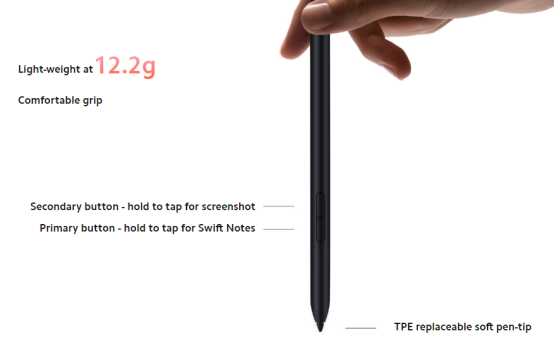
2.Q:How about the battery life of Xiaomi Smart Pen? A:Extra-long battery life: Long-lasting power, so your creative process is never interrupted. 1.Magnetically attached: Fully charge your Xiaomi Smart Pen in up to 18 minutes. 2.One charge is enough for eight hours of non-stop usage. 3.Just one 60-second charge is enough for 20 minutes of usage.
3.Q:What’s the function of two buttons? A:1.Primary button - hold to tap for Swift Notes: Press and hold the Primary Button, then tap the display for Notes. 2.Secondary button - hold to tap for screenshot: Press and hold the Secondary Button, then tap the display to take a full/partial screenshot.
4.Q:What are the sampling rate and pressure sensitivity? A:The sampling rate is 240Hz, and the pressure sensitivity is 4096-level.
Risk Issues
1.Q: Detailed Description: The Xiaomi Smart Pen on the side doesn't show battery Analysis When the Xiaomi Smart Pen is completely out of battery, it cannot connect with the PAD Suggest It may be that the Xiaomi Smart Pen is not placed in the correct position of the pad. It is recommended that you remove the Xiaomi Smart Pen again and readjust the position of the Xiaomi Smart Pen. The current power of the Xiaomi Smart Pen will be displayed. When the built-in battery of the Xiaomi Smart Pen is completely dead, the Xiaomi Smart Pen cannot start up and complete the communication with the tablet. It needs to be charged for a period of time before the Xiaomi Smart Pen can establish the communication connection with the pad, and then the current power of the Xiaomi Smart Pen will be displayed on the pad.
2.Q: Detailed Description: The Xiaomi Smart Pen was not fully charged when removed from the side of the PAD Analysis When the Xiaomi Smart Pen battery is full, it stops charging, and when it stops charging, it consumes power, causing the battery to drop Suggest We specially designed an anti-float charging strategy so that when the Xiaomi Smart Pen is fully charged, the pad will not continue to charge the Xiaomi Smart Pen until the Xiaomi Smart Pen is drained to 70% or so, and then start charging again until it is fully charged.
3.Q: Detailed Description: Let the Xiaomi Smart Pen sit for some time and then use it. When you click on the screen, the second or third stroke will respond Analysis The Xiaomi Smart Pen battery is small, in order to ensure better battery life/standby time, the following strategy: after 10 minutes of use will enter sleep mode, consumption of current will be greatly reduced, standby time will become longer. Suggest The Xiaomi Smart Pen will automatically enter the sleep mode after sitting for 10 minutes, which greatly reduces the power consumption of the Xiaomi Smart Pen and further improves the battery life experience. It is recommended that you press the primary/secondary key to wake up the Xiaomi Smart Pen before each use.
Does it help?
Yes
No