
Mi Curved Gaming Monitor 34” FAQ
Hardware overview
1. Q:What is the monitor?
A:Monitors are commonly used for computer screen display. The Mi Curved Gaming Monitor 34” is a 144Hz low latency 4MS (GTG) display screen with 1500R large curvature, 21:9 ratio wide screen, and office entertainment.
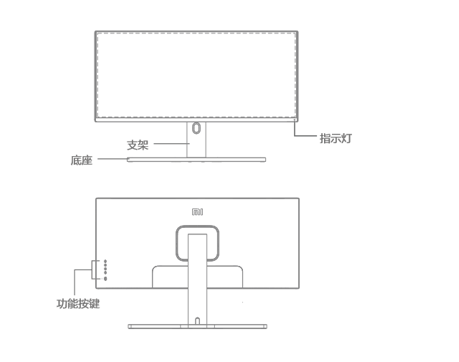
2. Q:The apperance of Mi Curved Gaming Monitor 34”:
A:
3. Q:What standard of Mi Curved Gaming Monitor 34”?
A:Display ×1, Bracket ×1, Base (including screws) ×1, DP signal line ×1, Power line ×1, Manual ×1, Wall-mounted stud ×4, Wall-mounted screw ×4.
4. Q:How to install the Mi Curved Gaming Monitor 34”?
A:Mi Curved Gaming Monitor 34”can’t leave the the foam before the support base is installed. The specific installation method is as follows:
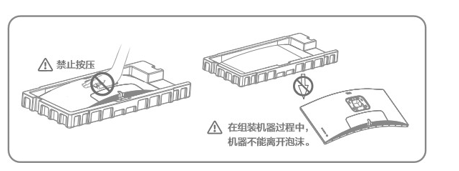
1) Open the carton, take out the whole machine with the foam, and place it on the horizontal table;
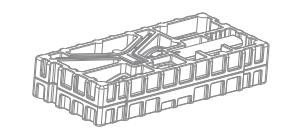
2) Fix the bracket and base with a screw;

3) Remove the upper foam and remove the plastic bag to expose the bracket on the back of the main engine;
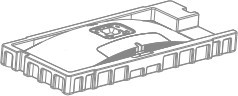
4) Fasten the assembled base bracket to the clamping position on the back of the main engine.(Pull the button up to remove the support);
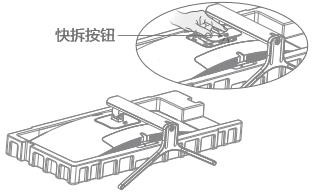
5) Put the assembled machine on the flat table with both hands.(Note: Please do not press the LCD screen directly with your hand during the whole machine to prevent the screen from breaking.)
5. Q:What interface does Mi Curved Gaming Monitor 34”have?
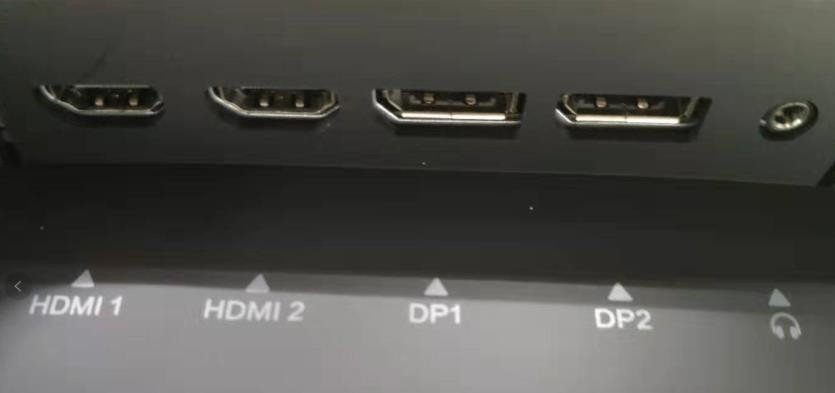
A:Mi Curved Gaming Monitor 34”has 2HDMI2.0,2DP1.4 , 1Audio cable and 1 power cable interface.
6. Q:What difference does HDMI1.4 interface and HDMI 2.0 interface have?
A:HDMI 1.4 can support 4K,however, limited by bandwidth, it can only achieve the maximum 3840×2160 resolution and 30FPS frame rate. HDMI 2.0 expands the bandwidth to 18Gbps, supports 3840×2160 resolution and 50FPS and 60FPS frame rate.Other major improvements are as follows:
1) Simultaneous transmission of dual video streams to multiple users on the same screen;
2) Multiple audio streams can be synchronously transmitted to a maximum of four users;
3) Support 21:9 ultra-widescreen display;
4) Dynamic synchronization of video and audio streams;
5) CEC extension can better control consumer electronic devices through a single control point;
HDMI 2.0 does not define new cables and connectors, meaning that the HDMI 2.0 cable is identical in shape to the current HDMI 1.x, and remains perfectly compatible with HDMI 1.x down. It also supports up to 32 channels in audio and up to 1536kHz sampling rate.
7. Q:What device can Mi Curved Gaming Monitor 34”connect to?
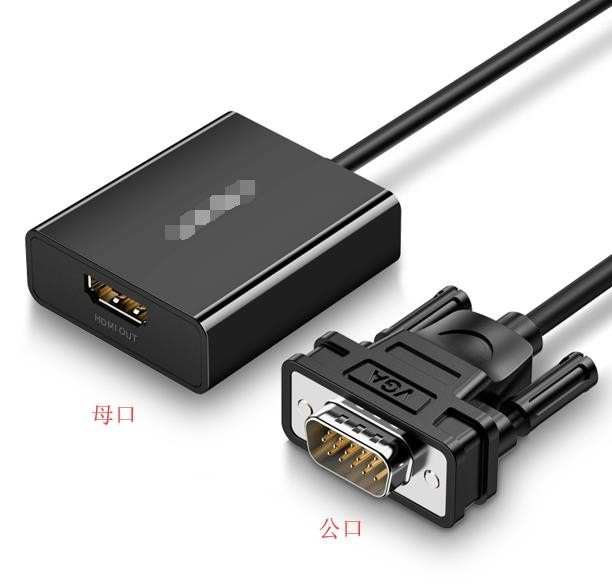
A:It can be connected to HDMI or DP interface host or notebook, set-top box, PS4 and other output devices.VGA non-DP devices can be purchased for use with corresponding wiring, such as VGA to DP (standard DP cable), or VGA to HDMI adapter to connect HDMI cable.
Note: Different internal chips of the adapter cannot realize reverse transfer. The adapter port needs to be inserted into the host as shown in the figure below to convert VGA to HDMI.
8. Q:What’s the net weight of Mi Curved Gaming Monitor 34”?
A:8kg.
9. Q:How long of the power cable and DP cable?
A:Both they are 1.5M.
10.Q:How to replace if power cable and DP cable are damaged?
A:If the power cable or DP cable is damaged, it must be replaced with a dedicated cable or with a dedicated component purchased from its manufacturer or after-sale.
11. Q:How to hang the Mi Curved Gaming Monitor 34”?
A:
1) Dial up the quick release button to remove the base;
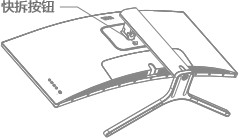
2) Lock the four hexagonal stud in the position shown above, and then lock the wall hanging bracket (to be purchased separately) on the hexagonal stud of the machine (The wall hanging hole is 100x100mm);
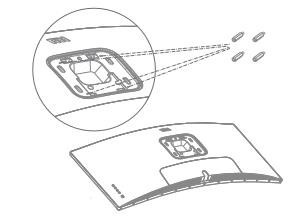
3) Hang the assembled machine on the wall according to the instructions of the wall hanging bracket.(Do not press the screen directly with your hands during the process of hanging the machine to prevent the screen from breaking.)
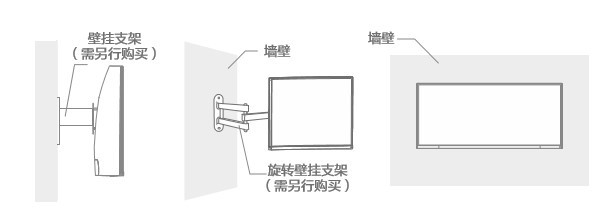
Note: The rack shall be purchased with normal brand bearing weight greater than the commodity weight and the hole spacing shall be 100mm×100mm.
Display
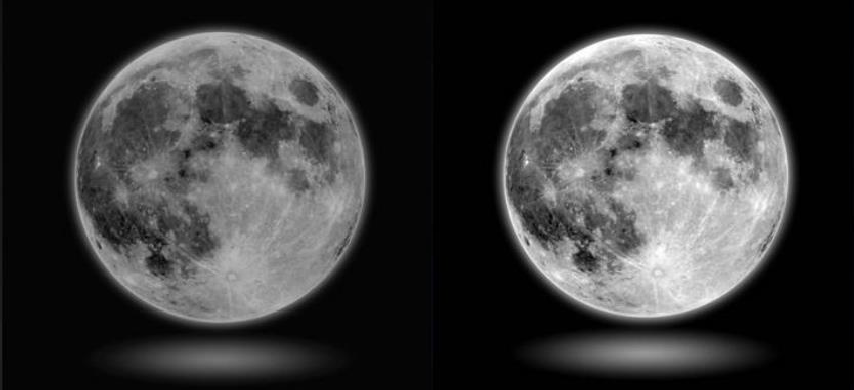
1. Q:What is dynamic brightness?
A: In the process of changing the picture, the dynamic brightness makes the white more white and the black more black, making the picture more bright and bright, which can reduce the fatigue of the eyes in the face of the picture that is too bright or too dark for a long time.
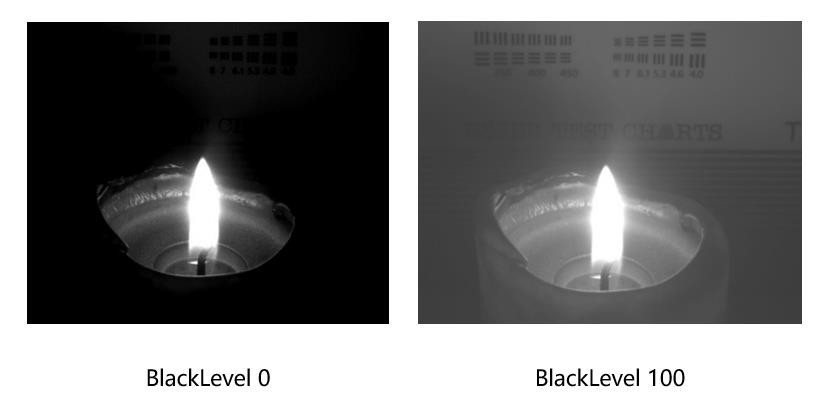
2. Q:What is BlackLevel?
A:BlackLevel It can improve the blur that occurs when the contrast of the image of black scene is not enough, so that the picture of black scene is very clear. If there is too much black in the image, the details will be lost.
3. Q:How to adjust the color temperature?
A:It supports standard 6500K, cool color 9300K, warm color 5800K custom (red, green and blue self-regulating) , we usually call the higher color temperature "cool" (blue), and the lower color temperature "warm" (yellow).
4. Q:How to adjust Mi Curved Gaming Monitor 34” screen scale?
1. Q:What is the monitor?
A:Monitors are commonly used for computer screen display. The Mi Curved Gaming Monitor 34” is a 144Hz low latency 4MS (GTG) display screen with 1500R large curvature, 21:9 ratio wide screen, and office entertainment.
2. Q:The apperance of Mi Curved Gaming Monitor 34”:
A:
3. Q:What standard of Mi Curved Gaming Monitor 34”?
A:Display ×1, Bracket ×1, Base (including screws) ×1, DP signal line ×1, Power line ×1, Manual ×1, Wall-mounted stud ×4, Wall-mounted screw ×4.
4. Q:How to install the Mi Curved Gaming Monitor 34”?
A:Mi Curved Gaming Monitor 34”can’t leave the the foam before the support base is installed. The specific installation method is as follows:
1) Open the carton, take out the whole machine with the foam, and place it on the horizontal table;
2) Fix the bracket and base with a screw;
3) Remove the upper foam and remove the plastic bag to expose the bracket on the back of the main engine;
4) Fasten the assembled base bracket to the clamping position on the back of the main engine.(Pull the button up to remove the support);
5) Put the assembled machine on the flat table with both hands.(Note: Please do not press the LCD screen directly with your hand during the whole machine to prevent the screen from breaking.)
5. Q:What interface does Mi Curved Gaming Monitor 34”have?
A:Mi Curved Gaming Monitor 34”has 2HDMI2.0,2DP1.4 , 1Audio cable and 1 power cable interface.
6. Q:What difference does HDMI1.4 interface and HDMI 2.0 interface have?
A:HDMI 1.4 can support 4K,however, limited by bandwidth, it can only achieve the maximum 3840×2160 resolution and 30FPS frame rate. HDMI 2.0 expands the bandwidth to 18Gbps, supports 3840×2160 resolution and 50FPS and 60FPS frame rate.Other major improvements are as follows:
1) Simultaneous transmission of dual video streams to multiple users on the same screen;
2) Multiple audio streams can be synchronously transmitted to a maximum of four users;
3) Support 21:9 ultra-widescreen display;
4) Dynamic synchronization of video and audio streams;
5) CEC extension can better control consumer electronic devices through a single control point;
HDMI 2.0 does not define new cables and connectors, meaning that the HDMI 2.0 cable is identical in shape to the current HDMI 1.x, and remains perfectly compatible with HDMI 1.x down. It also supports up to 32 channels in audio and up to 1536kHz sampling rate.
| color depth | HDMI 1.4 | HDMI 2.0 |
| 24 | 4096×2160p 24Hz | 3840×2160p 60Hz |
| 30 | 3840×2160p 30Hz | 3840×2160p 60Hz |
| 36 | 3840×2160p 25Hz | 3840×2160p 50Hz |
7. Q:What device can Mi Curved Gaming Monitor 34”connect to?
A:It can be connected to HDMI or DP interface host or notebook, set-top box, PS4 and other output devices.VGA non-DP devices can be purchased for use with corresponding wiring, such as VGA to DP (standard DP cable), or VGA to HDMI adapter to connect HDMI cable.
Note: Different internal chips of the adapter cannot realize reverse transfer. The adapter port needs to be inserted into the host as shown in the figure below to convert VGA to HDMI.
8. Q:What’s the net weight of Mi Curved Gaming Monitor 34”?
A:8kg.
9. Q:How long of the power cable and DP cable?
A:Both they are 1.5M.
10.Q:How to replace if power cable and DP cable are damaged?
A:If the power cable or DP cable is damaged, it must be replaced with a dedicated cable or with a dedicated component purchased from its manufacturer or after-sale.
11. Q:How to hang the Mi Curved Gaming Monitor 34”?
A:
1) Dial up the quick release button to remove the base;
2) Lock the four hexagonal stud in the position shown above, and then lock the wall hanging bracket (to be purchased separately) on the hexagonal stud of the machine (The wall hanging hole is 100x100mm);
3) Hang the assembled machine on the wall according to the instructions of the wall hanging bracket.(Do not press the screen directly with your hands during the process of hanging the machine to prevent the screen from breaking.)
Note: The rack shall be purchased with normal brand bearing weight greater than the commodity weight and the hole spacing shall be 100mm×100mm.
Display
1. Q:What is dynamic brightness?
A: In the process of changing the picture, the dynamic brightness makes the white more white and the black more black, making the picture more bright and bright, which can reduce the fatigue of the eyes in the face of the picture that is too bright or too dark for a long time.
2. Q:What is BlackLevel?
A:BlackLevel It can improve the blur that occurs when the contrast of the image of black scene is not enough, so that the picture of black scene is very clear. If there is too much black in the image, the details will be lost.
3. Q:How to adjust the color temperature?
A:It supports standard 6500K, cool color 9300K, warm color 5800K custom (red, green and blue self-regulating) , we usually call the higher color temperature "cool" (blue), and the lower color temperature "warm" (yellow).
4. Q:How to adjust Mi Curved Gaming Monitor 34” screen scale?
Does it help?
Yes
No