
Mi Wireless Charging Pad FAQ
Overview and Q&A
1. Q:Which phones can be charged by Mi Wireless Charging Pad?
A: Mi Wireless Charging Pad adopts the mainstream Qi wireless charging standard, which is compatible with mobile phones adopting Qi wireless charging standard in the market.
Currently, the mainstream wireless charging models on the market are as follows: Mi MIX2S, iPhone8, iPhone8 Plus, iPhone, Samsung S9.
2.Q: Can the mobile phone with the protective case be charged by Mi Wireless Charging Pad?
A: Mi Wireless Charging Pad also supports for mobile phones with protective cases, but the thickness of the protective case should be less than 4mm. If the protective case is too thick, it will not be able to charge.In addition, the inside and outside of the protective case must not contain metal materials. Mi Wireless Charging Pad supports metal foreign matter detection, which can avoid high temperature or other abnormal conditions caused by metal during charging.
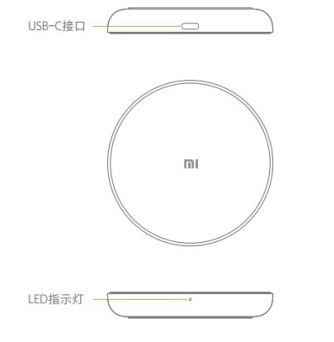
3.Q: Mi Wireless Charging Pad appearance introduction:
A: The appearance style of Mi Wireless Charging Pad is as follows:
4.Q: Which adapter does Mi Wireless Charging Pad support?
A: Mi Wireless Charging Pad uses 5V/2A adapter to support 5W ordinary charging.
QC2.0/QC3.0 adapters support 10W fast charging, not support 5V1A adapters.
5.Q: Does Mi Wireless Charging Pad support fast charge?
A: Mi Wireless Charging Pad supports up to 10W fast charging. Some mobile phone manufacturers limit the speed of wireless charging in the mobile phone terminal due to charging safety and other factors, and the charging efficiency is related to the mobile phone manufacturers.Currently, the Mi Wireless Charging Pad is available for Mi MIX2S, iPhone8, iPhone8 Plus and iPhone with 7.5W fast charge, and Samsung S9 with 10W fast charge.
6.Q: How to use Mi Wireless Charging Pad?
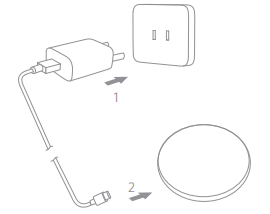
A:1. Power the Mi Wireless Charging Pad with the standard USB-C data line through the power adapter. After power on, the LED green light flashes three times, and then it can start working normally.
2. Place the device with wireless charging function with Qi standard in the center of Mi Wireless Charging Pad, and the charging will start automatically.When the Mi Wireless Charging Pad is in normal working condition, the LED green light is always on.
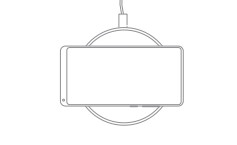
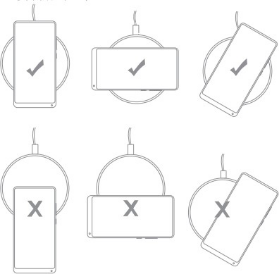
3.When charging, keep the center of the phone at the center of Mi Wireless Charging Pad. If charging cannot work normally, please adjust the location of the phone until the phone is normally powered on or the LED green light is always on (please refer to the location below).
4.When the LED light is flashing green, The Mi Wireless Charging Pad is at the stage of error and protection. At this time, it should pay attention to whether any metal objects are placed on the Mi Wireless Charging Pad, and observe whether they can be used normally after taking them off.
7.Q: What status does Mi Wireless Charging Pad indicator light have?
A: Mi Wireless Charging Pad has only one indicator light, which is green and located on the front side of the wireless charger. The indicator is in the following state:
1. When the power is on, the breathing light flashes 3 times.
2. The indicator light is always on when charging the mobile phone.
3. After charging, the indicator light will go out.
4, error or charging protection prompt, indicator light flashing.
8.Q: What should be paid attention to when using Mi Wireless Charging Pad?
A: 1. Do not squeeze or crash the product.
2. Do not disassemble, disassemble or transform by yourself.
3. Do not put the product near the fire or into the fire or water.
4. Do not use wireless charger in severe high temperature, humidity or corrosive conditions to avoid leakage of electricity in damaged circuit.
5. Do not place the magnetic card (ID card, bank card, etc.) with magnetic stripe or chip too close to avoid the failure of the magnetic card.
6. Please keep a distance of at least 20cm between the implanted medical device (pacemaker, cochlear implant, etc.) and the wireless charger to avoid potential interference to the medical device.
7. Children should be carefully monitored to ensure that they do not use wireless chargers as toys to avoid unnecessary accidents.
8. In order to achieve better charging effect, please avoid using in places with high temperature and unfavorable heat dissipation (such as bed sheets, mouse pad, etc.).
9.Q: What if Mi Wireless Charging Pad cannot charge?
A:1. Please check whether the mobile phone supports wireless charging, the wireless charging protocol is Qi charging protocol, whether the mobile phone wireless charging function is normal.
2. Check whether the power supply of the Mi Wireless Charging Pad is normal, whether the adapter is compatible with Mi Wireless Charging Pad, and try to replace other chargers.
3. Check whether the data line of the wireless charger is abnormal, and try to replace other data lines.
4. Check whether the charging placement method is correct, whether the distance between the mobile phone and the Mi Wireless Charging Pad is too far, and whether the mobile phone protective case is too thick.
5. Apply for after-sales inspection.
Does it help?
Yes
No