
MIUI11
Evolution of design
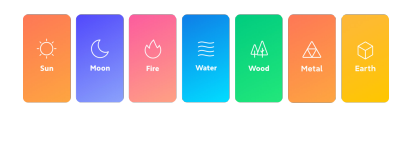
Since the very beginning, MIUI's goal has been to provide a direct and efficient way of communication between people and their mobile devices. MIUI 11 takes Xiaomi one step ahead along the road of design evolution, removing redundant elements from the screen and bringing content into the spotlight. The innovative use of color in MIUI 11 allows customer to see all the essential items at a glance.
Always-on display
Always-on display has already become a recognizable part of mobile phone interfaces. MIUI 11 brings this feature to a new level: a set of dynamic themes, multiple customization options, and special effects allow you to make your screen truly unique. Besides looking gorgeous, Always-on display will also show you the information you think is essential at all times.
Sounds of nature
MIUI 11 further refines the sound system introduced in MIUI 10. Although the new Nature alarm has a unified style, it always sounds different, so that customer can start each day with something fresh and exciting. New notification sounds are inspired by birds, insects, and water. They also change and adapt to your schedule, reminding you of important things, yet failing to disturb. Our new sound system is a proud winner of the Red Dot Award in 2019.
Mi Share
MIUI 11 brings customer a convenient cross-platform file transfer tool out of-the-box. Now customer can start a transfer by simply tapping "Share" and selecting the recipient's device. This works for almost any type of file, be it an image or a document.
Documents in File Manager
Working with documents in MIUI 11 is seamless and easy. Now customer can view all your documents in an intuitive and efficient preview format without having to install third-party apps. With the comprehensive file format support and custom features, you'll be able to manage all your documents directly on the phone.
Printing
Working with documents in MIUI 11 is seamless and easy. Now customer can view all your documents in an intuitive and efficient preview format without having to install third-party apps. With the comprehensive file format support and custom features, you'll be able to manage all your documents directly on your phone.
Tasks
In MIUI 11, Xiaomi introduce a system-level tool for managing tasks. Tap a button in the Notes app to add a task, then type or dictate its content. Add reminders for tasks with deadlines, and MIUI will automatically sync them to your calendar. Customer can also use the task toolbox to keep all your tasks just a swipe away.
Quick replies
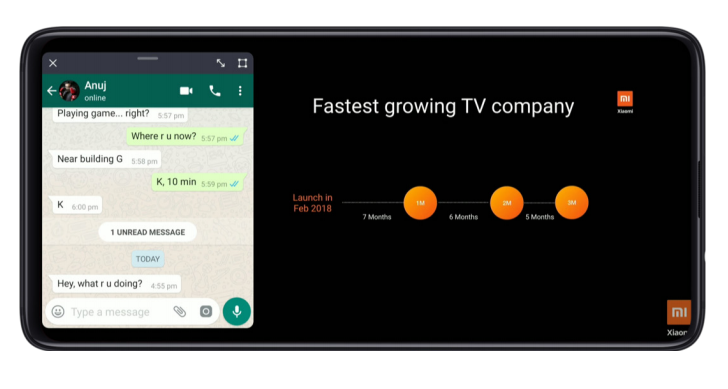
In MIUI 11, customer can use the new quick reply feature to respond to messages while playing games or watching videos. Customer will be able to type in a floating window without leaving the current app.
Emergency SOS
Today, personal safety concerns are as pressing as ever. To help customer stay safe in case of an emergency, Xiaomi have created Emergency SOS. Customer can use this feature to send your location information to your emergency contacts, and notify them of the emergency you are experiencing in the shortest possible time.
Step counter
Customer can view your activity stats in the App vault directly now. Set your goal, move, and see how many calories you've burned.
* This feature is available in India, Indonesia, and Spain.
* Available on devices with step counter sensor.
Period tracker
Reproductive health is important. Record when your periods start and end, receive notifications and suggested dates of your next period directly in the Calendar app.
* This feature is available in India, Indonesia, and Spain.
Mint Keyboard
India is a country with multiple official languages, and Xiaomi are committed to providing more and more language options to Indian users. Xiaomi and Bobble teamed up and launched Mint Keyboard in India, providing input capability for 26 local languages including English. Besides the basic keyboard functionality, Mint also allows translating words into multiple languages directly. Mint Keyboard is available in Google Play and Get Apps.
Evolution of design
Since the very beginning, MIUI's goal has been to provide a direct and efficient way of communication between people and their mobile devices. MIUI 11 takes us one step ahead along the road of design evolution, removing redundant elements from the screen and bringing content into the spotlight. The innovative use of color in MIUI 11 allows customer to see all the essential items at a glance.
Enhanced touch controls
With enlarged touch-sensitive control areas, MIUI 11 focuses on the visuals and makes touch controls more intuitive.

Always-on display
Always-on display has already become a recognizable part of mobile phone interfaces. MIUI 11 brings this feature to a new level: a set of dynamic themes, multiple customization options, and special effects allow customer to make your screen truly unique. Besides looking gorgeous, Always-on display will also show customer the information you think is essential at all times.
Personalization
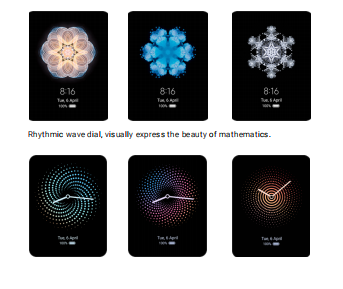
In MIUI 11, there are multiple ways to give your Always-on display a unique look. Just like a real kaleidoscope, this style keeps changing and reveals itself from a new angle every time. It breathes life into your screen at 60 frames per second. Generated from the same image, it always looks surprisingly different.
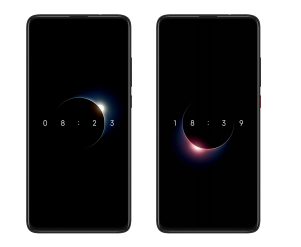
A good companion to MIUI's Dark mode, this theme reflects the light changes happening around you during the day. Sunrises and sunsets are also synced with your location when your device is connected to the network.
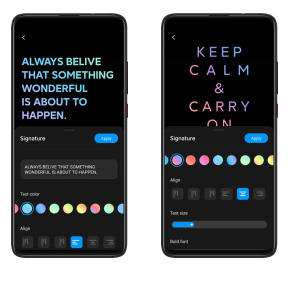
Personalized signature allows customer to put any words you like on the screen. Customer can change the colors, fonts, sizes etc of the text.

Settings
Select your custom clock, color scheme, alignment, and other elements.
Animations
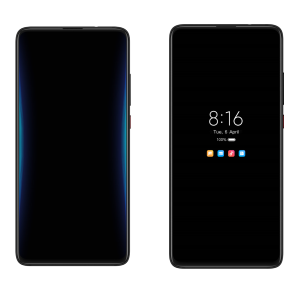
Notifications come to your Always-on display with gorgeous animation effects plates on the edges of your screen. You'll also be able to see the notification icon and decide whether you need to pay attention to the notification right away. It feels far less intrusive than a regular notification and consumes less power.
Sounds of nature
MIUI 11 further refines the sound system introduced in MIUI 10. Although the new Nature alarm has a unified style, it always sounds different, so that customer can start each day with something fresh and exciting. New notification sounds are inspired by birds, insects, and water. They also change and adapt to your schedule, reminding you of important things, yet failing to disturb. MIUI has also learned to categorize incoming calls according to their source. Now, a call from a food delivery company won't be identical to a call from your friend, which will allow you to manage incoming calls more efficiently. Our new sound system is a proud winner of the Red Dot Award in 2019.
New alarms
After hearing the same alarm for a long time, you gradually become immune to it and wake up more and more reluctantly. MIUI 11 comes with a set of dynamic alarms that always sound different. Unified in style, Nature alarms use slightly different ringtones to wake you up every morning.
Notification sounds
Notification sounds in MIUI are inspired by birds and crickets, and more importantly; they change accordingly over time, with birds singing during the day and crickets buzzing at night. At the same time, MIUI 11 will pay attention to your schedule using the alarms you set. When you rest, notifications will come with quieter sounds to protect your sleep. This works when you sleep at night or nap during the day.
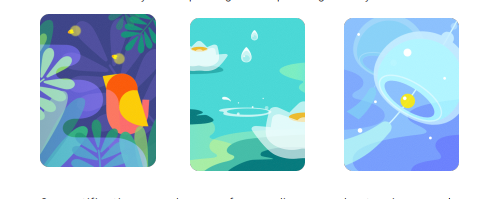
Our notification sounds come from a diverse and extensive sample library. They adapt to your routines and never fail to amaze.
Mi Share
MIUI 11 brings customer a convenient cross-platform file transfer tool out of-the-box. Now customer can start a transfer by simply tapping "Share" and selecting the recipient's device. This works for almost any type of file, be it an image or a document.
Seamless transfers
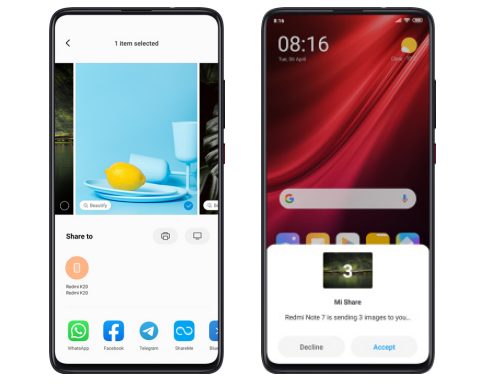
Sharing photos or files in MIUI 11 has become easier. Select an item, tap the Share button, select the recipient's device, and check the transfer progress in the Notification shade.
Mi Share will work when it's turned on on both devices. Customer can turn Mi Share on using the toggle in the Notification shade.
Multiple formats
Mi Share can transfer almost anything: photos, documents, videos, music, and much more. No size or quantity limits!
Sharing photos
To share a photo, open Gallery, select the photo you want to share and tap the Share button. Swipe left or right to add more photos to your transfer.
Sharing files
Select any file in File Manager and tap "Send" to start.
File Manager
Working with documents in MIUI 11 is seamless and easy. Now customer can view all your documents in an intuitive and efficient preview format without having to install third-party apps. With the comprehensive file format support and custom features, customer will be able to manage all your documents directly on the phone.
Previews
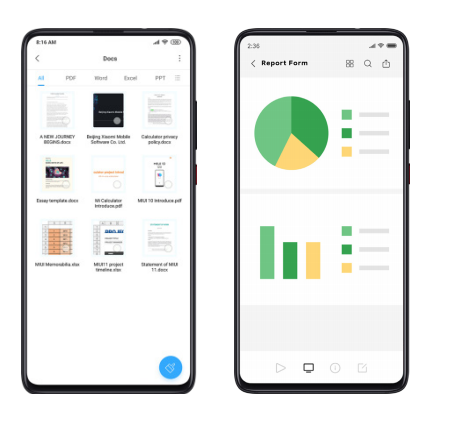
File Manager allows customer to preview documents before you even open them. Swipe between tabs to view the documents in different formats.
Custom features
MIUI 11 provides a powerful set of custom features that allows customer to work with different formats of documents.
Text
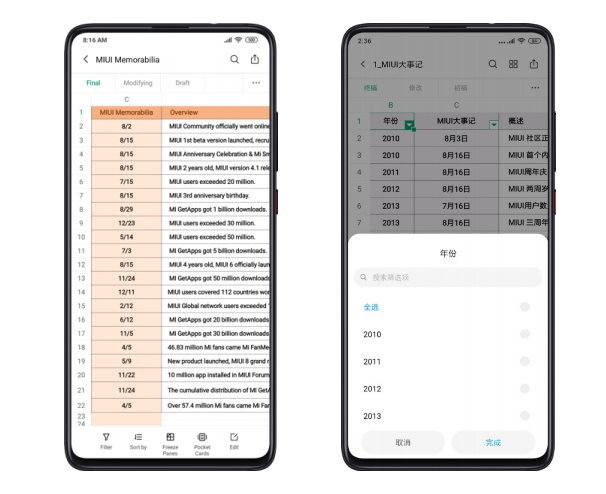
In text documents, you can view stats, add contents, or adjust display format to the screen of a mobile device. You can also make further edits to the documents, such as adjusting fonts, indenting, annotating, and even adding images.
Spreadsheets
Filtering, sorting, freezing panes, and editing is available for spreadsheets.
PDF
The PDF viewer in MIUI 11 is fully functional: you can play media, adjust the display format to phone screens, edit, and more.
Printing
MIUI makes wireless printing experience more efficient than ever before. You don't have to go through the complicated pairing process to connect your phone to a printer. Now a simple tap works just fine! Notifications will help you stay up-to-date on the printing process. Currently, 25 major printer brands support this functionality.
Print photos and documents
You can print items directly from the "Share" menu in the Gallery and File Manager apps. Most image formats, as well as PDF documents,are supported now.
Seamless experience
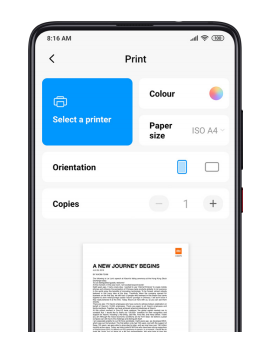
We are currently working on adding more supported formats. You'll be able to print Word documents later in 2019. More than 25 brands and 2000 printer models support our printing functionality(View 'Help" to check compatible devices). You can adjust color, select paper formats, and print items in different layouts.
Notifications
When printing starts, a floating notification will appear. You'll also be notified about any possible errors. 9 common error types are supported now.
Tasks
In MIUI 11, we introduce a system-level tool for managing tasks. Tap a button in the Notes app to add a task, then type or dictate its content.Add reminders for tasks with deadlines, and MIUI will automatically sync them to your calendar. You can also use the task toolbox to keep all your tasks just a swipe away.
Creating tasks
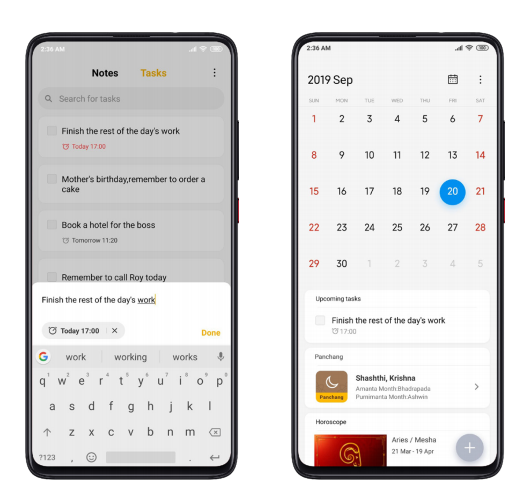
Swipe left in the Notes app to open Tasks. Your tasks with reminders will be synced to Calendar automatically.
Task toolbox
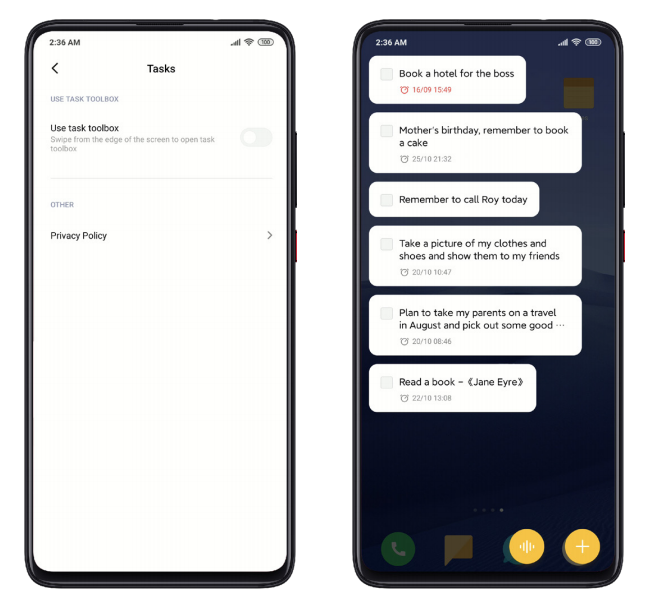
Open Tasks, tap "Settings" and toggle the "Use task toolbox" switch. You can open this toolbox anywhere outside of the Notes app by simply swiping from the upper left edge of the screen. There you can sort, complete, and add tasks, just like in the app.
Quick replies
In MIUI 11, customer can use the new quick reply feature to respond to messages while playing games or watching videos. You'll be able to type in a floating window without leaving the current app.
Setup
Besides players and live streaming apps where quick replies work by default, you can also add Twitter, Facebook, and other apps to the list.
Replying to messages
Simply tap a notification to open the conversation in a floating window. You can also use a minimized keyboard in landscape mode.
Emergency SOS
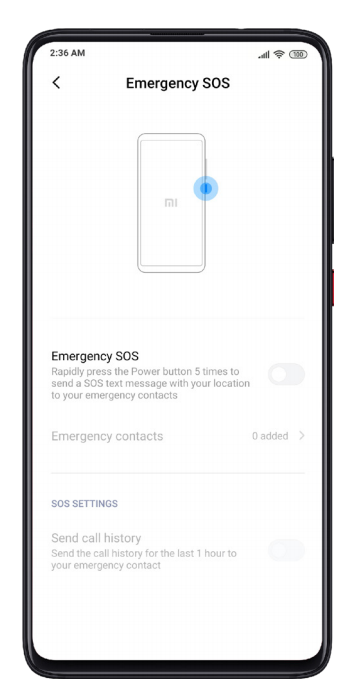
Today, personal safety concerns are as pressing as ever. To help you stay safe in case of an emergency, Xiaomi have created Emergency SOS. You can use this feature to send your location information to your emergency contacts, and notify them of the emergency you are experiencing in the shortest possible time.
Switching to Emergency SOS
When this feature is on, press the Power button 5 times to send an SOS message with your location info to your emergency contacts.
Adding emergency contacts
You need to add at least one emergency contact for Emergency SOS to work. When you switch to Emergency SOS, your emergency contacts will receive calls and text messages with your location info and recent call history.
Step counter
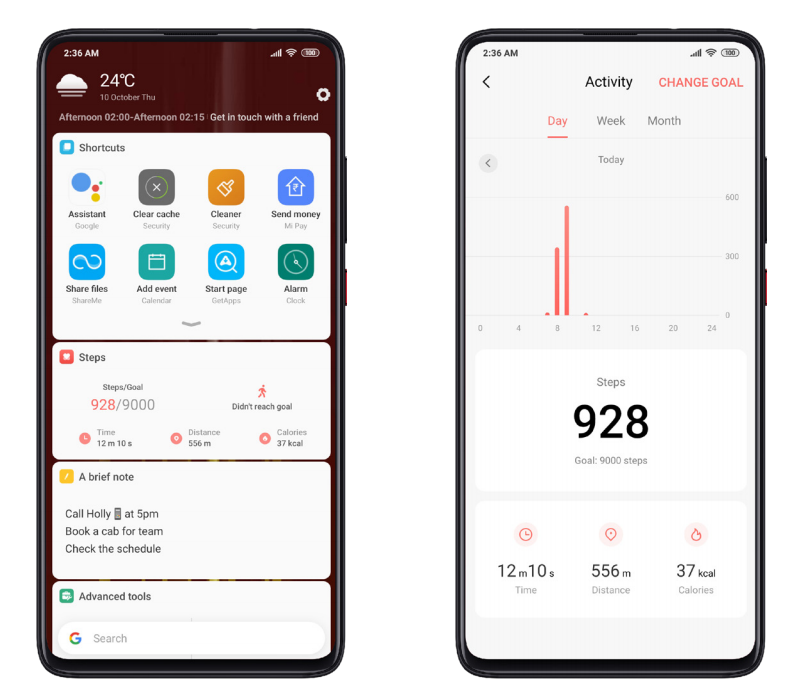
You can view your activity stats in the App vault directly now.
Set your goal
Step counter allows you to set your activity goal and follow your progress.
View stats
Switch between different views to see your activity stats for a day, week, or month.
Period tracker
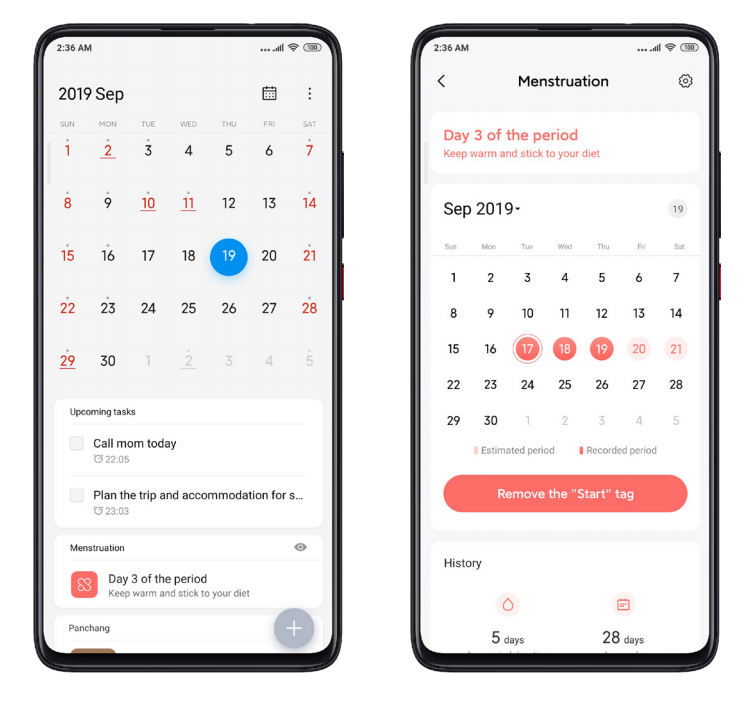
Record when your periods start and end in the Calendar app, and you'll be able to see the suggested date of your next period and receive notifications. You can also add your menstruation history to improve the accuracy of the suggested dates of your upcoming periods.
How to turn this feature on
Go to Calendar > Settings and toggle the "Show menstruation info"switch. The "Menstruation" card will appear on the start page.
Setup
Tap the "Menstruation" card and set the average duration of your period, as well as the duration of your menstrual cycle. After that, you'll have to record your recent period. The app will notify you about upcoming periods and remind you to record the info.
* This feature is available in India, Indonesia, and Spain.
Mint Keyboard
India is a country with multiple official languages, and Xiaomi are committed to providing more and more language options to our Indian users. Besides providing input capability for 26 local languages, Mint Keyboard has multiple additional features, which makes typing and communicating fast and easy. Mint Keyboard is available in Google Play and Get Apps.