

Xiaomi Offline Communication FAQ
What is Xiaomi Offline Communication on the Xiaomi smartphone?
A: Xiaomi Offline Communication is an innovative near-field voice communication technology that combines Bluetooth communication with a proprietary protocol. Its primary advantage is its ability to bypass cellular networks and Wi-Fi, enabling long-distance voice calls via a direct device-to-device connection. Currently, two-way, network-free calls can be conducted over distances of up to 1.9 km in open environments.
However, certain prerequisites must be met for this feature to be used properly. These include using supported Xiaomi devices (specifically, the Xiaomi 15T series) with the relevant system version installed, inserting a valid SIM card, and logging in to a Xiaomi account. Additionally, Bluetooth must be enabled, although Bluetooth headsets are not supported at this time.
What are the requirements for using Xiaomi Offline Communication?
A: Xiaomi Offline Communication requires the device to have a SIM card, be logged into a Xiaomi account, and have Bluetooth enabled to function.
Which models currently support Xiaomi Offline Communication?
A: As of now, the Xiaomi Offline Communication feature was first launched on the Xiaomi 15T and Xiaomi 15T Pro models.
Please note that Xiaomi Offline Communication is available via OTA from September 24, 2025. The availability of the feature and the OTA release schedule may vary by country.
Please note that the Xiaomi Offline Communication feature on the Xiaomi 15T phones is unavailable in Egypt. For specific support details about this feature, please refer to actual usage.
What are the differences between Xiaomi Offline Communication and calling with a regular SIM card?
A:
The Xiaomi 15T series now features the newly launched Xiaomi Offline Communication function, which allows Xiaomi devices to communicate directly with each other without an internet connection, mobile data, or even Wi-Fi.
Xiaomi Offline Communication supports voice calls up to 1.9 km in open areas on the Xiaomi 15T Pro device and up to 1.3 km on the Xiaomi 15T device, in unobstructed environments.
And here are the differences between the Xiaomi Offline Communication and the regular SIM card calling:
- Core differences:
Normal SIM card calling: Relies on mobile network base stations and cellular network signal transmission, requiring mobile network coverage for calls.
Xiaomi Offline Communication: It uses Bluetooth and does not rely on mobile network base stations, enabling point-to-point voice calls even without cellular or Wi-Fi signals.
- Applicable scenarios:
Normal SIM card calling: Suitable for all scenarios with mobile network coverage, ensuring stable calls as long as the network is within range.
Xiaomi Offline Communication: It is used only in special scenarios without network coverage, allowing you to stay connected even without a network connection.
- Different Call Ranges
Normal SIM card calling: The range of normal SIM card calling depends on the mobile network coverage. In theory, calls can be made in areas with network coverage, with relatively small distance restrictions.
Xiaomi Offline Communication: The range is limited, but in complex urban environments or with obstructions, it is significantly reduced.
Note:
- Xiaomi Offline Communication is available via OTA from September 24, 2025. The availability of the feature and the OTA release schedule may vary by country.
- Xiaomi Offline Communication requires the device to have a SIM card, be logged into a Xiaomi account, and have Bluetooth enabled.
- Xiaomi Offline Communication supports voice calls up to 1.9 km in open, unobstructed environments (the maximum communication distance supported by different models varies. Please refer to the local sales channels for details). Actual call quality may vary depending on environmental conditions. Please refer to your actual experience. This feature is not designed or intended for emergency or life-saving communications.
How to use Xiaomi Offline Communication?
A: Please confirm that your phone and the other party's phone currently meet the following conditions:
1. Ensure your Xiaomi 15T series phone has the required system version installed.
2. Insert a valid SIM card.
3. Log in to your Xiaomi account.
4. Enable Bluetooth (note: Bluetooth headsets are not supported currently).
5. Maintain within the effective range.
To use the Xiaomi Offline Communication function on the Xiaomi 15T device, please refer to the steps mentioned below:
- Go to the [Settings] App.
- Navigate to [Mobile networks].
- Find the [Xiaomi Offline Communication] and tap in.
- Select [Contacts only] or [Everyone] options under [Who can call me].
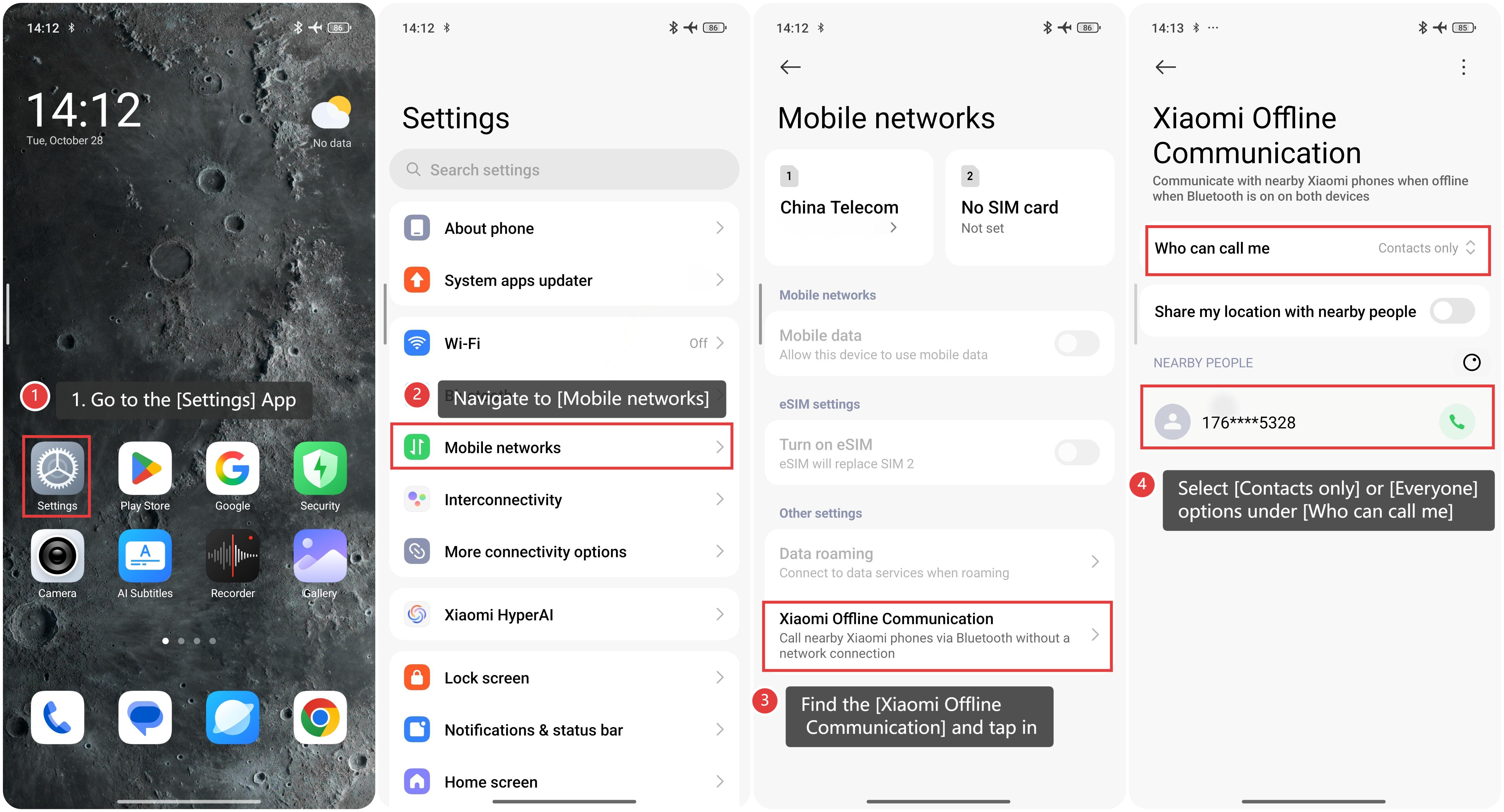
The interface will then show the phone number details for the Xiaomi Offline Communication model based on your current selection. Tap the phone icon to make a call.
What is the maximum distance supported by the Xiaomi Offline Communication?
A: Xiaomi Offline Communication supports voice calls up to 1.9 km for the Xiaomi 15T Pro and up to 1.3 km for the Xiaomi 15T in open, unobstructed environments (the maximum communication distance supported by different models varies; please refer to the local sales channels for details).
Actual call quality may vary depending on environmental conditions. Please refer to your actual experience. This feature is not designed or intended for emergency or life-saving communications.
Are there any call duration limits for Xiaomi Offline Communication?
A: Xiaomi Offline Communication has no specified call duration limit and is free, making it a suitable choice for short-range communication in environments without network coverage.
There are no automatic hang-up features or limits on total call time; calls can continue like traditional calls until you manually end the call or the device powers off.
Currently, this feature is only available on supported models and within certain communication distance limits. Please make calls in an environment with a stable Bluetooth connection and no signal obstructions.
Do two Xiaomi 15T series phones need to save each other's contacts to use the Xiaomi Offline Communication?
A: Whether you need to save contacts in advance depends on your selection on the [Who can call me] interface. There are two options: [Contacts only] or [Everyone].
You can choose your preferred setting by going to [Settings] >> [Mobile networks] >> [Xiaomi Offline Communication], then selecting either [Contacts only] or [Everyone] under [Who can call me].
Selecting [Contacts only] requires saving the other person's number beforehand; both you and the other party need to add each other as contacts to make a call. This mode emphasizes privacy protection, preventing unwanted communication from unknown devices, and is ideal for everyday use, such as staying connected with family and friends while traveling.
Alternatively, choosing [Everyone] means there's no need to save the other person's contact info. As long as both devices support Xiaomi Offline Communication, Bluetooth is on, and you're within range, they can find each other in the nearby devices list and initiate a call. This mode is especially useful in emergencies such as natural disasters, outdoor exploration, or temporary connections at large events or exhibitions.
The Xiaomi Offline Communication on the Xiaomi 15T series phone is offline in Egypt
Applied to: Xiaomi 15T; Xiaomi 15T Pro
Content Overview: The Xiaomi Offline Communication on the Xiaomi 15T and Xiaomi 15T Pro devices is offline in Egypt
Thank you for choosing the Xiaomi 15T series. Regarding your inquiry about the Xiaomi Offline Communication feature, we would like to clarify that due to local regulations in Egypt, Xiaomi will disable this feature in the Egyptian market via a system update.
This change ensures compliance with Egyptian wireless communication standards and prevents frequency interference. We apologize for any inconvenience this may cause and appreciate your understanding and support.
Does it help?
Yes
No