

How to turn on the Mijia Air Conditioner Pro Eco Inverter 1.0 HP automatically when a specified temperature is reached?
When the Mijia Air Conditioner Pro Eco Inverter 1.0 HP is turned off and the indoor temperature reaches a specified level, the AC will turn on automatically to cool the room. You can set both the indoor temperature threshold and the target temperature via the Xiaomi Home App, ensuring the room reaches your desired comfort level without manual operation.
To turn on the Mijia Air Conditioner Pro Eco Inverter 1.0 HP automatically when a specified temperature is reached, please refer to the following steps:
1. Open the Xiaomi Home App on your device;
2. Select [Mijia Air Conditioner Pro Eco Inverter 1.0 HP] device card;
3. Tap [Smart AC];
4. Choose [Smart temperature regulation];
5. Enable [Cool automatically] to set the indoor temperature threshold and target temperature, allowing the air conditioner to start cooling automatically when the room temperature reaches the specified level.
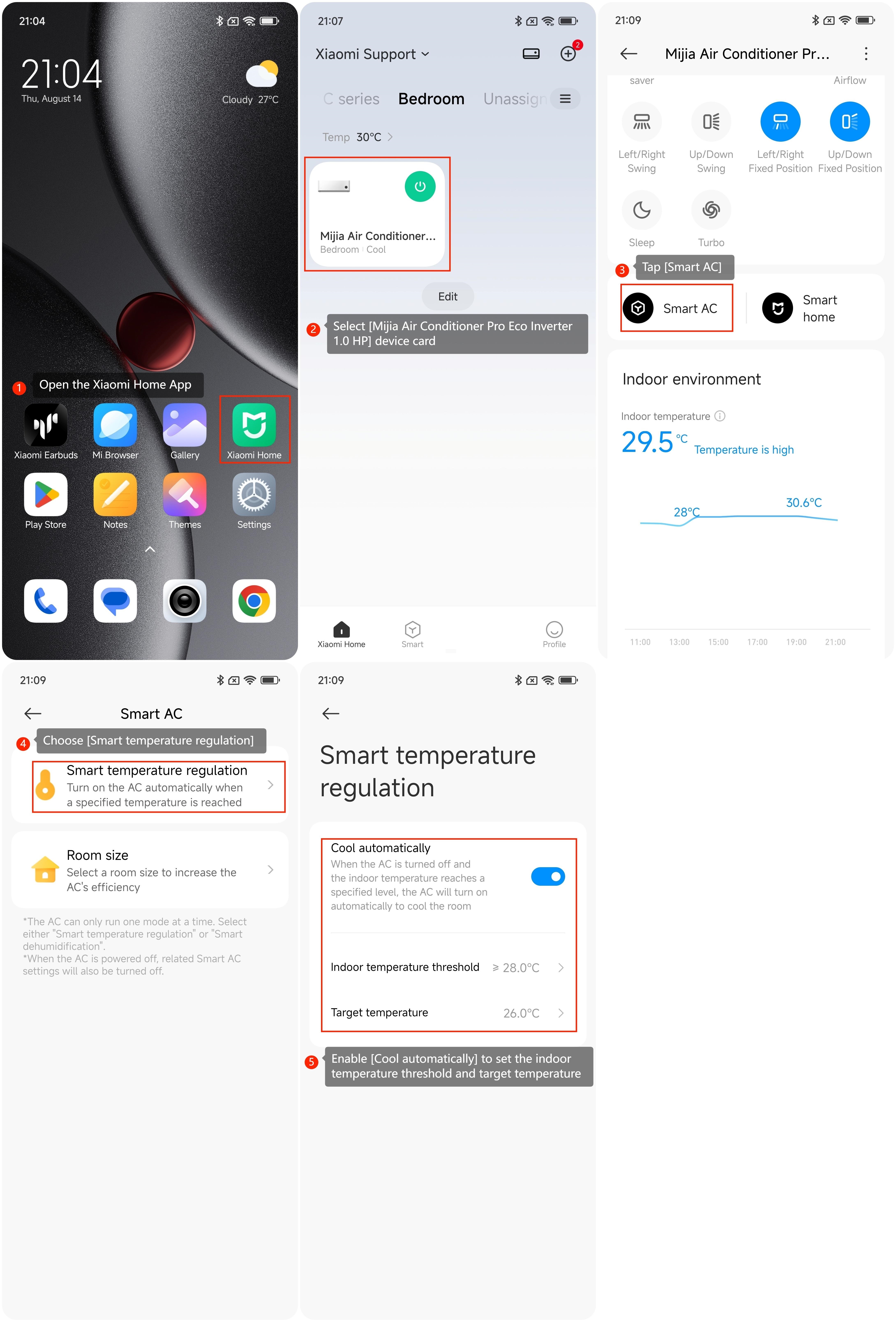
To turn on the Mijia Air Conditioner Pro Eco Inverter 1.0 HP automatically when a specified temperature is reached, please refer to the following steps:
1. Open the Xiaomi Home App on your device;
2. Select [Mijia Air Conditioner Pro Eco Inverter 1.0 HP] device card;
3. Tap [Smart AC];
4. Choose [Smart temperature regulation];
5. Enable [Cool automatically] to set the indoor temperature threshold and target temperature, allowing the air conditioner to start cooling automatically when the room temperature reaches the specified level.
Does it help?
Yes
No