

How to customize favorite modes for the Mijia Air Conditioner Pro Eco Inverter 1.0 HP?
You can customize favorite modes for the Mijia Air Conditioner Pro Eco Inverter 1.0 HP through the Xiaomi Home App. This feature allows you to save your preferred mode, temperature, fan speed, horizontal and vertical swing, fixed swing positions, airflow direction, gentle airflow, turbo, and ECO settings as a personalized mode. Once saved, you can quickly apply your most comfortable settings with just one tap, making operation faster and more convenient.
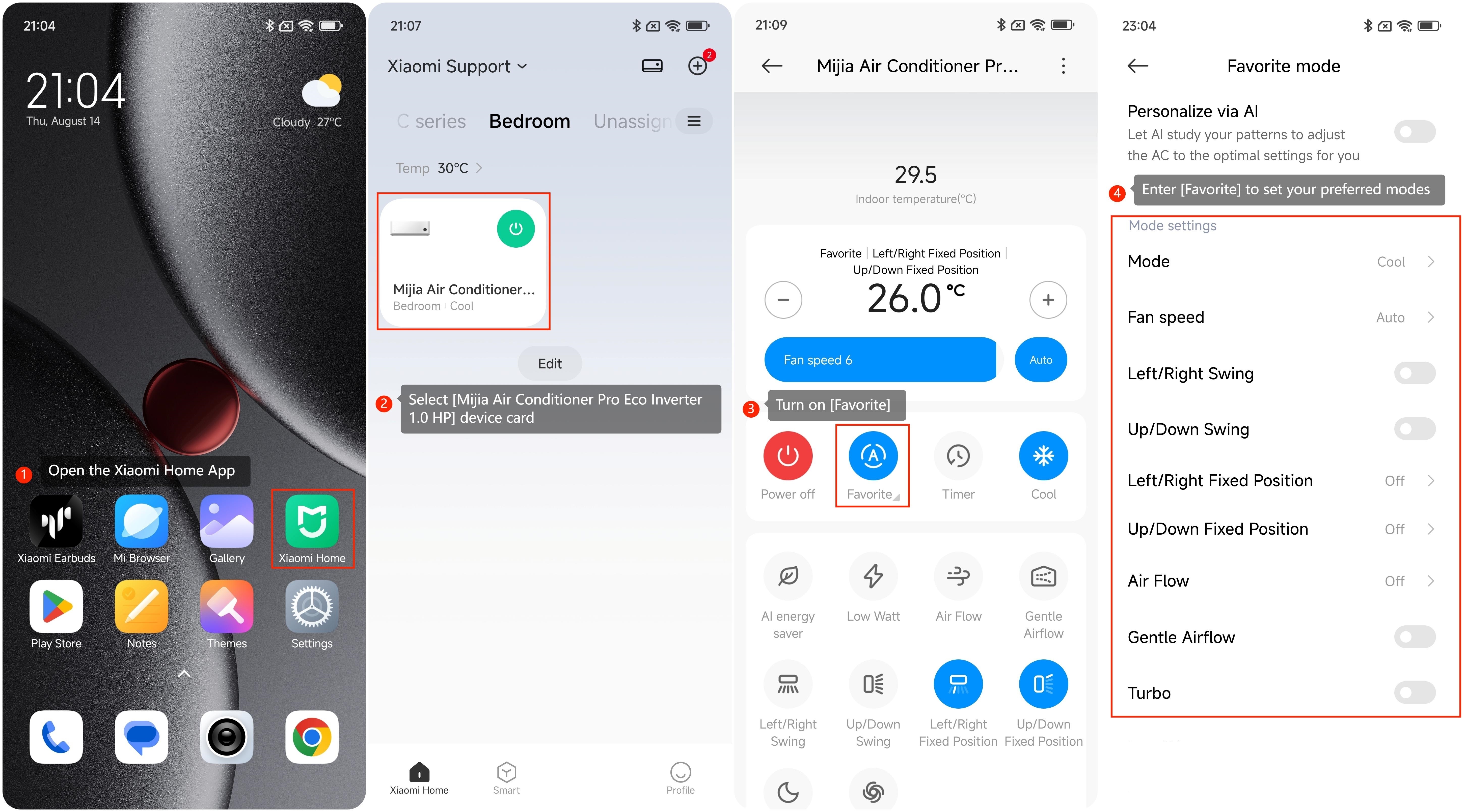
To customize favorite modes for the Mijia Air Conditioner Pro Eco Inverter 1.0 HP, please refer to the following steps:
1. Open the Xiaomi Home App on your device;
2. Select [Mijia Air Conditioner Pro Eco Inverter 1.0 HP] device card;
3. Turn on [Favorite];
4. Enter [Favorite] to set your preferred modes.
Note:
1. Slide the temperature points up and down to adjust. Changes can only be applied when the device is turned on;
2. Enable [Turn on Favorite mode automatically] to switch to your favorite mode each time you turn on the AC.
To customize favorite modes for the Mijia Air Conditioner Pro Eco Inverter 1.0 HP, please refer to the following steps:
1. Open the Xiaomi Home App on your device;
2. Select [Mijia Air Conditioner Pro Eco Inverter 1.0 HP] device card;
3. Turn on [Favorite];
4. Enter [Favorite] to set your preferred modes.
Note:
1. Slide the temperature points up and down to adjust. Changes can only be applied when the device is turned on;
2. Enable [Turn on Favorite mode automatically] to switch to your favorite mode each time you turn on the AC.
Does it help?
Yes
No