

How to turn the Button sounds on/off for the Mijia Air Conditioner Pro Eco Inverter 1.0 HP?
You can turn the button sound of the Mijia Air Conditioner Pro Eco Inverter 1.0 HP on or off via the Xiaomi Home App. This allows you to switch between silent operation and audible key tones according to your preference. Turning it off is useful for reducing noise at night or in quiet environments, while keeping it on provides an audible confirmation of your operations.
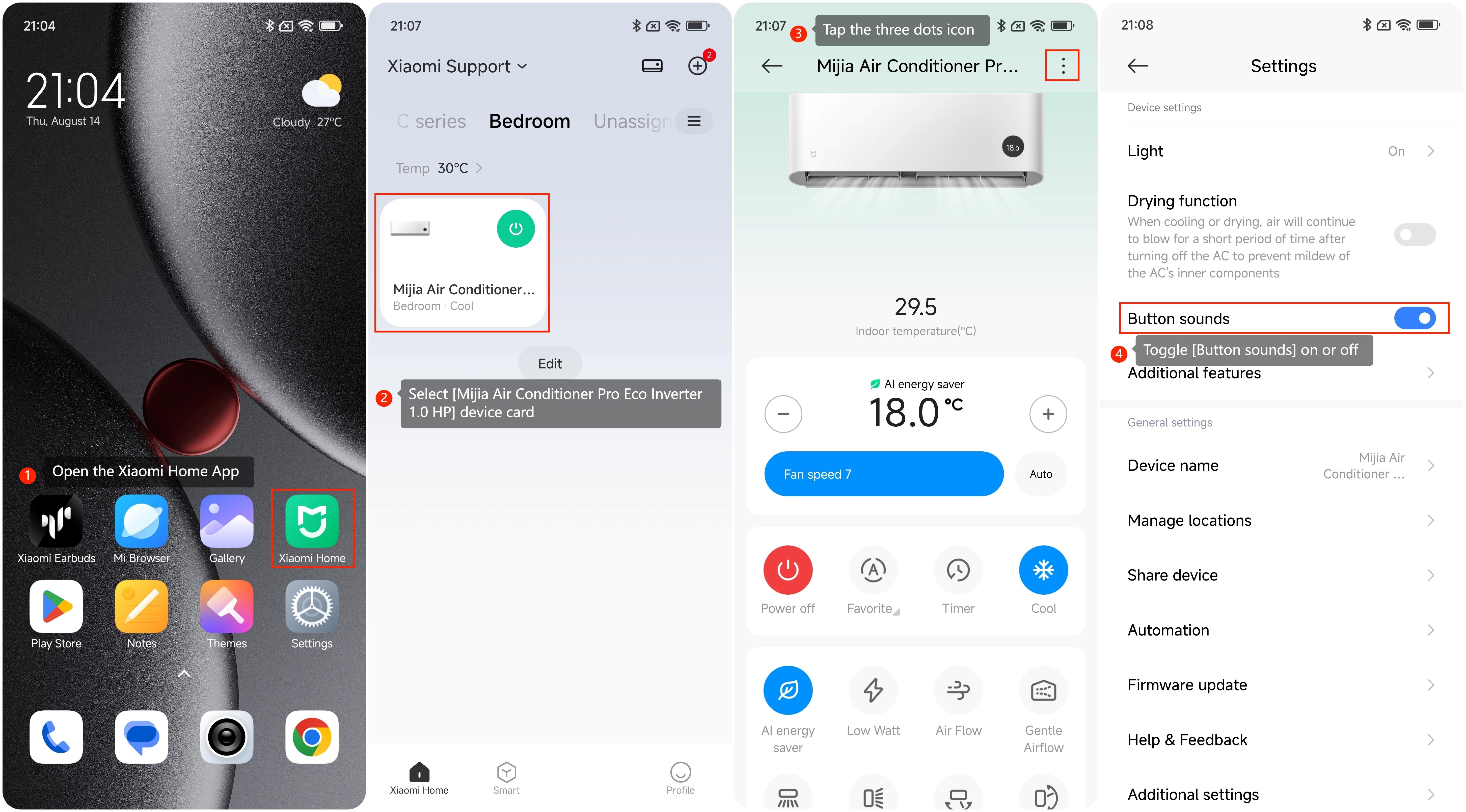
To turn the Button sounds on/off for the Mijia Air Conditioner Pro Eco Inverter 1.0 HP, please refer to the following steps:
1. Open the Xiaomi Home App on your device;
2. Select [Mijia Air Conditioner Pro Eco Inverter 1.0 HP] device card;
3. Tap the three dots icon in the top-right corner;
4. Toggle [Button sounds] on or off.
To turn the Button sounds on/off for the Mijia Air Conditioner Pro Eco Inverter 1.0 HP, please refer to the following steps:
1. Open the Xiaomi Home App on your device;
2. Select [Mijia Air Conditioner Pro Eco Inverter 1.0 HP] device card;
3. Tap the three dots icon in the top-right corner;
4. Toggle [Button sounds] on or off.
Does it help?
Yes
No