

How to adjust the temperature on the Mijia Air Conditioner Pro Eco Inverter 1.5 HP?
The Mijia Air Conditioner Pro Eco Inverter 1.5 HP supports temperature adjustment through both the remote control and the Xiaomi Home App. You can choose the method that is most convenient for you.
To adjust the temperature of the Mijia Air Conditioner Pro Eco Inverter 1.5 HP with the remote control, please refer to the following information:
1. Ensure the air conditioner is turned on;
2. The adjustable temperature range in cooling mode is 16°C to 31°C;
3. Use the temperature up and down buttons on the remote control to adjust the temperature. Each press will increase or decrease the temperature by 0.5°C, allowing for precise adjustments.
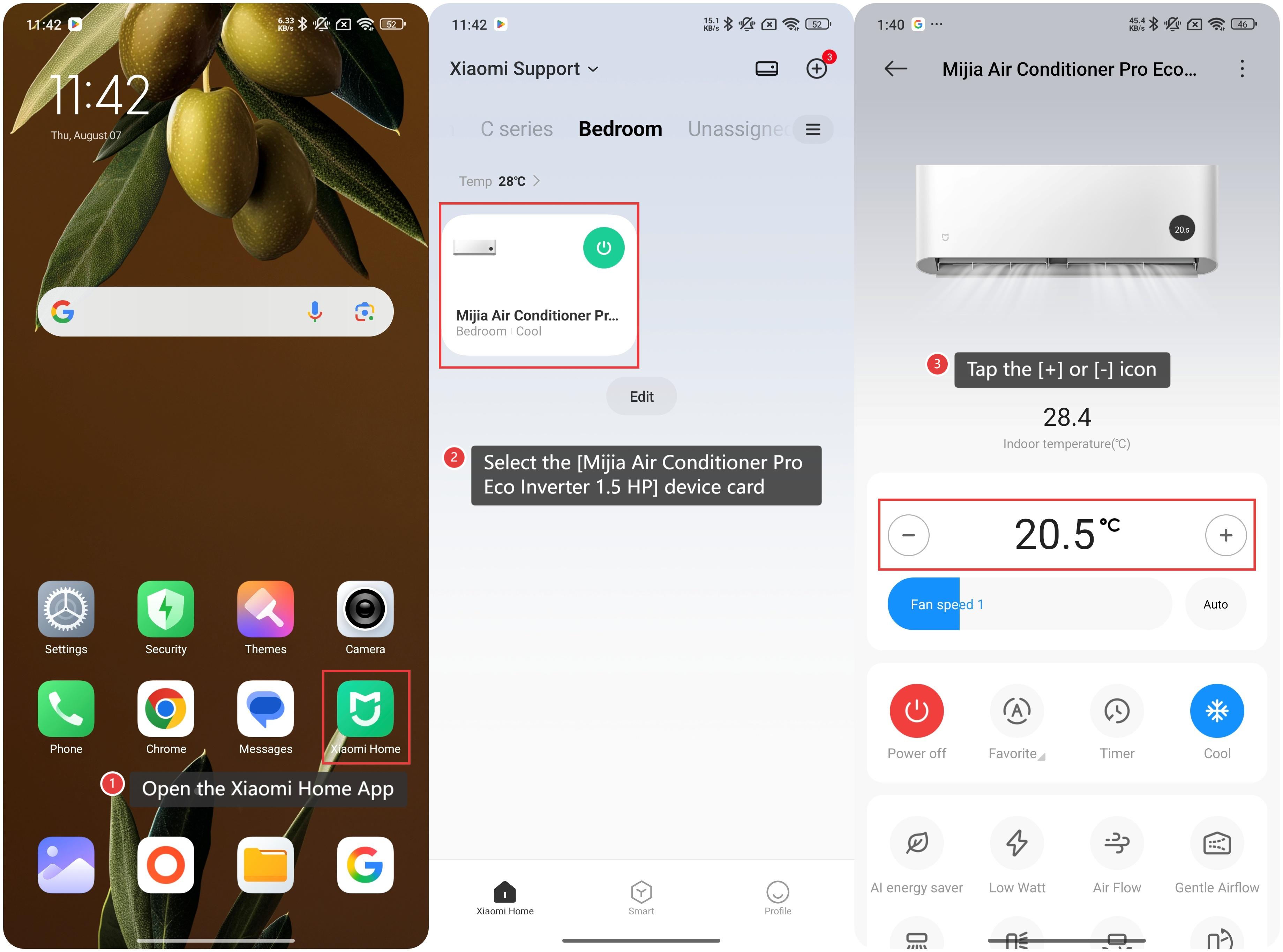
To adjust the temperature of the Mijia Air Conditioner Pro Eco Inverter 1.5 HP via the Xiaomi Home App, please refer to the following information:
1. Open the Xiaomi Home App on your device;
2. Select the [Mijia Air Conditioner Pro Eco Inverter 1.5 HP] device card;
3. Tap the [+] or [-] icon to raise or lower the temperature. The adjustable range is also 16°C to 31°C, with 0.5°C increments per tap. Continue tapping until you reach your desired temperature.
To adjust the temperature of the Mijia Air Conditioner Pro Eco Inverter 1.5 HP with the remote control, please refer to the following information:
1. Ensure the air conditioner is turned on;
2. The adjustable temperature range in cooling mode is 16°C to 31°C;
3. Use the temperature up and down buttons on the remote control to adjust the temperature. Each press will increase or decrease the temperature by 0.5°C, allowing for precise adjustments.
To adjust the temperature of the Mijia Air Conditioner Pro Eco Inverter 1.5 HP via the Xiaomi Home App, please refer to the following information:
1. Open the Xiaomi Home App on your device;
2. Select the [Mijia Air Conditioner Pro Eco Inverter 1.5 HP] device card;
3. Tap the [+] or [-] icon to raise or lower the temperature. The adjustable range is also 16°C to 31°C, with 0.5°C increments per tap. Continue tapping until you reach your desired temperature.
Does it help?
Yes
No