

Xiaomi Electric Scooter 5 Max FAQ
1. Q: How to ride the Xiaomi Electric Scooter 5 Max?
A: Please step on the scooter with one foot, and use the other foot to push off. Keep balance after stepping on the scooter with both feet and then press the accelerator to speed up. It is recommended that you maintain a constant speed when riding and not accelerate or brake suddenly.
Note:
The scooter will start working only when it is kept at a speed of 5 km/h or more.
2. Q: What are the requirements for the riders when riding the Xiaomi Electric Scooter 5 Max?
A: The requirements for riding the Xiaomi Electric Scooter 5 Max are 16 to 50 in age, 120 to 200cm in height, and no more than 120kg in load. Do not ride while under the influence of alcohol, or medication that impairs your judgment.
3. Q: How to charge the Xiaomi Electric Scooter 5 Max?
A: To charge the Xiaomi Electric Scooter 5 Max, please refer to the following steps:
1. Lift up the rubber flap;
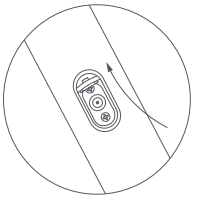
2. Connect the battery charger to the charging port;

3. Disconnect the battery charger from the charging port when charging is completed;
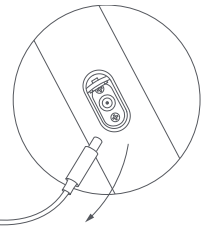
4. Put back the rubber flap.

4. Q: What battery does the Xiaomi Electric Scooter 5 Max use?
A: The Xiaomi Electric Scooter 5 Max uses a lithium-ion battery.
5. Q: How to maintain the battery of the Xiaomi Electric Scooter 5 Max?
A: In daily use, try to avoid completely depleting the battery. Charge it as often as possible after the scooter is ridden, in order to extend the battery's service life. In addition, the battery has better performance when used within a normal temperature range. If used in environments within temperatures below 0℃, the battery life and performance will be impacted. In normal conditions, if used at -20℃, the travel range will be only half or less than that in normal temperature. Besides, avoid using the scooter in environments with temperatures below 0℃ or above 45℃ and avoid storing it in environments with temperatures below -20℃ or above 50℃. If the scooter will not be used for more than 30 days, please charge the battery to about 80% and store it in a cool and dry place. Fully charge the battery every 1 to 2 months, in order to extend its service life.
Note:
If the battery is not charged in time, it will be damaged due to over-discharge, which is irreparable. The battery cannot be charged again if it is not charged for a long time and cannot be repaired for free.
6. Q: How to use the function of energy recovery on the Xiaomi Electric Scooter 5 Max?
A: In the process of riding, pinching the brake lever or releasing the accelerator will enable the function of energy recovery, which will convert the kinetic energy into electric energy for energy storage and reuse. The function of energy recovery can extend the battery life and provide a brake effect. It is recommended that you adjust the energy recovery intensity to low.
After connecting the scooter to the Mi Home/Xiaomi Home APP, you can adjust the energy recovery intensity to low, medium and high, which is set to low by default.
7. Q: What is the IP rating of the Xiaomi Electric Scooter 5 Max and can it be ridden in rainy and snowy days?
A: The IP rating of the Xiaomi Electric Scooter 5 Max is IPX5. It is not recommended that you ride the scooter on such bad weather conditions as rainy and snowy day.
8. Q: How to inflate the tires of the Xiaomi Electric Scooter 5 Max and what is the recommended pressure?
A: To inflate the tires of the Xiaomi Electric Scooter 5 Max, please refer to the following steps:
1. Remove the tire valve cap, and connect the pump and the valve securely together;
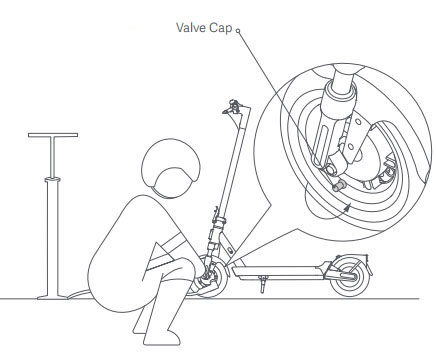
2. Inflate the tire;

3. Remove the pump and install the tire valve cap.
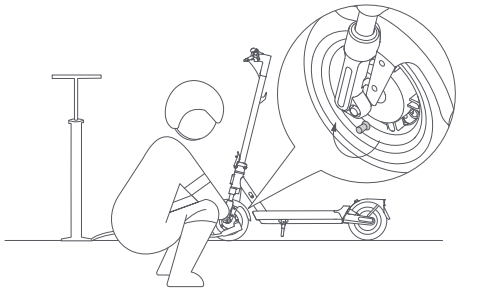
Note:
Check the tire pressure every month, and inflate the tires if the pressure is too low. The recommended tire pressure is 45 to 50psi.
9. Q: Why do the tires of the Xiaomi Electric Scooter 5 Max slowly deflate when riding?
A: The Xiaomi Electric Scooter 5 Max uses tubeless tires, and there will be a certain amount of pressure loss during storage and use.
Note:
Riding your scooter with low tire pressure can speed up tire wear, and even pose the risk of a puncture. It is recommended that you check the tire pressure every month and keep it between 45 to 50psi. Do not ride the scooter with the tire pressure higher or lower the range.
10. Q: How to determine that the Xiaomi Electric Scooter 5 Max is malfunctioning?
A: The wrench icon on the control panel blinking in red represents the scooter malfunctioned.
Here are more details to help you determine the malfunctions of the scooter:
1. When the scooter malfunctioned, the speedometer on the control panel will be displayed as an error code;
2. When the scooter is malfunctioned, the buzzer will ring 5 times in a 3-second cycle.
11. Q: Why can the Xiaomi Electric Scooter 5 Max not be charged?
A: If the Xiaomi Electric Scooter 5 Max cannot be charged, please refer to the following details:
1. Adapter error: Please connect the adapter to the power but not to the scooter. Check the LED indicator on the adapter. If it turns red or does not turn on, there is an error on the adapter. The adapter needs to be replaced. Please contact the local after-sales service center;
2. Battery over-discharge: If the scooter has not been used for a long time and has not been charged, the battery will be in the condition of over-discharge. Please contact the local after-sales service center;
3. Irregular temperature: If the battery temperature is too high or too low, the temperature warning icon will be on. In this case, the scooter cannot be charged. Please charge the scooter after its battery temperature returns to the normal operating range.
12. Q: What to do if the Xiaomi Electric Scooter 5 Max is disconnected in terms of Bluetooth?
A: If the Bluetooth is disconnected, please refer to the following details:
1. Check whether the Bluetooth is enabled on the phone;
2. Check whether the Mi Home/Xiaomi Home APP is updated to the latest version;
3. Please make the scooter within the efficient Bluetooth range.
13. Q: How to reconnect the Xiaomi Electric Scooter 5 Max with the Mi Home/Xiaomi Home APP?
A: Before reconnecting the scooter with the Mi Home/Xiaomi Home APP, press the accelerator and simultaneously press the power button 5 times to reset the scooter, and delete the scooter from the account it is paired with.
14. Q: How to install the screws on the Xiaomi Electric Scooter 5 Max?
A: Use the Allen key in the package to pre-tighten four screws into both sides of the stem diagonally (two screws for each side). Make sure the handlebar is correctly installed and then tighten the screws thoroughly.
15. Q: How to lock the Xiaomi Electric Scooter 5 Max?
A: The Xiaomi Electric Scooter 5 Max will be locked after tapping [Lock motor] on the Mi Home/Xiaomi Home APP. After 24 hours of being locked, the scooter will automatically turn off. The motor will still be locked when the scooter is turned on again. When the scooter is locked, it will sound an alarm when moved, and the button operation on the scooter will not work. This function cannot prevent your scooter from being stolen, please keep the scooter safe. Locking the scooter will consume the scooter's power, please use this function appropriately.
16. Q: How to restore the Xiaomi Electric Scooter 5 Max to factory settings?
A: Make sure the scooter is turned on. Pinch the brake lever, and simultaneously press and hold the accelerator and the power button for 7 seconds. When you hear a beep, the scooter has been restored to factory settings. This operation will completely delete the data stored in the scooter, please proceed with caution.
17. Q: Why is there a brightness change on the control panel of the Xiaomi Electric Scooter 5 Max?
A: The control panel will dim if the lights on the scooter are on and return to the normal brightness when the lights are off.
18. Q: How to adjust the mechanical brake of the Xiaomi Electric Scooter 5 Max?
A: Before adjustment, make sure the scooter is powered off and not charging. When the brake is too tight, use the tool to turn the nut on the screw rod counterclockwise, so as to slightly shorten the brake cable's exposed bottom part. When the brake is too loose, use the tool to turn the nut on the screw rod clockwise, so as to slightly lengthen the brake cable's exposed bottom part.
Note:
1. Do not adjust the brake too tightly, otherwise, the front wheel may lock up when braking, resulting in the scooter tipping forward;
2. Please prepare a 14mm T-handle socket wrench.
19. Q: How to find the QR code on the Xiaomi Electric Scooter 5 Max?
A: To connect to the Mi Home/Xiaomi Home APP, you need to scan the QR code that is unique to the scooter, which can be found according to the following methods:
1. After connecting the scooter to the Mi Home/Xiaomi Home, you can check the QR code of the scooter at the settings interface of the plugin of the Xiaomi Electric Scooter 5 Max;
2. You can also find the scooter's QR code on the labels attached to the control panel and to the right side of the deck, as well as on the back cover of the user manual.
20. Q: What are the impacts of low-temperature weathers on the Xiaomi Electric Scooter 5 Max?
A: The performance of the lithium-ion battery is reduced in winter. To avoid irreparable damage to the battery cell caused by low temperature, BMS will enable low-temperature protection and the temperature warning icon on the control panel will light up. This will result in reduced acceleration and charging issues for the scooter. Since low-temperature weather leads to the reduced performance of the lithium-ion battery and changed tire pressure, together with the impact of wind speed and heavy clothes worn by riders, the scooter's energy consumption will accelerate and its battery life will decrease as well.
21. Q: Why does the temperature warning icon on the control panel of the Xiaomi Electric Scooter 5 Max light up?
A: If the temperature warning icon lights up, the battery temperature is too high or too low. This will result in reduced acceleration and charging issues of the scooter, and you will not be able to ride the scooter. Please ride or charge the scooter after its battery temperature returns to the normal operating range.
22. Q: What is the travel range of the Xiaomi Electric Scooter 5 Max?
A: The travel range of the Xiaomi Electric Scooter 5 Max is approximately 60km, which is measured in fully-charged condition with no wind, normal temperature of 25℃, flat surface, standard mode and constant speed of 15km/h. The actual range will vary depending on the load, ambient temperature, wind speed, road surface, tire pressure, battery charging cycles, riding mode, and operating habits, such as rapid acceleration or deceleration.
23. Q: How to cycle through the riding modes when riding the Xiaomi Electric Scooter 5 Max?
A: Press the power button twice to cycle through the riding modes. The maximum speed for walking mode is 6km/h, 20km/h for standard mode (D) and 25km/h for sport mode (S) and sport plus mode (S+). Do not cycle through the riding modes when riding the scooter.
Note:
The maximum speed of standard mode and sport mode will vary according to the local regulations and laws.
24. Q: What is the self-discharging rate?
A: The half-charged battery has an initial self-discharging rate of 1% to 4% per month in a normal temperature environment. With the use of the battery, the self-discharging rate increases by about 0.6% per month on average for every 100 cycles of charging and discharging or every 6 months (based on which condition is reached first).
25. Q: What are the extreme temperatures when charging the scooter?
A: Extreme temperatures refer to the temperature of the environment in which the battery is charging, discharging, or in storage that is not within the range specified by the manufacturer. The temperature range specified by the manufacturer is 0°C to 45°C for charging, -20°C to 70°C for discharging, and -20°C to 60°C for storage.
26. Q: What is the TCS anti-slip function on the Xiaomi Electric Scooter 5 Max?
A: When the TCS (traction control system) anti-slip function is enabled, the scooter can prevent the tires from slipping excessively to maintain stability during starting, accelerating, turning, etc. The function can be enabled or disabled via the Mi Home/Xiaomi Home APP.
A: Please step on the scooter with one foot, and use the other foot to push off. Keep balance after stepping on the scooter with both feet and then press the accelerator to speed up. It is recommended that you maintain a constant speed when riding and not accelerate or brake suddenly.
Note:
The scooter will start working only when it is kept at a speed of 5 km/h or more.
2. Q: What are the requirements for the riders when riding the Xiaomi Electric Scooter 5 Max?
A: The requirements for riding the Xiaomi Electric Scooter 5 Max are 16 to 50 in age, 120 to 200cm in height, and no more than 120kg in load. Do not ride while under the influence of alcohol, or medication that impairs your judgment.
3. Q: How to charge the Xiaomi Electric Scooter 5 Max?
A: To charge the Xiaomi Electric Scooter 5 Max, please refer to the following steps:
1. Lift up the rubber flap;
2. Connect the battery charger to the charging port;
3. Disconnect the battery charger from the charging port when charging is completed;
4. Put back the rubber flap.
4. Q: What battery does the Xiaomi Electric Scooter 5 Max use?
A: The Xiaomi Electric Scooter 5 Max uses a lithium-ion battery.
5. Q: How to maintain the battery of the Xiaomi Electric Scooter 5 Max?
A: In daily use, try to avoid completely depleting the battery. Charge it as often as possible after the scooter is ridden, in order to extend the battery's service life. In addition, the battery has better performance when used within a normal temperature range. If used in environments within temperatures below 0℃, the battery life and performance will be impacted. In normal conditions, if used at -20℃, the travel range will be only half or less than that in normal temperature. Besides, avoid using the scooter in environments with temperatures below 0℃ or above 45℃ and avoid storing it in environments with temperatures below -20℃ or above 50℃. If the scooter will not be used for more than 30 days, please charge the battery to about 80% and store it in a cool and dry place. Fully charge the battery every 1 to 2 months, in order to extend its service life.
Note:
If the battery is not charged in time, it will be damaged due to over-discharge, which is irreparable. The battery cannot be charged again if it is not charged for a long time and cannot be repaired for free.
6. Q: How to use the function of energy recovery on the Xiaomi Electric Scooter 5 Max?
A: In the process of riding, pinching the brake lever or releasing the accelerator will enable the function of energy recovery, which will convert the kinetic energy into electric energy for energy storage and reuse. The function of energy recovery can extend the battery life and provide a brake effect. It is recommended that you adjust the energy recovery intensity to low.
After connecting the scooter to the Mi Home/Xiaomi Home APP, you can adjust the energy recovery intensity to low, medium and high, which is set to low by default.
7. Q: What is the IP rating of the Xiaomi Electric Scooter 5 Max and can it be ridden in rainy and snowy days?
A: The IP rating of the Xiaomi Electric Scooter 5 Max is IPX5. It is not recommended that you ride the scooter on such bad weather conditions as rainy and snowy day.
8. Q: How to inflate the tires of the Xiaomi Electric Scooter 5 Max and what is the recommended pressure?
A: To inflate the tires of the Xiaomi Electric Scooter 5 Max, please refer to the following steps:
1. Remove the tire valve cap, and connect the pump and the valve securely together;
2. Inflate the tire;
3. Remove the pump and install the tire valve cap.
Note:
Check the tire pressure every month, and inflate the tires if the pressure is too low. The recommended tire pressure is 45 to 50psi.
9. Q: Why do the tires of the Xiaomi Electric Scooter 5 Max slowly deflate when riding?
A: The Xiaomi Electric Scooter 5 Max uses tubeless tires, and there will be a certain amount of pressure loss during storage and use.
Note:
Riding your scooter with low tire pressure can speed up tire wear, and even pose the risk of a puncture. It is recommended that you check the tire pressure every month and keep it between 45 to 50psi. Do not ride the scooter with the tire pressure higher or lower the range.
10. Q: How to determine that the Xiaomi Electric Scooter 5 Max is malfunctioning?
A: The wrench icon on the control panel blinking in red represents the scooter malfunctioned.
Here are more details to help you determine the malfunctions of the scooter:
1. When the scooter malfunctioned, the speedometer on the control panel will be displayed as an error code;
2. When the scooter is malfunctioned, the buzzer will ring 5 times in a 3-second cycle.
11. Q: Why can the Xiaomi Electric Scooter 5 Max not be charged?
A: If the Xiaomi Electric Scooter 5 Max cannot be charged, please refer to the following details:
1. Adapter error: Please connect the adapter to the power but not to the scooter. Check the LED indicator on the adapter. If it turns red or does not turn on, there is an error on the adapter. The adapter needs to be replaced. Please contact the local after-sales service center;
2. Battery over-discharge: If the scooter has not been used for a long time and has not been charged, the battery will be in the condition of over-discharge. Please contact the local after-sales service center;
3. Irregular temperature: If the battery temperature is too high or too low, the temperature warning icon will be on. In this case, the scooter cannot be charged. Please charge the scooter after its battery temperature returns to the normal operating range.
12. Q: What to do if the Xiaomi Electric Scooter 5 Max is disconnected in terms of Bluetooth?
A: If the Bluetooth is disconnected, please refer to the following details:
1. Check whether the Bluetooth is enabled on the phone;
2. Check whether the Mi Home/Xiaomi Home APP is updated to the latest version;
3. Please make the scooter within the efficient Bluetooth range.
13. Q: How to reconnect the Xiaomi Electric Scooter 5 Max with the Mi Home/Xiaomi Home APP?
A: Before reconnecting the scooter with the Mi Home/Xiaomi Home APP, press the accelerator and simultaneously press the power button 5 times to reset the scooter, and delete the scooter from the account it is paired with.
14. Q: How to install the screws on the Xiaomi Electric Scooter 5 Max?
A: Use the Allen key in the package to pre-tighten four screws into both sides of the stem diagonally (two screws for each side). Make sure the handlebar is correctly installed and then tighten the screws thoroughly.
15. Q: How to lock the Xiaomi Electric Scooter 5 Max?
A: The Xiaomi Electric Scooter 5 Max will be locked after tapping [Lock motor] on the Mi Home/Xiaomi Home APP. After 24 hours of being locked, the scooter will automatically turn off. The motor will still be locked when the scooter is turned on again. When the scooter is locked, it will sound an alarm when moved, and the button operation on the scooter will not work. This function cannot prevent your scooter from being stolen, please keep the scooter safe. Locking the scooter will consume the scooter's power, please use this function appropriately.
16. Q: How to restore the Xiaomi Electric Scooter 5 Max to factory settings?
A: Make sure the scooter is turned on. Pinch the brake lever, and simultaneously press and hold the accelerator and the power button for 7 seconds. When you hear a beep, the scooter has been restored to factory settings. This operation will completely delete the data stored in the scooter, please proceed with caution.
17. Q: Why is there a brightness change on the control panel of the Xiaomi Electric Scooter 5 Max?
A: The control panel will dim if the lights on the scooter are on and return to the normal brightness when the lights are off.
18. Q: How to adjust the mechanical brake of the Xiaomi Electric Scooter 5 Max?
A: Before adjustment, make sure the scooter is powered off and not charging. When the brake is too tight, use the tool to turn the nut on the screw rod counterclockwise, so as to slightly shorten the brake cable's exposed bottom part. When the brake is too loose, use the tool to turn the nut on the screw rod clockwise, so as to slightly lengthen the brake cable's exposed bottom part.
Note:
1. Do not adjust the brake too tightly, otherwise, the front wheel may lock up when braking, resulting in the scooter tipping forward;
2. Please prepare a 14mm T-handle socket wrench.
19. Q: How to find the QR code on the Xiaomi Electric Scooter 5 Max?
A: To connect to the Mi Home/Xiaomi Home APP, you need to scan the QR code that is unique to the scooter, which can be found according to the following methods:
1. After connecting the scooter to the Mi Home/Xiaomi Home, you can check the QR code of the scooter at the settings interface of the plugin of the Xiaomi Electric Scooter 5 Max;
2. You can also find the scooter's QR code on the labels attached to the control panel and to the right side of the deck, as well as on the back cover of the user manual.
20. Q: What are the impacts of low-temperature weathers on the Xiaomi Electric Scooter 5 Max?
A: The performance of the lithium-ion battery is reduced in winter. To avoid irreparable damage to the battery cell caused by low temperature, BMS will enable low-temperature protection and the temperature warning icon on the control panel will light up. This will result in reduced acceleration and charging issues for the scooter. Since low-temperature weather leads to the reduced performance of the lithium-ion battery and changed tire pressure, together with the impact of wind speed and heavy clothes worn by riders, the scooter's energy consumption will accelerate and its battery life will decrease as well.
21. Q: Why does the temperature warning icon on the control panel of the Xiaomi Electric Scooter 5 Max light up?
A: If the temperature warning icon lights up, the battery temperature is too high or too low. This will result in reduced acceleration and charging issues of the scooter, and you will not be able to ride the scooter. Please ride or charge the scooter after its battery temperature returns to the normal operating range.
22. Q: What is the travel range of the Xiaomi Electric Scooter 5 Max?
A: The travel range of the Xiaomi Electric Scooter 5 Max is approximately 60km, which is measured in fully-charged condition with no wind, normal temperature of 25℃, flat surface, standard mode and constant speed of 15km/h. The actual range will vary depending on the load, ambient temperature, wind speed, road surface, tire pressure, battery charging cycles, riding mode, and operating habits, such as rapid acceleration or deceleration.
23. Q: How to cycle through the riding modes when riding the Xiaomi Electric Scooter 5 Max?
A: Press the power button twice to cycle through the riding modes. The maximum speed for walking mode is 6km/h, 20km/h for standard mode (D) and 25km/h for sport mode (S) and sport plus mode (S+). Do not cycle through the riding modes when riding the scooter.
Note:
The maximum speed of standard mode and sport mode will vary according to the local regulations and laws.
24. Q: What is the self-discharging rate?
A: The half-charged battery has an initial self-discharging rate of 1% to 4% per month in a normal temperature environment. With the use of the battery, the self-discharging rate increases by about 0.6% per month on average for every 100 cycles of charging and discharging or every 6 months (based on which condition is reached first).
25. Q: What are the extreme temperatures when charging the scooter?
A: Extreme temperatures refer to the temperature of the environment in which the battery is charging, discharging, or in storage that is not within the range specified by the manufacturer. The temperature range specified by the manufacturer is 0°C to 45°C for charging, -20°C to 70°C for discharging, and -20°C to 60°C for storage.
26. Q: What is the TCS anti-slip function on the Xiaomi Electric Scooter 5 Max?
A: When the TCS (traction control system) anti-slip function is enabled, the scooter can prevent the tires from slipping excessively to maintain stability during starting, accelerating, turning, etc. The function can be enabled or disabled via the Mi Home/Xiaomi Home APP.
Does it help?
Yes
No