

Redmi Watch 4 FAQ
1. Q: Why has the color of the Square Dial on the Redmi Watch 4 changed after the upgrade?
A: The visual optimization of the square dial has optimized the problem of abnormal display of the dial in an extremely dark environment.
2. Q: Why does AI Weather of the Redmi Watch 4 crash and restart?
A: This problem has been fixed, you can update to the latest version to experience it.
3. Q: Why is the positioning of the Redmi Watch 4 inaccurate when swimming in open water?
A: Due to the interference of the water surface, it is impossible to locate the position accurately by GPS, and the swimming track in open water will be deviated.
4. Q: Why is Redmi Watch 4 stuck in the language selection interface/binding QR code interface, and I can only slide but not tap?
A: Press and hold the power button to restart after the jamming, it will be back to normal. This problem has been fixed in the next version, please pay attention to the version update.
5. Q: Why can't the steps of the Redmi Watch 4 and the third-party applications be stacked?
A: The steps of watch and the third-party applications are not stacked statistics, but take the maximum value. Such as watch steps number 2000 steps, the third-party applications steps number 2500 steps. After synchronization, the third-party applications still show 2500 steps. If the watch steps number 2500 steps, the third-party applications step number 2000. After synchronization, the third-party applications will be updated to 2500 steps, taking the maximum value.
6. Q: Why is the Mi Fitness App on the Redmi Watch 4 often disconnected when connected to Huawei phones?
A: Open [Settings] on the phone>> Search battery optimization >> Tap on the three dots at the upper corner of the seat >> Select [All Apps] >> Find the [Mi Fitness] App >> Open all permissions.
7. Q: When the Redmi Watch 4 is used in a dark environment or when the screen is set to the lowest brightness, why do some of the display images show slightly greenish/blueish/reddish?
A: Redmi Watch 4 uses an OLED screen, due to the OLED's characteristics and preparation process, there may be different degrees of color deviation phenomenon in low grayscale, low brightness and large viewing angle observation, this color deviation problem is only possible in low brightness, and will not cause other screen functionality problems, you can rest assured to use.
8. Q: What to do if the alarm on the Redmi Watch 4 goes off even on weekends?
A: Turn off the wake-up alarm in sleep mode.
9. Q: Why is the data in the dial editor graph on the Redmi Watch 4 different from the first time I entered it?
A: The first time you enter Dial Edit, the default design chart is used and the data is fixed, the second time after you enter Dial Edit, the data of Dial Edit will be real-time data.
10. Q: Why does the screen of the Redmi Watch 4 freeze after downloading the market dial (Light and Night)?
A: The device reboots and crashes due to the error in the dial file, please delete the dial in the watch terminal/Mi Fitness App on the phone, wait for the dial to be re-launched and then download and use it.
11. Q: What to do if the music interface of the Redmi Watch 4 doesn't show the name of the playing music, can't switch songs, and the music can't be switched?
A: Please update to the latest version of your third-party Applications for use.
12. Q: Why bind an iOS phone, connect the Redmi Watch 4 to a new phone, bind Android, then connect to the new phone, and then connect back to iOS require multiple taps to connect back?
A: Please kill the Mi Fitness App in the background of your phone and re-enter to connect normally.
13. Q: What should I do if the battery life of Redmi Watch 4 suddenly becomes shorter and the battery consumption is faster when using other brands of mobile phones?
A: Please try to restart the phone and then observe the watch usage time again.
14. Q: Why can't my new phone connect to my Redmi Watch 4?
A: Please turn off Bluetooth in your old phone and then use your new phone to search again (OTA2 fixes this problem).
15. Q: What to do if the Redmi Watch 4 is stuck in logo screen when I turn on the watch for the first time?
A: Please tap the button or tap the screen to resume normal use.
II. Product Overview
1. Q: What are the features of the Redmi Watch 4?
A: The main features of the product are organized as follows:
1. 1.97" AMOLED HD large screen with 390*450 resolution and 60Hz max refresh rate;
2. Exquisite aluminum alloy metal middle frame, stainless steel rotating crown, fashionable strap quick release;
3. Ultra-long battery life of 30 days, typical scene life of up to 20 days;
4. Support all-day blood oxygen saturation, heart rate, pressure, sleep monitoring automatic detection, and deep understanding of the physical condition;
5. Support single-frequency GPS 5-star positioning: BeiDou, GPS, GLONASS, Galileo, QZSS, fast positioning speed, and high precision, so that every step is visible;
6. Hundreds of sports modes: 161 sports modes;
7. Equipped with speakers and microphone, support the watch to receive calls (need to connect the phone);
8. Support Alexa voice assistant;
9. Support 5ATM waterproof, no need to take it off for swimming in the pool, you can enjoy playing in the water. However, it is not suitable for hot water showers, hot springs, saunas, high-speed water movement, and other scenes.
2. Q: What are the Appearance, material, and structure of Redmi Watch 4?
A: 1. Appearance: The Appearance of Redmi Watch 4 series is as follows. Appearance size: 47.58 × 41.12 × 10.5mm (excluding heart rate tab);
Weight: About 48.2g (including wristband);
2. Screen: The Redmi Watch 4 has a 1.97-inch AMOLED square display with a resolution of 390x450 and a pixel density of up to 302 PPI, displaying a more detailed picture with a smooth and high refresh at 60Hz;
3. Center frame: Aluminum alloy metal material.
3. Q: What are the App features of Redmi Watch 4? How to switch App layout?
A: Exercise, Exercise Record, Running Course, Training Status, Vitality Indicator, Heart Rate, Metabolic Value, Blood Oxygen, Sleep, Stress, Breathing Exercise, Women's Health, Alexa, Weather, Calendar, To-Do, Frequently Used Contacts, Phone, Music, Remote Photo Taking, Alarm Clock, Tomato Clock, Stopwatch, Countdown Clock, World Clock, Compass, Find Phone, Flashlight, Settings.
Switch App layout:
Go to [Watch Settings] >> [App Layout].
4. Q: What is the difference between Redmi Watch 4 and Redmi Watch 3?
A: Redmi Watch 4 has a big improvement in sports and health monitoring capabilities: built-in running courses and training status. Provides more powerful custom dials, and richer App features.
5. Q: What are the strap and retail straps of the Redmi Watch 4 introductions?
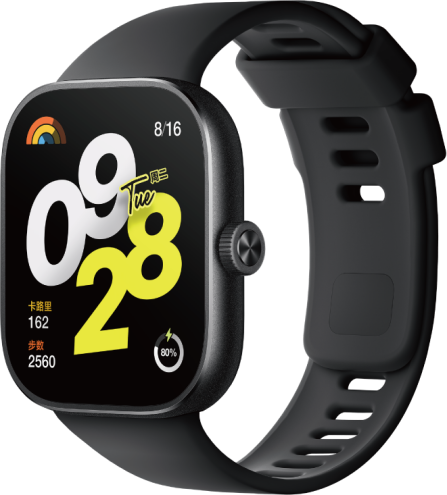
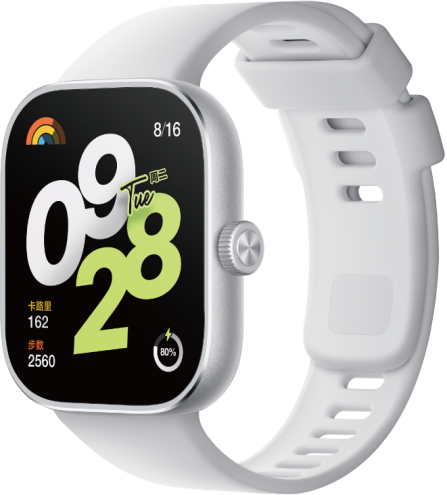
A: Black and gray straps are standard, and retail straps:
Redmi Watch 4 in Obsidian Black, Redmi Watch 4 in Silver Gray, Redmi Watch TPU Quick Release Strap in Dark Cyan, Redmi Watch TPU Quick Release Strap in Mint Green, Redmi Watch TPU Quick Release Strap in Pastel Purple.
 |  |  |  |  |
6. Q: Is the Redmi Watch 4 allergic to wear?
A: Redmi Watch 4 is made of professional healthy and environmentally friendly materials, which have been tested for allergenicity by professional organizations. Some places that often touch the skin, such as the watch band, bottom bracket, buttons, etc. have passed strict allergy-prone hazardous substance tests, and meet the limited requirements stipulated in the national standard GB/T 26572. Due to individual differences, there may be a few people who may not feel comfortable with certain materials. If you experience skin irritation while wearing the product, please stop wearing it and consult a doctor.
It is recommended to follow the following instructions when wearing the watch: When exercising, do not wear the watch too loosely or too tightly to ensure that the watch does not slide up and down on the wrist; for daily use, relax the strap slightly to ensure a comfortable experience of skin permeability. After wearing the watch continuously for a long time, remove the watch and let your wrist rest for about half an hour. Wash and wipe the sweat on your arms and watch band after exercise, clean and dry it before wearing it again.
7. Q: How do I replace the Redmi Watch 4 strap?
A: Redmi Watch 4 straps support quick release, and the replacement methods are as follows:
1. TPU Wristband Installation/Removal:
Installation of the watch strap: Align the clasps on both ends of the watch strap with the grooves of the watch body, and forcefully snap them together to ensure that the strap is fully inserted, so that the quick release button is reset successfully.
Note:
Before wearing, please pull the strap to make sure it is securely fastened.
Removing the strap: Press the quick release buttons on both sides of the watch, and pull the strap outward to separate it from the main body of the watch.
8. Q: Is the Redmi Watch 4 strap universal with the previous watch?
A: It is universal with the wristband of Xiaomi Band 8 Pro.
9. Q: Is the Redmi Watch 4 charging cable universal?
A: Redmi Watch 4 uses Xiaomi Small Square Head Magnetic Charging Cable 2 white charging cable, the charging cable is universal with Redmi Watch 3 Youth Edition, Redmi Bracelet 2, Bracelet 8, Redmi Watch 3 Youth Edition;
10. Q: What is the water resistance rating of the Redmi Watch 4?
A: Redmi Watch 4 has a water resistance rating of 5ATM and can be used for shallow water activities such as swimming in pools and swimming at the beach. It is not suitable for high humidity and high temperature scenarios such as saunas and hot springs, or other water-related activities such as diving, surfing and other deep water activities that face high speed water currents.
Note:
The 50-meter water resistance rating is said to be the waterproof depth of the watch under standard conditions, such conditions mean that the watch has a certain resistance to water pressure in a static state, this resistance value is not derived underwater, but through the conversion of the value of resistance to atmospheric pressure, 50 meters waterproof means that the watch can withstand the pressure of 50 meters of water depth in a static state.
11. Q: Does Redmi Watch 4 support independent satellite positioning? What positioning system is used?
A: Redmi Watch 4 supports independent satellite positioning.
It supports 5-star positioning, China BeiDou Positioning System BDS, US GPS, EU Galileo GALILEO, Russia GLONASS and Quasi-Zenith Satellite System (QZSS).
III. System Settings
1. Q: What cell phone bindings does Redmi Watch 4 support and how do I bind them?
A: Before using Redmi Watch 4, you need to bind it with the Mi Fitness App, which has the same name for iOS and Android, and you can search and download it from the App Store.
The binding method is as follows:
1. Press and hold the power button for about 5 seconds to turn on the watch. Scan the QR code on the screen of the watch with your cell phone, or search the Mi Fitness App in the cell phone Application market to download and install the Mi Fitness App;
2. Open the Mi Fitness App, log into your account according to the page prompts, and open the relevant permissions required by the App;
3. The watch supports three ways to add:
(1). Tap [Sweep] to scan the QR code on the watch screen;
(2). Tap [Add Device]. The App will automatically search for devices that can be added. In the list of searched devices, select the Bluetooth name of your watch. If your watch is not searched in the list, you can try to search again;
(3). Tap [Add Device] >> tap [Add by Model] at the bottom of the page >> select [Redmi Watch 4], and the App will automatically search for Redmi Watch 4 that can be added >> in the list of searched devices, select the Bluetooth name of your watch. If your watch is not searched in the list, you can try to search again;
4. Android phone: When your phone displays the same security code as the screen of your watch, tap [pairing request] on the phone and the watch side respectively to complete the pairing connection with your watch;
iOS cell phone: First, jump to the Bluetooth list of cell phone systems, select the Bluetooth name of your watch, and agree to the pairing request in the security code page popped up on the cell phone and the watch respectively. Then return to App to select the Bluetooth name of your watch, and then carry out the pairing operation once again to complete the pairing connection with the watch.
Note:
Please make sure the Bluetooth of your cell phone is on during the pairing process to ensure the connection between your watch and cell phone is normal.
If the security code has popped up on the watch but the pop-up window to confirm pairing is not displayed on the cell phone, please look for the pairing request in the notification bar of the cell phone.
If you can't find the watch during the adding device process, or can't connect the watch during use, please try to press and hold the watch power button for 3 seconds, select Restore Factory in the system operation interface, and then add the watch again.
2. Q: How to rebind the watch if I change my phone for Redmi Watch 4?
A: 1. Replace different Xiaomi account login binding: Restore factory settings on the watch and then rebind it using the new phone;
2. Use the same Xiaomi account login binding on the new phone: When the watch is connected to the original phone, tap System Operation in Settings on the watch, and then tap Connect New Phone to rebind.
3. Q: What to do if the Redmi Watch 4 binding failure/Bluetooth connection failure/unable to bind?
A: If you encounter a binding failure, please do the following checks:
1. Please check whether the Bluetooth of your phone is on or not;
2. Please check whether the watch is in the QR code pairing interface;
3. Please do not turn off the Bluetooth during the binding process;
4. During the binding process, please keep the cell phone and the watch within the pairing range and do not be too far away from each other (it is recommended not to exceed the range of 2 meters, and the specific performance of the actual use of the watch shall prevail).
The connection failure/binding failure may occur in the following situations, and you can refer to the troubleshooting suggestions as follows:
1. iOS phone can not be connected back, the iOS system in the background after opening more Applications will kill the background caused. Suggestions are as follows:
(1). Open the Mi Fitness App to confirm whether it can be connected back normally;
(2). If you can't connect back, tap the [Connect] button to see if you can connect back normally;
(3). If you still can't connect back, confirm whether the device is connected to the Bluetooth of the cell phone system. If it is connected to the device, ignore the device to confirm whether it is connected back to the normal. If it is not connected to the device, it is recommended to restart the watch and try again;
(4). If the device still can't be connected back, restore the device to factory status, ignore the device in the system Bluetooth again, and scan and connect the device to the Mi Fitness App again.
2. After the watch is restored to the factory, the cell phone fails to connect after researching.
(1). Confirm whether there is this device in the Bluetooth of cell phone system, if there is, please ignore it and return to the Mi Fitness App again and re-pair it according to the prompts;
(2). When there are three "x" signs in the binding, confirm whether the system Bluetooth is ignored. If there is this device in the system Bluetooth, please ignore it and try to connect again.
3. In the iOS connection state, the watch end restores the factory, and the App end fails to add the watch repeatedly when re-adding the watch.
When the watch is paired with an iOS cell phone, the watch is unilaterally restored to factory status, and the App side fails to add the watch repeatedly, it is necessary to ignore the device in the system Bluetooth first, and then retry again for successful pairing.
4. Android phones do not open the background running privileges, resulting in Millet Mi Fitness App being killed in the background.
To use the watch better, avoid one-key memory cleanup and some Butler software cleanup processes or interception in the Android system. It is recommended to keep the Mi Fitness App running in the background, and the path to open it is as follows:
(1). Open background privileges according to the guide for the first-time pairing;
(2). After pairing, you can set it in the [Mi Fitness] App >> [Device] >> on the [Enable background running privileges] page, please set it according to the requirements.
5. After restoring the watch to factory status, the device cannot be searched.
(1). If the device cannot be searched after unbinding, turn off and turn on the Bluetooth of the cell phone system again.
(2). Confirm whether there is a pop-up box prompting connection from a nearby cell phone, if so, you need to reject it.
6. The watch or cell phone has turned on the power saving mode.
(1). After the device is turned on in the power saving mode, it will turn off the Bluetooth of the watch, disconnect the currently connected cell phone, and can not be connected back automatically.
(2). After the cell phone turns on the power saving mode, it may turn off the cell phone Bluetooth, disconnect the currently connected watch, and cannot connect back.
7. Handling method when Bluetooth is disconnected or cell phone is turned off when binding.
If you turn off the Bluetooth of iOS cell phone when binding, the watch will pop up the interface of [Pairing failure], Mi Fitness App will prompt the Bluetooth to turn off, and then prompt you to open the Bluetooth to re-scan. After re-opening the Bluetooth of the iOS mobile system, the interface of binding failure will Appear, tap the [Retry] pop-up box again, and then re-binding can be bound successfully.
8. In the binding if you close the Android phone Bluetooth, the watch will pop up [Pairing failure] interface and the Mi Fitness App will show binding failure. If you tap on [Retry], the App will prompt you to open the Bluetooth prompt box. If you re-open the Bluetooth, you can bind successfully.
9. Reasons why other watches can't be connected.
(1). In the disconnected state, when you unbind the watch in App terminal, the watch will not restore the factory settings. You need to restore the factory before the next binding, otherwise you can't pair it with the new phone;
(2). When the iOS cell phone is connected to the device and the device is unilaterally restored to factory status, iOS cell phone system Bluetooth will try to connect back to the device. The new phone has the probability of searching for the device (iOS cell phone and the device will always be connected to the disconnected, in the connecting period, the new phone can not be searched for. In the intermittent gap of the disconnected, the new phone is scanning, you can search for it). You need to enter the old phone's iOS mobile system Bluetooth, look for the corresponding device that has been connected, and ignore this device. At this time with the new phone search for the pairing connection;
(3). When the Android phone is connected to the device, the device is restored unilaterally after leaving the factory, Mi Fitness App will be connected back to the device and prompt you that the current status is [Delete] or [Add]. At this time, the new phone can not search for the device. Tap [Delete this device] on the old phone, and then use the new phone to search and connect the watch.
4. Q: How to keep Redmi Watch 4 connected to the Mi Fitness App?
A: Please set Mi Fitness App as App whitelist, and lock the App to run in the background. If the Bluetooth of your phone is not turned off, it will stay connected within the Bluetooth connection distance between the watch and the phone.
The setting methods are different for different phone models, please go to the [Mi Fitness] App >> [Device] >> [Enable Background Running Permission] and follow the prompts according to the specific setting method.
5. Q: How far away is the Bluetooth automatically disconnected between Redmi Watch 4 and my phone?
A: The Bluetooth connection status of Redmi Watch 4 and cell phones is affected by the surrounding environment. In general, there is a normal cover, when the watch and cell phone are 5-8 meters away, the Bluetooth will be automatically disconnected. In an open area or a long corridor, when the watch and cell phone are 20 meters away, the Bluetooth will be automatically disconnected. If there is 1 person apart (the watch and the cell phone are directly opposite to each other), the Bluetooth will be disconnected automatically when the distance between the watch and cell phone is 3-5 meters. The details are subject to the actual use performance.
6. Q: How to turn on, turn off and restart Redmi Watch 4?
A: Redmi Watch 4 has a power button.
Power on:
1. In the power-off state, press and hold the power button for about 5 seconds to turn on the watch and enter the home screen;
2. In the power-off state, connect the watch charger for about 5 seconds to turn on the watch and enter the watch home screen.
Power off:
1. In the power-on state, press and hold the power button for 3 seconds the watch will enter the page of reboot, shutdown, restore factory, choose shutdown;
2. In the power-on state, tap [Settings] >> [System Operation] >> select [Power off].
Reboot:
1. In the power-on state, press and hold the power button for 3 seconds the watch will enter the page of reboot, shutdown, restore factory, select reboot;
2. In the power-on state, keep pressing and holding the power button for about 15 seconds, the watch will be forced to reboot;
3. In the power-on state, tap [Settings] >> [System Operation] >> select [Reboot].
7. Q: What are the features of the Redmi Watch 4 control panel?
A: The Redmi Watch 4 control panel can be accessed by swiping up on the bottom edge of the dial home screen: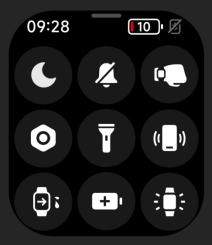
1. The status bar from left to right is:(1). Do Not Disturb Mode: Tap it to quickly enter the Do Not Disturb Mode setting;
(2). Silent mode: Tap it to quickly turn off/on silent mode;
(3). Wrist lift: Tap it to quickly turn off/on the wrist lift mode;
(4). Settings: Tap it to enter the system settings interface;
(5). Flashlight: Tap it to turn on the flashlight;
(6). Find Phone: Tap it to enter the Find Phone application;
(7). Drain Mode: Tap it to turn on the drain function;
(8). Long life mode: Tap it to turn on the long life mode, rotate the crown or charge to exit the long life;
(9). Always on for 5 minutes: Tap it to keep the screen always on for 5 minutes, after resting the screen to restore the resting time set by the system.
8. Q: What are Redmi Watch 4 system settings?
A: The system settings features are as follows:
Dial Management, Display & Brightness, Sound & Vibration, Do Not Disturb Mode, App Notifications, Motion Recognition, Device Password, App Layout, Battery, System Operation, and About.
9. Q: How to customize widgets on Redmi Watch 4?
A: Redmi Watch 4 supports widget function. On the main page of the watch, swipe left and right to view different component cards.
Setting method: Go to the [Mi Fitness] App >> [Device] >> [Widget Management] >> press and hold the right side of the card to drag up and down to adjust the order >> tap on the component card to enter >> tap on the widget that needs to be customized >> select the shortcut function or data item you need at the bottom, and tap on [Save] to complete the customization of the component card.
10. Q: What are the ways of resting the screen on Redmi Watch 4? How to set it?
A: 1. By default, if there is no operation within 5 seconds, the screen will turn off automatically.
Setting method: Go to [Settings] >> [Display & Brightness] >> [Rest time] >> choose the time of resting screen. The time range is from 5 seconds to 60 seconds;
2. The watch supports cover rest screen. After opening it, when you cover and touch the dial with your palm and the area reaches 1/2, the dial will go from bright screen to rest screen directly;
3. Turn the wrist to rest screen, reverse turn the wrist watch to rest screen;
4. Dropping hand to rest screen, the arm will rest screen when it is lowered.
11. Q: How to set Redmi Watch 4 to light up the screen when I raise my wrist?
A: Setting method: Go to [Settings] >> [Display & Brightness] >> [Wrist Lift Screen] >> Timer On/All Day On/Off. Timer On will have the option of effective period, so you can set the effective time according to your needs.
Slide up the main page of the watch dial, open the control panel, tap the icon of Wrist Lift and you can quickly switch on/off the Wrist Lift status.
Note:
When the watch is in sleep mode, it will automatically turn off the wrist lift screen. Setting method: Go to the [Mi Fitness] App >> [Device] >> [Sleep Mode] >> Set rest time.
12. Q: How to adjust the dial brightness on Redmi Watch 4?
A: The brightness of the watch supports automatic adjustment, or you can set the brightness manually.
Auto Brightness: The watch turns on auto brightness by default, and the watch brightness will be adjusted automatically according to the ambient light.
Setting method: Go to [Settings] >> [Display & Brightness] >> [Screen Brightness] >> [Auto Brightness].
Customized Brightness: Customized brightness adjustment is divided into 255 levels. It supports adjusting the brightness by pressing buttons to increase or decrease step by step and sliding the brightness bar to adjust the brightness.
Setting method: Go to [Settings] >> [Display & Brightness] >> [Screen Brightness] >> [Customized Brightness] >> Select the appropriate brightness level.
Note:
Customized brightness can be operated only after auto brightness is turned off.
13. Q: Does Redmi Watch 4 support the device password (off-wrist password) function?
A: Yes. After this feature is turned on, the watch will activate the password lock screen when it detects that it is not being worn. To ensure information security, the password is a 6-digit number in the combination of 0-9.
Enabling method:
Watch side: Go to [Settings] >> [Device Password] >> enable [Password] >> set input password.
App side: Go to the [Mi Fitness] App >> [Device] >> [Device Password] >> [Unlock Password] >> set password.
14. Q: What should I do if Redmi Watch 4 forgets the device password?
A: If you forget the device password, the watch side can't unlock the password, you need to operate it through the App. The operation method is as follows:
1. Keep the watch connected with the Mi Fitness App;
2. Enter the [Mi Fitness] App >> [Device] >> [Device Password] >> choose [Close Password]/[Change Password].
15. Q: Does Redmi Watch 4 support Bluetooth to unlock the phone?
A: The watch supports the function of unlocking cell phones, and this function currently supports Xiaomi phones with system version MIUI 12 and above.
In the state of Bluetooth connection between the phone and the watch, watch unlocking is a one-to-one binding between the watch and the phone, and the watch serves as an identity ID within a safe distance, which can be used as an alternative to inputting the unlocking password or pattern, which ensures security and greatly improves the convenience of operation.
Setting method:
1. Go to the [Mi Fitness] App >> [Device] >> unlock the phone >> set the device unlock;
2. After the lock screen password is set, confirm the unlocking on the watch side to bind successfully, and you can choose the unlocking distance (close, moderate, slightly far away).
Unbinding: You need to turn off the Bluetooth device unlocking function in the system settings of your cell phone to Xiaomi phone.
16. Q: Does Redmi Watch 4 support connecting to Bluetooth headsets?
A: It does not support connecting Bluetooth headsets.
17. Q: How to adjust the volume on Redmi Watch 4?
A: Redmi Watch 4 supports manual adjustment of alarm volume, ringtone volume, media volume, and call volume.
Path: Go to [Settings] >> [Sounds & Vibration].
Alarm volume adjustment:
1. Open [Settings] >> [Sounds & Vibration] >> [Alarm volume] >> tap the volume plus and minus buttons on both sides of the volume bar to adjust the required volume;
2. The alarm clock volume supports adjustment between 0-10. Alarm clock reminders and countdown reminders both belong to the alarm clock volume.
Ringer volume adjustment:
1. Open [Settings] >> [Sounds & Vibration] >> [Ring volume] >> Tap the volume up and down buttons on both sides of the volume bar to adjust the required volume;
2. The ringtone volume supports adjustment between 0-10. Incoming call reminders, App notifications, system prompts, sports and health reminders, etc., all belong to the ringtone volume;
3. After muting the watch, the ringer volume automatically changes to 0.
Media volume adjustment:
1. Open [Settings] >> [Sounds & Vibration] >> [Media volume] >> tap the volume plus and minus buttons on both sides of the volume bar, and adjust the required volume;
2. The media volume supports adjustment between 0-10. The music playback of the watch and the voice broadcast during exercise are both media volumes;
3. The volume of the voice broadcast during exercise can also be adjusted during exercise. Adjustment method: During the exercise, swipe right to enter the exercise negative screen, tap on the volume control, drag the volume bar on the screen, and tap on the screen Use the volume up and down buttons, or tap the up and down buttons to adjust the required volume;
4. Third-party music Applications support volume adjustment within the music control Application. The volume adjustment method is subject to the design of the Applications.
Call volume adjustment:
1. The call volume can only be adjusted during the call. Tap the volume button on the call page to enter the volume adjustment page. You can drag the volume bar on the screen, tap the volume increase and decrease buttons on the screen, or tap the up and down buttons to adjust the required volume;
2. The call volume supports adjustment between 0-15.
Note:
1. The voice assistant has a fixed volume and does not support adjustment (some mobile phone models support adjustment on the mobile phone during voice broadcast).
2. Redmi Watch 4 does not support custom ringtones, and all ringtones are system defaults.
18. Q: How to enable silent mode on Redmi Watch 4? After turning on silent mode, which sounds are turned off?
A: 1. Silent mode supports the following ways to turn on:
Method 1:
Open [Settings] >> [Sound & Vibration] >> turn on the [Silent mode] switch;
Method 2:
Swipe up on the watch's main dial page to open the control panel, and light the silent mode icon in the control panel;
Method 3:
Open [Settings] >> [Sound & Vibration] >> [Ring volume], and manually adjust the ring volume to 0.
2. After turning on the silent mode, incoming call reminders, App notifications, system prompts, sports and health reminders, etc., it will no longer ring, but only vibrate reminders.
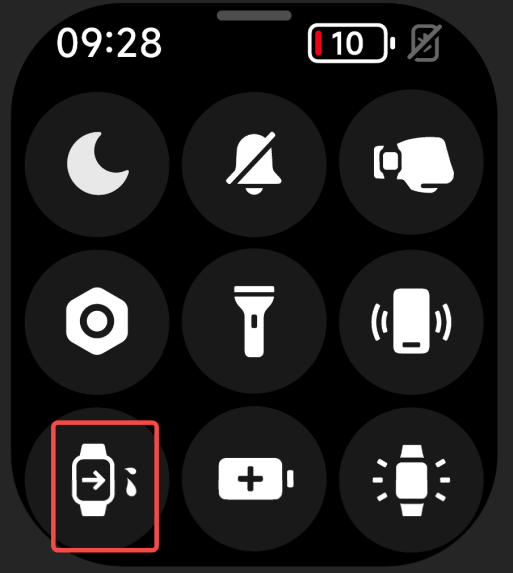
19. Q: What is the drainage function of Redmi Watch 4?
A: The drainage function can be used when the watch is finished swimming or when the speaker is filled with water in daily life. The principle of the drainage function is to make the speaker vibrate by playing sound of a specific frequency and use the vibration to drain out the water that has invaded the speaker, protecting the speaker from being eroded by water.
Method 1:
Swipe up on the watch's main dial page to open the control panel, and tap the drain icon in the control panel;
Method 2:
After swimming, it will automatically enter the drainage process.
20. Q: What are the ways to turn on the screen of Redmi Watch 4?
1. With the screen off, tap the power button;
2. If raising your wrist to light up the screen is enabled, raise your wrist to light up the screen;
3. If one-tap to light up the screen is enabled, one-tap to light up the screen is supported when the screen is on.
21. Q: Does Redmi Watch 4 support image display?
A: Support. After turning it on, the watch will enter the screen-time display state after the screen is turned off.
When the screen is on, you can wake up the screen by raising your wrist or tapping a button to exit the screen.
Setting method:
Go to [Settings] >> [Display & Brightness] >> [Screen Display] >> turn it on and you can customize the turn-on period. The default period is 08:00-22:00, turning on this function will reduce the battery life of the watch.
Note:
When the sleep screen display is turned on, the sleep screen display will be turned off when sleep is detected at night.
22. Q: Can Redmi Watch 4 control the phone to play music?
A: The watch can control the phone to play music. To use this function, the phone and the watch need to be connected. App notifications are turned on in the Mi Fitness App, and the right that uses App notifications is turned on.
How to use: Open the music player on the mobile phone. After starting to play music, enter the function list on the watch and select the music icon to enter the music control page. You can start/pause music, switch to the previous/next song, and increase the volume/ reduced functionality.
Note:
Currently, it supports most music players on the market, but due to differences in the openness of music players and App versions, the experience of the watch's music control function may be affected to a certain extent. (There may be some compatibility issues when controlling the third-party music players with your watch on iOS)
23. Q: How to set the time on Redmi Watch 4?
A: After the watch and mobile phone are paired via Bluetooth and synchronized data, the watch will automatically synchronize the time of the mobile phone system without manual settings. If the time of the mobile phone is modified, it will be modified simultaneously after the watch is connected to the mobile phone.
24. Q: How long can the data on Redmi Watch 4 be saved independently?
A: The watch can save up to 20 pieces of exercise data, and heart rate and pressure data are retained for 30 days. The sleep data is only retained for the current day. Please connect to your mobile phone in time and synchronize it to the Mi Fitness App. If the watch is reset, the previous exercise data on the watch will be cleared, and the data synced to the Mi Fitness App will not be cleared.
Note:
All exercises need to meet the minimum exercise recording standard (calorie consumption is no less than 3 kcal) before they will be saved, otherwise, they will not be saved.
IV. Charging and battery life
1. Q: What is the battery life of Redmi Watch 4? How long does it take to fully charge? Is the battery life in line with the actual usage scenarios?
A: It takes about 1.5 hours to fully charge Redmi Watch 4. The battery life can reach 20 days or more in typical usage scenarios, the battery life in typical AOD mode usage scenarios can reach 10 days or more, and the long battery life mode can last up to 30 days or more.
2. Q: What is the battery capacity of Redmi Watch 4? How to charge?
A: The battery capacity of Redmi Watch 4 is 470mAh. It comes standard with a dedicated magnetic USB charging base and a 50cm long power cord.
The charging method is as follows:
1. Place the watch on the charging stand so that the charging contacts on the back of the watch fully fit the metal contacts on the charging stand;
2. Connect the other end of the charging base to the USB-A charger (output voltage is 5V, output current ≥1A).
When the power of the watch is lower than 20%, 10% and 5%, it will prompt to connect to the charger for charging; during the charging process, there will be a charging prompt.
Note:
1. If the watch cannot be turned on after being left for a long time, it will need to be recharged for about 1 minute before the charging icon will be displayed before using it again;
2. Please wipe the charging contacts of the watch clean before charging to avoid sweat or moisture residue.
3. Q: Why does the Redmi Watch 4 lose power quickly and have short standby time?
A: Regarding the power consumption of the watch, it is related to personal daily use. For example, some special scenes lead to an increase in the number of times you raise your wrist to turn on the screen, frequent information reminders, and all-day heart rate detection and other functions will also lead to increased power consumption. At the same time, the amount of current required for the heart rate detection of the watch will vary depending on individual physical differences, resulting in differences in power consumption. You can turn off some unnecessary functions to improve the watch’s battery life.
Through some simple settings, you can improve the battery life of the watch. For example, when you do not need to experience the following functions, it is recommended to turn off all-day blood oxygen monitoring, all-day heart rate monitoring, stress monitoring, and App notifications by going to the [Mi Fitness] App >> [Device].
Note:
In Redmi Watch 4, the 20-day battery life statistics in typical usage mode scenarios do not include the power consumption statistics of the idle screen display standby dial function. When the screen display is turned on, the battery life may be reduced to half of the original value.
4. Q: Does Redmi Watch 4 support power saving mode/long battery life mode?
A: Yes, long battery life mode is the power saving mode of the watch.
1. Long battery life mode supports the following ways to turn on:
Method 1:
Swipe up on the watch's main dial page to open the control panel, and tap the long battery life mode icon in the control panel;
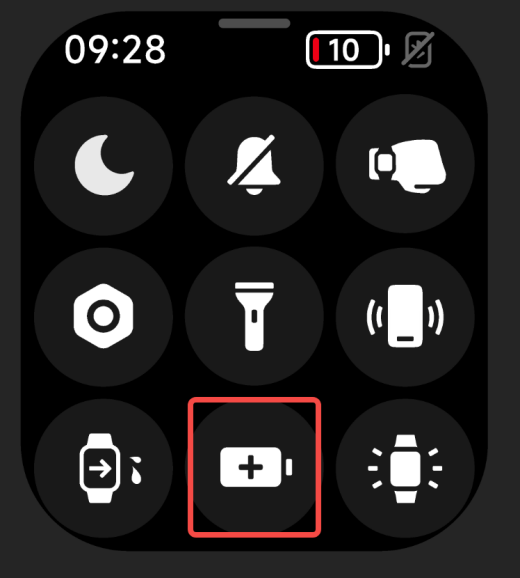
Method 2:
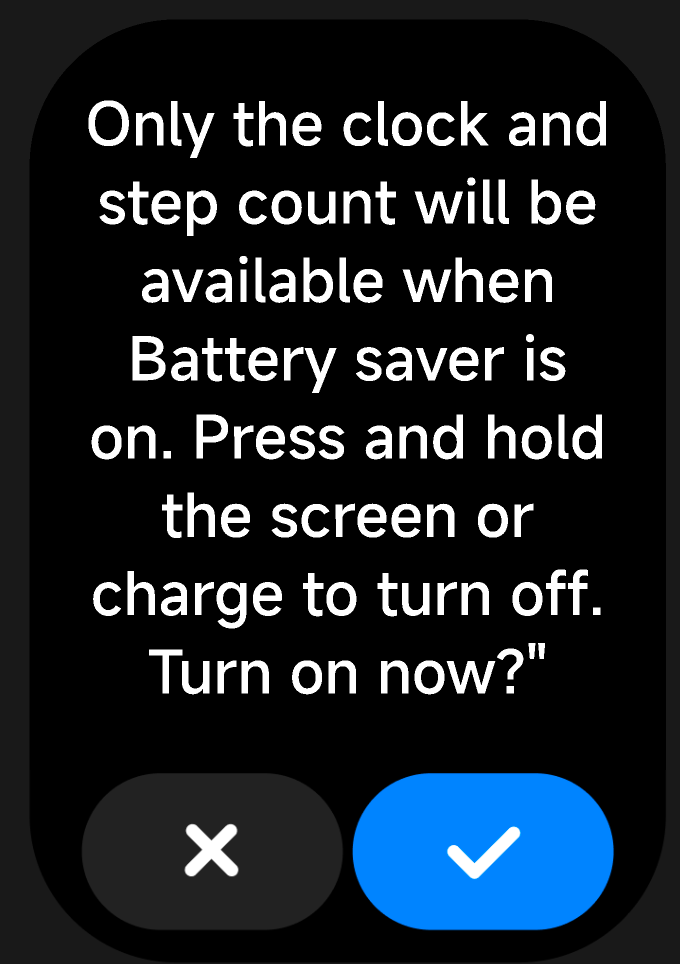
When the watch pops up a 5% low battery reminder, there will be a [Turn on long battery life mode] button on the reminder page. tap the button to turn on the long battery life mode.
2. Long battery life mode supports the following exit methods:
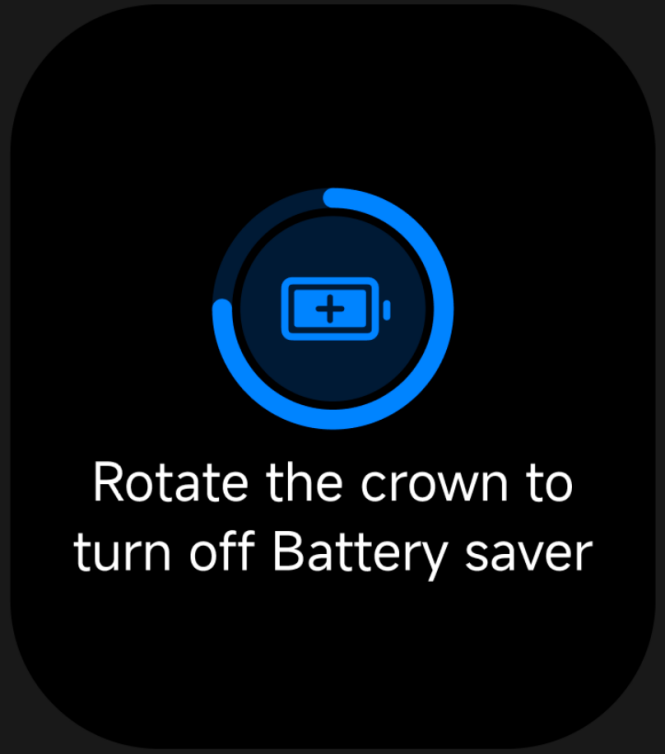
Method 1:
After taping the screen, rotate the crown according to the prompts to exit the long battery life mode;
 |  |
Place the watch on the charging stand to charge, and it will automatically exit the long battery life mode.
Note:
While the watch is charging, it cannot enter long battery life mode.
V. Functions and Usage
1. Q: Does Redmi Watch 4 support sleep monitoring?
A: The watch supports all-day sleep monitoring, all-day long sleep and sporadic nap monitoring. After turning on [Sleep High Precision Monitoring], the distribution of sleep quality can be presented. After wearing the watch to sleep at night, the watch can automatically recognize it through the built-in sensor.
How to view sleep data:
1. On the dial home page of the watch, left and right slide to the sleep component entrance. You can view last night's sleep time and tap to enter the Application to see more information;
2. Tap the [Sleep] icon in the Application list to open sleep, you can view the sleep data of the day;
3. After connecting the watch and cell phone to synchronize data, in the data section of the Mi Fitness App, tap [Sleep] to view historical sleep data, including day, week, month and year. You can also view the daily sleep period, the percentage of deep sleep, light sleep, rapid eye movement, and awake sleep, as well as the detailed sleep status of each time point.
Note:
1. There is a delay in generating the sleep report, and opening the sleep function the first time after waking up may result in no sleep report for the time being;
2. The watch retains the detailed sleep data of the previous night + the sleep period data of the last 7 days. Please synchronize the data to the Mi Fitness App in time to avoid data loss.
2. Q: Why Redmi Watch 4 heart rate test data is not allowed, and there are times when it is very high at one time and very low at another, sudden rise and fall?
A: Inaccurate heart rate measurement may be caused by the way of wearing, skin color, hair, reduced blood perfusion, low temperature vasoconstriction, dirt, or water stains between the watch and wrist.
To ensure the accuracy of the measurement, please wear the device on the bias, keep the device from sliding downward when your arm is shaking, and wear the device to a distance of one finger above the wrist bone.
For cold weather conditions, due to the impact of low temperature, the human limb capillary contraction, blood back to the torso and organs, resulting in the wrist photoelectric heart rate signal acquisition difficulty, but also more likely to lose the real heart rate signal in the exercise process. Therefore, it is recommended to warm up sufficiently before exercise to speed up the blood flow and facilitate the sensor to obtain more accurate heart rate data.
Please make sure that the watch case is clean and dry, the temperature of the watch body is not too low or too high, and there is no sweat or foreign matter on the wrist, and maintain a comfortable and snug wearing condition.
Meanwhile, engineers are trying their best to optimize the solution, please wait for the subsequent update.
3. Q: What should I do if my Redmi Watch 4 heart rate measurement fails?
A: Turn off the all-day heart rate monitoring, tap the watch heart rate Application, single measurement of heart rate, when the watch is measuring check whether the heart rate light at the bottom of the watch will light up, if it does not light up, you can unbind and rebind or restart the watch and clean the back shell lens (dirt and oil will affect the test and accuracy), if it is still ineffective, you can Apply for after-sales testing.
4. Q: What is the sports mode on Redmi Watch 4?
A: Redmi Watch 4's sports modes are currently Outdoor Running, Walking, Free Activity, Hiking, Outdoor Cycling, Indoor Running, Rope Skipping, Pool Swimming, Open Water Swimming, Hiking, Cross Country, Triathlon, Elliptical, Rowing Machine, and 147 other extended sports.
5. Q: How many specialized sports modes does Redmi Watch 4 support?
A: It supports 22 specialized sports modes.
6. Q: Does Redmi Watch 4 support running courses?
A: Support.
7. Q: How to turn on Redmi Watch 4 Sports Mode?
A: Organized as follows:
1. Display the sports data page after the sport starts.
2. During the exercise, tap the power button button to pause the exercise, and then choose to end or continue the exercise.
Note:
If the amount of exercise is too small (the length of exercise is too short or the distance of exercise is too short), the exercise record cannot be saved.
8. Q: How to set exercise reminders on Redmi Watch 4?
A: 1. Through the watch tap on the sports App, shortcut button can enter the sports list, on the right side of the sports items tap on the settings button to set.
2. Tap the sports reminder, you can choose to set the reminder item with distance, pace, target heart rate zone, too high heart rate and energy replenishment according to your own needs.
Take outdoor running as an example:
(1). Distance reminder: default 1km, adjust the unit to 1km, you can set it according to your situation;
(2). Pace reminder: default 5 minutes and 30 seconds, adjust the unit to 10 seconds, you can set it according to your situation;
(3). Target heart rate interval reminder: you can choose the heart rate interval corresponding to warm-up, fat burning, aerobic, anaerobic and extreme;
(4). High heart rate reminder: the default is the maximum heart rate measured automatically, the adjustment unit is 1 beat/minute, you can set it according to your situation;
(5). Energy replenishment reminder:
a. Reminder by distance, default is 1km, adjustment unit is 1km, you can set it according to your situation;
b. Reminder by duration, default 10 minutes, adjustment unit is 5 minutes, can be set according to your situation.
9. Q: What do the data of maximum altitude, average altitude, cumulative ascent and descent on the Redmi Watch 4 mean respectively?
A: Maximum altitude is the maximum value taken from each unit time altitude value during your movement.
Average altitude is the average value taken by adding and dividing each unit time altitude value during your movement.
Cumulative ascent/descent is the accumulation of cumulative upward/downward data during your movement, take cumulative ascent as an example, for example, riding, there are 5 uphill slopes on flat ground, and the elevation of each slope rises by 8 meters, then the cumulative ascent of these 5 slopes is 5x8=40m (cumulative descent is the same as the cumulative summation of the difference in altitude of the descending slopes).
10. Q: How do I set a goal on Redmi Watch 4 while exercising?
A: When the watch selects the sport mode, you can set the sport goal: you can choose the sport with distance, time and calorie consumption as the goal according to your own needs, and you can set the target value of this sport for the above 3 goals, and you can slide down to clear the goal. Take outdoor running as an example:
1. Target time: the default is 10 minutes, and the adjustment unit is 5 minutes, which can be set according to your situation;
2. Target distance: the default is 5 kilometers, the adjustment unit is 1 kilometer, you can set it according to your situation;
3. Target Calorie: Default is 300kcal, adjustment unit is 50kcal, you can set it according to your own situation.
11. Q: How to view exercise records on Redmi Watch 4?
A: When the exercise is completed, rich and vivid exercise report will be generated on the watch side, which contains the exercise date, time, distance, calories, steps, pace, speed, heart rate, pace curve, speed curve, heart rate curve, heart rate percentage, step frequency curve, stride rate, and so on, in all the exercise record data.
Viewing method:
1. Check the detailed sports data in the [Sports Record] App of the watch;
2. After the watch is connected to the phone, tap [Data] on the home page of the Mi Fitness App, and then tap the calendar icon in the upper left corner on the [Today's Activities] page to view the sports data of any day.
12. Q: How can I adjust the order of the campaign list on the Redmi Watch 4?
A: Adjusting the order is not supported.
13. Q: Does Redmi Watch 4 support voice announcements during exercise and how to turn off the exercise announcement?
A: Voice announcement is not supported.
14. Q: How can Redmi Watch 4 view the number of steps, active calories, and effective standing/moderate to high intensity activities for the day?
A: There are three ways to view it:
1. Component card: Swipe left and right on the dial home screen of the watch to view the current calories, steps, effective standing data/moderate-high intensity activity on the corresponding widget.
2. Application list: Tap the power button on the watch to enter the Application list, and then tap the icon of [Activity Indicator] Application to view it.
3. Mi Fitness App: When the phone is connected with the watch, open the Mi Fitness App, and tap on the Vitality Indicator card on the Health tab page to view.
Note:
[Effective standing] and [Medium-High Intensity Activity] in the vitality indicators can only be displayed by choosing one of the two. Go to the [Mi Fitness] App >> [Health tab] >> [Vitality Indicator Card] >> tap the [More] button at the upper right corner >> [Goal Management] >> you can select [Goals], [Effective Standing] or [Medium-High Intensity Activity] as the third data item of [Vitality Indicator].
15. Q: When Redmi Watch 4 is exercising indoors, the number of steps is rising even if I don't exercise?
A: The distance between indoor walking and outdoor walking of the watch is calculated in different ways. The outdoor is calculated according to GPS positioning and indoor is calculated according to the sensor hardware of the product. If you open the outdoor walking exercise mode in an indoor environment, due to the weak indoor GPS signals, the signal drift of the analog GPS amplifier signals and the phone in the indoor environment GPS signals are weak and therefore the GPS positioning of the sent back and forth jumping back. Please choose the corresponding exercise mode according to the correct environment. For outdoor exercise, you can choose outdoor cycling, outdoor running and other exercises; for indoor exercise, please choose indoor running, indoor swimming and other exercises.
16. Q: How to set Redmi Watch 4 standing reminder?
A: Enable [Standing Reminder] in the Mi Fitness App, and the standing reminder will be sent if there is no walking or strenuous hand activity within one hour, but the following conditions need to be considered:
(1). If there is ever walking or wearing the watch sports behavior in one hour, the reminder will be extended for half an hour, and the delay time will not exceed one hour;
(2). The reminder will be delayed for half an hour if the hand strenuous activity reaches 10 seconds, and for one hour if it reaches 20 seconds;
(3). The current time point is within the reminder time range set by yourself (pay attention to the open lunch break time disturbance-free function, the default is 12:00 ~ 14:00);
(4). No standing reminder during exercise.
17. Q: What is the reminder logic of Redmi Watch 4 standing reminder?
A: Every hour will be reminded if the judgment condition of activity reminder is satisfied. The conditions for the reminder are no more than 100 steps per hour or less than 2 minutes of moderate to high intensity activity.
18. Q: How do I delete exercise data on Redmi Watch 4?
A: It does not support deleting exercise data on the watch, retaining 20 pieces of exercise data, after more than 20 pieces of exercise data, new exercise data will be generated to overwrite the previous data, scrolling update.
Mi Fitness App terminal supports manual deletion.
19. Q: Can Redmi Watch 4 set auto pause during exercise?
A: Yes, auto pause is supported by default for outdoor running, indoor running, and walking. If you need to turn it off, you can turn it off in the sports settings.
20. Q: Why is the exercise data shown in the Mi Fitness App not accurate or no data after Redmi Watch 4 turns on the snowboarding/ snowboarding function and exercises?
A: As the snowboarding/double-skiing function is a new function added in the new version, the Mi Fitness App has been optimized accordingly, and you need to use the latest version of the Mi Fitness App to display the detailed data of snowboarding/double-skiing, so please upgrade the Mi Fitness App to the latest version to use it.
21. Q: Why is the data of steps, calories, etc. displayed by the Mi Fitness App not consistent with those displayed on the watch side after Redmi Watch 4 is automatically synchronized or manually synchronized?
A: Hello, due to the definition of the dual-end mutual writing synchronization protocol of the Mi Fitness App, according to the different habits, there is a minimum of 5 minutes and a maximum of 30 minutes after the completion of the automatic synchronization or manual synchronization of the data differences between the intervals, for example, when there is a minimum of 5 minutes after the synchronization of the data differences, then the calorie and step data generated in the 5 minutes will be synchronized again next time will be reflected. The setting is currently being interpreted and continuously optimized by the engineers of the Mi Fitness App.
22. Q: Why Redmi Watch 4 swimming trips are not allowed, for example, swimming 20 lays, but the watch shows only 10 lays?
A: The identification of swimming trips needs to be judged and calculated based on the movements during swimming, when swimming, please ensure that you wear the wearable equipment properly and tightly.
Meanwhile, the engineers are actively solving and optimizing the problem that the number of swimming trips may not be allowed, please wait for the subsequent upgrades and updates.
23. Q: Why the Redmi Watch 4 is not accurate in recording kilometers when running outdoors, the phone records 6km, but the watch shows only 5km?
A: When you are exercising outdoors, the calculation of distance relies on the positioning information, please choose an open field to exercise as much as possible when you are exercising outdoors, to ensure the relatively high strength of the positioning signal. At the same time, Redmi Watch 4 supports intelligent selection of positioning signal sources when connected to the phone, so it is recommended to check whether the phone has been given full positioning privileges to the Mi Fitness App to improve the accuracy of the distance.
At the same time, the engineers are actively solving and optimizing the problem of inaccurate recording of kilometers, please wait for the subsequent update.
24. Q: How to use the schedule on Redmi Watch 4?
A: In the Mi Fitness-device-Application settings-mobile schedule synchronization open, each time you synchronize data, the device will synchronize the last 7 days of the mobile system schedule. Schedule synchronization only supports MIUI system and iOS, other systems are not supported at the moment.
Quantity Limit:
The maximum number of all schedules is 20 (sorted according to the schedule list), the exceeding part will not be displayed.
1. Maximum 3 lines for title (including punctuation);
2. Maximum 3 lines for notes (including punctuation marks);
3. Address up to 3 lines (including punctuation).
25. Q: How to view weather information on Redmi Watch 4?
A: When the watch is connected to the cell phone, the way to view is as follows:
1. tap the knob under the home screen, select the weather App in the App list to view, slide up and down to get the local temperature, weather conditions, AQI (Air Quality) pollution, air quality forecast, wind level, UV intensity, relative humidity, sunrise and sunset time, and the weather forecast for the coming week;
2. Slide the screen left and right on the dial home screen to view the weather widget, you can get the temperature and weather condition information, by tapping the widget to enter the weather App to view more information.
Note:
To view the real-time weather with the watch, you need to keep the phone and watch connected, and the weather synchronization function of Mi Fitness App is on.
1. If the watch is not connected to the phone, the weather shows the information synchronized when the phone was last connected;
2. If you hide the [Weather] widget in the Mi Fitness App, you can't view the weather on the watch through the widget;
3. The weather information displayed on the watch is obtained by the Mi Fitness App from the service provider and then pushed, if it is different from the weather service provider used by the cell phone system, the results displayed may be slightly different.
26. Q: How to use the stopwatch function on Redmi Watch 4?
A: 1. Open the Stopwatch App in the App list;
2. Tap [Start timing] >> Tap the [Dot] button or tap the shortcut key during timing to generate dot data. In the dot record display area, slide the screen up and down to view all dot records, up to 50 dot records can be displayed;
3. Tap the [Zero] button to clear the stopwatch data.
Note:
Stopwatch App does not support background running, exiting Stopwatch will clear all timing data.
27. Q: How to use the countdown function on Redmi Watch 4?
A: The watch provides 1 minute, 2 minutes, 3 minutes, 5 minutes, 10 minutes and 30 minutes countdown time by default, and you can also customize the time to adapt to the needs of different scenes. The setting methods are as follows:
1. Open the countdown time in the Application list;
2. Select a number and tap it to start the countdown directly; you can also tap [Customize] to set the time you need;
3. After the countdown is over, the watch will vibrate + ring (ring volume is alarm volume) to remind you, you can tap the screen to close the countdown reminder or open a new countdown.
28. Q: Does Redmi Watch 4 support Find Phone/Find Watch function?
A: Redmi Watch 4 supports Find Phone function, and Find Watch is not supported on the phone side. In the state of Bluetooth connection between the phone and the watch, if you can't find your phone, you can use the Find Phone function of the watch. The operation is as follows:
1. Go to the [Find Phone] App in the App list and tap [Start Search];
2. During the searching process, tap [Stop Searching] to end the search status.
Note:
If Bluetooth is not connected, the Find Phone function is not available.
29. Q: Does Redmi Watch 4 support compass function?
A: Yes, open Compass in the App list, turn the watch according to the watch's screen prompts, and then you can use the compass to locate your position after the calibration is completed.
30. Q: Why does Redmi Watch 4's compass function need to be calibrated with 8 strokes every time I go in?
A: To improve the accuracy of the compass, it needs to be calibrated every time you use it to provide more accurate pointing.
31. Q: Does Redmi Watch 4 support viewing altitude barometric pressure?
A: No support.
32. Q: How do I set an alarm on Redmi Watch 4?
A: Redmi Watch 4 supports alarm clock function, alarm clock reminder by vibration + ringing (ringing volume is alarm volume), and support to set multiple alarms and repeat alarms.
1. Set the alarm:
Tap the [Power] button on the home page of the dial to enter the Application list >> open the alarm clock >> choose to create a new alarm clock >> set the reminder time. If you don't choose the repeating date, it will be a single alarm; if you choose the repeating date, it will be repeated according to the setting of the repeating rules. Tap [√] to complete the setting.
2. Close the alarm:
The alarm reminds you with vibration + ringing, tap the button or the nap button on the screen, it will continue to remind you after a 10-minute delay. Tap the screen close button, the alarm reminds you.
3. Delete Alarm Clock:
Tap the [Power] button on the home screen of the dial to enter the App list and open the alarm clock App. Tap the alarm clock to be deleted, and then tap the [Delete] button to delete the alarm clock.
33. Q: What is the sleep mode of Redmi Watch 4 and how to use it?
A: When sleep mode is turned on, it will remind you every day. When the watch reaches bedtime, it will remind you to go to sleep and automatically turn on the Do Not Disturb mode and turn off the wrist-raising screen. When the watch reaches wake-up time, it will sound a wake-up alarm, which is the same as the alarm set by the watch. After you turn off the alarm, the watch will automatically exit the Do Not Disturb mode and turn on the wrist-raising screen. For non-MIUI phones, after closing the alarm, it will also pop up the morning report reminder and show the sleep time and today's weather information. MIUI phones have their wake-up morning report, and the watch will not repeat the reminder.
You can turn on the sleep mode by opening the [Mi Fitness] App >> [Device] >> [Sleep Mode] >> [Customize Work and Rest Time] >> choose to synchronize your phone's work and rest time (MIUI system), or customize bedtime and wakeup time (non-MIUI system), and wait for the watch to be synchronized successfully.
34. Q: Does Redmi Watch 4 support phone synchronized alarm clock?
A: For MIUI phones, Redmi Watch 4 supports synchronizing the phone alarm clock to the watch for reminders, non-MIUI does not support it for the time being.
This feature does not need to be turned on, MIUI 9.2.27.6 and above, and the phone's clock App 12.8.01 and above can support it automatically.
A synchronized alarm clock will be reminded on both the watch and mobile at the same time, and the operation on either side, such as turning off the reminder/delaying the reminder, will take effect on both sides at the same time.
Alarm reminders can be synchronized to the watch, it is necessary to ensure that the Bluetooth connection between the phone and the watch is normal, and that the Mi Fitness App keeps running normally.
Note:
You can tap on [App] >> [Device] >> [Alarm Clock] to turn off the alarm clock reminder for your cell phone.
35. Q: How to change and delete dials on Redmi Watch 4?
A: Redmi Watch 4 supports replacing dials in the following ways:
1. Replacement is done on the watch side, slide up on the watch home screen to enter [Control Panel] >> [Settings] >> select [Dial Replacement], or press and hold on 0.7 seconds on the main dial interface to enter the dial selection page, and then slide left and right to switch to select the dial. The dials that come with the system and the dials that have been downloaded and replaced before will be displayed on the dial selection page;
2. Replacement in the Mi Fitness App, when the watch is connected to the phone, open the [Mi Fitness] App >> [My Dials] >> tap the dial you want to replace >> tap [Use].
Note:
Due to the large memory consumption of dials, to ensure the running rate of the watch system, when the number of added dials is too large, you will not be able to add new dials, and there will be a prompt of insufficient memory when downloading. The deletion method is as follows:
Open the [Mi Fitness] App >> [Dial Management] >> [My Dials] >> tap downloaded dials >> tap [Delete] button;
Press and hold the main dial interface for 0.7 seconds to enter the dial selection through [Settings-Dial Replacement], slide the dial up to display the [Delete] button, you can also delete the dial.
Note:
The last preset dial cannot be deleted.
36. Q: Can Redmi Watch 4 customize the dial background?
A: Redmi Watch 4 supports customized dial background (needs to update to the latest system), this function needs to be realized through the album dial.
Setting method:
1. Open the Mi Fitness App, connect and synchronize the device correctly;
2. On the Mi Fitness App home page, tap the dial card, enter the dial management page;
3. Select the dial market, find and tap the album dial >> download and install >> tap to replace the background image >> select the image >> select the location of the retained image >> select the dial style, and then tap [OK];
4. Album Dial supports adding multiple background images and switching the background image every time you tap the screen in the bright screen state.
Note:
With different styles, you can choose to display different data items in the dial, such as steps, heart rate, power, and weather.
37. Q: Why doesn't the function of Resting Dial Smart On of Redmi Watch 4 turn on automatically?
A: After the smart opening of the resting dial, falling asleep and taking off the wrist will automatically turn off the resting display, the screen will light up for the first time after waking up (lifting the wrist to light up the screen, pressing the button to light up the screen), and then resting the screen again to display the resting dial normally.
38. Q: Does Redmi Watch 4 support customizing dial content?
A: Redmi Watch 4 supports customized dials, when switching dials the dials that support customization can be seen at the bottom of the [Edit] button, you can customize the dial.
39. Q: What does the dial icon on Redmi Watch 4 mean?
A: Message alert related.
40. Q: Does Redmi Watch 4 support receiving App notifications from the phone? How to view and manage messages?
A: It supports receiving messages from cell phones. After turning on the App notifications switch on the Mi Fitness App side, you can synchronize to view the App notifications on your phone on the watch when the watch and phone remain connected. The watch side only supports viewing messages, not replying.
1. Setting method:
Open the [Mi Fitness] App >> [Device] >> [App notifications] >> enable [Message notifications] >> select one-key to enable (all the Apps' messages of the phone can be synchronized to the watch) or select the Apps that need to turn on the notification.
Note:
The Apps that turn on notification messages in the Mi Fitness App need to turn on the notification privileges on the phone side at the same time.
2. View App notifications:
(1). When the watch and Mi Fitness App remain connected, the messages received by the phone's message bar can be synchronized to the notification on the watch;
Note:
By default, when the watch receives a message reminder, it only vibrates and does not actively light up the screen, and you can lift your wrist to light up the screen or manually light up the screen to view the details of the message. If you need the watch to light up the screen to remind you when you receive a message, you can turn on the switch to light up the screen automatically when the device receives a message by going to the [Mi Fitness] App >> [Device] >> [App Notifications] >> open the switch when the device receives a message.
(2). Slide down on the home page of the main dial of the watch and open the message notifications.
3. Delete message notifications:
(1). When the watch and Mi Fitness App are connected, the read messages on the phone will be synchronized and deleted on the watch;
(2). In the message detail page of the watch, tap the [Ignore] button, the message will be deleted on the watch, and if the watch and the App are in the connected state at this time, the message will also be deleted on the phone synchronously;
(3). In the message detail page of the watch, tap the [Open on phone] button, the message will be deleted from the watch, and at the same time, the phone will jump to the App corresponding to the message (this function is only supported by Android phones, and the watch and the App are in the connection state);
(4). Slide down on the home page of the watch dial to open the message panel, slide left on a single message in the message list to delete the message, or tap the Clear button at the top of the message list to clear all the messages.
Note:
1. Turning off or restarting the watch will clear all messages;
2. The watch can receive up to 10 message notifications, if it exceeds 10, the newly received messages will overwrite the previous ones.
41. Q: Can't receive cell phone messages on the Redmi Watch 4?
A: Here’s the principle of message notification for your reference. When the Mi Fitness App keeps Bluetooth connection with your watch, it will push the notifications generated by the status bar of your cell phone to your watch to remind you that your cell phone has generated new messages. When the notification message is not shown on the status bar of your phone, even if the App of your phone receives a new message, the phone will not push the message to your watch.
If you find that you are not receiving alerts, please follow the steps below to check:
1. Make sure that your phone has a good network connection, Bluetooth remains turned on, and is connected to your watch properly;
2. Make sure the notification message can be displayed in the notification bar of your phone;
3. Check if the message notification option is turned on in the App;
4. Check if the watch is in Do Not Disturb mode or Sleep mode. The watch will not vibrate to alert you when you receive a new message when you are in Do Not Disturb or Sleep mode;
5. If your phone is Android, it is recommended to turn on background running privileges to ensure that the App is running in the background.
42. Q: What is the number of characters Redmi Watch 4 supports for message alerts?
A: Maximum support is 200 Chinese characters, beyond 200 Chinese characters display dots and 600 English characters.
43. Q: Does Redmi Watch 4 support incoming call reminders?
A: Support. When the watch and the phone are connected, there is an incoming call on the phone. The watch will vibrate and ring to remind, and display the number or name of the caller (you need to turn on the address book permission first). You can tap the red phone icon on the watch screen to reject the call or tap the green icon to answer the call.
Note:
1. The caller ID name is consistent with that on the cell phone; unfamiliar callers display the caller's number; calls from cell phone address book contacts display the name deposited in the address book;
2. If the Do Not Disturb mode is enabled and during the Do Not Disturb period, you will not receive incoming call alerts.
44. Q: Can't receive incoming call alerts on Redmi Watch 4?
A: The incoming call reminder function is one of the default functions enabled by the product, please check whether the Mi Fitness App is running in the background (background process lock, background self-start, background high power consumption permission, etc., please check whether the permission is turned on or not by going to the [Mi Fitness] App >> [Device] >> [Incoming call reminder] >> enable [Incoming call reminder].
45. Q: Does Redmi Watch 4 support Bluetooth disconnection reminders?
A: Bluetooth disconnection reminder is not supported, you can check the connection status of Bluetooth in the status bar of watch control panel.
46. Q: How does Redmi Watch 4 work with emergency contacts?
A: 1. Enable emergency contacts: Make sure the watch is connected to the App, and enter Mi Fitness App.
Method 1:
[Device] >> [Emergency Contacts Settings] >> Turn on the switch and enter the phone number and notes >> After the input is complete, tap [Save] to automatically synchronize to the watch side.
Method 2:
[Device] >> [Emergency Contacts Settings] >> [MIUI SOS Emergency Help] (This function is only supported by MIUI phones).
2. Call emergency contact: Make sure the watch is connected to the cell phone, and press the down button three times in a row.
(1). If you set it as Method 1 on the App, you can call the emergency contact directly (synchronize to initiate dialing on the phone);
(2). If set to Method 2 on the App, it can trigger the SOS emergency help of MIUI phone (this function is only supported by MIUI phones).
47. Q: How to use frequently used contacts on Redmi Watch 4?
A: 1. Add frequently used contacts: Make sure the watch is in connection with App. Go to the [Mi Fitness] App >> [Device] >> [Frequently Used Contacts] >> [Add] >> Go to the contact selection page of the phone's address book (you need to enable the App's address book permissions first) >> tap on the contact you want to add, and the contact will be synchronized with the watch side automatically;
2. Call frequently used contacts: Make sure the watch is connected to the phone. Open the frequently used contacts in the Watch App list, select the contact you want to call and tap to call the contact directly (synchronized with the phone to initiate the call).
48. Q: How to view call logs on Redmi Watch 4?
A: Open the watch App list >> [Call Records] >> You can view the call records generated on the watch side.
1. The call log recorded on the watch side contains the following 4 types: missed calls, calls hung up by the watch, calls answered by the watch, and calls dialed by the watch;
2. Tap the [Clear All] button to clear all the call records on the watch side;
3. Tap the call log to initiate a call (cell phone synchronization operation).
Note:
Only the last 30 call records are retained on the watch side, and the new records overwrite the old records after exceeding 30.
49. Q: How to receive and make calls on Redmi Watch 4?
A: 1. Watch answer calls: When the phone is normally connected to the watch, the incoming call reminder of the phone will be synchronized and prompted in the watch, and the watch side can answer/reject the call by taping the answer button or hang up button (synchronized operation of the phone);
2. Watch dialing: When the cell phone is normally connected to the watch, the phone call can be initiated through the frequently used contacts, emergency contacts, call records and missed call reminders (cell phone synchronization initiates the dialing);
3. Calls from cell phone to watch: When the cell phone is normally connected to the watch, calls being made on the cell phone side can be made using the watch by switching the calling device to the watch.
50. Q: Why does Redmi Watch 4 occasionally automatically light up the screen when there is no message alert, call alert and no trigger to lift the wrist to light up the screen?
A: Due to the synchronization setting of Mi Fitness App, according to the different usage habits, on average about 15~30 minutes, Mi Fitness App will automatically Apply for synchronization with the watch, and the successful synchronization will trigger the screen of the watch to light up, but the impact of this setting on the product's range is very slight, and it will not lead to a significant reduction in the range, and if the automatic light up affects your sleep state, you can adjust the brightness of the watch by adjusting the brightness of the watch to light up. If the auto-lighting during sleep affects your sleep state, you can adjust the brightness of the watch to the lowest level, and the engineers will continue to interpret and optimize this setting.
VI. Troubleshooting
1. Q: Is Redmi Watch 4 step counting accurate?
A: The principle of step counting: the watch has a built-in acceleration sensor, and the data detected by the acceleration sensor is then combined with the algorithm and the basic information of the human body, which is ultimately converted into information such as the number of steps and consumption.
Factors affecting the number of steps recorded by the watch:
1. Because the principle of the watch to measure walking distance is based on your height, gender and weight to estimate the length of your step, and then multiplied by the number of steps taken by the individual to arrive at an estimated value;
2. Because the step length will vary from person to person, maybe the same height, gender, and weight of the person’s step length will be different, so the final calculated value will also be a large error;
3. The accuracy of counting steps, that is, the number of steps, there are many uncertainties, with each person's behavioral habits will have a great relationship, such as the amplitude of the arm swing walking habits, etc., and the human body activities more scenes (such as walking, riding in a car, driving, bathing, etc.), arm movements are more complex (such as keyboard taping, moving the mouse, lifting and pulling the object, etc.);
4. It is because of the above reasons that the final distance calculated by the watch is also an estimated value, the watch can not be used as a professional measurement tool to measure the distance. We will continue to optimize the software algorithm to calculate more accurate data.
2. Q: Is GPS positioning of the Redmi Watch 4 slow?
A: GPS startup is divided into cold startup, warm startup, and hot startup. Cold start generally occurs in the following situations:
1. When the watch’s GPS function is used for the first time;
2. Watch battery power depletion shutdown leads to the loss of satellite ephemeris information;
3. The watch is displaced more than 200 kilometers when it is turned off.
As the watch GPS positioning system needs to download the satellite ephemeris information in the cold start state, its positioning time will be much longer than the warm start and hot start cases. Considering the way of wearing the watch and the influence of the arm on the GPS antenna, during the cold start (including the first positioning), it is recommended that you choose an open field and keep the dial pointing to the sky under the normal wearing condition of the watch, and the download of the ephemeris and the GPS cold start positioning can be completed within 60 seconds to 90 seconds, and the specific positioning time is related to the weather and the surrounding environment.
The specific positioning time depends on the weather and the surrounding environment. If the watch has not been shifted too much after the last positioning, and the time interval with the last positioning is less than 2 hours, the watch GPS can realize the hot start. In the open field, the watch can be positioned in about 5 seconds if it is worn normally and the dial is pointing to the sky. The specific time is related to the weather and the surrounding environment.
When encountering slow GPS positioning, you can re-open the Mi Fitness App and reconnect the watch to synchronize the data, which will also greatly improve the GPS positioning speed.
3. Q: Why does the Redmi Watch 4 still show the pace information after I have stopped exercising in sports mode?
A: Mileage and pace during sports are determined by time calculation, and the pace will only stop after 10 seconds of stopping the sport (completely stationary).
4. Q: What should I do if the Redmi Watch 4 does not vibrate?
A: 1. First of all, check whether the watch is turned on the Do Not Disturb mode, etc.;
2. If it is not turned on, you can restart the watch and set a few more watch alarms after the restart is successful. If the watch screen can display the alarm reminder interface normally at the time point but the watch does not vibrate, you can Apply for after-sale treatment of the watch.
5. Q: What should I do if the Redmi Watch 4 is dead, black screen or cannot be turned on?
A: 1. Connect the device to the charging base, and charging cable and keep charging for more than 10 minutes;
2. When the device still can't turn on after charging, you can try to force restart. Press and hold the power button for more than 16 seconds to force restart;
3. If the device still can not be turned on, you need to Apply for after-sales testing.
6. Q: What to do if Redmi Watch 4 occasionally crashes and black screen?
A: 1. Connect the device to the charging dock, and charging cable and keep charging for more than 10 minutes;
2. When the device still can't turn on after charging, you can try to force restart. Press and hold the power button for more than 16 seconds to force restart;
3. If the device still can't be turned on, you need to apply for after-sales testing.
7. Q: What to do if Redmi Watch 4 has a black screen after restoring from factory status and cannot be turned on?
A: 1. Connect the device to the charging dock, and charging cable and keep charging for more than 10 minutes;
2. When the device still can't turn on after charging, you can try to force restart. Press and hold the power button for more than 16 seconds to force restart;
3. If the device still can't be turned on, you need to Apply for after-sales testing.
8. Q: What should I do if the Redmi Watch 4 system upgrade fails?
A: 1. If the Mi Fitness App or device prompts upgrade failure, please try to restart the device and upgrade again;
2. Place the watch on the charger, when the power is more than 20%, upgrade again;
3. Reset the watch, repair it and try to upgrade again;
4. Try to change another cell phone and try to upgrade after re-binding;
5. If the upgrade fails and the watch cannot be turned on, please contact after-sales service for processing.
9. Q: What to do if the system OTA on the Redmi Watch 4 upgrade push is stuck at 100%?
A: Watch the system OTA upgrade, push to 100% stuck in the interface does not move, please force to press the button for 16 seconds to reboot and then retry the version push.
10. Q: Why does Redmi Watch 4 have a strange smell after opening the package?
A: Redmi Watch 4 may have a slight odor when unpacking, plastic products and packaging materials due to its material and other factors, there is usually some plastic smell, and the product is stored in the packaging sealed space for some time, the smell gathered, the opening of the box may be relatively obvious, usually placed for some time, the smell will naturally disappear, will not affect the human body and functional use.
11. Q: What should I do if I can't bind the Redmi Watch 4 watch?
A: 1. Quit the App and turn off the Bluetooth switch, turn it on again to try to bind;
2. If the watch cannot be searched in the Mi Fitness App, you can bring your watch close to your phone or go to a place where there are fewer Bluetooth devices and search again to add it;
3. If you still can't search, check whether there is watch information in the Bluetooth settings of your cell phone, clear the Bluetooth pairing information of your watch, and then go to the home screen of the Mi Fitness App and re-add the device, take Xiaomi cell phone as an example: Go to [Settings] >> [Select Watch] >> [Cancel Pairing] and then re-add the binding;
4. Restart the watch or cell phone, reset the watch to change the environment.
12. Q: What should I do if the weather of Redmi Watch 4 doesn't update?
A: Weather is usually updated once in 15 to 30 minutes, if you find the weather condition is not updated for a long time.
Please troubleshoot as below:
1. Please open the Mi Fitness App and check whether the watch is disconnected from the phone by Bluetooth connection in the home screen;
2. Please check whether weather synchronization is enabled. Go to the [Mi Fitness] App >> [Device] >> [Weather Settings] >> tap [Sync].
13. Q: What should I do if the screen of Redmi Watch 4 can't light up?
A: If the watch screen is resting, lifting your wrist to light up the screen or pressing the power button/shortcut button can't light up the screen, please try the following actions:
1. It may be because the watch is low on power, please connect the charging cradle to check if the power is sufficient;
2. Please press and hold the power button for 16 seconds to restart the watch. After rebooting, please check the version of the watch, please upgrade the watch to the latest version.
14. Q: What should I do if the Redmi Watch 4 is not sensitive to lifting the wrist and lighting up the screen?
A: The function works by relying on the accelerometer sensor inside the watch. You can wake up the screen by tilting your wrist such as flipping and lifting your wrist. However, if the angle of turning your wrist is too small and the speed is too slow it may lead to the problem of not being able to light up the screen.
15. Q: Why the bottom of the Redmi Watch 4's charging cradle and the black strap are prone to getting dusty?
A: There is a layer of specification sticker at the bottom of the charging base of the watch, which can effectively avoid the accumulation of dust, and it is recommended to clean it up in time when you find any dust during use.
The strap is made of TPU and silicone, both strap surfaces are treated with anti-allergic, comfortable and skin-friendly; however, it will inevitably come into contact with dust during wear and use, and the black strap is more obvious, so it is recommended to clean up in time when dust is found during wear.
16. Q: Why does the Redmi Watch 4 only vibrate but not light up the screen when there is a new message reminder?
A: By default, the watch only vibrates and does not light up the screen when it receives a message reminder, and you can lift your wrist to light up the screen or light up the screen manually when you check the message. If you need to light up the screen when receiving message alerts, you can turn on the [Automatically light up the screen when the device receives a message] switch by going to the [Mi Fitness] App >> [Device] >> [App notifications] >> turn on the [Automatically light up the screen when the device receives a message] switch.
17. Q: What should I do if I can't connect my Redmi Watch 4 even though it has been successfully bound?
A: 1. First of all, make sure the watch is fully charged;
2. Check the connection status of the Mi Fitness App, if it is disconnected, tap the Connect button to restore the connection;
3. End the process of the Mi Fitness App, restart the Bluetooth of the phone, restart the phone or watch, and try to refresh the connection status in App;
4. Please try to restore the watch to factory status, and then tap [Connect] on the App home screen, when the same pairing code appears in the interface of the watch and App, tap [Pairing];
5. If you still can't solve it, please clear the Bluetooth pairing with the watch in the Bluetooth settings of your cell phone and restore the watch to the factory settings, then redo the binding process.
18. Q: What should I do if I can't slide the screen of Redmi Watch 4?
A: 1. Check if the power level of the watch is too low;
2. Press the power button to go back to the dial page, still can't slide the screen you can press and hold the power button for 16s to force restart the watch;
3. Try to press and hold the power button for 3s and choose factory restore in the pop-up system operation to rebind the watch.
19. Q: Why does the Redmi Watch 4 not count the steps when I have already started walking?
A: The watch updates the step count once every minute, not every second in real-time.
20. Q: Why is there a black screen when I turn on the holographic display?
A: When you turn on the hibernate display, the black screen will appear under the following circumstances.
1. Turn on the Smart On function, detecting off the wrist or sleep, the watch will automatically black screen to reduce the power consumption caused by the screen always being on;
2. Entering sleep mode, the watch will black screen automatically.
21. Q: Why does the charging battery of the Redmi Watch 4 not charge enough?
A: Some rechargeable batteries have a small current protection mechanism, when the charging current is small when it is almost full, the rechargeable battery self-protection leads to broken charging, it is recommended to replace the 5V1A adapter for charging.
22. Q: Why is there a black screen after restarting the Redmi Watch 4 by pressing and holding the button?
A: Press and hold the button until the screen lights up and then release the button, or press and hold the button for 3 seconds and then release the button when the screen is black.
23. Q: What to do if the heart rate/blood oxygen cannot be measured and the screen does not light up when I lift my wrist?
A: It can be restored to normal after 5 minutes of powering on the device, the latest version has been fixed, please upgrade to the latest version to try.
24. Q: What to do if the sports center rate deviation is large, the data performance is slow to catch up, not aligned, and continues to go high and low on the Redmi Watch 4?
A: Known issues must be set to the type of exercise and the actual sports scene to maintain consistency, and movement data is not allowed. Follow-up will continue to optimize, please pay attention to upgrading the new version.
Does it help?