

What to do if the Xiaomi Electric Scooter 3 Lite’s throttle failed?
If you are experiencing issues with the throttle on your Xiaomi Electric Scooter 3 Lite, please refer to the following troubleshooting steps:
1. If the dashboard displays fault code 14 or you hear one long beep and four short beeps, it indicates that the throttle should be replaced. In this situation, it is recommended to send the scooter to our service center for repair;
2. Ensure that the scooter has sufficient battery power. Low battery levels can impact the performance of electronic components, including the throttle;
3. Switch riding modes on the scooter to see if the issue persists;
4. For your safety, the throttle can only start working until the scooter exceeds 2.5 mph (4 km/h). If the speed does not exceed 2.5 mph (4 km/h), there is no response after turning the throttle;
5. Make sure no physical obstructions or objects are blocking the throttle. Sometimes, debris or foreign objects can hinder its movement;
6. Check the throttle grip itself for any damage or wear. If the grip is worn out or damaged, it may not properly engage with the throttle mechanism. Consider replacing the grip if necessary;
7. Please check whether there is a gap between the handlebar and the throttle. If there is no gap, the throttle may become stuck. In this case, move the handlebar handle slightly and keep a certain distance between the two parts;
8. Turn off the scooter, wait for a few seconds, and then turn it back on. This simple power cycle can sometimes resolve minor glitches;
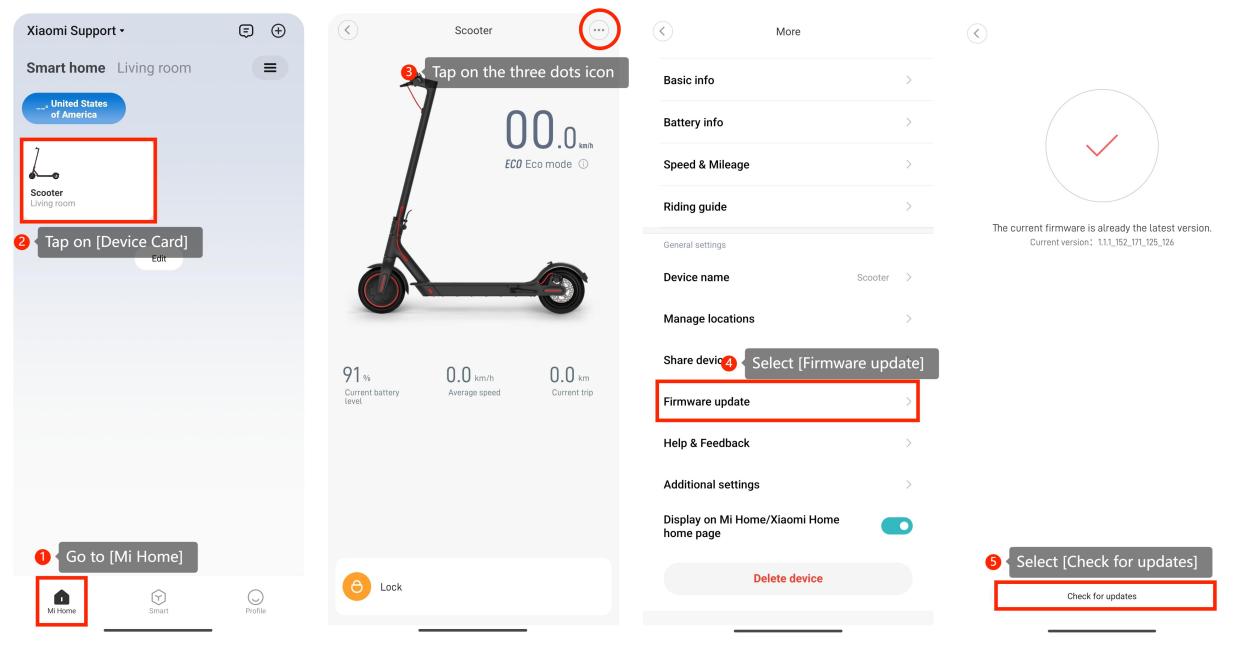
9. You can check for updates on the scooter by going to the Mi Home app >> [Mi Home] >> tap on [Device Card] >> tap on the three dots icon at the upper right corner >> [Firmware update] >> [Check for updates];
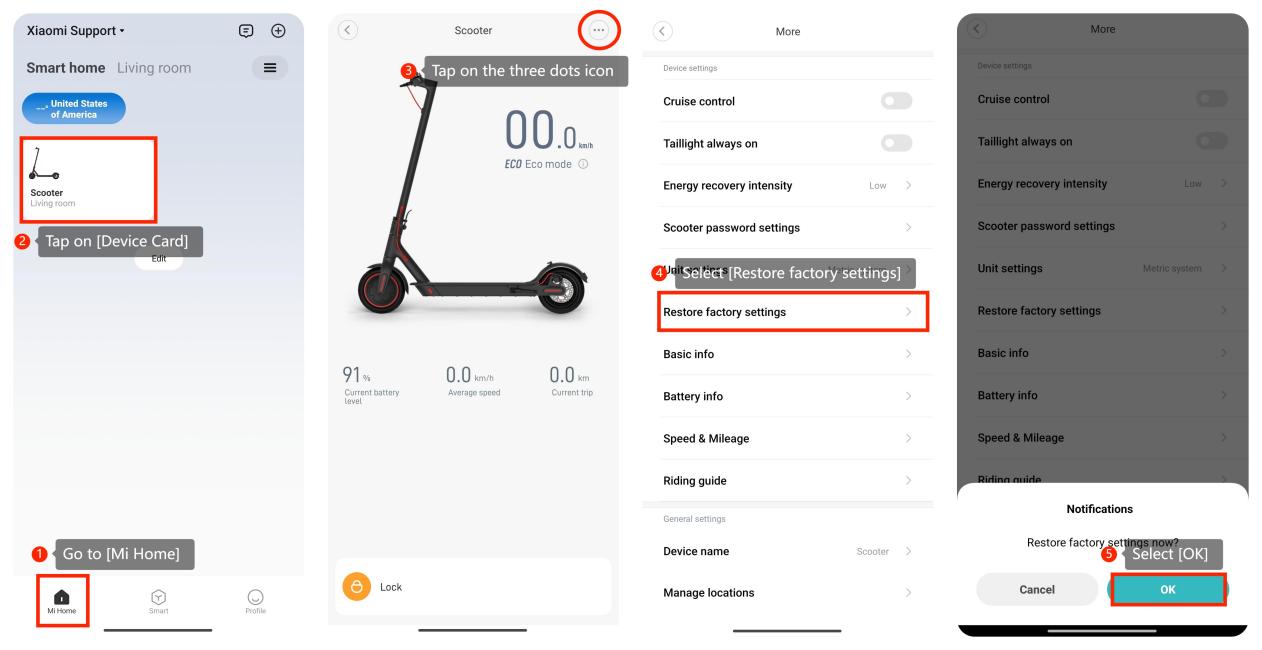
10. Please perform a factory reset on your scooter. Keep in mind that this will erase all personalized settings, so use this option as a last resort. Go to the Mi Home app >> [Mi Home] >> tap on [Device Card] >> tap on the three dots icon at the upper right corner >> [Restore factory settings] >> [OK].
If the above troubleshooting methods can’t resolve the issue, please contact our local official service center or your seller for further assistance. They will help you in this regard.
1. If the dashboard displays fault code 14 or you hear one long beep and four short beeps, it indicates that the throttle should be replaced. In this situation, it is recommended to send the scooter to our service center for repair;
2. Ensure that the scooter has sufficient battery power. Low battery levels can impact the performance of electronic components, including the throttle;
3. Switch riding modes on the scooter to see if the issue persists;
4. For your safety, the throttle can only start working until the scooter exceeds 2.5 mph (4 km/h). If the speed does not exceed 2.5 mph (4 km/h), there is no response after turning the throttle;
5. Make sure no physical obstructions or objects are blocking the throttle. Sometimes, debris or foreign objects can hinder its movement;
6. Check the throttle grip itself for any damage or wear. If the grip is worn out or damaged, it may not properly engage with the throttle mechanism. Consider replacing the grip if necessary;
7. Please check whether there is a gap between the handlebar and the throttle. If there is no gap, the throttle may become stuck. In this case, move the handlebar handle slightly and keep a certain distance between the two parts;
8. Turn off the scooter, wait for a few seconds, and then turn it back on. This simple power cycle can sometimes resolve minor glitches;
9. You can check for updates on the scooter by going to the Mi Home app >> [Mi Home] >> tap on [Device Card] >> tap on the three dots icon at the upper right corner >> [Firmware update] >> [Check for updates];
10. Please perform a factory reset on your scooter. Keep in mind that this will erase all personalized settings, so use this option as a last resort. Go to the Mi Home app >> [Mi Home] >> tap on [Device Card] >> tap on the three dots icon at the upper right corner >> [Restore factory settings] >> [OK].
If the above troubleshooting methods can’t resolve the issue, please contact our local official service center or your seller for further assistance. They will help you in this regard.
Does it help?
Yes
No