

What to do if you fail to open apps on the Xiaomi TV F2 32?
If you fail to open apps on the Xiaomi TV F2 32, please refer to the following troubleshooting steps:
1. Ensure that your TV is connected to a stable network;
2. Restart your TV and try again;
3. If you are using external devices connected to the TV, make sure the HDMI or AV connections are secure. You can reconnect the cables and try again;
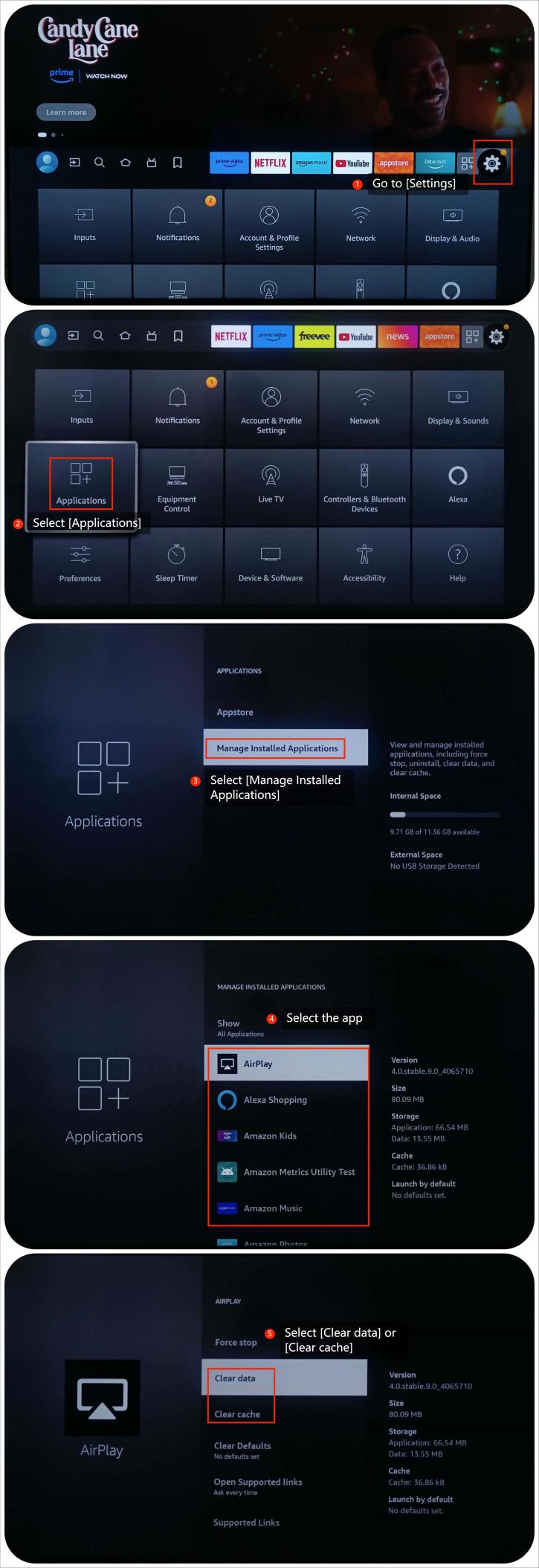
4. Clear the cache and data of the app by going to [Settings] >> [Applications] >> [Manage Installed Applications] >> select the app >> [Clear data] or [Clear cache];
5. Make sure that the app is up to date. Go to the Home screen >> select the [Search for] icon with your remote control >> go to [Appstore] >> select the app you want to update >> press the three-horizontal-lined button on the remote control >> select the [More Info] option and update the app;
6. Reinstall the app and see if the issue still persists. Go to [Apps] >> select [My Apps] >> select the app and press the three horizontal lines button on the remote control, select [Uninstall] and then reinstall the app;
7. Make sure your TV is updated, please check for updates by going to [Settings] >> select [Device & Software] >> select [About] >> [Check for Updates];
8. If the above steps can’t resolve the issue, please perform a factory reset by going to [Settings] >> select [Device & Software] >> select [Reset to Factory Defaults].
Note:
Performing the factory reset will erase all the data on the TV, please back up important data first.
We hope the above methods can resolve the issue. If the issue still persists, you could submit your feedback on your TV by going to [Settings] >> [Help] >> [Send feedback], follow the instructions on this interface.
1. Ensure that your TV is connected to a stable network;
2. Restart your TV and try again;
3. If you are using external devices connected to the TV, make sure the HDMI or AV connections are secure. You can reconnect the cables and try again;
4. Clear the cache and data of the app by going to [Settings] >> [Applications] >> [Manage Installed Applications] >> select the app >> [Clear data] or [Clear cache];
5. Make sure that the app is up to date. Go to the Home screen >> select the [Search for] icon with your remote control >> go to [Appstore] >> select the app you want to update >> press the three-horizontal-lined button on the remote control >> select the [More Info] option and update the app;
6. Reinstall the app and see if the issue still persists. Go to [Apps] >> select [My Apps] >> select the app and press the three horizontal lines button on the remote control, select [Uninstall] and then reinstall the app;
7. Make sure your TV is updated, please check for updates by going to [Settings] >> select [Device & Software] >> select [About] >> [Check for Updates];
8. If the above steps can’t resolve the issue, please perform a factory reset by going to [Settings] >> select [Device & Software] >> select [Reset to Factory Defaults].
Note:
Performing the factory reset will erase all the data on the TV, please back up important data first.
We hope the above methods can resolve the issue. If the issue still persists, you could submit your feedback on your TV by going to [Settings] >> [Help] >> [Send feedback], follow the instructions on this interface.
Does it help?
Yes
No