

What to do if the power indicator light of the Xiaomi TV F2 50 fails to light up?
If the power indicator light on your Xiaomi TV F2 50 fails to illuminate. Here are steps and keywords to troubleshoot this problem:
1. Check the power connection between the Xiaomi Fire TV and the power outlet. Ensure the power cable is securely plugged in;
2. Verify the functionality of the power outlet by plugging in another device. Try using a different power cable to rule out a faulty cable;
3. Make sure that all cables (HDMI, power, etc.) are securely connected to the TV or streaming device. A loose connection might prevent the device from powering on;
4. Make sure the remote control is working correctly and has functioning batteries;
5. If the light itself is not working, please check for signs of physical damage;
6. Ensure the Xiaomi Fire TV has the latest firmware updates installed. Updates may resolve issues related to power management and indicator lights. To check updates, please go to [Settings] >> [Device & Software] >> [About] >> [Check for Updates];
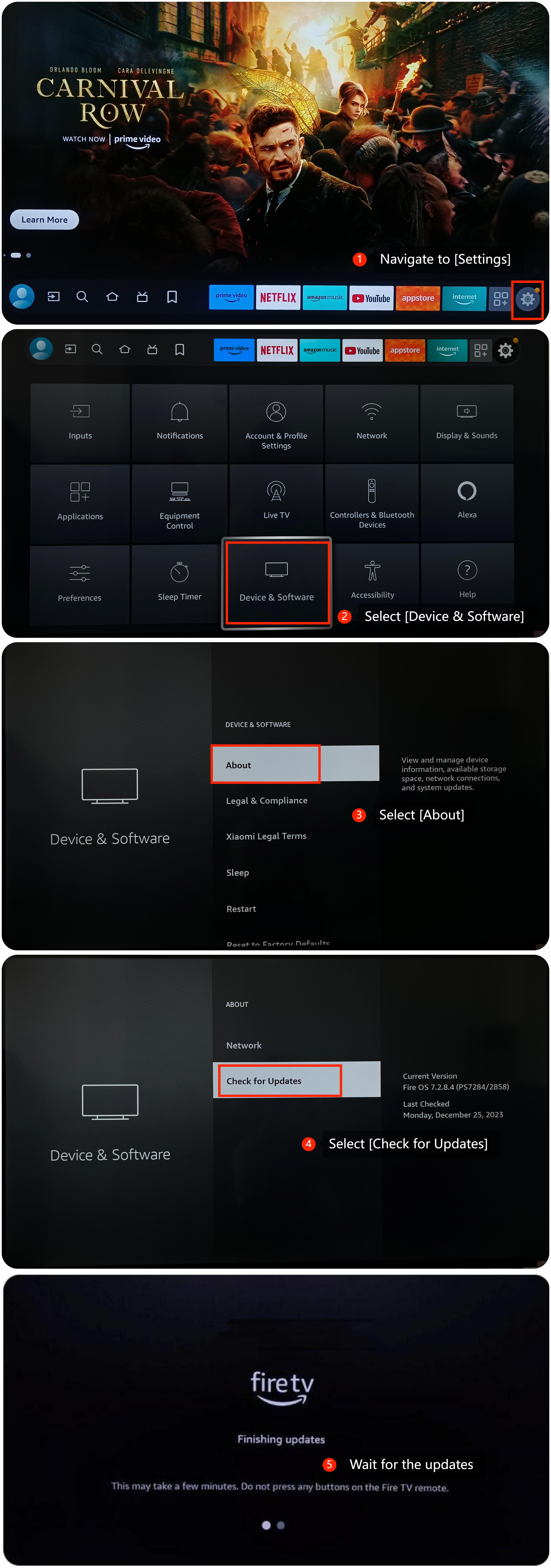
7. Performing a factory reset can sometimes resolve persistent issues. This resets the device to its default settings, so ensure to back up important data before proceeding. To perform a factory reset, go to [Settings] >> [System] >> [About] >> [Reset] >> [Factory reset].
If the above troubleshooting methods can’t resolve the issue, please contact our local official service center or your seller for further assistance. They will help you in this regard.
1. Check the power connection between the Xiaomi Fire TV and the power outlet. Ensure the power cable is securely plugged in;
2. Verify the functionality of the power outlet by plugging in another device. Try using a different power cable to rule out a faulty cable;
3. Make sure that all cables (HDMI, power, etc.) are securely connected to the TV or streaming device. A loose connection might prevent the device from powering on;
4. Make sure the remote control is working correctly and has functioning batteries;
5. If the light itself is not working, please check for signs of physical damage;
6. Ensure the Xiaomi Fire TV has the latest firmware updates installed. Updates may resolve issues related to power management and indicator lights. To check updates, please go to [Settings] >> [Device & Software] >> [About] >> [Check for Updates];
7. Performing a factory reset can sometimes resolve persistent issues. This resets the device to its default settings, so ensure to back up important data before proceeding. To perform a factory reset, go to [Settings] >> [System] >> [About] >> [Reset] >> [Factory reset].
If the above troubleshooting methods can’t resolve the issue, please contact our local official service center or your seller for further assistance. They will help you in this regard.
Does it help?
Yes
No