

What to do if the Xiaomi TV F2 43 is unable to browse the internet or access specific websites?
If your Xiaomi TV F2 43 is unable to browse the internet or access specific websites, please refer to the following steps:
1. Check the Wi-Fi or wired connection settings on the TV to make sure it is connected to the correct network;
2. If your TV can access some websites but not others, it could be a problem with those specific websites. Confirm if the issue is isolated to particular sites;
3. Restart your router and modem. After the restart, try to connect your TV again;
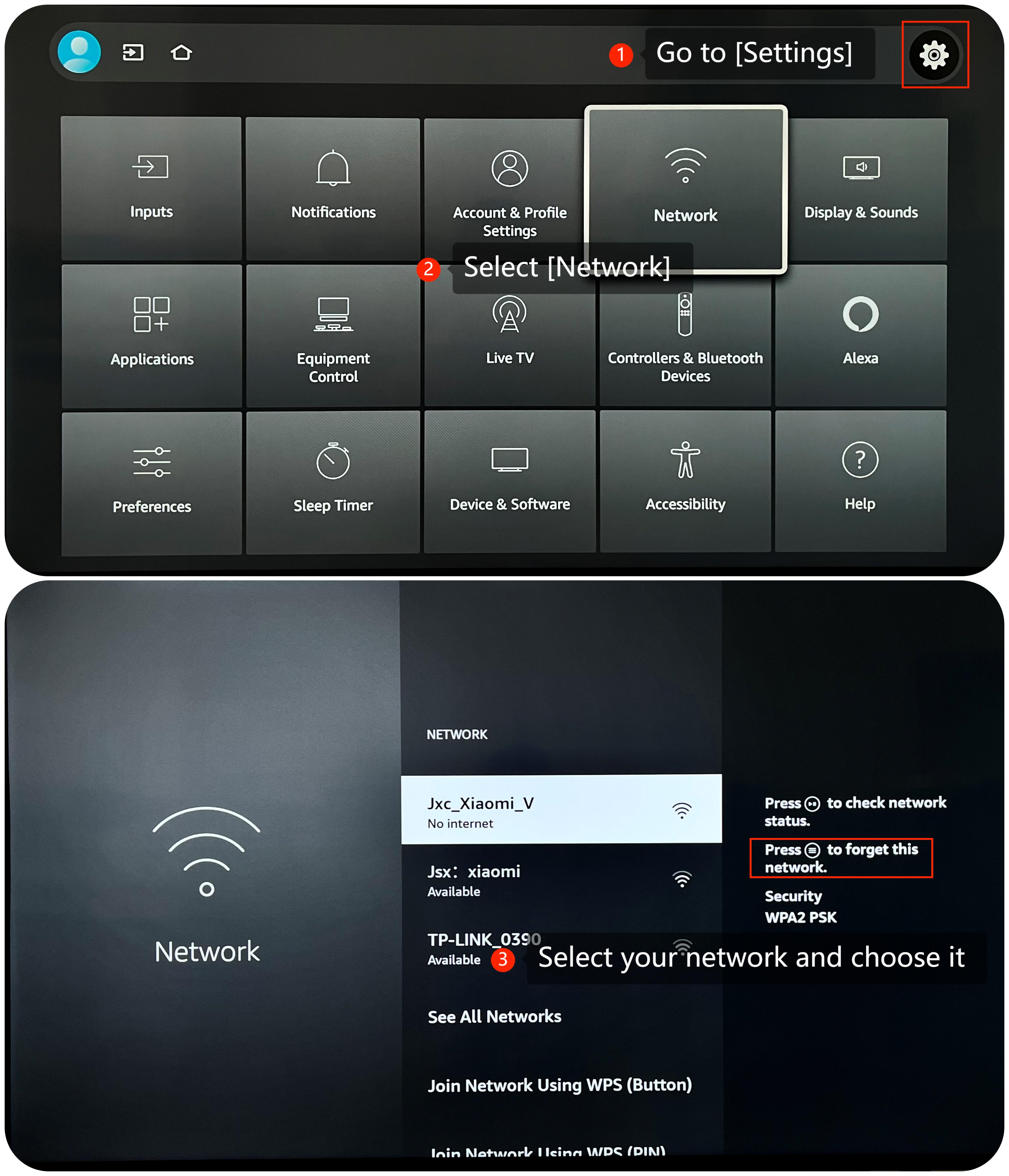
4. If you are using Wi-Fi, try reconnecting the Wi-Fi to see if that resolves the issue by navigating to [Settings] >> [Network] >> choose the Wi-Fi you connected >> forget this network and then reconnect to it;
5. Verify the DNS settings on your TV. You can set the DNS manually in the TV's network settings. Alternatively, you can use your router's DNS settings;
6. Double-check the website URL for typos. Ensure you've entered the correct address;
7. If you are using a VPN or proxy on your TV, try disabling it to see if it's causing the problem. Some VPNs or proxies may restrict access to specific websites;
8. If you have parental control settings or website filtering enabled on your router or within the TV's settings, make sure they are not blocking the websites you want to access;
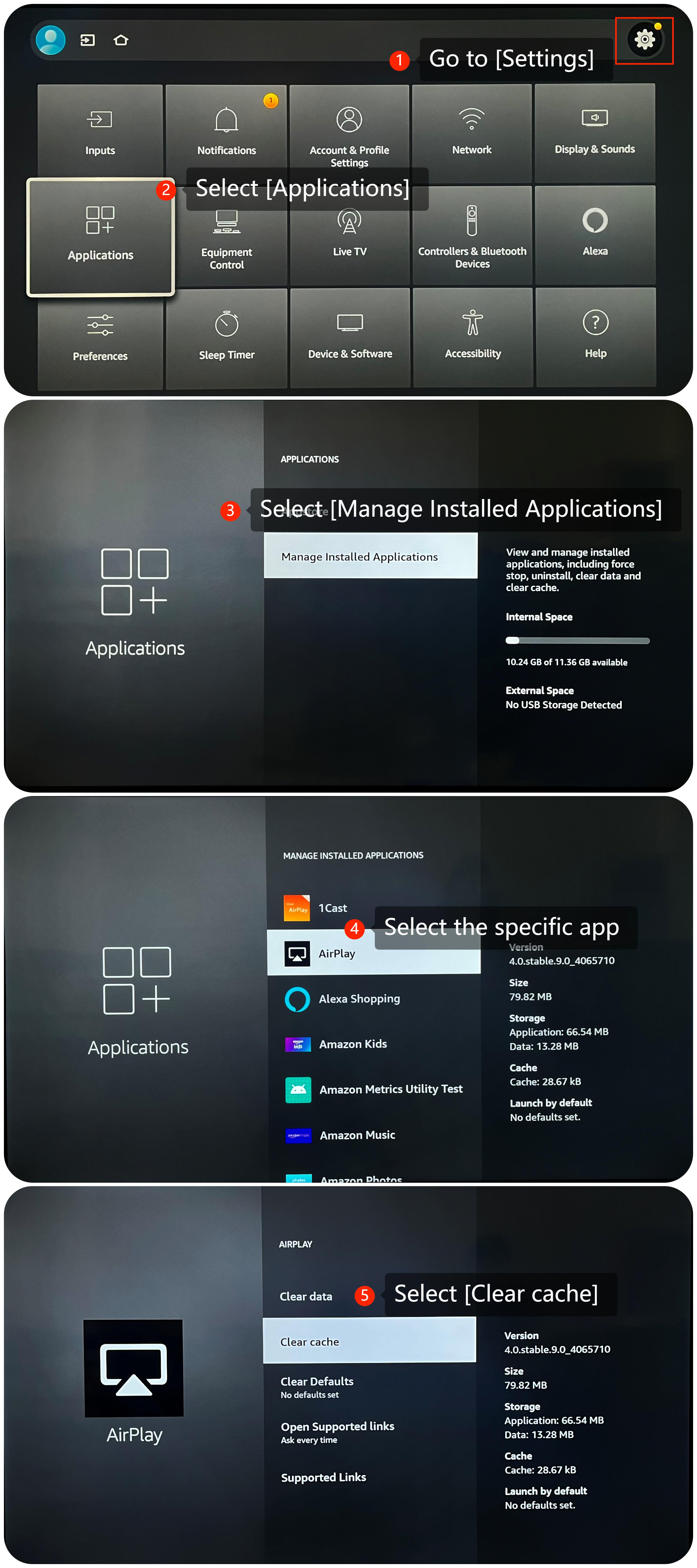
9. Please try clearing the app cache and data by going to [Settings] >> [Applications] >> [Manage Installed Applications] >> select the specific app >> [Clear cache];
10. Make sure that your TV's operating system is up-to-date, which often includes bug fixes and improvements. Go to [Settings] >> [Device & Software] >> [About] >> [Check for Updates];
11. As a last resort, you can try performing a factory reset on your TV. Be aware that this will erase all your settings and data, so make sure to back up any important data before proceeding. Navigate to [Settings] >> [Device & Software] >> [Reset to Factory Defaults].
If the above troubleshooting methods can’t resolve the issue, please contact our local official service center or your seller for further assistance. They will help you in this regard.
1. Check the Wi-Fi or wired connection settings on the TV to make sure it is connected to the correct network;
2. If your TV can access some websites but not others, it could be a problem with those specific websites. Confirm if the issue is isolated to particular sites;
3. Restart your router and modem. After the restart, try to connect your TV again;
4. If you are using Wi-Fi, try reconnecting the Wi-Fi to see if that resolves the issue by navigating to [Settings] >> [Network] >> choose the Wi-Fi you connected >> forget this network and then reconnect to it;
5. Verify the DNS settings on your TV. You can set the DNS manually in the TV's network settings. Alternatively, you can use your router's DNS settings;
6. Double-check the website URL for typos. Ensure you've entered the correct address;
7. If you are using a VPN or proxy on your TV, try disabling it to see if it's causing the problem. Some VPNs or proxies may restrict access to specific websites;
8. If you have parental control settings or website filtering enabled on your router or within the TV's settings, make sure they are not blocking the websites you want to access;
9. Please try clearing the app cache and data by going to [Settings] >> [Applications] >> [Manage Installed Applications] >> select the specific app >> [Clear cache];
10. Make sure that your TV's operating system is up-to-date, which often includes bug fixes and improvements. Go to [Settings] >> [Device & Software] >> [About] >> [Check for Updates];
11. As a last resort, you can try performing a factory reset on your TV. Be aware that this will erase all your settings and data, so make sure to back up any important data before proceeding. Navigate to [Settings] >> [Device & Software] >> [Reset to Factory Defaults].
If the above troubleshooting methods can’t resolve the issue, please contact our local official service center or your seller for further assistance. They will help you in this regard.
Does it help?
Yes
No