

What to do if you fail to cast the computer to the Xiaomi TV F2 50?
When encountering difficulties casting from a computer to the Xiaomi TV F2 50, here are steps to troubleshoot the issue:
1. Please ensure that both the computer and your TV are connected to the same Wi-Fi network;
2. Ensure that there's no interference in the wireless signal. Physical obstacles or other devices can sometimes disrupt the Wi-Fi connection. Move closer to the router or eliminate potential sources of interference;
3. If you're using a wired connection between the computer and TV, ensure the cable is properly connected and in good condition;
4. Ensure that the computer is compatible with casting. Some older computers may not support casting features;
5. Xiaomi TVs often support casting through various methods, such as Miracast, Chromecast, or Apple AirPlay. Make sure you're using a casting method that's compatible with your computer's operating system;
6. If you are using a VPN or have a firewall enabled on your computer, try disabling them temporarily. These can sometimes interfere with casting;
7. Make sure your TV is running the latest firmware or system software. Sometimes, system updates include bug fixes that can address app-related problems. Navigate to [Settings] >> [Device & Software] >> [About] >> [Check for Updates];
8. Make sure your TV's operating system is up-to-date, which often includes bug fixes and improvements. Go to [Settings] >> [Device & Software] >> select [About] >> select [Install Update];
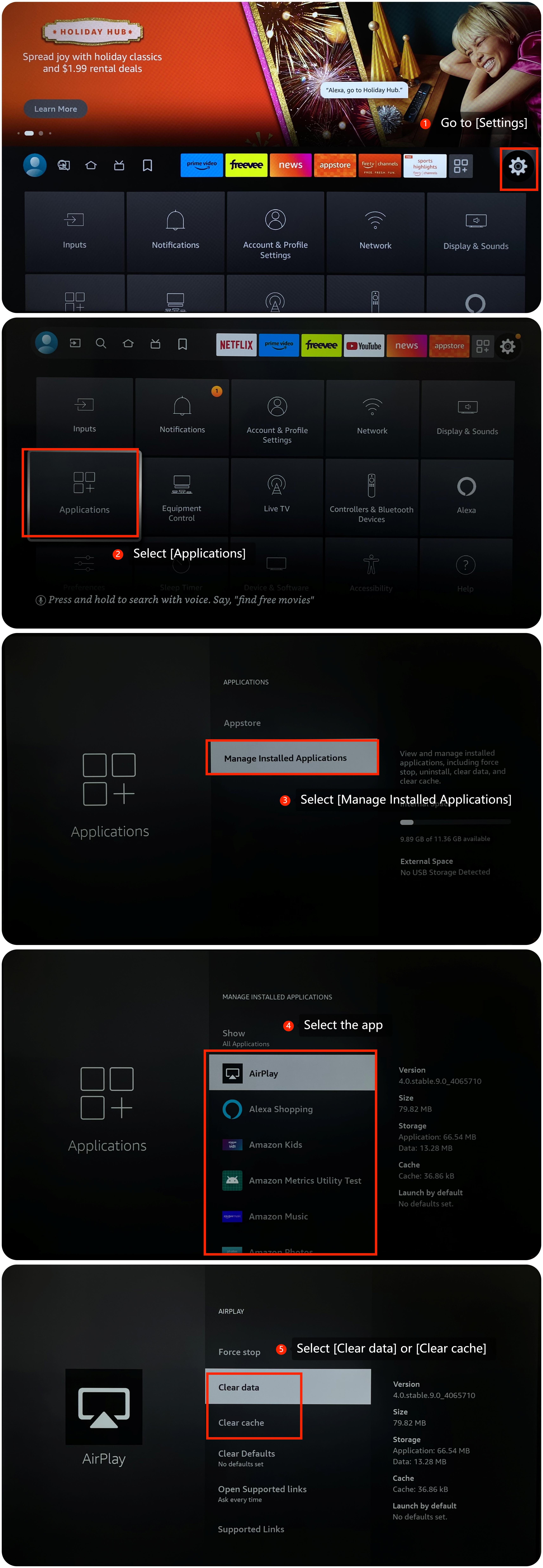
9. Clear cache and data by going to [Settings] >> [Applications] >> [Manage Installed Applications] >> select the app >> [Clear data] or [Clear cache];
10. Reinstall the app and see if the issue still persists. Go to [Apps] >> select [My Apps] >> select the app and press the three horizontal lines button on the remote control, select [Uninstall] and then reinstall the app;
11. If none of the above steps work, you may consider performing a factory reset on your TV. Navigate to [Settings] >> [Device & Software] >> scroll down and select [Reset to Factory Defaults].
We hope the above methods can resolve the issue.
If the issue persists, you could submit your feedback on your TV by going to [Settings] >> [Help] >> [Send feedback], and following the instructions on this interface.
1. Please ensure that both the computer and your TV are connected to the same Wi-Fi network;
2. Ensure that there's no interference in the wireless signal. Physical obstacles or other devices can sometimes disrupt the Wi-Fi connection. Move closer to the router or eliminate potential sources of interference;
3. If you're using a wired connection between the computer and TV, ensure the cable is properly connected and in good condition;
4. Ensure that the computer is compatible with casting. Some older computers may not support casting features;
5. Xiaomi TVs often support casting through various methods, such as Miracast, Chromecast, or Apple AirPlay. Make sure you're using a casting method that's compatible with your computer's operating system;
6. If you are using a VPN or have a firewall enabled on your computer, try disabling them temporarily. These can sometimes interfere with casting;
7. Make sure your TV is running the latest firmware or system software. Sometimes, system updates include bug fixes that can address app-related problems. Navigate to [Settings] >> [Device & Software] >> [About] >> [Check for Updates];
8. Make sure your TV's operating system is up-to-date, which often includes bug fixes and improvements. Go to [Settings] >> [Device & Software] >> select [About] >> select [Install Update];
9. Clear cache and data by going to [Settings] >> [Applications] >> [Manage Installed Applications] >> select the app >> [Clear data] or [Clear cache];
10. Reinstall the app and see if the issue still persists. Go to [Apps] >> select [My Apps] >> select the app and press the three horizontal lines button on the remote control, select [Uninstall] and then reinstall the app;
11. If none of the above steps work, you may consider performing a factory reset on your TV. Navigate to [Settings] >> [Device & Software] >> scroll down and select [Reset to Factory Defaults].
We hope the above methods can resolve the issue.
If the issue persists, you could submit your feedback on your TV by going to [Settings] >> [Help] >> [Send feedback], and following the instructions on this interface.
Does it help?
Yes
No