

What to do if the Xiaomi TV F2 43’s sound is interrupted?
If your Xiaomi TV F2 43’s sound is interrupted, please refer to the following scenarios and troubleshooting methods:
Scenario 1:
If the issue occurs when you are using apps on your TV, please refer to the following methods:
1. Test different sources (such as a different channel, or streaming service) to check if the issue is specific to a particular source or content;
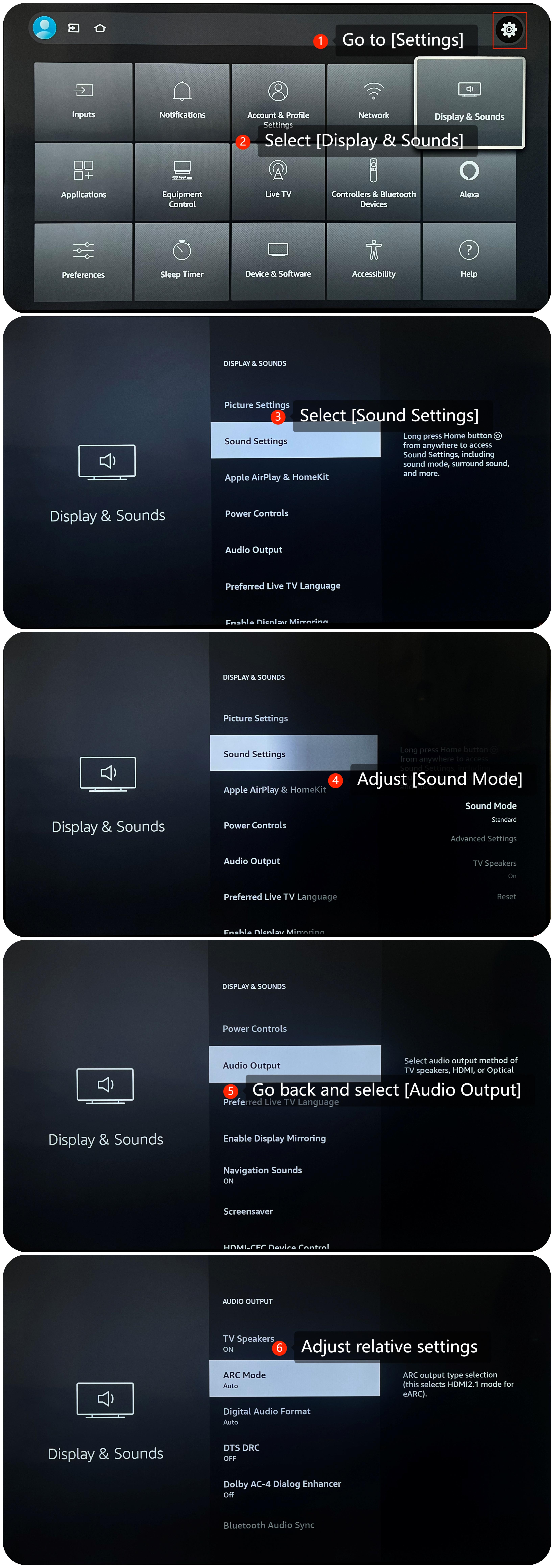
2. You can check and adjust sound settings by going to [Settings] >> [Display & Sounds] >> [Sound settings] >> adjust [Sound Mode]. If the issue persists, you can also select [Reset] to reset the sound settings. Additionally, you can go back and select [Audio Output] to adjust relative settings;
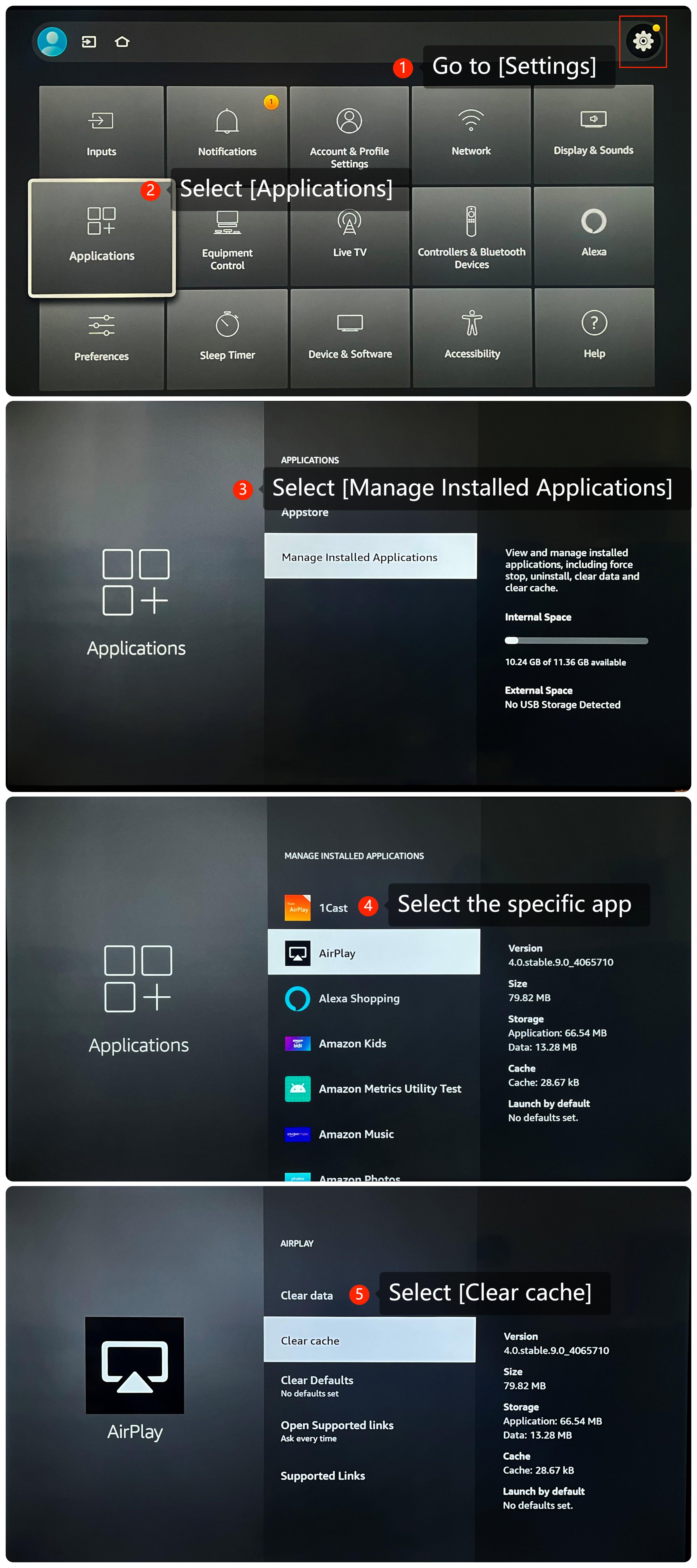
3. Please try clearing the app cache and data by going to [Settings] >> [Applications] >> [Manage Installed Applications] >> select the specific app >> [Clear cache];
4. Ensure that the apps you are using are up to date. Sometimes, app updates can fix the sound issues;
5. If the issue persists, try uninstalling the app and then reinstalling it;
6. Make sure that your TV's operating system is up-to-date, which often includes bug fixes and improvements. Go to [Settings] >> [Device & Software] >> [About] >> [Check for Updates];
7. As a last resort, you can try performing a factory reset on your TV. Be aware that this will erase all your settings and data, so make sure to back up any important data before proceeding. Navigate to [Settings] >> [Device & Software] >> [Reset to Factory Defaults].
Scenario 2:
If the issue occurs when you are using external device like DVD player or game console, please refer to the following methods:
1. Ensure the cables connecting external devices to your TV are firmly and correctly plugged into the appropriate ports;
2. Ensure that your HDMI cable is in good condition. If possible, try using a different HDMI cable to see if the issue persists;
3. Check if the device you’re using has any specific settings for controlling sound.
Scenario 3:
If the issue occurs when you are using casting on your TV, please refer to the following methods:
1. Please ensure that both the casting device and your TV are connected to the same Wi-Fi network with a strong signal;
2. Check the casting device settings for any audio or casting settings. Make sure the casting device is set to the correct audio settings.
If the above troubleshooting methods can’t resolve the issue, please contact our local official service center or your seller for further assistance. They will help you in this regard.
Scenario 1:
If the issue occurs when you are using apps on your TV, please refer to the following methods:
1. Test different sources (such as a different channel, or streaming service) to check if the issue is specific to a particular source or content;
2. You can check and adjust sound settings by going to [Settings] >> [Display & Sounds] >> [Sound settings] >> adjust [Sound Mode]. If the issue persists, you can also select [Reset] to reset the sound settings. Additionally, you can go back and select [Audio Output] to adjust relative settings;
3. Please try clearing the app cache and data by going to [Settings] >> [Applications] >> [Manage Installed Applications] >> select the specific app >> [Clear cache];
4. Ensure that the apps you are using are up to date. Sometimes, app updates can fix the sound issues;
5. If the issue persists, try uninstalling the app and then reinstalling it;
6. Make sure that your TV's operating system is up-to-date, which often includes bug fixes and improvements. Go to [Settings] >> [Device & Software] >> [About] >> [Check for Updates];
7. As a last resort, you can try performing a factory reset on your TV. Be aware that this will erase all your settings and data, so make sure to back up any important data before proceeding. Navigate to [Settings] >> [Device & Software] >> [Reset to Factory Defaults].
Scenario 2:
If the issue occurs when you are using external device like DVD player or game console, please refer to the following methods:
1. Ensure the cables connecting external devices to your TV are firmly and correctly plugged into the appropriate ports;
2. Ensure that your HDMI cable is in good condition. If possible, try using a different HDMI cable to see if the issue persists;
3. Check if the device you’re using has any specific settings for controlling sound.
Scenario 3:
If the issue occurs when you are using casting on your TV, please refer to the following methods:
1. Please ensure that both the casting device and your TV are connected to the same Wi-Fi network with a strong signal;
2. Check the casting device settings for any audio or casting settings. Make sure the casting device is set to the correct audio settings.
If the above troubleshooting methods can’t resolve the issue, please contact our local official service center or your seller for further assistance. They will help you in this regard.
Does it help?
Yes
No