

What to do if the internet runs slowly on the Xiaomi TV A Pro 32?
If you’re experiencing slow internet on your Xiaomi TV A Pro 32, please refer to the following troubleshooting steps:
1. Ensure that your TV is within a reasonable range of your Wi-Fi router as walls and other obstructions can weaken the signal. So try moving the router closer to your TV if possible;
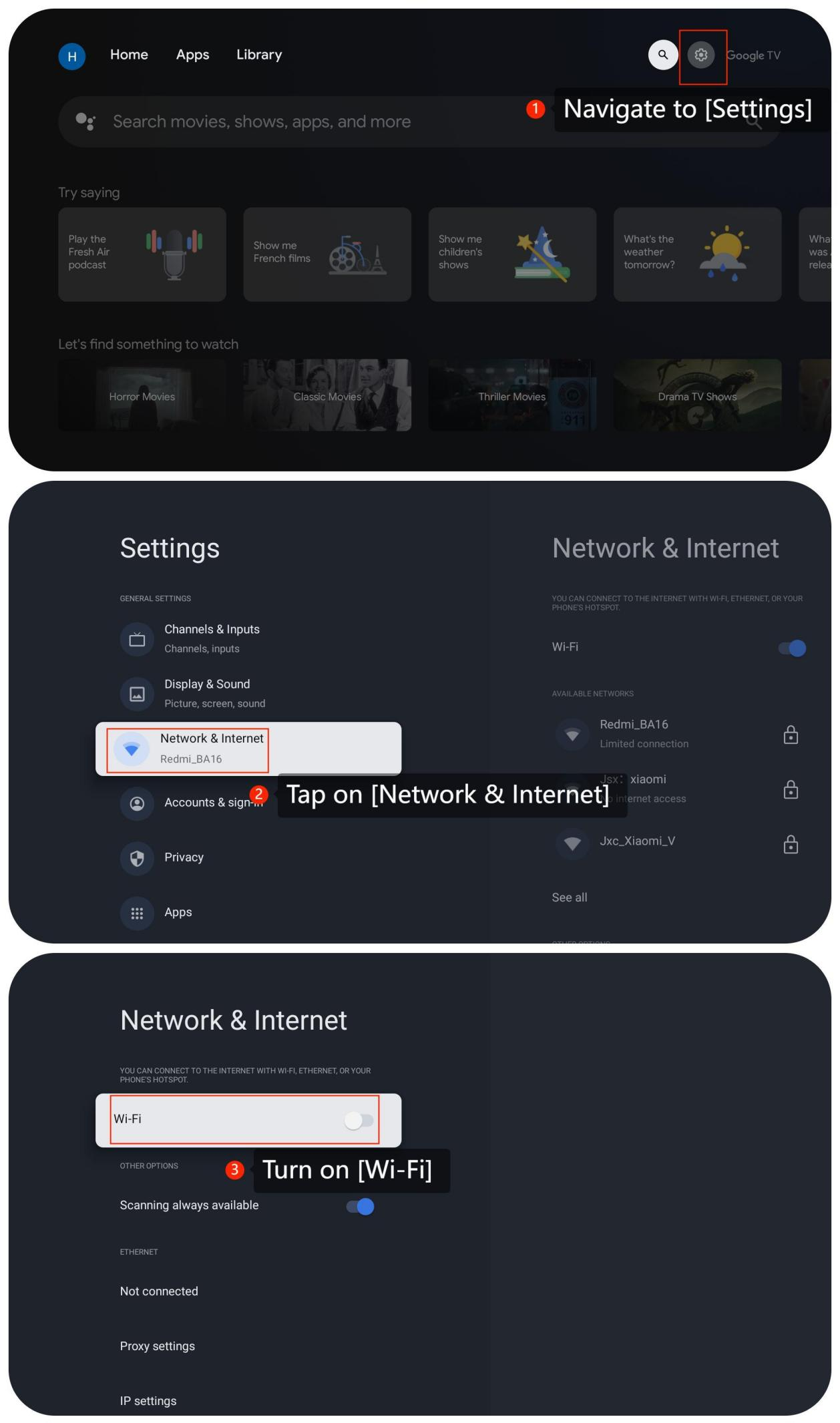
2. Check the internet by going to [Settings] >> [Network & Internet] >> turn on [Wi-Fi] >> check for your network connection and status;
3. Turn off your TV, wait for a few seconds, and then turn it back on, which can sometimes help refresh the system and improve internet performance;
4. If your router supports dual-band Wi-Fi (2.4 GHz and 5 GHz), try switching between them;
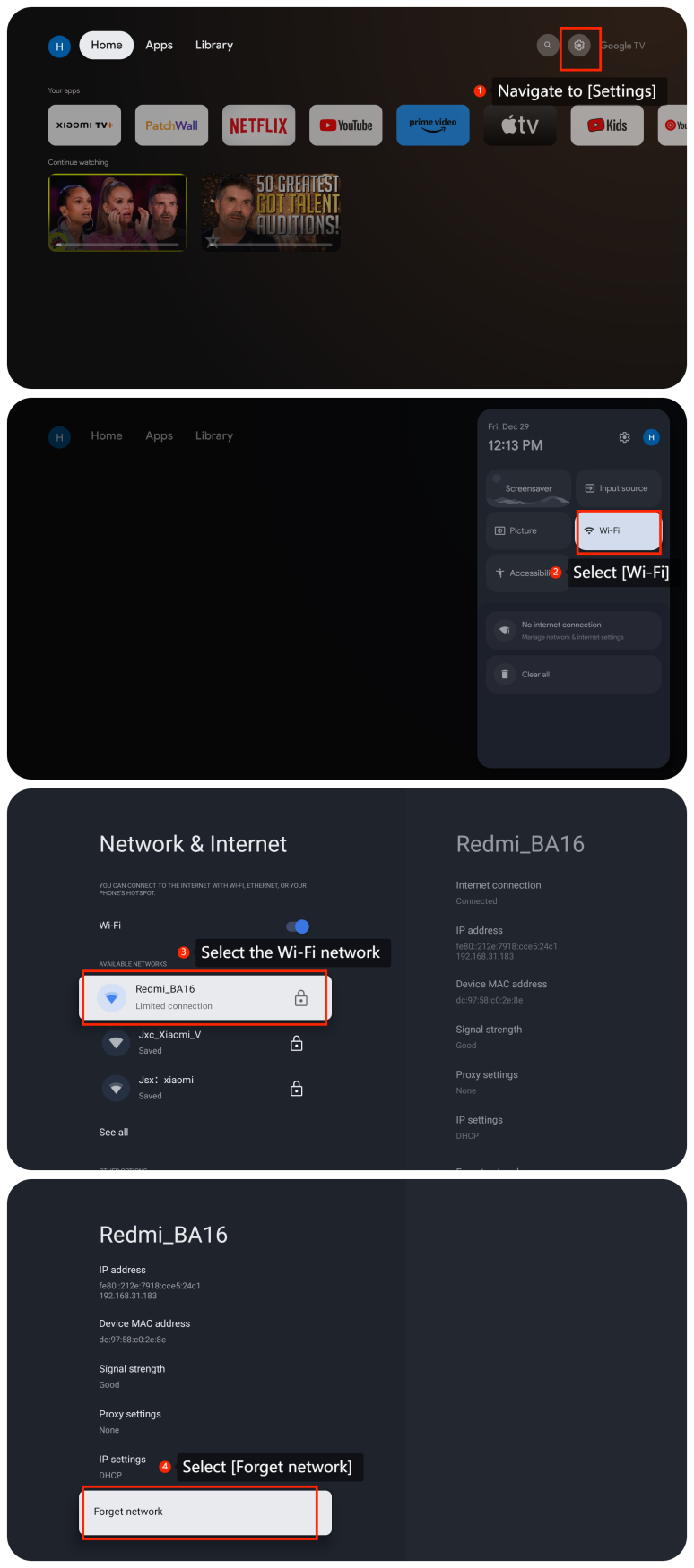
5. You can reset network settings by going to [Settings] >> [Network & Internet] >> select the network >> select [Forget network] and then reconnect to your Wi-Fi network;
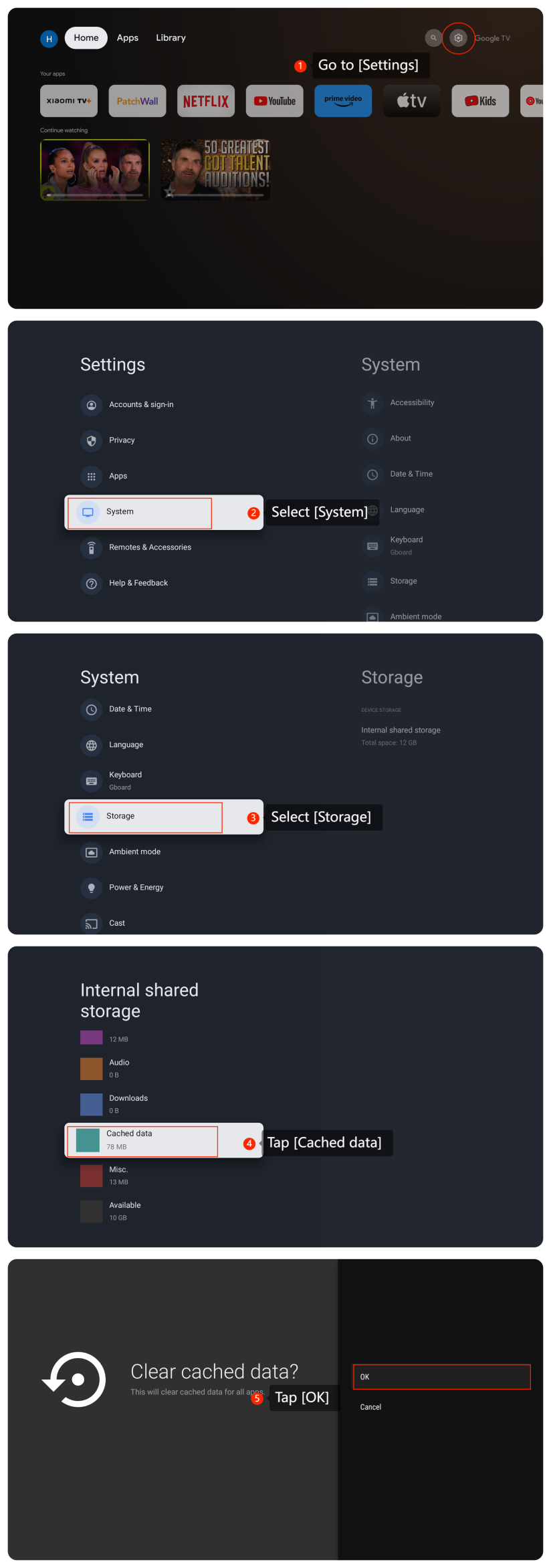
6. Check for apps that are running and clear cache and data to release more space by going to [Settings] >> [System] >> [Storage] >> [Internal shared storage] >> [Cached data] >> tap [OK];
7. If possible, connect your TV directly to the router using an Ethernet cable as wired connections are generally more stable and faster than Wi-Fi;
8. If the issue persists, contact your internet service provider for assistance. They may be able to identify and address any problems with your connection;
9. Ensure that your TV’s firmware and software are up to date so please go to [Settings] >> [System] >> [About] >> [System update];
10. You can perform a factory reset on the TV by going to [Settings] >> [System] >> [About] >> [Reset].
Note:
This will erase all data and settings, returning the device to its default state. So ensure you have backed up any important data before doing this.
If the above troubleshooting methods can’t resolve the issue, please contact our local official service center or your seller for further assistance. They will help you in this regard.
1. Ensure that your TV is within a reasonable range of your Wi-Fi router as walls and other obstructions can weaken the signal. So try moving the router closer to your TV if possible;
2. Check the internet by going to [Settings] >> [Network & Internet] >> turn on [Wi-Fi] >> check for your network connection and status;
3. Turn off your TV, wait for a few seconds, and then turn it back on, which can sometimes help refresh the system and improve internet performance;
4. If your router supports dual-band Wi-Fi (2.4 GHz and 5 GHz), try switching between them;
5. You can reset network settings by going to [Settings] >> [Network & Internet] >> select the network >> select [Forget network] and then reconnect to your Wi-Fi network;
6. Check for apps that are running and clear cache and data to release more space by going to [Settings] >> [System] >> [Storage] >> [Internal shared storage] >> [Cached data] >> tap [OK];
7. If possible, connect your TV directly to the router using an Ethernet cable as wired connections are generally more stable and faster than Wi-Fi;
8. If the issue persists, contact your internet service provider for assistance. They may be able to identify and address any problems with your connection;
9. Ensure that your TV’s firmware and software are up to date so please go to [Settings] >> [System] >> [About] >> [System update];
10. You can perform a factory reset on the TV by going to [Settings] >> [System] >> [About] >> [Reset].
Note:
This will erase all data and settings, returning the device to its default state. So ensure you have backed up any important data before doing this.
If the above troubleshooting methods can’t resolve the issue, please contact our local official service center or your seller for further assistance. They will help you in this regard.
Does it help?
Yes
No