

What to do if the Xiaomi TV A2 55 has color issues?
If you notice the screen has color issues on the Xiaomi TV A2 55, please refer to the following scenarios and their troubleshooting methods:
Scenario 1:
If the issue occurs while you are using apps on your TV, please refer to the following methods:
1. Check if the app you’re using has any specific settings for picture quality as some apps have their own display settings;
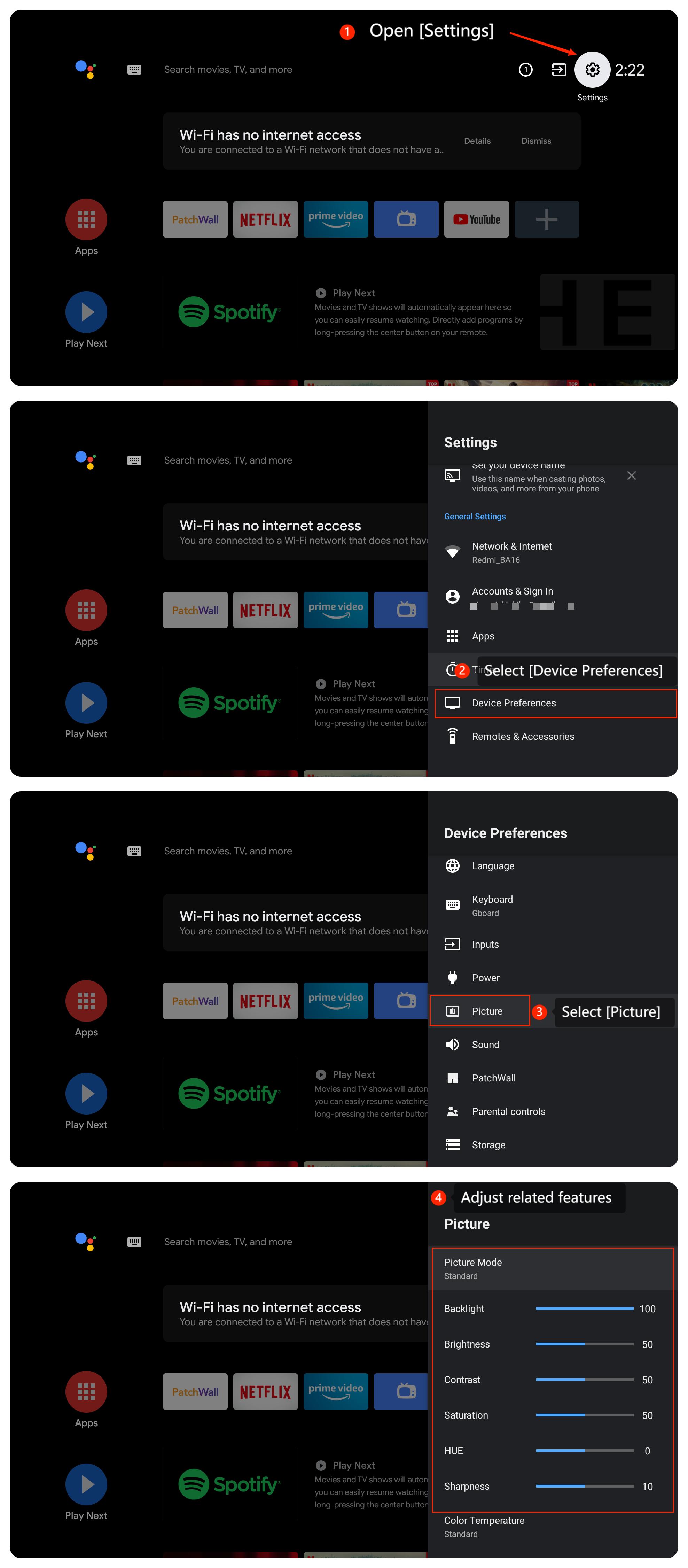
2. Adjust settings related to the picture by going to [Settings] >> [Device Preferences] >> [Picture] >> adjust the settings;
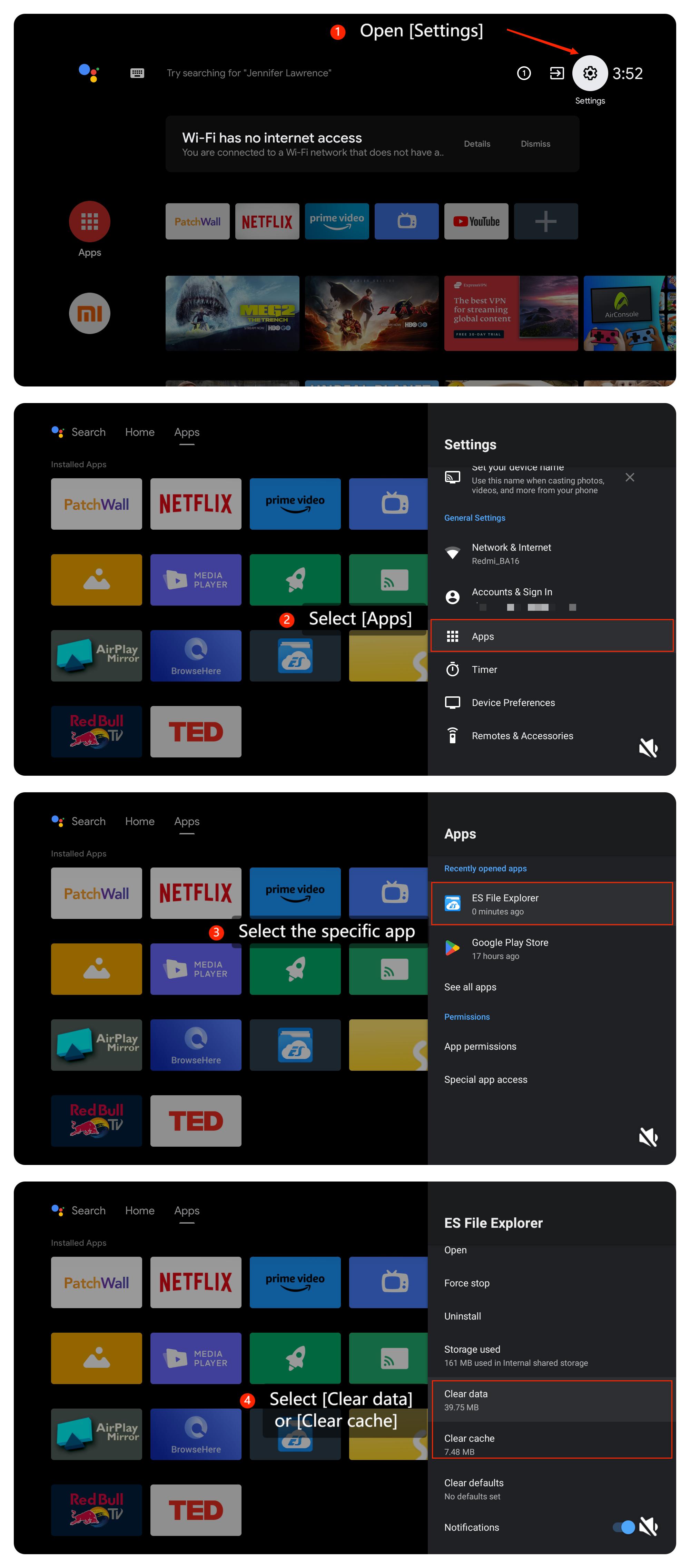
3. Ensure the app you are using has enough storage by opening [Settings] >> [Apps] >> [Clear cache] or [Clear data];
4. Install any available updates and see if that resolves the issue. Please navigate to [Apps] >> select Play Store >> select the icon at the upper right corner >> [Manage apps & games] >> [Updates] >> [Check for updates];
Scenario 1:
If the issue occurs while you are using apps on your TV, please refer to the following methods:
1. Check if the app you’re using has any specific settings for picture quality as some apps have their own display settings;
2. Adjust settings related to the picture by going to [Settings] >> [Device Preferences] >> [Picture] >> adjust the settings;
3. Ensure the app you are using has enough storage by opening [Settings] >> [Apps] >> [Clear cache] or [Clear data];
4. Install any available updates and see if that resolves the issue. Please navigate to [Apps] >> select Play Store >> select the icon at the upper right corner >> [Manage apps & games] >> [Updates] >> [Check for updates];
5. You can uninstall the app and reinstall it from the Play Store;
6. Turn off the TV, unplug the power cord and for two minutes, then reconnect the power cable and turn on the TV. A power reset or restart of the TV is a recommended troubleshooting step that resolves many temporary issues;
7. Ensure the TV’s firmware and software are up-to-date by going to [Settings] >> [Device Preferences] >> [About] >> [System update];
8. If the issue persists, please go to [Settings] >> [Device Preferences] >> [Reset].
Note:
Be aware that this will erase all data and settings on your TV. So make sure to back up important information before proceeding.
Scenario 2:
If the issue occurs while you are using an external device like a DVD player or game console on your TV, please refer to the following methods:
1. Ensure that all cables as well as source devices like HDMI or gaming consoles are securely connected to the TV. Try replacing the cables if they appear damaged or loose;
2. Verify both your TV and external devices are under a stable internet connection;
3. Inspect the cables and connections between the TV and external devices to make sure they are properly connected and undamaged;
4. Check the HDMI port on the TV for any physical damage or debris that might be obstructing the connection. Be very careful if you’re attempting to clean the HDMI port and make sure the TV is unplugged.
Scenario 3:
If the issue occurs while you are casting on your TV, please refer to the following methods:
1. Ensure that the content being played from the casting device doesn’t have a color issue. Media quality might be damaged from their source or might be affected during casting;
2. Make sure the casting device is set to the correct picture settings;
3. Please ensure that both the casting device such as your computer or your smartphone and your TV are connected to the same Wi-Fi network.
If the above troubleshooting methods can’t resolve the issue, please contact our local official service center or your seller for further assistance. They will help you in this regard.
6. Turn off the TV, unplug the power cord and for two minutes, then reconnect the power cable and turn on the TV. A power reset or restart of the TV is a recommended troubleshooting step that resolves many temporary issues;
7. Ensure the TV’s firmware and software are up-to-date by going to [Settings] >> [Device Preferences] >> [About] >> [System update];
8. If the issue persists, please go to [Settings] >> [Device Preferences] >> [Reset].
Note:
Be aware that this will erase all data and settings on your TV. So make sure to back up important information before proceeding.
Scenario 2:
If the issue occurs while you are using an external device like a DVD player or game console on your TV, please refer to the following methods:
1. Ensure that all cables as well as source devices like HDMI or gaming consoles are securely connected to the TV. Try replacing the cables if they appear damaged or loose;
2. Verify both your TV and external devices are under a stable internet connection;
3. Inspect the cables and connections between the TV and external devices to make sure they are properly connected and undamaged;
4. Check the HDMI port on the TV for any physical damage or debris that might be obstructing the connection. Be very careful if you’re attempting to clean the HDMI port and make sure the TV is unplugged.
Scenario 3:
If the issue occurs while you are casting on your TV, please refer to the following methods:
1. Ensure that the content being played from the casting device doesn’t have a color issue. Media quality might be damaged from their source or might be affected during casting;
2. Make sure the casting device is set to the correct picture settings;
3. Please ensure that both the casting device such as your computer or your smartphone and your TV are connected to the same Wi-Fi network.
If the above troubleshooting methods can’t resolve the issue, please contact our local official service center or your seller for further assistance. They will help you in this regard.
Does it help?
Yes
No