

What to do if the bass effect of the Xiaomi TV F2 55 is abnormal?
If the Xiaomi TV F2 55 lacks bass or the bass effect is weak, please refer to the following troubleshooting steps:
Scenario 1:
If the issue occurs when you are using apps on your TV, please refer to the following methods:
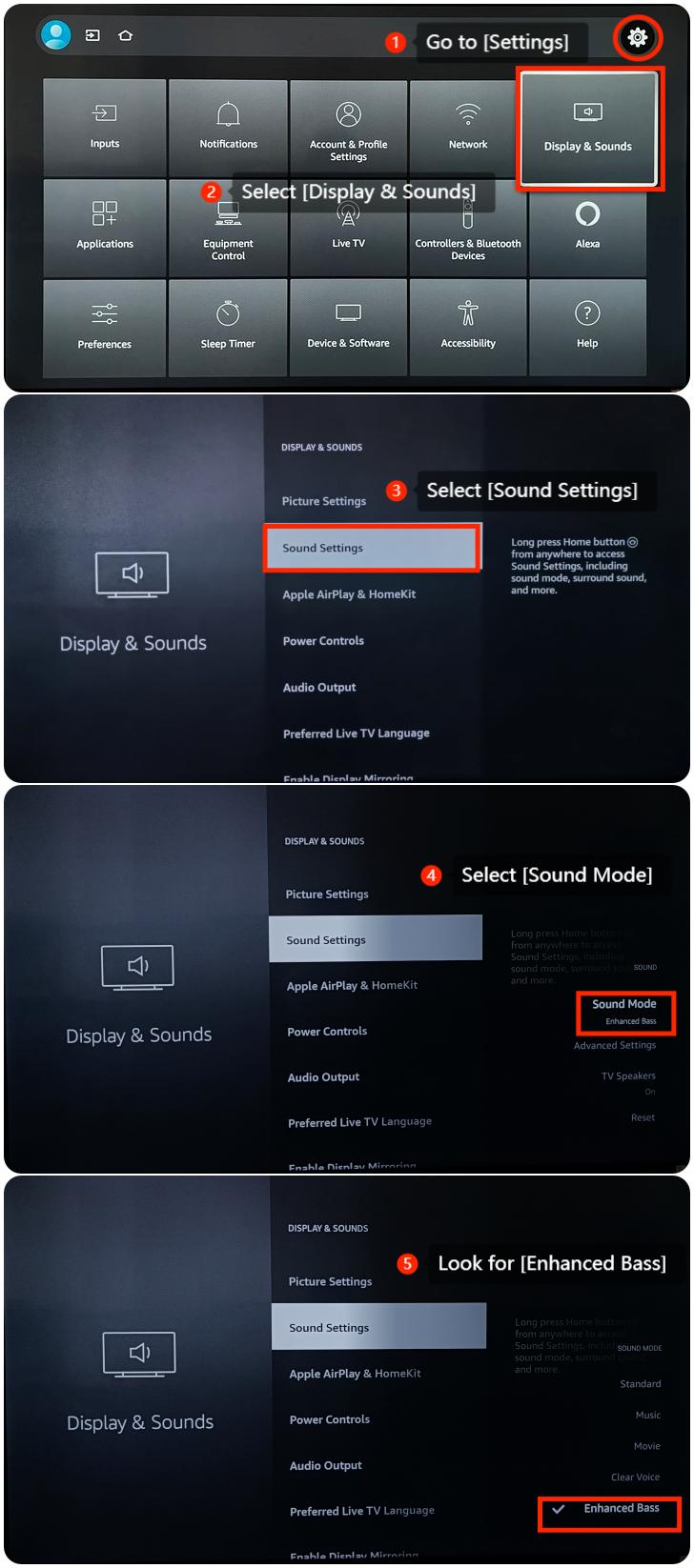
1. Go to [Settings] >> [Display & Sounds] >> [Sound Settings] >> [Sound Mode] >> look for [Enhanced Bass] and choose whether to use Enhanced Bass mode as you prefer;
Scenario 1:
If the issue occurs when you are using apps on your TV, please refer to the following methods:
1. Go to [Settings] >> [Display & Sounds] >> [Sound Settings] >> [Sound Mode] >> look for [Enhanced Bass] and choose whether to use Enhanced Bass mode as you prefer;
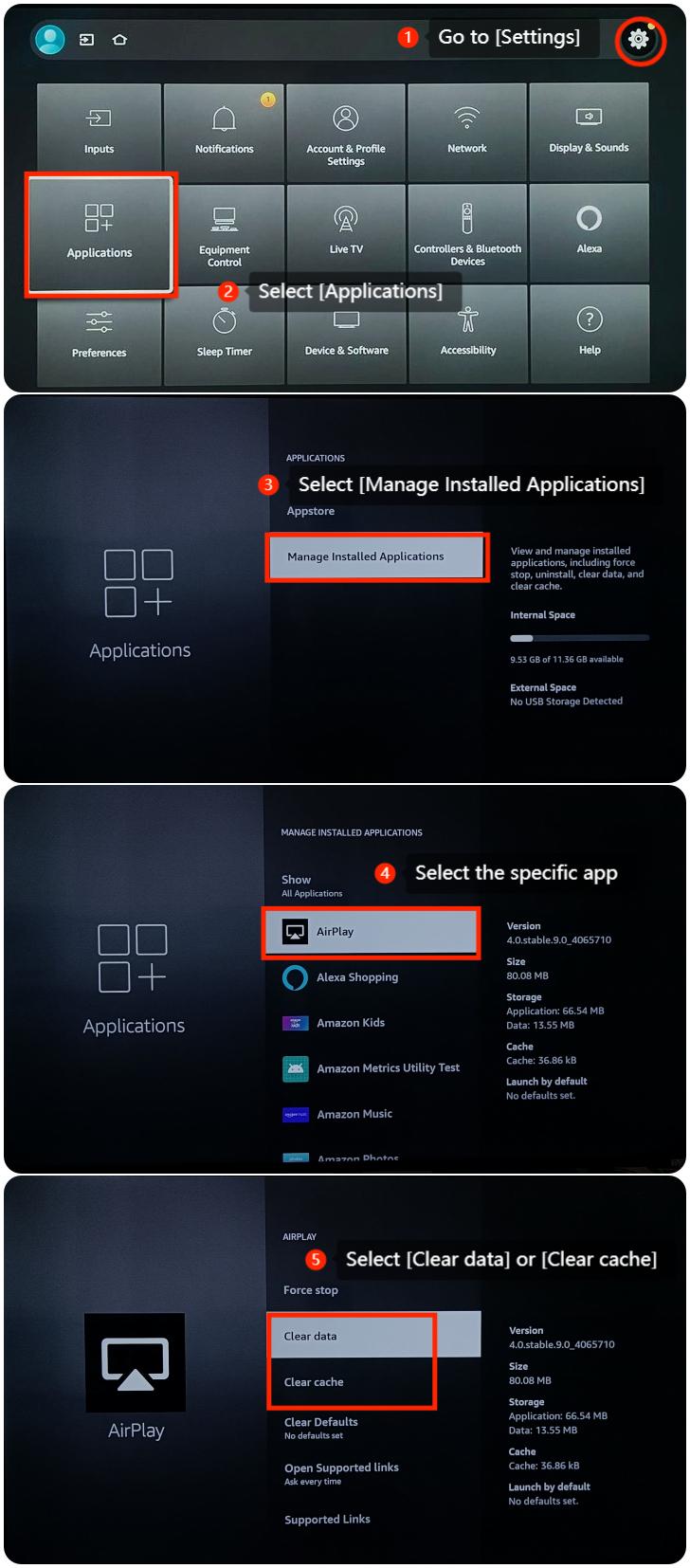
2. If the issue persists with a specific app, please clear the cache or data of the app by going to [Settings] >> [Applications] >> [Manage Installed Applications] >> select the specific app >> select [Clear data] or [Clear cache];
3. Ensure that the apps you are using are updated to the latest versions. Outdated apps may have bugs or compatibility issues that could affect audio performance;
4. If the issue persists, try uninstalling the app and then reinstalling it;
5. Please check for updates by navigating to the [Settings] icon >> [Device & Software] >> [About] >> [Check for Updates];
6. If all other methods fail, please reset your TV to the factory defaults by navigating to [Settings] >> [Device & Software] >> [Reset to Factory Defaults] >> [Reset].
Scenario 2:
If the issue occurs when you are using an external device like a DVD player or game console, please refer to the following methods:
1. Make sure the HDMI cable connecting the external device to your TV is securely plugged in. Try using a different HDMI cable or port to rule out any issues with the connection;
2. Verify the audio settings on your external device. Ensure that the bass and audio settings are configured correctly;
3. Try playing different content on the external device to see if the abnormal bass is consistent across various sources. This can help identify whether the issue is content-specific;
4. If you have a surround sound system, check its settings. Make sure that the speaker configuration and bass settings are appropriate for your setup;
5. Ensure that the firmware or software of your external device is up to date.
Scenario 3:
If the issue occurs when you are using casting on your TV, please refer to the following methods:
1. Ensure that the casting source (e.g., smartphone, tablet, computer) has its audio settings configured correctly. Check the volume and bass settings on the casting device to make sure they are appropriate;
2. Ensure there are no other electronic devices or sources of interference that may be affecting the wireless casting connection;
3. Try casting from a different device to see if the issue persists. This can help determine whether the problem is with the casting device or the Fire TV.
If the above troubleshooting methods can’t resolve the issue, please contact our local official service center or your seller for further assistance. They will help you in this regard.
4. If the issue persists, try uninstalling the app and then reinstalling it;
5. Please check for updates by navigating to the [Settings] icon >> [Device & Software] >> [About] >> [Check for Updates];
6. If all other methods fail, please reset your TV to the factory defaults by navigating to [Settings] >> [Device & Software] >> [Reset to Factory Defaults] >> [Reset].
Scenario 2:
If the issue occurs when you are using an external device like a DVD player or game console, please refer to the following methods:
1. Make sure the HDMI cable connecting the external device to your TV is securely plugged in. Try using a different HDMI cable or port to rule out any issues with the connection;
2. Verify the audio settings on your external device. Ensure that the bass and audio settings are configured correctly;
3. Try playing different content on the external device to see if the abnormal bass is consistent across various sources. This can help identify whether the issue is content-specific;
4. If you have a surround sound system, check its settings. Make sure that the speaker configuration and bass settings are appropriate for your setup;
5. Ensure that the firmware or software of your external device is up to date.
Scenario 3:
If the issue occurs when you are using casting on your TV, please refer to the following methods:
1. Ensure that the casting source (e.g., smartphone, tablet, computer) has its audio settings configured correctly. Check the volume and bass settings on the casting device to make sure they are appropriate;
2. Ensure there are no other electronic devices or sources of interference that may be affecting the wireless casting connection;
3. Try casting from a different device to see if the issue persists. This can help determine whether the problem is with the casting device or the Fire TV.
If the above troubleshooting methods can’t resolve the issue, please contact our local official service center or your seller for further assistance. They will help you in this regard.
Does it help?
Yes
No