

What to do if there is watermark or image residue on the Xiaomi TV F2 43 screen?
If you notice a watermark or image residue on the screen of your Xiaomi TV F2 43, here are some methods to address the issue:
1. Determine whether the watermark is temporary (like image retention) or a permanent problem (such as burn-in);
2. If the watermark is temporary, please gently wipe it with a soft, microfiber cloth. Please notice that do not use any tough methods to clean the screen, as this can potentially worsen the issue;
3. If the watermark is permanent, you can refer to the following steps:
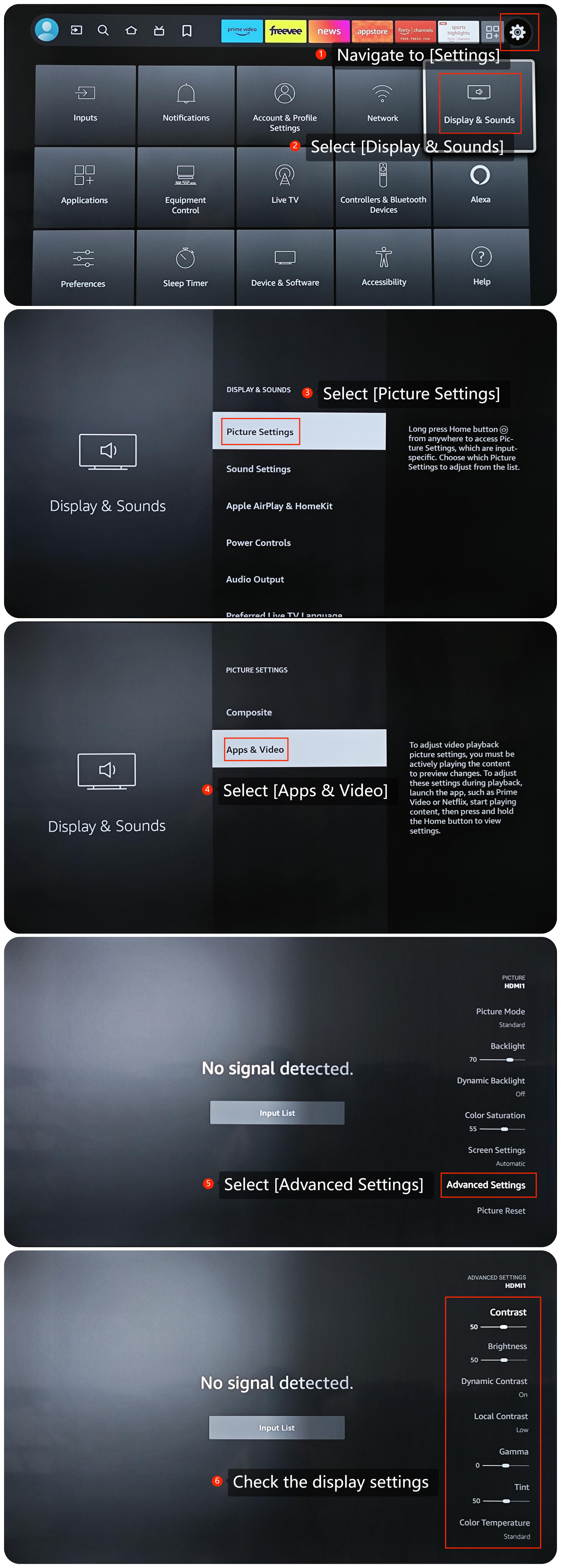
(1). Navigate to [Settings] >> select [Display &Sounds] >> [Apps & Video] >> scroll down and find [Advanced Settings] >> select the setting you want to change;
(2). Limit displaying static images or leaving the same image on the screen for too long time to prevent future image retention issues;
(3). Please display a moving pattern or solid color for a period, as solid colors or moving patterns can help reduce image retention;
4. If all other methods fail, please reset your TV to the factory defaults. Go to [Settings] >> select [Device & Software] >> scroll down to find [Reset to Factory Defaults] and select it.
If the above troubleshooting methods can’t resolve the issue, please contact our local official service center or your seller for further assistance. They will help you in this regard.
1. Determine whether the watermark is temporary (like image retention) or a permanent problem (such as burn-in);
2. If the watermark is temporary, please gently wipe it with a soft, microfiber cloth. Please notice that do not use any tough methods to clean the screen, as this can potentially worsen the issue;
3. If the watermark is permanent, you can refer to the following steps:
(1). Navigate to [Settings] >> select [Display &Sounds] >> [Apps & Video] >> scroll down and find [Advanced Settings] >> select the setting you want to change;
(2). Limit displaying static images or leaving the same image on the screen for too long time to prevent future image retention issues;
(3). Please display a moving pattern or solid color for a period, as solid colors or moving patterns can help reduce image retention;
4. If all other methods fail, please reset your TV to the factory defaults. Go to [Settings] >> select [Device & Software] >> scroll down to find [Reset to Factory Defaults] and select it.
If the above troubleshooting methods can’t resolve the issue, please contact our local official service center or your seller for further assistance. They will help you in this regard.
Does it help?
Yes
No