

What to do if online audios or videos cannot be played on the Xiaomi TV A Pro 55?
If online audios or videos cannot be played on the Xiaomi TV A Pro 55, please refer to the following troubleshooting steps:
1. Ensure that your TV is connected to the internet and that the connection is stable. Accordingly, you can try restarting your router or connecting to a different network to see if the issue persists;
2. Sometimes, restarting the TV can resolve temporary glitches. Turn it off, wait for a minute, and then turn it back on;
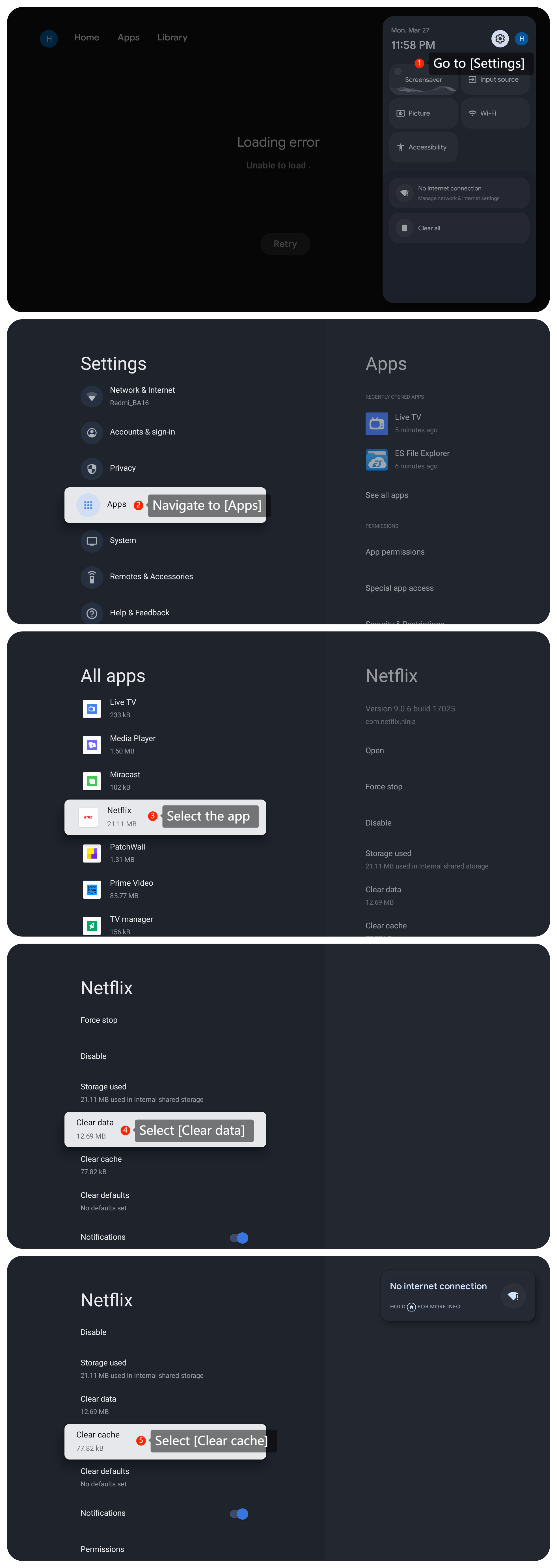
3. If the issue is specific to certain apps, try clearing the cache or data of those apps by going to [Settings] >> [Apps] >> select the app >> [Clear data] and [Clear cache];
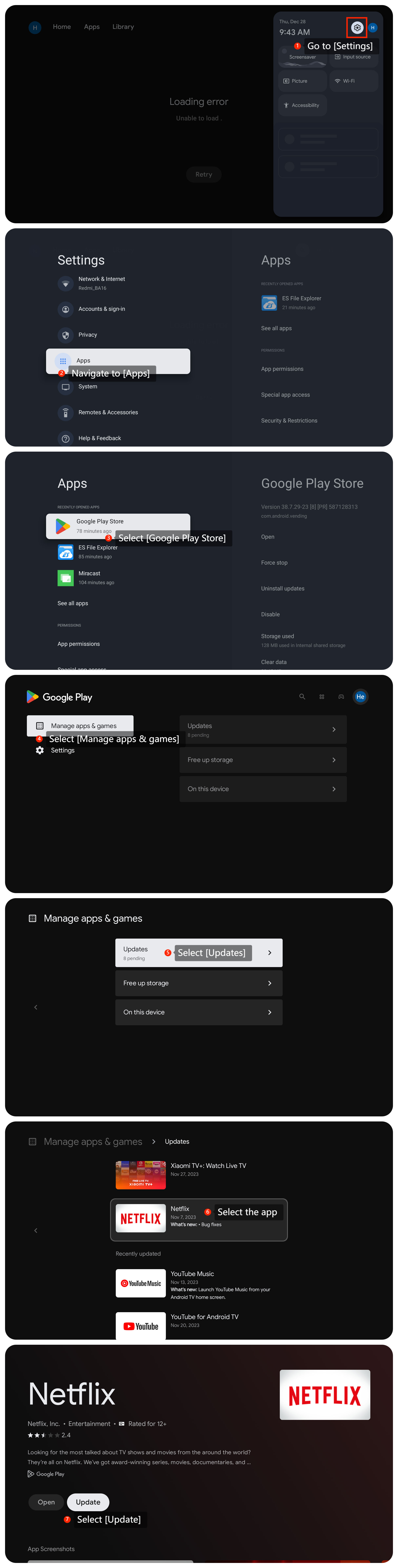
4. Make sure the apps you're using for streaming are updated to the latest versions by going to [Settings] >> [Apps] >> [Google Play Store] >> [Manage apps & games] >> [Updates] >> select the app >> [Update];
5. If you're using external devices or cables to connect to the TV, ensure they are properly connected and not damaged;
6. Ensure that your TV has the latest software updates installed by going to [Settings] >> [System] >> [About] >> [System update] and check for updates;
7. As a last resort, consider performing a factory reset on your TV by going to [Settings] >> [System] >> [About] >> [Reset] >> [Factory reset]. This will erase all the data on your TV, so make sure to back up important data before proceeding.
If the above troubleshooting methods can’t resolve the issue, please contact our local official service center or your seller for further assistance. They will help you in this regard.
1. Ensure that your TV is connected to the internet and that the connection is stable. Accordingly, you can try restarting your router or connecting to a different network to see if the issue persists;
2. Sometimes, restarting the TV can resolve temporary glitches. Turn it off, wait for a minute, and then turn it back on;
3. If the issue is specific to certain apps, try clearing the cache or data of those apps by going to [Settings] >> [Apps] >> select the app >> [Clear data] and [Clear cache];
4. Make sure the apps you're using for streaming are updated to the latest versions by going to [Settings] >> [Apps] >> [Google Play Store] >> [Manage apps & games] >> [Updates] >> select the app >> [Update];
5. If you're using external devices or cables to connect to the TV, ensure they are properly connected and not damaged;
6. Ensure that your TV has the latest software updates installed by going to [Settings] >> [System] >> [About] >> [System update] and check for updates;
7. As a last resort, consider performing a factory reset on your TV by going to [Settings] >> [System] >> [About] >> [Reset] >> [Factory reset]. This will erase all the data on your TV, so make sure to back up important data before proceeding.
If the above troubleshooting methods can’t resolve the issue, please contact our local official service center or your seller for further assistance. They will help you in this regard.
Does it help?
Yes
No