

What to do if the Appstore on the Xiaomi TV F2 50 is not accessible?
If the Appstore on your Xiaomi TV F2 50 is not accessible, please refer to the following troubleshooting steps:
1. Ensure that your TV is connected to the internet and that the connection is stable. A weak or unstable internet connection can cause download and update issues. Navigate to [Settings] >> [Network] >> Make sure [Enable Wi-Fi/Ethernet] is on;
2. Restarting your TV can resolve many temporary issues. You can restart your TV by navigating to [Settings] >> [Device & Software] >> select [Restart];
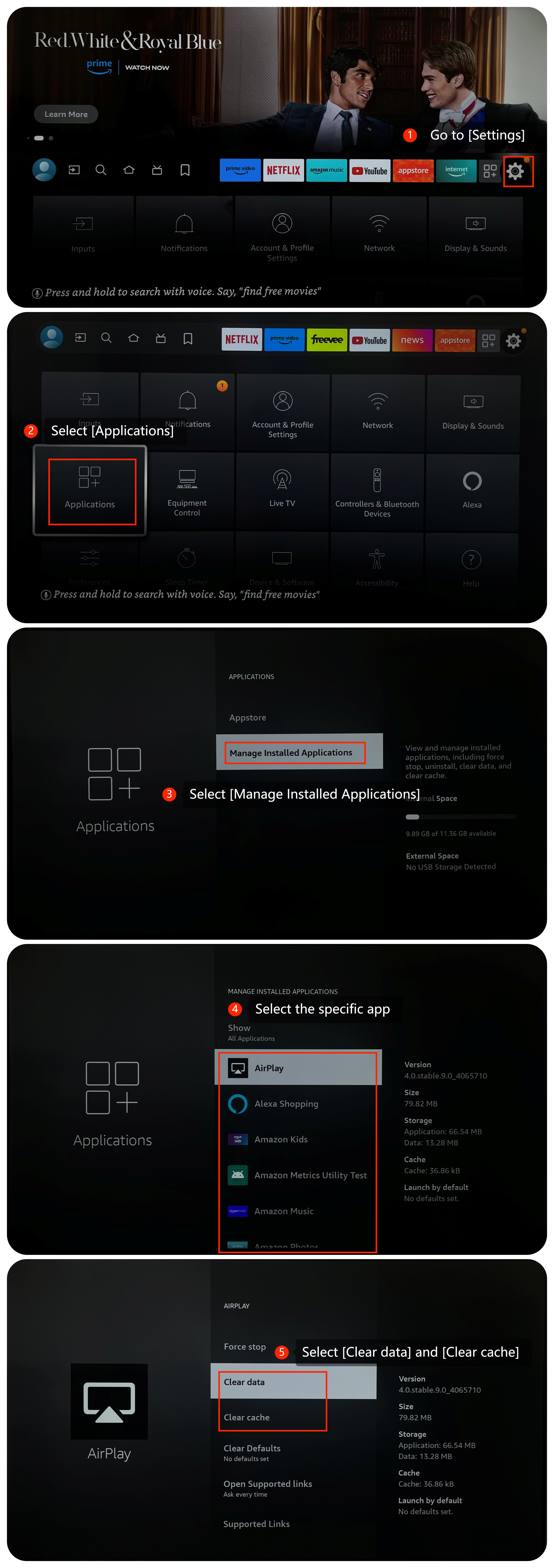
3. Try clearing the app's cache and data by going to [Settings] >> select [Applications] >> [Manage Installed Applications] >> select the specific app >> select [Clear data] and [Clear cache];
4. Make sure that your TV's operating system is up-to-date, which often includes bug fixes and improvements. Go to [Settings] >> [Device & Software] >> select [About] >> select [Install Update];
5. If the issue persists, you can consider performing a factory reset. This will erase all data and settings, so make sure to back up your important data first. Go to [Settings] >> select [Device & Software] >> select [Reset to Factory Defaults].
We hope the above methods can resolve the issue. If the issue persists, you could submit your feedback on your TV by going to [Settings] >> [Help] >> [Send feedback], and following the instructions on this interface.
1. Ensure that your TV is connected to the internet and that the connection is stable. A weak or unstable internet connection can cause download and update issues. Navigate to [Settings] >> [Network] >> Make sure [Enable Wi-Fi/Ethernet] is on;
2. Restarting your TV can resolve many temporary issues. You can restart your TV by navigating to [Settings] >> [Device & Software] >> select [Restart];
3. Try clearing the app's cache and data by going to [Settings] >> select [Applications] >> [Manage Installed Applications] >> select the specific app >> select [Clear data] and [Clear cache];
4. Make sure that your TV's operating system is up-to-date, which often includes bug fixes and improvements. Go to [Settings] >> [Device & Software] >> select [About] >> select [Install Update];
5. If the issue persists, you can consider performing a factory reset. This will erase all data and settings, so make sure to back up your important data first. Go to [Settings] >> select [Device & Software] >> select [Reset to Factory Defaults].
We hope the above methods can resolve the issue. If the issue persists, you could submit your feedback on your TV by going to [Settings] >> [Help] >> [Send feedback], and following the instructions on this interface.
Does it help?
Yes
No