

What to do if the Xiaomi TV A Pro 43 fails to adjust the volume?
If your Xiaomi TV A Pro 43 cannot adjust the volume, please refer to the following troubleshooting steps:
1. Make sure the batteries in the remote control are not depleted and are properly inserted. Replace the batteries if necessary;
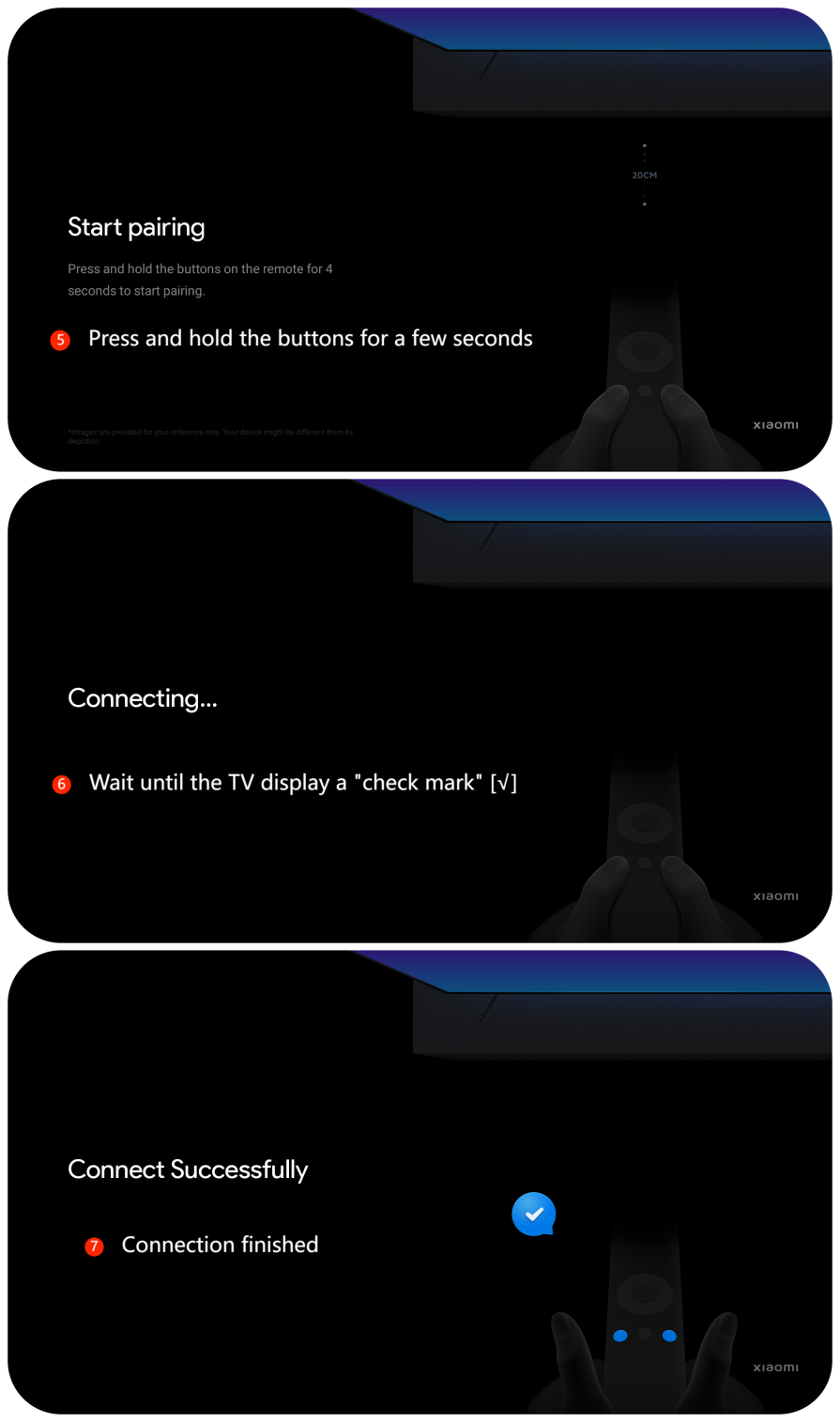
2. Ensure that the remote is properly paired with the TV. You can also try to re-pair them by going to [Settings] >> [Remote & Accessories] >> select your remote >> [Forget] >> press and hold the two buttons beside the [Home] button for a few seconds >> wait until the TV display “a check mark ” [√], and wait for the connection to be finished;

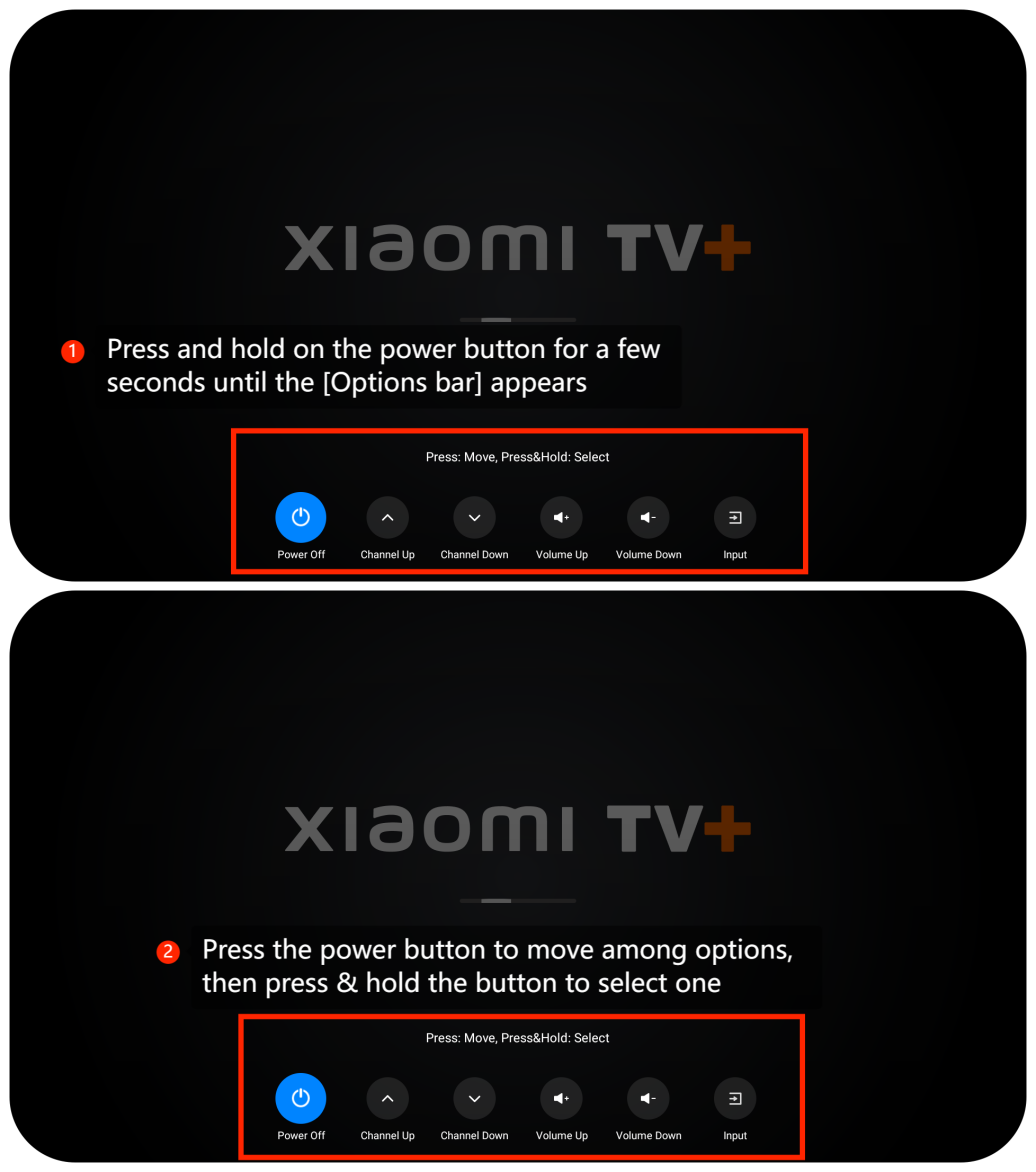
3. Try using the Power button at the bottom of the TV to adjust the volume. Press and hold on the button for a few seconds until the [Options bar] appears on the new interface, which contains [Volume Up] and [Volume Down]. Press the power button to move among options, then press & hold the button to select one;
4. Rebooting the TV to refresh the system often resolves temporary glitches or issues;
5. Make sure your TV’s operating system is up-to-date. Go to [Settings] >> [System] >> [About] >> [System update] >> [Check for update];
6. As a last resort, you can try performing a factory reset on your TV. Go to [Settings] >> [System] >>[About] >> [Reset] >> [Factory reset]. Be aware that this will erase all your settings and data, so make sure to back up any important data before proceeding.
If the above troubleshooting methods can’t resolve the issue, please contact our local official service center or your seller for further assistance. They will help you in this regard.
1. Make sure the batteries in the remote control are not depleted and are properly inserted. Replace the batteries if necessary;
2. Ensure that the remote is properly paired with the TV. You can also try to re-pair them by going to [Settings] >> [Remote & Accessories] >> select your remote >> [Forget] >> press and hold the two buttons beside the [Home] button for a few seconds >> wait until the TV display “a check mark ” [√], and wait for the connection to be finished;
3. Try using the Power button at the bottom of the TV to adjust the volume. Press and hold on the button for a few seconds until the [Options bar] appears on the new interface, which contains [Volume Up] and [Volume Down]. Press the power button to move among options, then press & hold the button to select one;
4. Rebooting the TV to refresh the system often resolves temporary glitches or issues;
5. Make sure your TV’s operating system is up-to-date. Go to [Settings] >> [System] >> [About] >> [System update] >> [Check for update];
6. As a last resort, you can try performing a factory reset on your TV. Go to [Settings] >> [System] >>[About] >> [Reset] >> [Factory reset]. Be aware that this will erase all your settings and data, so make sure to back up any important data before proceeding.
If the above troubleshooting methods can’t resolve the issue, please contact our local official service center or your seller for further assistance. They will help you in this regard.
Does it help?
Yes
No