

What to do if the Xiaomi TV A Pro 32's screen appears color gradient or uneven color?
If the Xiaomi TV A Pro 32's screen appears color gradient or uneven color, here are some troubleshooting steps you can try to address this problem:
Scenario 1:
If the issue occurs when you are using apps on your TV, please refer to the following methods:
1. Close and restart the app, and then see if the issue persists;
2. Restart the TV and try again;
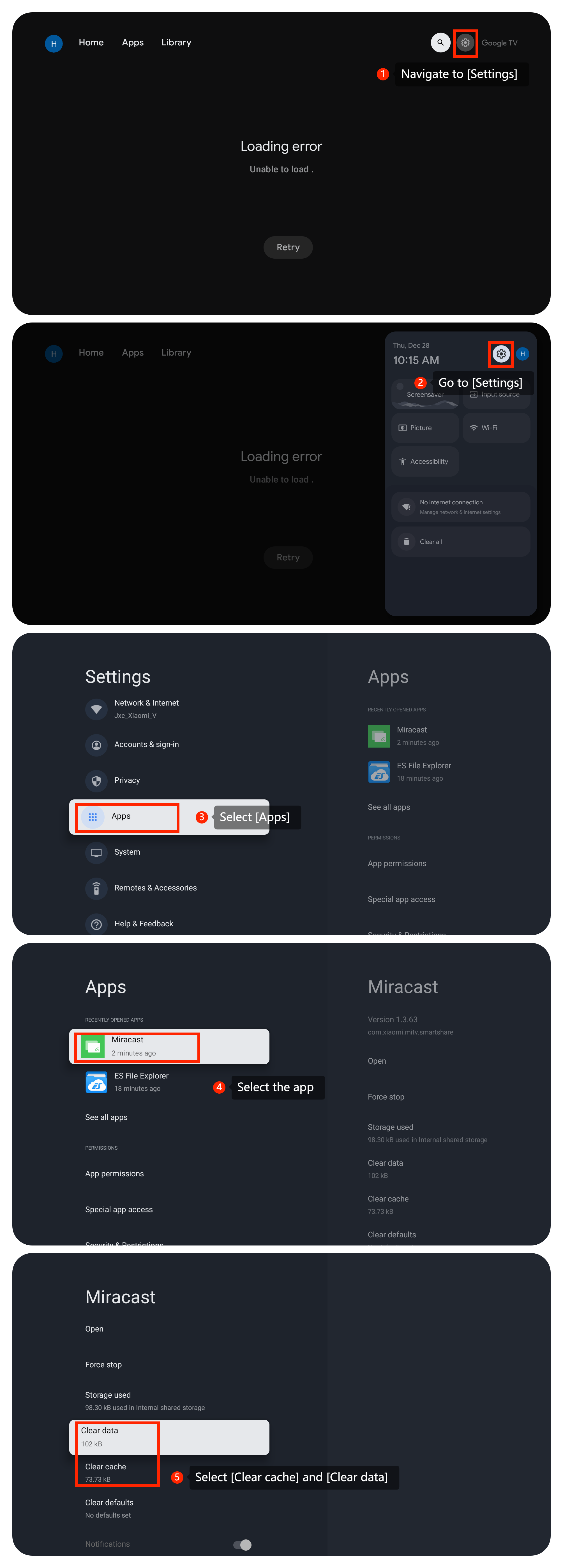
3. Too much cache will cause the app to crash, you can clear data and cache for the app by going to [Settings] >> [Apps] >> select the app >> select [Clear data] and [Clear cache];
4. Make sure that the app is up to date. You can update the app by going to [Settings] >> [Apps] >> [Google Play Store] >> [Manage apps & games] >> [Updates] >> select the app >> [Update];
5. If the above doesn't work, you can uninstall it and then reinstall it from the Google Play Store.
Scenario 2:
If the issue occurs when you are using external devices, please refer to the following methods:
1. Disconnect the external device and reconnect it to your TV. Test if the issue persists with only the TV itself;
2. Ensure that all cables (such as HDMI, power, etc.) are properly connected to the TV;
3. Try using a different HDMI cable to rule out cable issues;
4. Switch to a different HDMI input on your TV to see if the issue persists. This can help determine if the problem is specific to one input or affects the entire TV.
Scenario 3:
If the issue occurs when you are using casting on your TV, please refer to the following methods:
1. Test casting with a different device to see if the issue persists;
2. Try casting different content to see if the issue is specific to certain types of media.
If the above troubleshooting methods can't resolve the issue, please contact our local official service center or your seller for further assistance. They will help you in this regard.
Scenario 1:
If the issue occurs when you are using apps on your TV, please refer to the following methods:
1. Close and restart the app, and then see if the issue persists;
2. Restart the TV and try again;
3. Too much cache will cause the app to crash, you can clear data and cache for the app by going to [Settings] >> [Apps] >> select the app >> select [Clear data] and [Clear cache];
4. Make sure that the app is up to date. You can update the app by going to [Settings] >> [Apps] >> [Google Play Store] >> [Manage apps & games] >> [Updates] >> select the app >> [Update];
5. If the above doesn't work, you can uninstall it and then reinstall it from the Google Play Store.
Scenario 2:
If the issue occurs when you are using external devices, please refer to the following methods:
1. Disconnect the external device and reconnect it to your TV. Test if the issue persists with only the TV itself;
2. Ensure that all cables (such as HDMI, power, etc.) are properly connected to the TV;
3. Try using a different HDMI cable to rule out cable issues;
4. Switch to a different HDMI input on your TV to see if the issue persists. This can help determine if the problem is specific to one input or affects the entire TV.
Scenario 3:
If the issue occurs when you are using casting on your TV, please refer to the following methods:
1. Test casting with a different device to see if the issue persists;
2. Try casting different content to see if the issue is specific to certain types of media.
If the above troubleshooting methods can't resolve the issue, please contact our local official service center or your seller for further assistance. They will help you in this regard.
Does it help?
Yes
No