

What to do if the Xiaomi TV F2 55 cannot connect to the cable network?
If your Xiaomi TV F2 55 cannot connect to the cable network, there are several steps you can take to troubleshoot and resolve the issue:
1. Make sure there are no loose or damaged cables. Inspect the cable for any visible damage or fraying. If you find any issues, replace the cable;
2. Ensure your Wi-Fi network is working properly and that other devices can connect to it;
3. Unplug the power, wait for about 10-15 seconds, and then plug it back in. Allow the router or modem to fully restart, and then check if the TV can connect to the network;
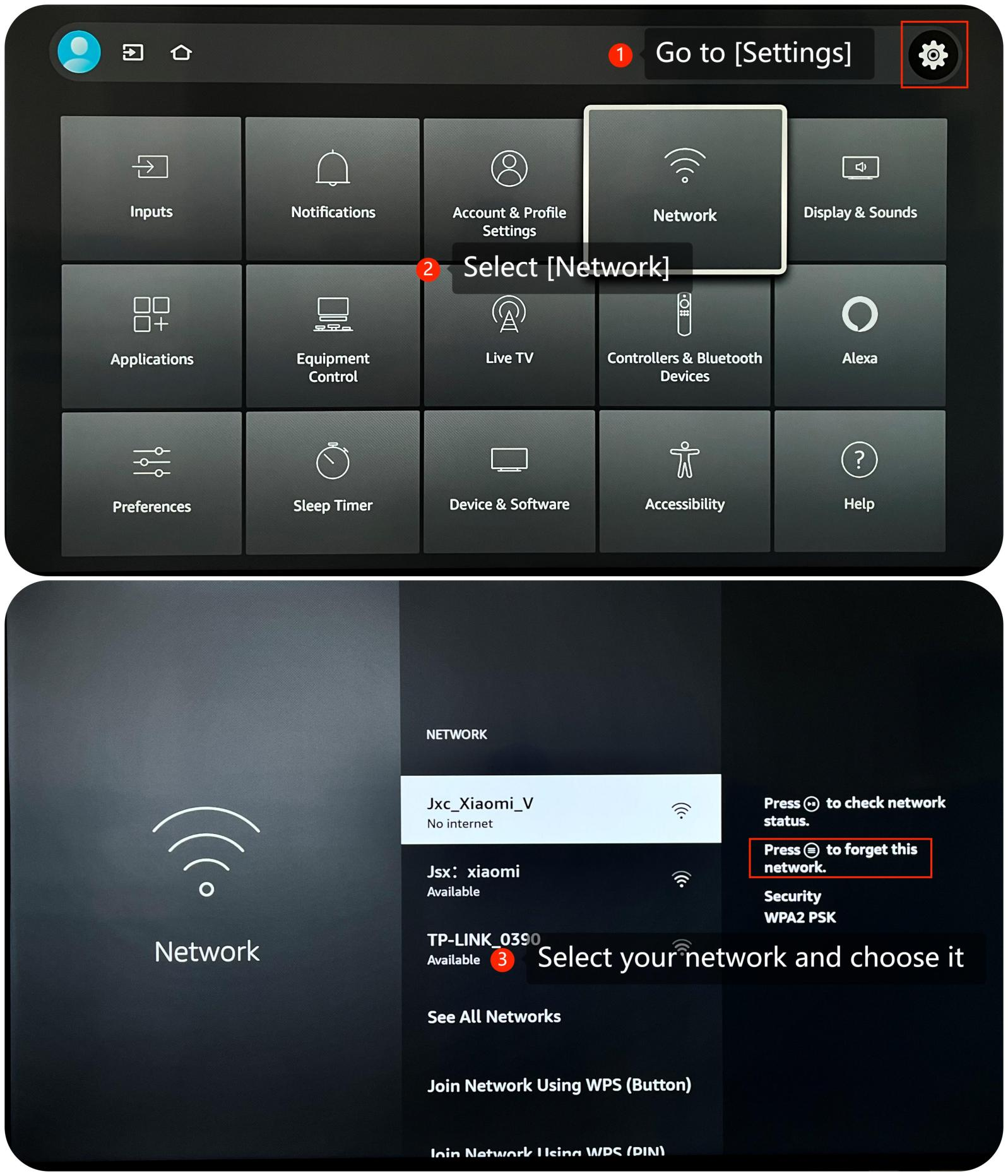
4. You can reset network settings by going to [Settings] >> [Network] >> forget this network and then reconnect to your Wi-Fi network;
5. Make sure that your TV's operating system is up-to-date, which often includes bug fixes and improvements. Go to [Settings] >> [Device & Software] >> [About] >> [Check for Updates];
6. As a last resort, you can try performing a factory reset on your TV. Be aware that this will erase all your settings and data, so make sure to back up any important data before proceeding. Navigate to [Settings] >> [Device & Software] >> [Reset to Factory Defaults].
Friendly Tips:
The recommended bit rates of the video stream are shown as below:
1. The 4K UHD video stream requires 10Mbps;
2. The 2K video stream requires 5Mbps;
3. The 720p video stream requires 2.5Mbps.
If the above troubleshooting methods can’t resolve the issue, please contact our local official service center or your seller for further assistance. They will help you in this regard.
1. Make sure there are no loose or damaged cables. Inspect the cable for any visible damage or fraying. If you find any issues, replace the cable;
2. Ensure your Wi-Fi network is working properly and that other devices can connect to it;
3. Unplug the power, wait for about 10-15 seconds, and then plug it back in. Allow the router or modem to fully restart, and then check if the TV can connect to the network;
4. You can reset network settings by going to [Settings] >> [Network] >> forget this network and then reconnect to your Wi-Fi network;
5. Make sure that your TV's operating system is up-to-date, which often includes bug fixes and improvements. Go to [Settings] >> [Device & Software] >> [About] >> [Check for Updates];
6. As a last resort, you can try performing a factory reset on your TV. Be aware that this will erase all your settings and data, so make sure to back up any important data before proceeding. Navigate to [Settings] >> [Device & Software] >> [Reset to Factory Defaults].
Friendly Tips:
The recommended bit rates of the video stream are shown as below:
1. The 4K UHD video stream requires 10Mbps;
2. The 2K video stream requires 5Mbps;
3. The 720p video stream requires 2.5Mbps.
If the above troubleshooting methods can’t resolve the issue, please contact our local official service center or your seller for further assistance. They will help you in this regard.
Does it help?
Yes
No