

What to do if the Xiaomi TV A2 43’s sound is cut off or interrupted?
If your Xiaomi TV A2 43’s sound is being cut off or interrupted, please refer to the following scenarios and their troubleshooting methods:
Scenario 1:
If the issue occurs when you are using a built-in speaker on your TV, please refer to the following methods:
1. Test different sources (such as a different channel, or streaming service) to check if the issue is specific to a particular source or content;
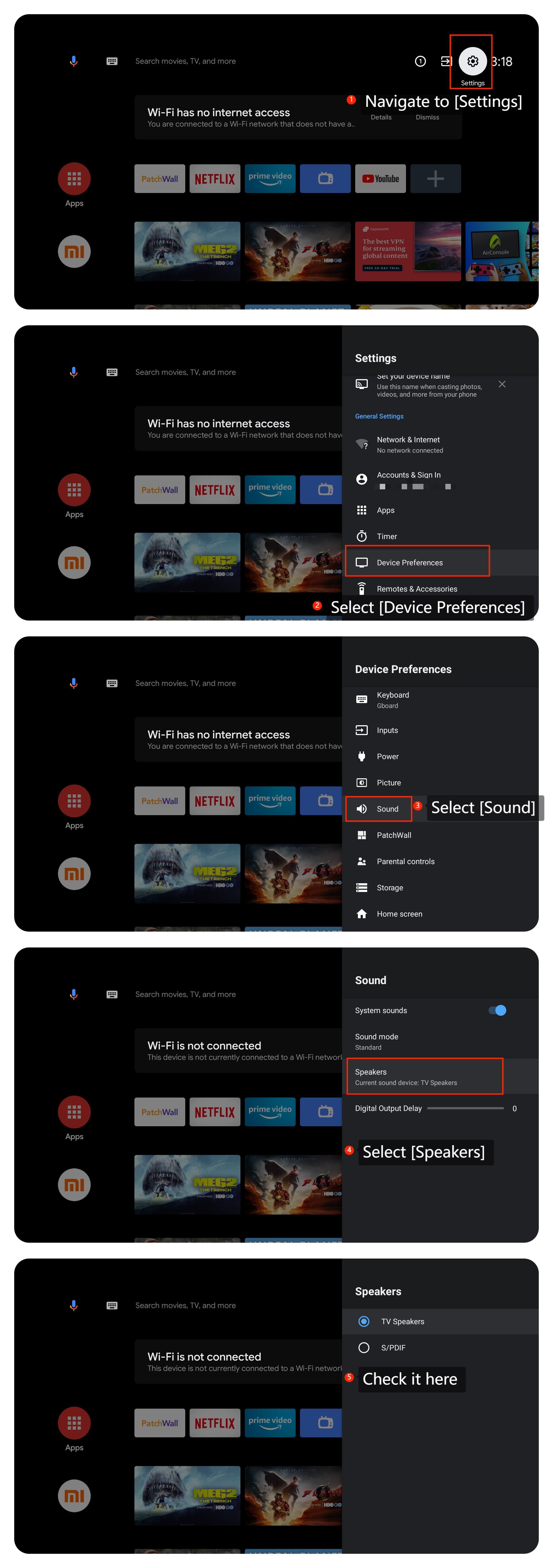
2. Check if the speaker setting is correct on your TV by navigating to [Settings] >> [Device Preferences] >> [Sound] >> [Speakers] >> [TV Speakers] or [S/PDIF];
3. Turn off the TV, unplug it from power, wait for a minute, and then plug it back in and turn it on;
4. You can check for updates by navigating to [Settings] >> [Device Preferences] >> [About] >> [System update];
5. If the problem persists, you can perform a factory reset by navigating to [Settings] >> [Device Preferences] >> [Reset]. Be aware that this will erase all data and settings on your TV, so make sure to back up anything important before doing this.
Scenario 2:
If the issue occurs when you are using an external device like a soundbar, please refer to the following methods:
1. Check the audio settings on your external device. Ensure that it is set to the correct audio output format and that there are no conflicting settings;
2. Ensure that your HDMI cable is in good condition. If possible, try using a different HDMI cable to see if the issue persists;
3. Connect a different device (e.g., another soundbar) to your TV to see if the audio issue is still present.
If the above troubleshooting methods can’t resolve the issue, please contact our local official service center or your seller for further assistance. They will help you in this regard.
Scenario 1:
If the issue occurs when you are using a built-in speaker on your TV, please refer to the following methods:
1. Test different sources (such as a different channel, or streaming service) to check if the issue is specific to a particular source or content;
2. Check if the speaker setting is correct on your TV by navigating to [Settings] >> [Device Preferences] >> [Sound] >> [Speakers] >> [TV Speakers] or [S/PDIF];
3. Turn off the TV, unplug it from power, wait for a minute, and then plug it back in and turn it on;
4. You can check for updates by navigating to [Settings] >> [Device Preferences] >> [About] >> [System update];
5. If the problem persists, you can perform a factory reset by navigating to [Settings] >> [Device Preferences] >> [Reset]. Be aware that this will erase all data and settings on your TV, so make sure to back up anything important before doing this.
Scenario 2:
If the issue occurs when you are using an external device like a soundbar, please refer to the following methods:
1. Check the audio settings on your external device. Ensure that it is set to the correct audio output format and that there are no conflicting settings;
2. Ensure that your HDMI cable is in good condition. If possible, try using a different HDMI cable to see if the issue persists;
3. Connect a different device (e.g., another soundbar) to your TV to see if the audio issue is still present.
If the above troubleshooting methods can’t resolve the issue, please contact our local official service center or your seller for further assistance. They will help you in this regard.
Does it help?
Yes
No