

What to do if the Wi-Fi signal of the Xiaomi TV F2 55 is weak or intermittent?
If the Wi-Fi signal of your Xiaomi TV F2 55 is weak or intermittent, please refer to the following steps:
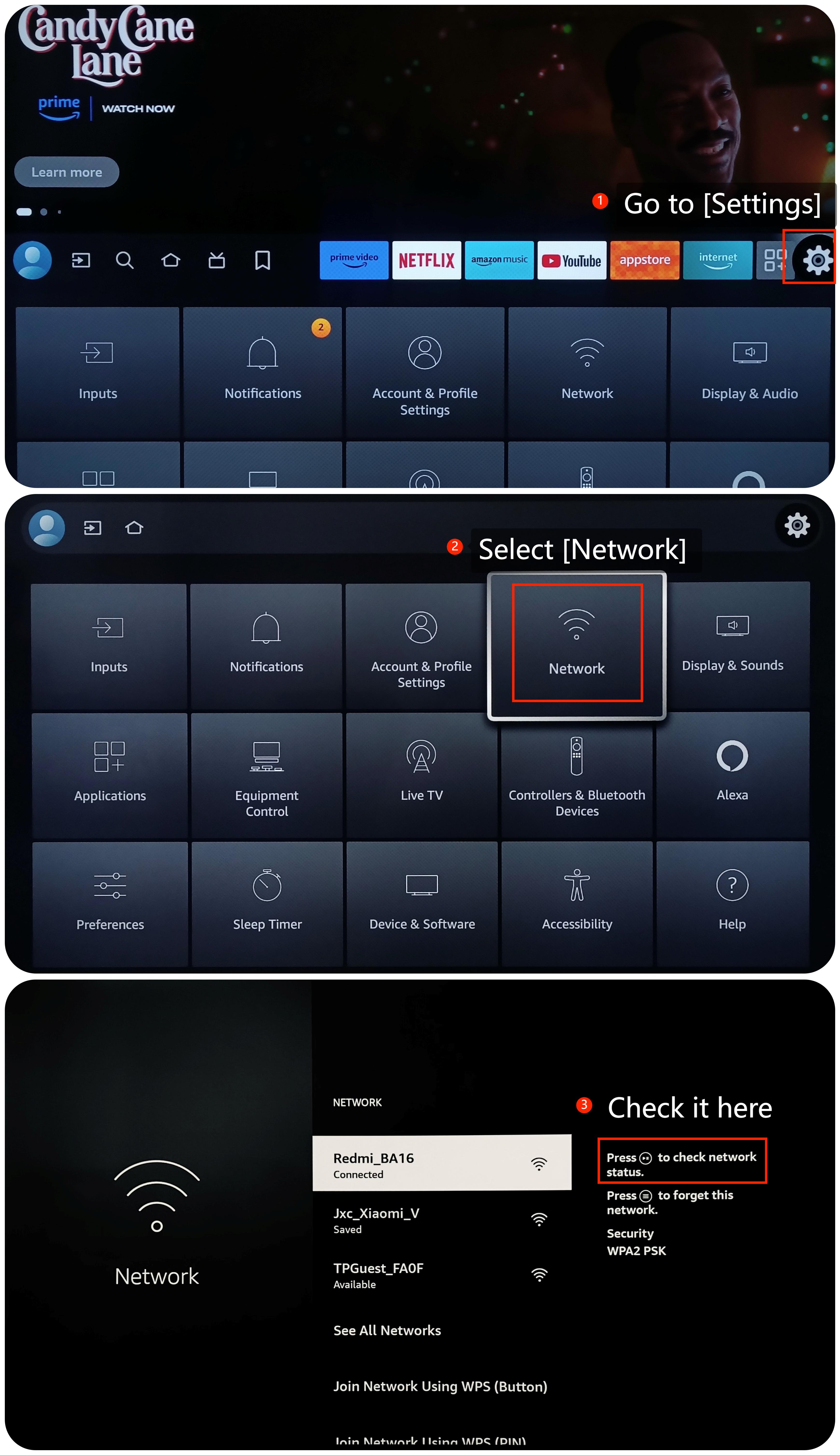
1. Check the Wi-Fi status and settings by going to [Settings] >> [Network] >> select your Wi-Fi and press the [Play/Pause] button on your remote control;
2. If the signal strength is weak, consider moving closer to the Wi-Fi router or placing the TV in a location with better signal reception;
3. Try to avoid placing the router near thick walls, large furniture, or other electronic devices that may cause interference;
4. Access your router's settings and try changing the channel or frequency band. Some channels might be less congested and provide a stronger signal;
5. Unplug the router, wait a few seconds, then plug it back in to restart and restore its functionality;
6. Keep electronic devices like microwaves or baby monitors away from the router, as they can interfere with the Wi-Fi signal;
7. Consider using a Wi-Fi extender to enhance and extend the Wi-Fi coverage in your home. The devices can improve the signal strength of the Wi-Fi;
8. Consider upgrading to a more powerful router to boost the Wi-Fi signal strength;
9. If necessary, use a wired Ethernet connection instead of Wi-Fi. This can provide a more stable and faster connection;
10. Ensure your TV is running on the latest system by navigating to [Settings] >> [Device & Software] >> [About] >> [Install Update];
11. As a last resort, you can try performing a factory reset on your TV. Be aware that this will erase all your settings and data, so make sure to back up any important data before proceeding. Go to [Settings] >> [Device & Software]>> [Reset to Factory Defaults].
If the above troubleshooting methods can’t resolve the issue, please contact our local official service center or your seller for further assistance. They will help you in this regard.
1. Check the Wi-Fi status and settings by going to [Settings] >> [Network] >> select your Wi-Fi and press the [Play/Pause] button on your remote control;
2. If the signal strength is weak, consider moving closer to the Wi-Fi router or placing the TV in a location with better signal reception;
3. Try to avoid placing the router near thick walls, large furniture, or other electronic devices that may cause interference;
4. Access your router's settings and try changing the channel or frequency band. Some channels might be less congested and provide a stronger signal;
5. Unplug the router, wait a few seconds, then plug it back in to restart and restore its functionality;
6. Keep electronic devices like microwaves or baby monitors away from the router, as they can interfere with the Wi-Fi signal;
7. Consider using a Wi-Fi extender to enhance and extend the Wi-Fi coverage in your home. The devices can improve the signal strength of the Wi-Fi;
8. Consider upgrading to a more powerful router to boost the Wi-Fi signal strength;
9. If necessary, use a wired Ethernet connection instead of Wi-Fi. This can provide a more stable and faster connection;
10. Ensure your TV is running on the latest system by navigating to [Settings] >> [Device & Software] >> [About] >> [Install Update];
11. As a last resort, you can try performing a factory reset on your TV. Be aware that this will erase all your settings and data, so make sure to back up any important data before proceeding. Go to [Settings] >> [Device & Software]>> [Reset to Factory Defaults].
If the above troubleshooting methods can’t resolve the issue, please contact our local official service center or your seller for further assistance. They will help you in this regard.
Does it help?
Yes
No