

What to do if you fail to use AirPlay on the Mi TV Bezel-less?
If you encounter issues with AirPlay on the Mi TV Bezel-less, several troubleshooting methods can be tried to resolve the issue:
1. Ensure that both the TV and your Apple device attempting to use AirPlay are connected to the same Wi-Fi network. You can also try restarting the router to see if the issue is resolved;
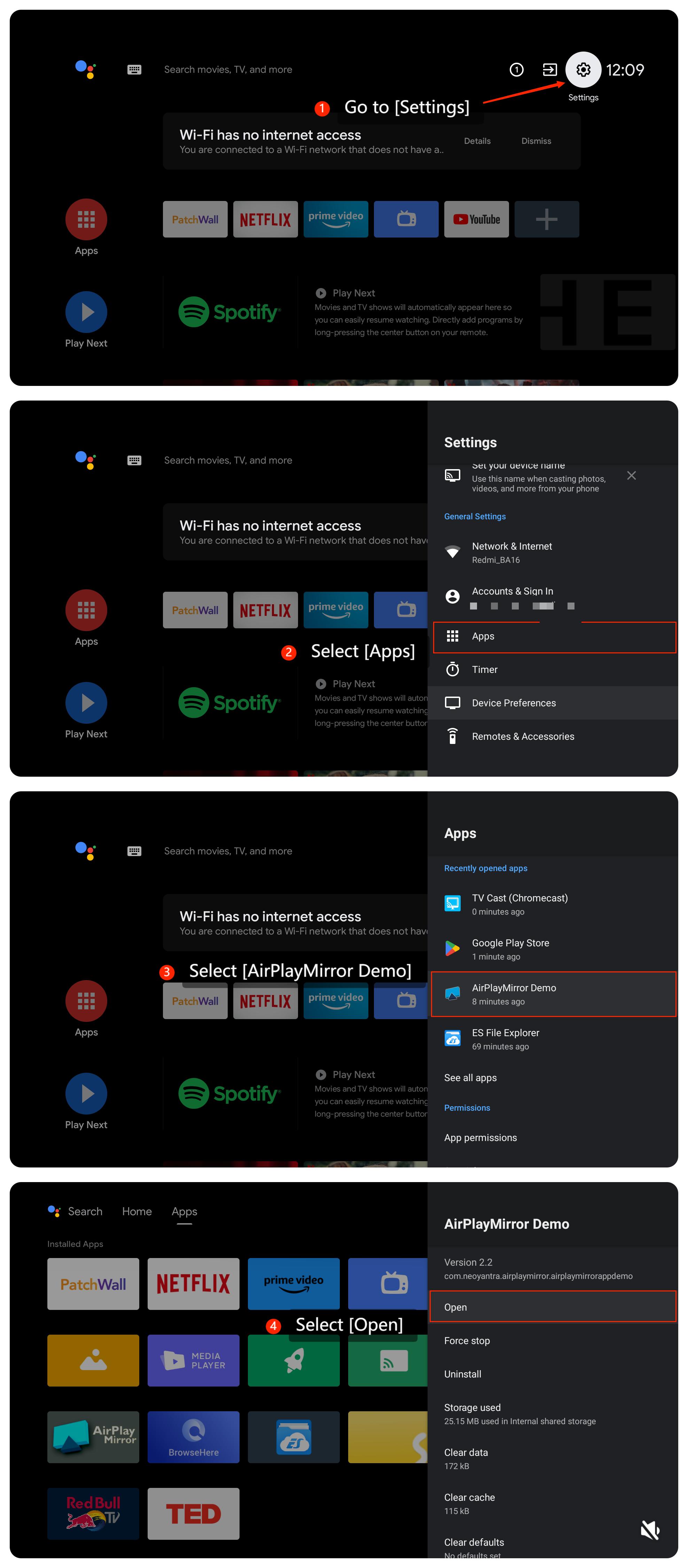
2. Make sure AirPlay is enabled on the TV by going to [Settings] >> [Apps] >> [AirPlay] >> [Open];
3. Try restarting both the TV and your Apple device. Sometimes, a simple restart can resolve temporary glitches;
4. Ensure your Apple device and the content you want to screen is compatible with your TV;
5. Ensure the TV’s firmware to the latest version available. Please go to [Settings] >> [Device Preferences] >> [About] >> [System update];
6. If the issue persists after the steps above, you can perform a factory reset by going to [Settings] >> [Device Preferences] >> [Reset] >> [Reset].
We hope the above methods can resolve the issue. If the issue still persists, you could submit your feedback on your TV by going to [Settings] >> [Device Preferences] >> [Home screen] >> [Send feedback].
1. Ensure that both the TV and your Apple device attempting to use AirPlay are connected to the same Wi-Fi network. You can also try restarting the router to see if the issue is resolved;
2. Make sure AirPlay is enabled on the TV by going to [Settings] >> [Apps] >> [AirPlay] >> [Open];
3. Try restarting both the TV and your Apple device. Sometimes, a simple restart can resolve temporary glitches;
4. Ensure your Apple device and the content you want to screen is compatible with your TV;
5. Ensure the TV’s firmware to the latest version available. Please go to [Settings] >> [Device Preferences] >> [About] >> [System update];
6. If the issue persists after the steps above, you can perform a factory reset by going to [Settings] >> [Device Preferences] >> [Reset] >> [Reset].
We hope the above methods can resolve the issue. If the issue still persists, you could submit your feedback on your TV by going to [Settings] >> [Device Preferences] >> [Home screen] >> [Send feedback].
Does it help?
Yes
No