

What to do if you fail to use Chromecast on the Xiaomi TV P1E 65?
If you notice that the Chromecast doesn’t work properly on your Xiaomi TV P1E 65, you can refer to the following steps to troubleshoot and resolve the issue:
1. Ensure that your TV is connected to the same Wi-Fi network as the casting device;
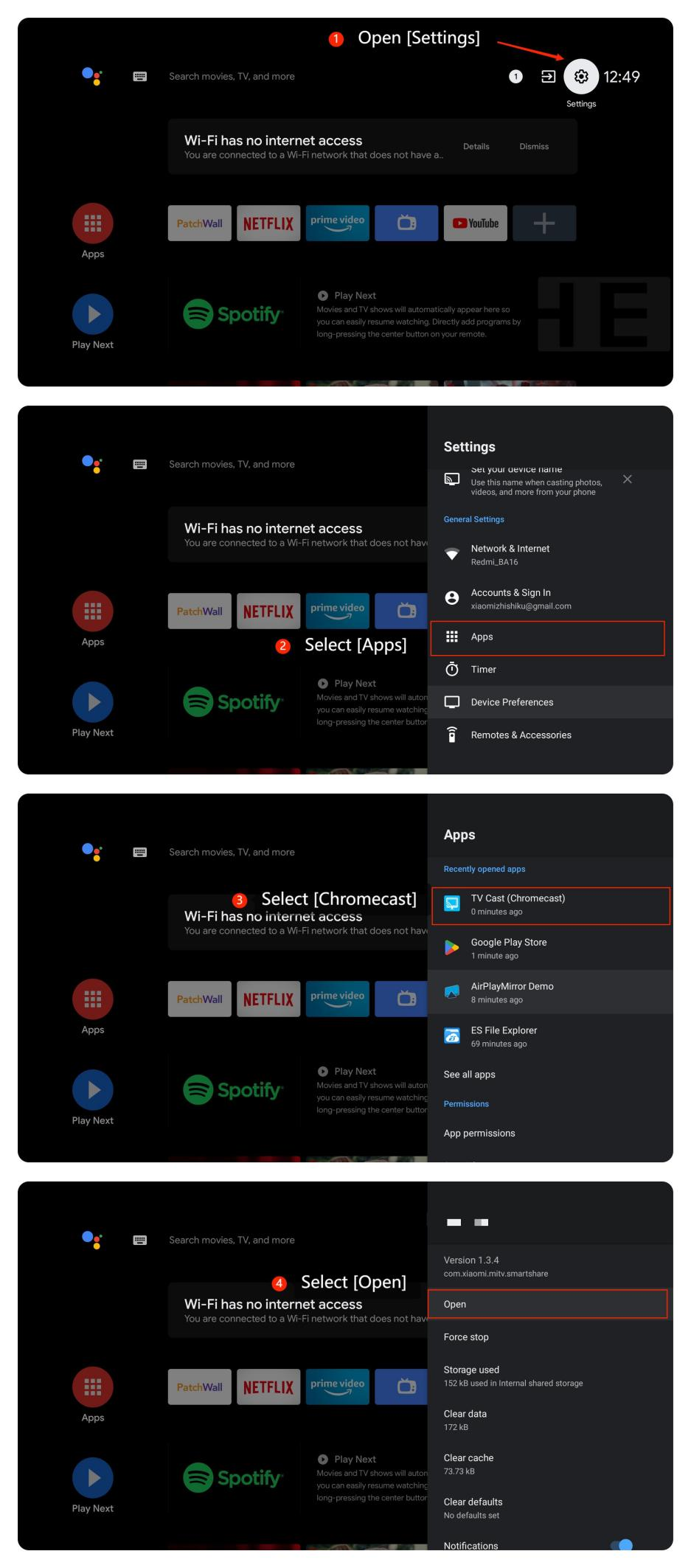
2. Check if Chromecast is enabled on your TV by opening [Settings] >> [Apps] >> [Chromecast] >> [Open];
3. Ensure the content you want to cast is compatible with your TV. Try using different contents to see if the issue is resolved;
4. Restart your TV by navigating to [Settings] >> [Device Preferences] >> [About] >> [Restart];
5. Make sure that your TV's system is the latest version by going to [Settings] >> [About] >> [System Update]. If available, install the updates;
6. If none of the above steps work, you may consider performing a factory reset on your TV by navigating to [Settings] >> [Device Preferences] >> [Reset].
Note:
Keep in mind this will erase all settings and data on your TV. So please be cautious before proceeding.
We hope the above methods can resolve the issue. If the issue still persists, you could submit your feedback on your TV by going to [Settings] >> [Device Preferences] >> [Home screen] >> [Send feedback].
1. Ensure that your TV is connected to the same Wi-Fi network as the casting device;
2. Check if Chromecast is enabled on your TV by opening [Settings] >> [Apps] >> [Chromecast] >> [Open];
3. Ensure the content you want to cast is compatible with your TV. Try using different contents to see if the issue is resolved;
4. Restart your TV by navigating to [Settings] >> [Device Preferences] >> [About] >> [Restart];
5. Make sure that your TV's system is the latest version by going to [Settings] >> [About] >> [System Update]. If available, install the updates;
6. If none of the above steps work, you may consider performing a factory reset on your TV by navigating to [Settings] >> [Device Preferences] >> [Reset].
Note:
Keep in mind this will erase all settings and data on your TV. So please be cautious before proceeding.
We hope the above methods can resolve the issue. If the issue still persists, you could submit your feedback on your TV by going to [Settings] >> [Device Preferences] >> [Home screen] >> [Send feedback].
Does it help?
Yes
No