

What to do if the Mi TV P1 55 experiences slow network performance?
If you experience slow network performance on your Mi TV P1 55, please refer to the following troubleshooting steps:
1. Ensure that the TV is located within a reasonable range of the router to receive a strong signal. Physical obstructions and distance can affect the quality of the connection;
2. Sometimes, restarting both the router and the TV can resolve connectivity issues. Turn off the devices, wait for a few minutes, and then power them back on;
3. If your router supports dual-band Wi-Fi (2.4GHz and 5GHz), try switching between them. Sometimes, the 5GHz band offers faster speeds but has a shorter range compared to the 2.4GHz band;
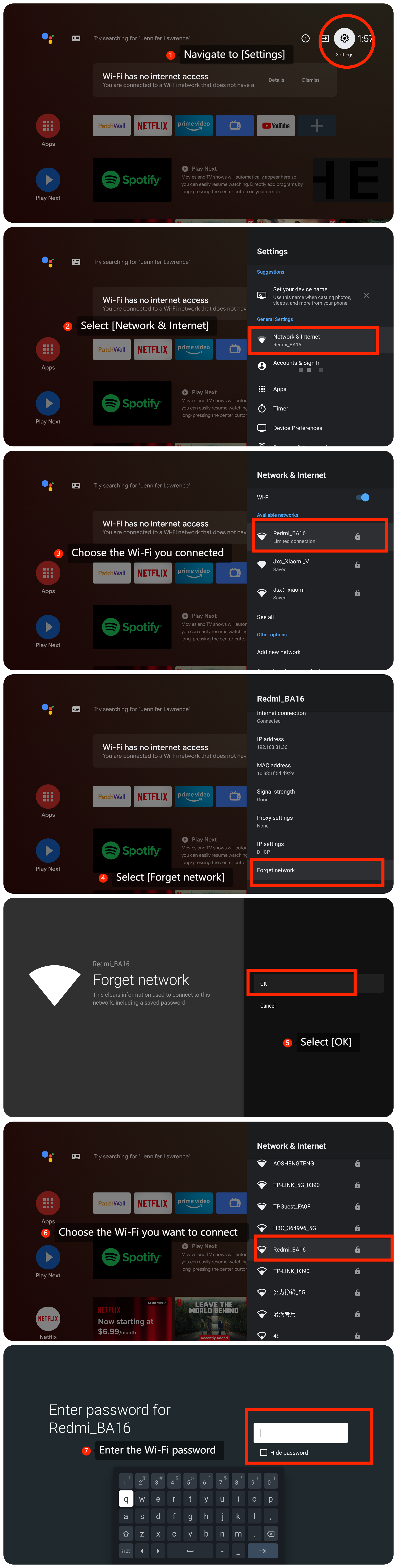
4. If you are using Wi-Fi, try reconnecting the Wi-Fi to see if that resolves the issue by navigating to [Settings] >> [Network & Internet] >> choose the Wi-Fi you connected >> [Forget network] >> [OK] >> choose the Wi-Fi you want to connect >> enter the Wi-Fi password and confirm it;
5. Close any unnecessary apps running in the background. Some apps may consume network resources even when not actively in use;
6. If possible, connect your Android TV directly to the router using an Ethernet cable. Wired connections are generally more stable and faster than Wi-Fi;
7. Use speed test apps or websites on other devices to verify the internet speed. If other devices also show slow speeds, the issue might be with your internet service provider (ISP);
8. If the issue still persists, please update the firmware of your TV by navigating to [Settings] >> [Device Preferences] >> [About] >> [System update];
9. If all else fails, you can perform a factory reset on your TV by navigating to the [Settings] icon >> [Device Preferences] >> scroll down and select [Reset].
Friendly Tips:
The recommended bit rates of the video stream are shown as below:
1. The 4K UHD video stream requires 10Mbps;
2. The 2K video stream requires 5Mbps;
3. The 720p video stream requires 2.5Mbps.
If the above troubleshooting methods can’t resolve the issue, please contact our local official service center or your seller for further assistance. They will help you in this regard.
1. Ensure that the TV is located within a reasonable range of the router to receive a strong signal. Physical obstructions and distance can affect the quality of the connection;
2. Sometimes, restarting both the router and the TV can resolve connectivity issues. Turn off the devices, wait for a few minutes, and then power them back on;
3. If your router supports dual-band Wi-Fi (2.4GHz and 5GHz), try switching between them. Sometimes, the 5GHz band offers faster speeds but has a shorter range compared to the 2.4GHz band;
4. If you are using Wi-Fi, try reconnecting the Wi-Fi to see if that resolves the issue by navigating to [Settings] >> [Network & Internet] >> choose the Wi-Fi you connected >> [Forget network] >> [OK] >> choose the Wi-Fi you want to connect >> enter the Wi-Fi password and confirm it;
5. Close any unnecessary apps running in the background. Some apps may consume network resources even when not actively in use;
6. If possible, connect your Android TV directly to the router using an Ethernet cable. Wired connections are generally more stable and faster than Wi-Fi;
7. Use speed test apps or websites on other devices to verify the internet speed. If other devices also show slow speeds, the issue might be with your internet service provider (ISP);
8. If the issue still persists, please update the firmware of your TV by navigating to [Settings] >> [Device Preferences] >> [About] >> [System update];
9. If all else fails, you can perform a factory reset on your TV by navigating to the [Settings] icon >> [Device Preferences] >> scroll down and select [Reset].
Friendly Tips:
The recommended bit rates of the video stream are shown as below:
1. The 4K UHD video stream requires 10Mbps;
2. The 2K video stream requires 5Mbps;
3. The 720p video stream requires 2.5Mbps.
If the above troubleshooting methods can’t resolve the issue, please contact our local official service center or your seller for further assistance. They will help you in this regard.
Does it help?
Yes
No