

What to do if the brightness or contrast on the Mi TV 4 43 can’t be adjusted?
If you’re unable to adjust the brightness or contrast on your Mi TV 4 43, please refer to the following steps:
Scenario 1:
If the issue occurs when you are using apps on your TV, please refer to the following methods:
1. Check the settings within the app to see if there are options for adjusting brightness or contrast;
2. If the issue is specific to a particular app, check the Play Store for updates to the app;
3. Sometimes, issues can be resolved by restarting the app;
4. Test with different types of content. Sometimes, the issue might be specific to certain videos or apps;
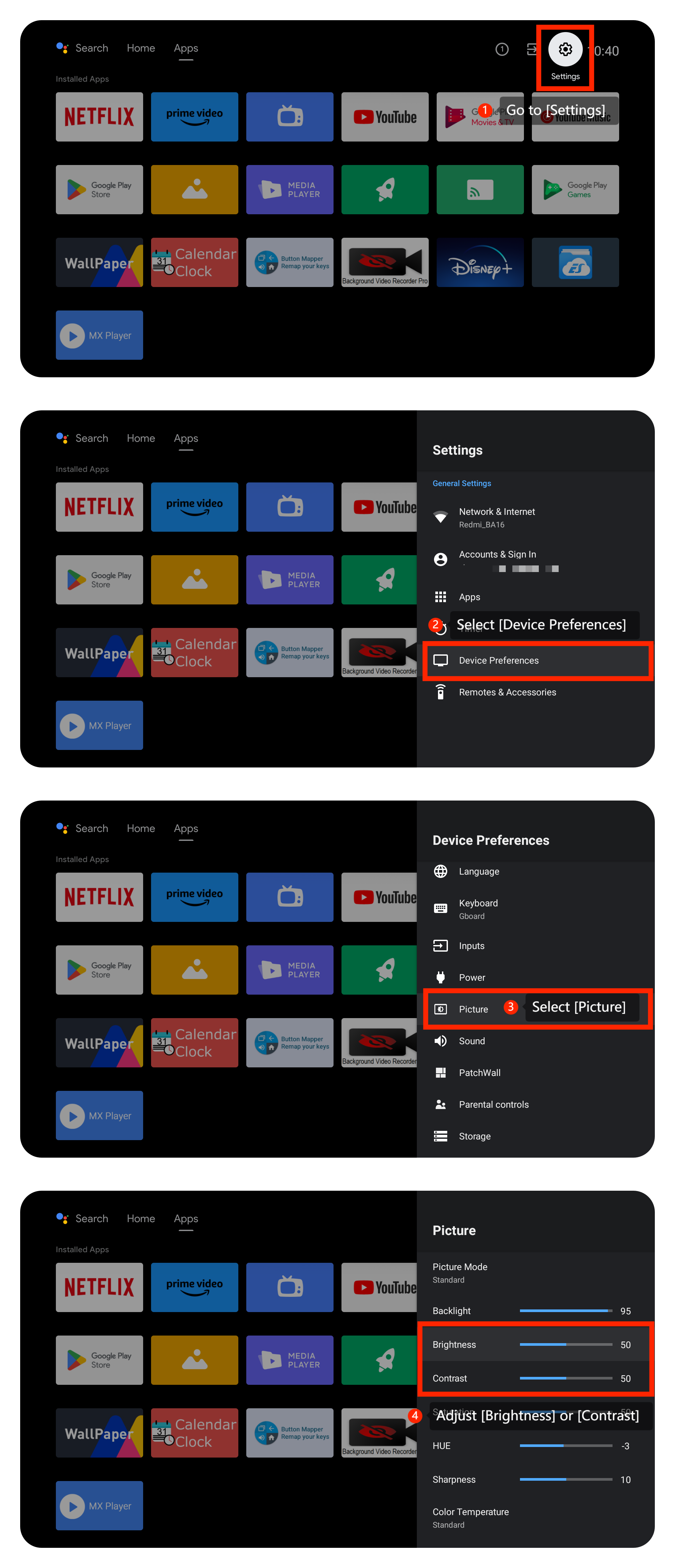
5. Check TV settings by going to [Settings] >> [Device Preferences] >> [Picture] >> adjust [Brightness] or [Contrast];
6. Make sure your TV’s operating system is up-to-date. Please navigate to [Settings] >> [Device Preferences] >> [About] >> [System update] >> search for an available update and then select the download and install option to update the system;
7. If the issue persists, you can try factory resetting your TV. Please perform a factory reset by going to [Settings] >> [Device Preferences] >> scroll down and select [Reset]. After the reset, set up the TV again and check if the issue persists.
Scenario 2:
If the issue occurs when you are using an external device like a DVD player or game console, please refer to the following methods:
1. Check the HDMI or input source settings. The issue might be with the connected device rather than the TV itself;
2. Access the settings or menu on your external device (DVD player, game console), adjust the brightness and contrast settings if available;
3. Confirm that the external device is compatible with your TV;
4. Connect a different external device (another game console, or DVD player) to the TV and see if the issue persists;
5. Ensure that the remote control is working correctly and that it’s sending signals to the TV. Check the remote’s batteries and try replacing them if necessary.
Scenario 3:
If the issue occurs when you are using external storage, please refer to the following methods:
1. Make sure the external storage device is properly connected to one of the USB ports on your TV. Try using a different USB port to rule out any issues with a specific port;
2. Ensure that the files on the external storage are in a format compatible with your TV;
3. Confirm that the files on the external storage device are not corrupted. Try playing the same content on another device to ensure it's functioning correctly;
4. Verify that the external storage device is formatted correctly;
5. If possible, test the TV’s ability to adjust brightness and contrast with different content from the external storage. The issue might be specific to certain files.
If the above troubleshooting methods can’t resolve the issue, please contact our local official service center or your seller for further assistance. They will help you in this regard.
Scenario 1:
If the issue occurs when you are using apps on your TV, please refer to the following methods:
1. Check the settings within the app to see if there are options for adjusting brightness or contrast;
2. If the issue is specific to a particular app, check the Play Store for updates to the app;
3. Sometimes, issues can be resolved by restarting the app;
4. Test with different types of content. Sometimes, the issue might be specific to certain videos or apps;
5. Check TV settings by going to [Settings] >> [Device Preferences] >> [Picture] >> adjust [Brightness] or [Contrast];
6. Make sure your TV’s operating system is up-to-date. Please navigate to [Settings] >> [Device Preferences] >> [About] >> [System update] >> search for an available update and then select the download and install option to update the system;
7. If the issue persists, you can try factory resetting your TV. Please perform a factory reset by going to [Settings] >> [Device Preferences] >> scroll down and select [Reset]. After the reset, set up the TV again and check if the issue persists.
Scenario 2:
If the issue occurs when you are using an external device like a DVD player or game console, please refer to the following methods:
1. Check the HDMI or input source settings. The issue might be with the connected device rather than the TV itself;
2. Access the settings or menu on your external device (DVD player, game console), adjust the brightness and contrast settings if available;
3. Confirm that the external device is compatible with your TV;
4. Connect a different external device (another game console, or DVD player) to the TV and see if the issue persists;
5. Ensure that the remote control is working correctly and that it’s sending signals to the TV. Check the remote’s batteries and try replacing them if necessary.
Scenario 3:
If the issue occurs when you are using external storage, please refer to the following methods:
1. Make sure the external storage device is properly connected to one of the USB ports on your TV. Try using a different USB port to rule out any issues with a specific port;
2. Ensure that the files on the external storage are in a format compatible with your TV;
3. Confirm that the files on the external storage device are not corrupted. Try playing the same content on another device to ensure it's functioning correctly;
4. Verify that the external storage device is formatted correctly;
5. If possible, test the TV’s ability to adjust brightness and contrast with different content from the external storage. The issue might be specific to certain files.
If the above troubleshooting methods can’t resolve the issue, please contact our local official service center or your seller for further assistance. They will help you in this regard.
Does it help?
Yes
No