

What to do if my Xiaomi TV Max 86 can’t play or stream content smoothly from applications?
To troubleshoot the problem with your Xiaomi TV Max 86 can’t play or stream content smoothly from applications, please refer to the following scenarios and their troubleshooting methods:
Scenarios 1:
If the issue occurs when you are using apps on your TV, please refer to the following methods:
1. Ensure that your TV is connected to a stable and high-speed internet connection. You may need to restart your router and reconnect to the network or plug in the network cable tightly;
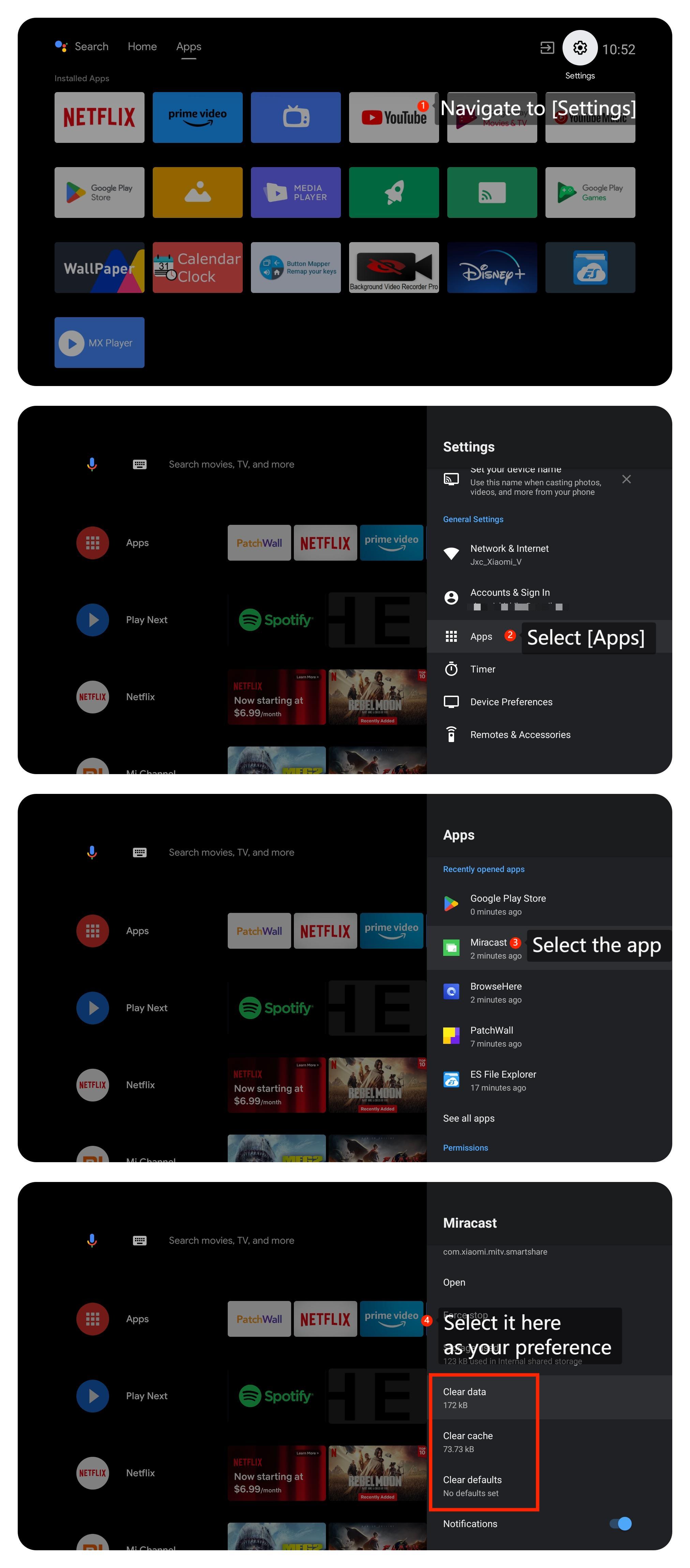
2. Please try clearing the app cache and data by going to [Settings] >> [Apps] >> [Clear data], [Clear cache] or [Clear defaults] >> [OK];
3. Some apps have their own display settings. Check if the app you’re using has any specific settings for streaming content;
4. Make sure that your TV's system is the latest version by going to [Settings] >> [About] >> [System Update]. If available, install the updates;
5. If the problem persists, you can perform a factory reset by navigating to [Settings] >> [Device Preferences] >> [Reset]. Be aware that this will erase all data and settings on your TV, so make sure to back up anything important before doing this.
Friendly Tips:
The recommended bit rates of the video stream are shown as below:
1. The 4K UHD video stream requires 10Mbps;
2. The 2K video stream requires 5Mbps;
3. The 720p video stream requires 2.5Mbps.
Scenario 2:
If the issue occurs when you are using external devices like DVD player or game console, please refer to the following methods:
1. Ensure the cables connecting external devices to your TV are firmly and correctly plugged into the appropriate ports;
2. Ensure that your HDMI cable is in good condition. Try using a different HDMI cable to see if the issue persists;
3. Check if the device you’re using has any specific settings for streaming content.
Scenario 3:
If the issue occurs when you are using casting on your TV, please refer to the following methods:
1. Please ensure that both the casting device such as your computer or your smartphone and your TV are connected to the same Wi-Fi network;
2. Check the casting device settings (e.g.smartphone, tablet, or computer) for any display or casting settings. Make sure the casting device is set to the correct picture settings.
We hope the above methods can resolve the issue. If the issue still persists, you could submit your feedback on your TV by going to [Settings] >> [Device Preferences] >> [Home screen] >> [Send feedback].
Scenarios 1:
If the issue occurs when you are using apps on your TV, please refer to the following methods:
1. Ensure that your TV is connected to a stable and high-speed internet connection. You may need to restart your router and reconnect to the network or plug in the network cable tightly;
2. Please try clearing the app cache and data by going to [Settings] >> [Apps] >> [Clear data], [Clear cache] or [Clear defaults] >> [OK];
3. Some apps have their own display settings. Check if the app you’re using has any specific settings for streaming content;
4. Make sure that your TV's system is the latest version by going to [Settings] >> [About] >> [System Update]. If available, install the updates;
5. If the problem persists, you can perform a factory reset by navigating to [Settings] >> [Device Preferences] >> [Reset]. Be aware that this will erase all data and settings on your TV, so make sure to back up anything important before doing this.
Friendly Tips:
The recommended bit rates of the video stream are shown as below:
1. The 4K UHD video stream requires 10Mbps;
2. The 2K video stream requires 5Mbps;
3. The 720p video stream requires 2.5Mbps.
Scenario 2:
If the issue occurs when you are using external devices like DVD player or game console, please refer to the following methods:
1. Ensure the cables connecting external devices to your TV are firmly and correctly plugged into the appropriate ports;
2. Ensure that your HDMI cable is in good condition. Try using a different HDMI cable to see if the issue persists;
3. Check if the device you’re using has any specific settings for streaming content.
Scenario 3:
If the issue occurs when you are using casting on your TV, please refer to the following methods:
1. Please ensure that both the casting device such as your computer or your smartphone and your TV are connected to the same Wi-Fi network;
2. Check the casting device settings (e.g.smartphone, tablet, or computer) for any display or casting settings. Make sure the casting device is set to the correct picture settings.
We hope the above methods can resolve the issue. If the issue still persists, you could submit your feedback on your TV by going to [Settings] >> [Device Preferences] >> [Home screen] >> [Send feedback].
Does it help?
Yes
No