

What to do if the Xiaomi TV F2 43 can not be recognized or connected to the Bluetooth devices?
If your Xiaomi TV F2 43 can not be recognized or connected to the Bluetooth devices, please refer to the following steps:
1. Check if the Bluetooth device you're trying to connect to is compatible with the Xiaomi TV. Make sure the TV and the Bluetooth device are within the effective range for Bluetooth connectivity;
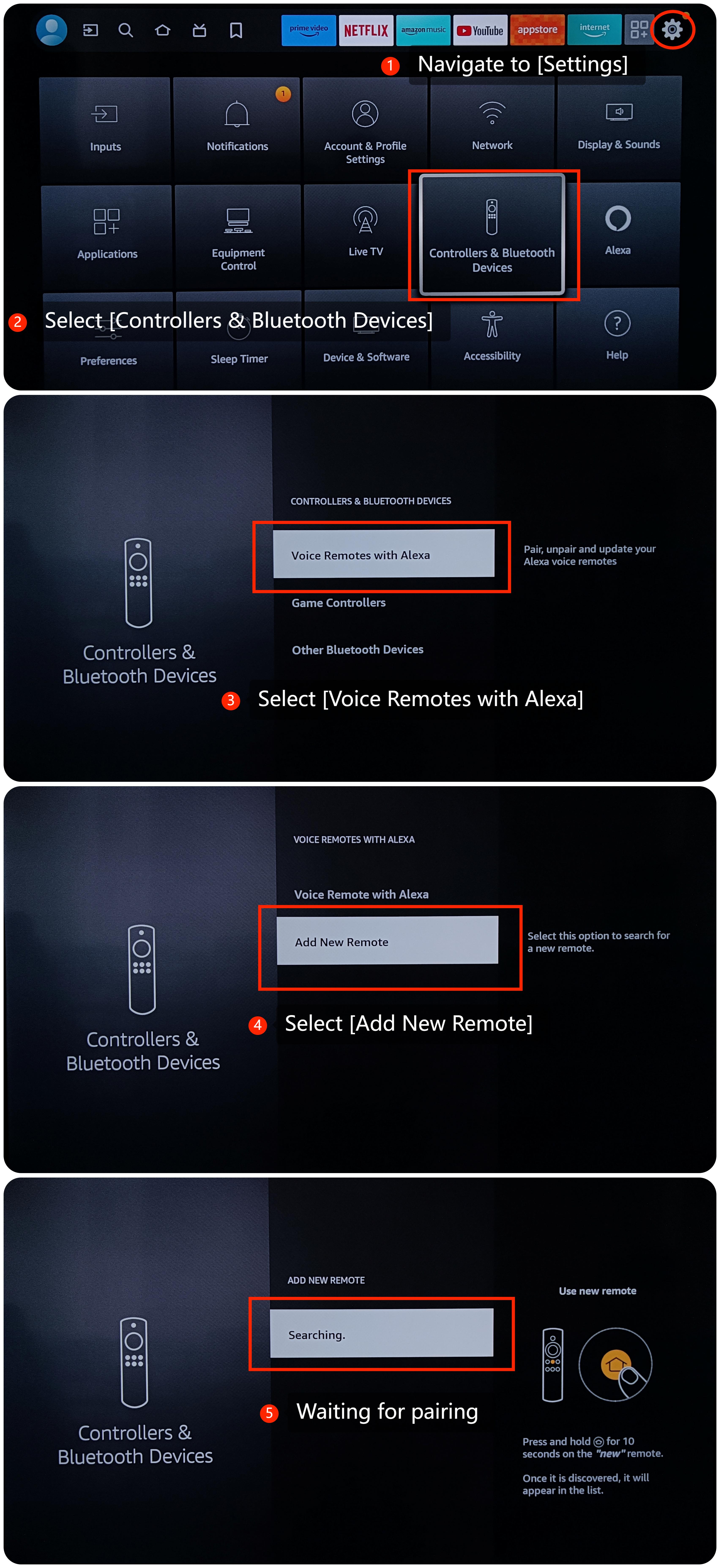
2. Put the Bluetooth device in pairing mode. Navigate to [Settings] >> select [Controllers & Bluetooth Devices] >> select [Voice Remotes with Alexa] >> select [Add New Remote] >> waiting for pairing;
1. Check if the Bluetooth device you're trying to connect to is compatible with the Xiaomi TV. Make sure the TV and the Bluetooth device are within the effective range for Bluetooth connectivity;
2. Put the Bluetooth device in pairing mode. Navigate to [Settings] >> select [Controllers & Bluetooth Devices] >> select [Voice Remotes with Alexa] >> select [Add New Remote] >> waiting for pairing;
3. Sometimes, a simple restart can resolve temporary issues. Turn off the TV, unplug it from the power source, wait for a few seconds, and then plug it back in and turn it on;
4. Make sure there are no other electronic devices nearby that could be causing interference with the Bluetooth signal. Other wireless devices, such as routers and cordless phones, can sometimes interfere with Bluetooth connections;
5. Ensure that your TV and the Bluetooth device are compatible with each other;
6. If possible, try connecting a different Bluetooth device to your TV to see if the issue persists. This can help determine whether the issue is with the TV or the specific Bluetooth device;
7. Go to [Settings] >> select [Device & Software] >> select [About] >> select [Install Update] and check for updates;
8. If all these methods fail, please go to [Settings] >> select [Device & Software] >> select [Reset to Factory Defaults].
If the above troubleshooting methods can’t resolve the issue, please contact our local official service center or your seller for further assistance. They will help you in this regard.
4. Make sure there are no other electronic devices nearby that could be causing interference with the Bluetooth signal. Other wireless devices, such as routers and cordless phones, can sometimes interfere with Bluetooth connections;
5. Ensure that your TV and the Bluetooth device are compatible with each other;
6. If possible, try connecting a different Bluetooth device to your TV to see if the issue persists. This can help determine whether the issue is with the TV or the specific Bluetooth device;
7. Go to [Settings] >> select [Device & Software] >> select [About] >> select [Install Update] and check for updates;
8. If all these methods fail, please go to [Settings] >> select [Device & Software] >> select [Reset to Factory Defaults].
If the above troubleshooting methods can’t resolve the issue, please contact our local official service center or your seller for further assistance. They will help you in this regard.
Does it help?
Yes
No