

What are the steps for wall mounting Xiaomi Smart Camera C500 Pro?
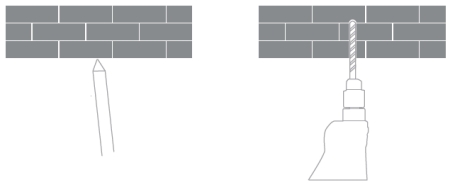
1. Drill two large holes in the wall with a drilling tool according to the spacing of the holes in the base. It is recommended to mark the wall with a pencil before drilling the holes. Drilling diameter of around 6mm, drilling depth of around 30mm;
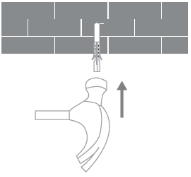
2. Insert 2 plastic expansion nuts into the holes.
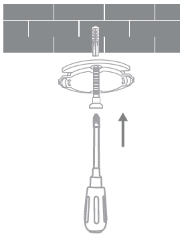
3. Place the base with the arrow-marked side up and align the holes in the base with the holes in the wall, place the screws through the holes in the base and screw them into the expansion nuts on the wall with a cross screwdriver;
Note:
1. The wall on which the device is mounted must have a loading capacity of at least 3 times the weight of the device.
2. To prevent accidents and injuries, please secure the device firmly onto the floor/ wall as illustrated.
3. After choosing the upside-down mounting method, you need to rotate the screen setting in the screen settings by 180° in Mi Home App;
4. Wall mounting kit is compatible with other PTZ cameras, the two-hole distance of the base plate is 36mm in the kit.
2. Insert 2 plastic expansion nuts into the holes.
3. Place the base with the arrow-marked side up and align the holes in the base with the holes in the wall, place the screws through the holes in the base and screw them into the expansion nuts on the wall with a cross screwdriver;
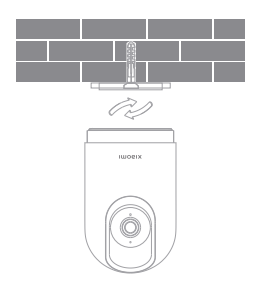
4. Align the groove at the bottom of the camera with the raised portion on the base, install and snap together, then rotate clockwise until it locks into place.
Note:
1. The wall on which the device is mounted must have a loading capacity of at least 3 times the weight of the device.
2. To prevent accidents and injuries, please secure the device firmly onto the floor/ wall as illustrated.
3. After choosing the upside-down mounting method, you need to rotate the screen setting in the screen settings by 180° in Mi Home App;
4. Wall mounting kit is compatible with other PTZ cameras, the two-hole distance of the base plate is 36mm in the kit.
Does it help?
Yes
No