

Xiaomi 18 Pro FAQ
Product Overview
Q1: What are the selling points of the Xiaomi 18 Pro?
A: For your reference, here are the selling points of the Xiaomi 18 Pro:
1. It features the all-new dynamic back display for an enhanced rear-screen experience.
2. It is equipped with a 200 MP Leica main camera and a 200 MP Leica telephoto camera.
3. It supports Xiaomi x Gemini integration and features a fully customizable AI button.
4. It features the next-generation hardware-based Xiaomi Privacy Display.
5. It is powered by the 2nm Snapdragon 8 Elite Gen 6.
6. It is equipped with a 6000 mAh silicon-carbon L-shaped battery.
Q2: What is the positioning of the Xiaomi 18 Pro and who is it for?
A: The Xiaomi 18 Pro is positioned as a flagship smartphone designed to deliver powerful performance, advanced imaging, and an innovative smart experience. It is powered by a 2 nm Snapdragon 8 Elite Gen 6 and equipped with a 6000 mAh silicon-carbon L-shaped battery for extended battery life. It also features a Dynamic Back Display with ultra-low-power OLED technology, a 200MP Leica main camera, a 200MP Leica telephoto camera, hardware-based Xiaomi Privacy Display, and Xiaomi x Gemini AI capabilities. Additional highlights include a customizable AI button and an immersive display experience. It is suitable for those who prioritize flagship performance, versatile photography, long battery life, and advanced AI features.
Q3: What does the exterior of the Xiaomi 18 Pro look like?
A: Here are the exterior details of the Xiaomi 18 Pro:
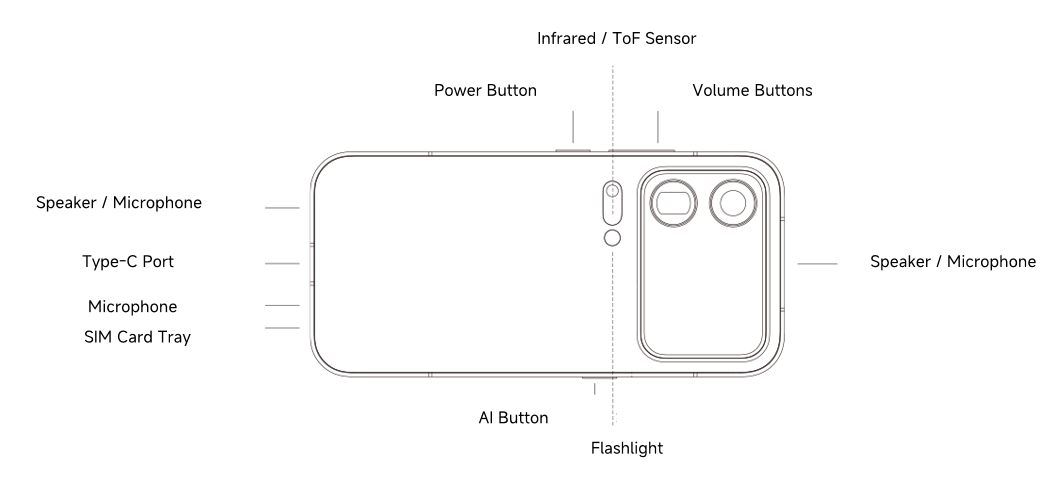
The Xiaomi 18 Pro features a compact, rounded body with a narrow-bezel flat front display. On the upper back sits a raised rectangular camera island that integrates the 2.7 inches versatile back display and two Leica camera lenses, with the Flashlight located just below the module. The top edge has a Speaker/Microphone opening; the left edge carries the Volume Buttons near the top, the Infrared/ToF Sensor along the center axis, and the Power Button below it; the right edge holds the dedicated AI Button; and the bottom edge includes a Speaker/Microphone, a Type-C Port, Microphone, and the SIM Card Tray.
Q4: What color options are available for the Xiaomi 18 Pro?
A: The Xiaomi 18 Pro is available in Velvet Red, Cosmic Blue, Black, and White.
Note:
Available colors may vary by country or region. Please refer to local official sales channels.
Q5: Where can the SN and IMEI numbers of the Xiaomi 18 Pro be viewed?
A: The SN and IMEI of the Xiaomi 18 Pro can be viewed in the following locations:
1. You can check the SN and the IMEI of the Xiaomi 18 Pro on the packaging box and the label on the body.
2. On the phone, enter * # 06 # , and you can check the IMEI and SN.
3. Open the [Settings] App >> [About phone] >> [Detailed info and specs] >> [Status] >> tap [Model] to check the SN >> tap [IMEI] to check the IMEI.
Q6: What are the dimensions and weight of the Xiaomi 18 Pro?
A: Here are the dimensions and weight specifications of the Xiaomi 18 Pro:
Package dimensions (H × W × T):
Includes charger: 192 mm x 100 mm x 71 mm
Without charger: 192 mm x 100 mm x 43 mm
Product dimensions (H × W × T):
Velvet Red, Black, and White versions: 151.8 mm × 72 mm × 8.46 mm
Cosmic Blue version: 151.8 mm × 72 mm × 8.56 mm
Package weight:
Without charger: 425 g ± 5 g
Product weight:
Velvet Red, Black, and White versions: 198 g
Cosmic Blue version: 203 g
Note:
Data provided by internal laboratories. Industry measurement methods may vary. Actual results may differ. Products may vary by region; please refer to the actual product.
Screen Display
Q1: What are the screen size, aspect ratio, and screen-to-body ratio of the Xiaomi 18 Pro?
A: The Xiaomi 18 Pro features a 6.4-inch main display with a 19.6:9 aspect ratio and a 2.7-inch back display with a 13.77:9 aspect ratio. The screen-to-body ratio is 96.16% for the main display and 76.37% for the back display.
Q2: What is the screen resolution of the Xiaomi 18 Pro?
A: The Xiaomi 18 Pro features a main display with a resolution of 2436 × 1120 pixels and a back display with a resolution of 912 × 596 pixels.
The pixel density is 419 PPI for the main display and 400 PPI for the back display.
Q3: What is the refresh rate of the Xiaomi 18 Pro, and how is it adjusted?
A: Here are the refresh rate specifications and adjustment method:
1. It supports two screen refresh rate options: 60 Hz and 120 Hz.
2. The refresh rate can be adjusted in the display settings menu on the device: [Settings] >> [Display & brightness] >> [Refresh rate] >> [Custom], then you can adjust it as you prefer.
3. The Xiaomi 18 Pro supports a touch sampling rate of up to 300 Hz on the main display and up to 120 Hz on the back display.
Q4: What is the brightness range of the Xiaomi 18 Pro screen?
A: The Xiaomi 18 Pro features a local peak brightness of up to 4000 nits, a peak brightness of 2100 nits in high-brightness mode (HBM), and a manually adjustable peak brightness of 1060 nits (Typ.) on both the main display and the back display.
Q5: Why does the screen of the Xiaomi 18 Pro exhibit light leakage?
A: Thank you for your support of Xiaomi products. Because the Xiaomi 18 Pro uses an AMOLED display, slight light leakage may occur due to the characteristics of the panel and its structure. This may be more noticeable under certain viewing angles or in dark environments, especially when displaying dark or black content. This is a normal characteristic of AMOLED displays and does not affect the normal use or functionality of the phone. Xiaomi phones undergo rigorous professional inspection before leaving the factory, so you can use your device with confidence.
Q6: What to do if the touchscreen of the Xiaomi 18 Pro is unresponsive?
A: Thank you for supporting Xiaomi products. After a version update or a fresh installation, the App has not yet completed compilation and optimization; consequently, you may experience slight lag during the initial few uses. Once the compilation and optimization process is complete, the lag issue will improve.
If lag issues persist even after application compilation and optimization, please refer to the following steps:
1. Restart the device to reset the system.
2. Clean the screen surface to remove any dirt or moisture.
3. Remove any protective film that may interfere with touch sensitivity.
4. Check for system updates and install them if available.
If the issue persists, contact the local official after-sales service center for further assistance.
Q7: What to do if the screen brightness of the Xiaomi 18 Pro changes automatically?
A: If the Xiaomi 18 Pro screen brightness changes automatically, the following information may help:
1. The Xiaomi 18 Pro supports an ambient light sensor that automatically adjusts screen brightness based on the surrounding lighting conditions.
2. The Auto brightness function of the Xiaomi 18 Pro can be turned off in the display settings ([Settings] >> [Display & brightness] >> turning off [Automatic brightness]) to prevent automatic changes.
3. If the Auto brightness behavior seems erratic, the ambient light sensor of the Xiaomi 18 Pro should be checked for obstructions such as screen protectors or dirt.
Q8: What is the function of HDR display on the Xiaomi 18 Pro?
A: The Xiaomi 18 Pro supports HDR10, HDR10+, and HDR Vivid, delivering a more vivid and immersive viewing experience. When playing HDR-compatible content, the display automatically adjusts to enhance contrast, enrich colors, and reveal more detail in highlights and shadows.
Q9: What to do if the screen of the Xiaomi 18 Pro is hard to see in sunlight?
A: The Xiaomi 18 Pro supports Sunlight mode to improve visibility outdoors. This mode can be enabled in the display settings, and the device will automatically increase screen brightness and contrast for improved visibility in bright sunlight.
Please note that the Sunlight mode requires the Automatic brightness feature to be enabled.
Q10: What dimming methods does the Xiaomi 18 Pro support at different brightness levels?
A: Both the main display and the back display of the Xiaomi 18 Pro support full-range DC dimming.
Q11: How to change the dimming method on the Xiaomi 18 Pro?
A: The Xiaomi 18 Pro supports changing the display dimming method; you can switch from DC dimming to PWM dimming.
To change the dimming method on the phone, please go to [Settings] >> [Display & brightness] >> turn on [Adaptive refresh rate Pro].
Q12: How to set the wallpaper for the back display on the Xiaomi 18 Pro?
A: The Xiaomi 18 Pro supports personalized wallpaper settings for the back display, allowing you to choose from various styles and designs to customize its appearance.
To set the wallpaper for the back display, please go to [Settings] >> [Back display] >> [Back display personalization] >> You can choose from the following categories: Creative clocks, Nature, Pets, Wallpapers and signatures, Big numbers, Fun wallpapers, Technology, and Weather.
Network Issues
Q1: Does the Xiaomi 18 Pro support Wi-Fi 6/7, and what router settings are required?
A: The Xiaomi 18 Pro supports Wi-Fi 7 and operates on the 2.4 GHz (IEEE 802.11b/g/n), 5 GHz (IEEE 802.11a/n/ac/ax), and 7 GHz frequency bands. To connect to Wi-Fi, the router must support broadcasting on a compatible frequency band.
Q2: What to do if the Xiaomi 18 Pro cannot connect to 5 GHz Wi-Fi?
A: If the Xiaomi 18 Pro cannot connect to a 5 GHz Wi-Fi network, the following steps can be tried:
1. Ensure the router is broadcasting on a channel compatible with the device. The router settings should be checked to ensure the 5 GHz band is enabled and broadcast.
2. Verify the network password is entered correctly.
3. The Xiaomi 18 Pro supports IEEE 802.11a/n/ac/ax on the 5 GHz band, and the device should be placed within range of the router.
4. Restart the router and the device to refresh the connection.
Q3: How is a shared hotspot enabled on the Xiaomi 18 Pro?
A: To enable the portable hotspot on the Xiaomi 18 Pro, please open the [Settings] App >> [More connectivity options] >> [Portable hotspot] >> enable [Portable hotspot] and adjust the related settings. It allows Wi-Fi and hotspots to be turned on simultaneously, so the mobile data connection can be shared while staying connected to a Wi-Fi network.
Q4: Does the Xiaomi 18 Pro support an Ethernet connection via an adapter?
A: The Xiaomi 18 Pro supports an Ethernet connection via a Type-C to Ethernet adapter. The USB Type-C port of the device allows wired network connectivity through compatible adapters. Please note that this feature is subject to the specific adapter's chipset compatibility with the device's system.
Bluetooth
Q1: What Bluetooth version is supported by the Xiaomi 18 Pro?
A: The Xiaomi 18 Pro supports Bluetooth version 6.0.
Q2: What Bluetooth codecs are supported by the Xiaomi 18 Pro?
A: The Xiaomi 18 Pro supports the SBC, AAC, aptX, aptX HD, aptX Adaptive, LDAC, LHDC 4.0, LHDC 5.0, LC3, and Auracast Bluetooth audio codecs. The Xiaomi 18 Pro does not support LHDC 1.0, LHDC 2.0, LHDC 3.0, or MIHC codecs.
Q3: Does the Xiaomi 18 Pro support LE Audio?
A: The Xiaomi 18 Pro supports LE Audio.
Q4: What to do if the Xiaomi 18 Pro cannot find other Bluetooth devices?
A: If the Xiaomi 18 Pro cannot find other Bluetooth devices, the following steps can be tried:
1. Ensure Bluetooth is enabled on both the device and the target device.
2. Set the target device to discoverable or pairing mode.
3. Move the two devices closer together to improve signal strength.
4. Restart Bluetooth by toggling it off and on.
5. Restart both devices to clear any temporary connection issues.
Audio and Video
Q1: What to do if there is no sound on the Xiaomi 18 Pro?
A: If there is no sound from the Xiaomi 18 Pro, the following troubleshooting steps can be taken to identify and resolve the issue:
1. Check the volume level on the device and ensure it is not set to silent or vibrate mode.
2. Ensure Do Not Disturb mode is disabled, as this mode may suppress all audio output.
3. Verify that audio output is not routed to a connected Bluetooth device by checking the Bluetooth settings and disconnecting any paired accessories if necessary.
4. Restart the device to resolve any temporary software glitches that may be affecting the audio system.
5. Check the speaker grilles for dust or debris and clean them gently if blockage is visible.
If the issue persists after trying all the above steps, contact the local after-sales service center for further assistance.
Q2: What to do if the speaker volume on the Xiaomi 18 Pro becomes low?
A: If the speaker volume on the Xiaomi 18 Pro becomes low, the following troubleshooting steps can be taken:
1. Check the volume settings and increase the volume level to ensure it is not set too low for the current audio output.
2. Clean the speaker grilles gently with a soft brush or cloth to remove any dust, lint, or debris that may be blocking sound output.
3. Remove any protective case or cover that may be covering or obstructing the speaker openings.
4. Disconnect any connected Bluetooth audio devices to verify that audio is playing through the built-in speakers and not being routed externally.
5. Restart the device to refresh the system audio processing and resolve any temporary software issues.
6. Check for system updates and install them if available, as software optimizations can improve audio performance.
7. If the issue persists after trying all the above steps, contact the local after-sales service center for further hardware diagnostics or repair assistance.
Q3: What to do if video playback stutters on the Xiaomi 18 Pro?
A: If video playback stutters on the Xiaomi 18 Pro, please refer to the following troubleshooting steps:
1. Close background applications to free up system resources and reduce CPU and memory load.
2. Clear the cached data of the video playback application being used.
3. If streaming video content, check the network connectivity and ensure a stable Wi-Fi or mobile data connection is available.
4. The Xiaomi 18 Pro supports playback of video formats including MP4, MKV, WEBM, 3GP, and TS.
5. Lower the video quality settings within the playback application to reduce bandwidth and processing demands.
6. Check if there is sufficient storage space, as a lack of storage space can affect playback performance.
7. Check for system updates and application updates, as newer versions can contain performance optimizations and bug fixes.
Q4: Why is there an audio channel imbalance on the Xiaomi 18 Pro?
A: The Xiaomi 18 Pro features a dual speaker system with speaker dimensions of 10 mm × 14 mm and 11 mm × 15 mm. Any perceived channel imbalance may be related to the audio source content being played, the equalizer settings applied on the device, or the physical positioning of the device during playback, affecting acoustic reflection.
If the problem persists, please check the audio hardware for potential damage.
Camera Usage
Q1. Does the Xiaomi 18 Pro camera support macro mode, and how is it used?
A: The Xiaomi 18 Pro supports super macro mode. Open the [Camera] App >> tap the arrow at the top of the screen in the [Photo], [Video], and [Documents] modes >> tap [Super macro].
Q2. Which camera is used for macro mode on the Xiaomi 18 Pro?
A: The Xiaomi 18 Pro uses the wide-angle main camera for Super macro mode.
Q3. What shooting modes does the Xiaomi 18 Pro camera support?
A: Here are the shooting modes supported by the Xiaomi 18 Pro camera:
The rear camera of the Xiaomi 18 Pro supports the following modes: 200MP, Essential Moment, Original style, Lecia Vibrant & Authentic, Back display selfie, Back display preview, Back display photo booth, Live moment, Live cinematography, Auto Supermoon, Photo watermark, Video watermark, Dolby Vision, Motion capture, Filter, Auto night mode, Motion tracking focus, Source tracking, Portrait bokeh, Master-lens system, Portrait fill light, Smart beautify, Video beautify, Fastshot, Pro mode, Time-lapse, Documents mode, Slow motion, Long exposure, Panorama, Timer, Audio shutter, Tap to take a photo, Timed burst, Gridlines, Straighten.
The Xiaomi 18 Pro front camera supports the following modes: Live moment, Smart beautify, Portrait bokeh, Portrait fill light, Photo watermark, Video watermark, Video beautify, Time-lapse, Slow motion, Teleprompter, Timer, Palm shutter, Audio shutter, Tap to take a photo, Gridlines.
Q4. What is the zoom magnification and technology of the Xiaomi 18 Pro camera?
A: Here is the zoom information for the Xiaomi 18 Pro camera:
1. The main camera of the Xiaomi 18 Pro supports zoom ratios of 0.7x to 120x in Photo mode.
2. The main camera of the Xiaomi 18 Pro supports zoom ratios of 0.7x to 30x in Video recording mode.
3. Only 0.7x, 1x, and 3.2x support optical zoom; other zoom levels use digital zoom.
4. The front camera of the Xiaomi 18 Pro supports 0.8× and 1× zoom in Photo and Portrait modes.
Q5. Does the Xiaomi 18 Pro support Live moment, and how is it used?
A: The Xiaomi 18 Pro supports Live moment. Open the [Camera] App >> tap the Live moment icon in the upper-right corner in the [Photo] or [Portrait] modes.
Q6. What is the maximum recording time for the Xiaomi 18 Pro, and why does it stop automatically?
A: The Xiaomi 18 Pro supports rear video recording at 720p 30 fps, 1080p 30/60 fps, 4K 30/60/120 fps, and 8K 30 fps, and front video recording at 720p 30 fps, 1080p 30/60 fps, and 4K 30/60 fps.
For slow-motion recording, the wide-angle main camera and periscope telephoto camera support 720p at 120/240/480/960/1920 fps and 1080p at 120/240/960 fps, while the ultra-wide camera supports 720p and 1080p at 120 fps.
Recording on the Xiaomi 18 Pro may stop automatically due to storage space limitations on the device. Recording on the Xiaomi 18 Pro may also stop due to temperature protection when the device exceeds safe operating temperatures.
Q7. Does the Xiaomi 18 Pro support ultra-wide-angle mode?
A: The Xiaomi 18 Pro has a dedicated ultra-wide-angle camera with 50 MP.
Q8. Why does the Xiaomi 18 Pro take time to capture and process a 200MP photo after the shutter button is pressed?
A: After the shutter button is pressed on the Xiaomi 18 Pro, a rotating loading animation appears on the shutter button before the photo is captured. Once the capture is complete, when you enter the photo preview, the image still displays a "Processing" message. This is because 200MP photos require additional image processing time to generate the final image. Please wait until processing is complete to view the final result.
App Usage
Q1. How to set default apps on the Xiaomi 18 Pro?
A: Please open the [Settings] App >> [Apps] >> tap the three-dot icon >> [Other settings] >> [Default apps] >> you can set the default apps.
Q2. How to enable video call beauty on the Xiaomi 18 Pro and which apps support it?
A: To enable video call beauty on the Xiaomi 18 Pro, please refer to the following steps:
Open the [Settings] App >> [Additional settings] >> [Floating windows] >> [Side toolbox] >> enable [Call toolbox] >> [Manage Beautify for video calls] >> enable [Beautify for video calls] >> you can open it from the side toolbox during video calls to use this feature.
Note:
Please refer to the actual usage for the specific third-party software supported.
Q3. Does the Xiaomi 18 Pro support in-app call recording?
A: The Xiaomi 18 Pro does not support in-app call recording.
Q4. Does the Xiaomi 18 Pro support FM radio?
A: The Xiaomi 18 Pro does not support FM radio.
Q5. Is ARcore pre-installed on the Xiaomi 18 Pro, and what does it do?
A: Search for ARCore in Google Chrome on the Xiaomi 18 Pro and tap Install to open the ARCore interface in the Google Play Store. If the interface displays "Uninstall", ARCore is supported and already preinstalled on the device. If it displays "This device isn't supported for installation", ARCore is not supported.
Q6. Is the Xiaomi 18 Pro flashlight brightness adjustable, and is it stepless?
A: The flashlight brightness on the Xiaomi 18 Pro can be adjusted steplessly.
System Usage
Q1. Does the Xiaomi 18 Pro support split-screen?
A: The Xiaomi 18 Pro supports split-screen mode.
Q2. Does the Xiaomi 18 Pro support floating windows?
A: The Xiaomi 18 Pro supports floating windows.
Q3. Why does the system occupy a large amount of storage on the Xiaomi 18 Pro?
A: The system occupies a large amount of storage on the Xiaomi 18 Pro because the operating system, including Xiaomi HyperOS 4.0 based on Android 17, along with pre-installed applications and essential system files, all require a portion of the internal storage for proper device operation. Additionally, the Xiaomi 18 Pro retains system cache and temporary files that accumulate over time, and these files can be cleared through the storage settings to free up space without affecting system functionality.
Q4. What voice assistant does the Xiaomi 18 Pro support and how is it activated?
A: The Xiaomi 18 Pro supports Gemini. You can wake it by voice command using "Hey Google" or by pressing the power button for 0.5 seconds.
Note:
The availability of Gemini varies by country or region.
Q5. Why do notifications stay on the Xiaomi 18 Pro screen for a long time?
A: If the system notifications stay on the Xiaomi 18 Pro screen for a long time, please set it as follows:
Open the [Settings] App >> [Accessibility] >> [Physical] >> [Time to take action] >> set it to [Default].
Q6. Does the Xiaomi 18 Pro support step counting?
A: The Xiaomi 18 Pro does not support natively displaying step count information. Third-party fitness applications can be used on it, or the device can be connected to a compatible wearable device to track step count data.
Q7. Does the Xiaomi 18 Pro support NFC?
A: The Xiaomi 18 Pro supports NFC payments and NFC card reader/writer functions.
Note:
The availability of NFC features may differ by country/region.
Q8. Which control center style does the Xiaomi 18 Pro support and can it be switched?
A: The Xiaomi 18 Pro does not support switching the Control Center style. The current style can be accessed by swiping down from the right side of the screen. Tap [Edit] to customize the available controls.
Q9. How to set the boot-up sound effect on the Xiaomi 18 Pro?
A: To set the boot audio on the Xiaomi 18 Pro, please open the [Themes] App >> [My account] >> [Ringtones] >> select a ringtone and tap [Apply] >> [Boot audio].
Q10. How to enable picture-in-picture permission for apps on the Xiaomi 18 Pro?
A: To enable picture-in-picture permission, please open the [Settings] App >> [Security and privacy] >> [More security & privacy] >> [Special permissions] >> [Picture-in-picture].
Battery and Charging
Q1: What type of battery is used in the Xiaomi 18 Pro?
A: The Xiaomi 18 Pro features a dual-cell lithium-polymer battery with a rated capacity of 5880 mAh and a typical capacity of 6000 mAh.
Note:
Data provided by internal laboratories. Industry measurement methods may vary. Actual results may differ. Products may vary by countries/regions. Please refer to the actual product.
Q2: Why does the charging power of the Xiaomi 18 Pro not reach the advertised value?
A: The actual charging power of the Xiaomi 18 Pro may not reach the maximum advertised value because it is intelligently adjusted in real time based on several factors to ensure safe and efficient charging. These factors include the specific charger and data cable being used, the remaining battery level of the device (as the charging speed is deliberately reduced near full capacity to protect the battery), and the usage environment, such as ambient temperature conditions, which may trigger thermal regulation to safeguard battery health.
This dynamic adjustment is a normal and necessary feature that prioritizes long-term battery safety over peak charging speed, so occasional deviations from the advertised value are to be expected and do not indicate any malfunction.
Q3: What charging protocols are supported by the Xiaomi 18 Pro?
A: The Xiaomi 18 Pro supports BC1.2, PPS, PD 2.0, and QC 3.0 wired charging protocols, as well as Qi and Qi2 wireless charging protocols. The charger supports QC, PD, and PPS charging protocols.
Q4: Why is the charging speed of the Xiaomi 18 Pro very slow?
A: The Xiaomi 18 Pro charging speed may be slow for the following reasons:
1. High ambient temperature can cause the Xiaomi 18 Pro to reduce charging speed for battery protection.
2. Use of incompatible chargers or cables will limit the charging speed of the Xiaomi 18 Pro.
3. Simultaneous heavy usage during charging on the Xiaomi 18 Pro reduces the available charging power.
4. The Xiaomi 18 Pro achieves a full charge in approximately 51 minutes under optimal conditions with the recommended charger.
Note:
Data provided by Xiaomi internal laboratories. Industry measurement methods may vary. Actual results may differ. Products may vary by region; please refer to the actual product.
Q5: Does long-term plug-in charging damage the battery of the Xiaomi 18 Pro?
A: Long-term plug-in charging does not significantly damage the Xiaomi 18 Pro battery because the device incorporates battery management systems that prevent overcharging. The Xiaomi 18 Pro uses a high-voltage battery with a 4.58 V charging limit, and the charging control system automatically stops charging when the battery reaches full capacity. For safety reasons, it is recommended to unplug the charger after the device is fully charged.
Q6: Can the Xiaomi 18 Pro be used while charging?
A: The Xiaomi 18 Pro can be used while charging, but this practice is not recommended for optimal battery health and charging efficiency. Charging speed on the Xiaomi 18 Pro may be significantly reduced when the device is used heavily during charging to manage heat generation. The Xiaomi 18 Pro incorporates temperature management to protect the battery during simultaneous charging and usage, but prolonged usage while charging may generate additional heat and potentially affect long-term battery performance.
For the best charging experience and battery longevity, it is recommended to allow the Xiaomi 18 Pro to charge without active usage whenever possible.
Q7: Why does the battery drain faster on the Xiaomi 18 Pro after a system update?
A: After a system update, the Xiaomi 18 Pro may experience faster battery drain because background optimization processes run on the device, app recompilation is triggered, which consumes additional power, and system re-indexing, along with other background tasks, temporarily consumes more power. This increased battery drain typically stabilizes within a few charge cycles as the system completes its post-update optimization.
Q8: Does the Xiaomi 18 Pro power on automatically when plugged in, and is there a minimum battery requirement?
A: The Xiaomi 18 Pro supports instant power-on at 0% battery. The device can power on immediately when connected to a charger, even when the battery is completely depleted.
Hardware Issues
Q1: What sensors are supported by the Xiaomi 18 Pro?
A: The Xiaomi 18 Pro supports a Proximity sensor, Ambient light sensor, Accelerometer, Gyroscope, Electronic compass, IR blaster, Barometer, Flicker sensor, and X-axis linear vibration motor.
Q2: Does the Xiaomi 18 Pro have an infrared port, and can it be used as a remote?
A: The Xiaomi 18 Pro supports an infrared sensor, so it can be used as a remote control for infrared-enabled appliances.
Q3: What type of proximity sensor does the Xiaomi 18 Pro use—physical, virtual, or ultrasonic?
A: The Xiaomi 18 Pro uses a physical optical proximity sensor.
Q4: What type of fingerprint sensor is used in the Xiaomi 18 Pro?
A: The Xiaomi 18 Pro uses an in-screen ultrasonic fingerprint sensor.
Q5: Where is the NFC sensing area located on the Xiaomi 18 Pro?
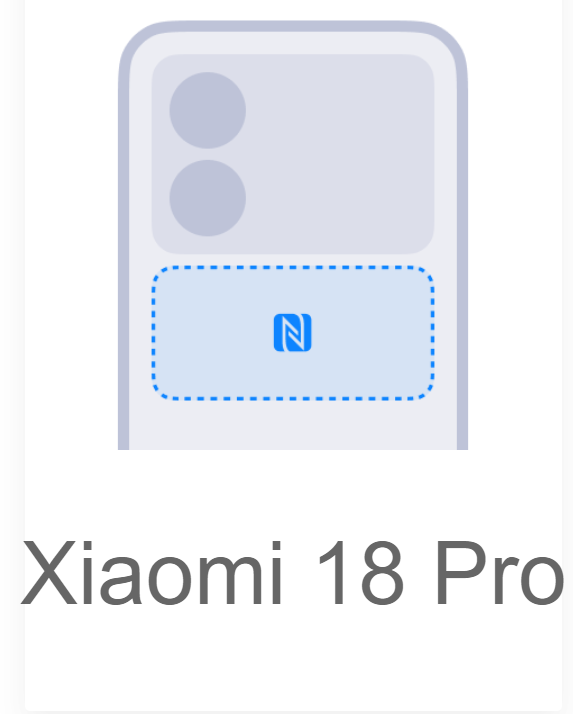
A: The NFC area on the Xiaomi 18 Pro is located near the upper-central part of the device, around or slightly below the rear camera module.
Note:
NFC availability varies by country/region.
Q6: What is the USB Type-C specification of the Xiaomi 18 Pro?
A: The Xiaomi 18 Pro uses a USB Type-C port with USB 2.0.
Q7: What materials are used for the battery cover and frame of the Xiaomi 18 Pro?
A: The back shell of the Xiaomi 18 Pro does not support self-disassembly. It has a sandwich structure, and the battery cover is adhered to the middle frame with adhesive.
The Xiaomi 18 Pro features different back shell materials depending on the version:
Velvet Red, Black, and White versions: Fiberglass
Cosmic Blue version: Xiaomi Shield Glass 3.0 + ion implantation
The middle frame is made of the following materials:
Metal: Hoshion 6M42 aluminum alloy
Plastic: Toray PBT + 40% GF
Q8: What type of vibration motor is supported by the Xiaomi 18 Pro?
A: The Xiaomi 18 Pro uses an X-axis linear vibration motor.
Gaming Related
Q1: Does the Xiaomi 18 Pro support Game Turbo, and how is it used?
A: The Xiaomi 18 Pro supports Game Turbo. It can be accessed by going to the Security App, then continuing to scroll down the page to find [Game Turbo]. Game Turbo optimizes system resources by prioritizing CPU and GPU performance for gaming, minimizes background activity, and provides an enhanced gaming experience with improved frame rate stability.
After enabling Game Turbo, go to [Settings] >> [Additional settings] >> [Floating windows] >> [Side toolbox] >> enable [Sidebar] and [In-game shortcuts]. Then, open a game and swipe inward from the edge of the screen to open the sidebar and access Game Turbo features.
Q2: Does the Xiaomi 18 Pro support Wild Boost?
A: The Xiaomi 18 Pro does not support Wild Boost.
Q3: Is the Xiaomi 18 Pro suitable for high-performance games?
A: The Xiaomi 18 Pro is suitable for high-performance games.
Q4: Does the Xiaomi 18 Pro support gamepad connectivity?
A: The Xiaomi 18 Pro supports game controllers via Bluetooth HID connectivity. The Xiaomi 18 Pro also supports OTG for wired controller connections through the Type-C USB port.
Q5: Which games support 120Hz high frame rate on the Xiaomi 18 Pro?
A: The Xiaomi 18 Pro supports 120Hz high-frame-rate gameplay in PUBG, CODM, MLBB, and LOLM.
Q6: What is the maximum frame rate for common games on the Xiaomi 18 Pro?
A: The Xiaomi 18 Pro's gaming performance varies by application and game optimization, and actual frame rates depend on game settings, background processes, and the specific title being played.
Here are some of the maximum frame rates supported by the games:
1. PUBG: Supports up to 120 fps with smooth graphics quality.
2. CODM: Supports up to 120 fps with MID image quality.
3. MLBB: Supports up to 120 fps.
4. LOLM: Supports up to 120 fps with cloud-based control.
Q7: Does the Xiaomi 18 Pro support Game frame insertion and Game high frame rate mode, and for which games?
A: The Xiaomi 18 Pro supports Game frame insertion and Game super resolution in Genshin Impact, but not in other games. The Xiaomi 18 Pro also supports Game High Frame Rate mode for PUBG, CODM, MLBB, and LOLM.
SIM Card and Mobile Network
Q1: Does the Xiaomi 18 Pro support SIM cards and voice calls?
A: The Xiaomi 18 Pro supports dual SIM (nano SIM + nano SIM or nano SIM + eSIM) with dual SIM dual standby (it is subject to the carrier's specific requirements). In terms of network formats, it supports GSM, WCDMA, LTE, SA, and NSA. For voice services, it supports VoLTE for high-quality 4G voice calls, VoNR for 5G voice calls, and VoWiFi. (These three features are subject to the carrier's specific requirements.)
Q2: How are different ringtones set for two SIM cards on the Xiaomi 18 Pro?
A: To set different ringtones for two SIM cards on the Xiaomi 18 Pro, please open the [Themes] App >> [My account] >> [Ringtones] >> select a ringtone and tap [Apply] >> select SIM 1 or SIM 2.
Q3: Does the Xiaomi 18 Pro support eSIM?
A: The Xiaomi 18 Pro supports dual eSIM. You can go to the phone [Settings] >> [Mobile networks] >> enable [Turn on eSIM], then your phone will pop up an option >> select [OK].
Q4: Does the Xiaomi 18 Pro support call recording, and where are the files saved?
A: The Xiaomi 18 Pro supports call recording, and the recording files are saved to the internal storage. Open the Phone App and tap the Home icon, then select the contact. To view the most recent call recording, simply play it. If you are viewing a previous call recording, you need to tap on the call log first, then select the recording.
Note:
1. Due to local laws and regulations, availability may vary by country and region.
2. If you delete the call history, the call recordings are also deleted.
Q5: Does the Xiaomi 18 Pro support Xiaomi Offline Communication?
A: The Xiaomi 18 Pro supports Xiaomi Offline Communication.
Note:
1. Xiaomi Offline Communication requires a SIM card and a logged-in Xiaomi account to function. It supports voice calls within a limited range between two supported devices in open, unobstructed environments.
2. The Xiaomi Offline Communication feature is only available for devices that support Xiaomi Offline Communication. Feature availability may vary by region. Please consult local resellers for more details.
3. Actual call quality may vary depending on environmental conditions. Please refer to your experience. This feature is not designed or intended for emergency or life-saving communications.
Q6: Does the Xiaomi 18 Pro support satellite communication?
A: The Xiaomi 18 Pro does not support satellite communication.
Q7: Does the Xiaomi 18 Pro support call noise reduction? How to enable it, and for which scenarios?
A: The Xiaomi 18 Pro supports smart noise reduction for calls. You can enable Noise reduction in the Call toolbox. For people who need to speak through electronic devices, the sound may be recognized by the phone as background noise and reduced if it sounds too mechanical. In this case, you can disable this feature.
Accessory Usage
Q1: What type of charging cable and adapter are used with the Xiaomi 18 Pro?
A: The Xiaomi 18 Pro comes with a USB-A to Type-C cable featuring a warm sun colored port and supporting the USB 2.0 transfer specification, a length of 1 meter, and a current rating of 6 A. It supports chargers that are compatible with QC, PD, and PPS charging protocols.
Q2: Does the Xiaomi 18 Pro come with a protective film pre-installed?
A: The Xiaomi 18 Pro comes with a PET protective film pre-installed on the screen.
Q3: Does the Xiaomi 18 Pro support OTG?
A: The Xiaomi 18 Pro supports OTG functionality, allowing external USB devices to be connected.
Q4: Can a game controller be connected to the Xiaomi 18 Pro?
A: Game controllers can be connected to the Xiaomi 18 Pro via Bluetooth HID or an OTG wired connection. The Xiaomi 18 Pro supports standard Bluetooth game controllers through Bluetooth 6.0.
Q5: Does the Xiaomi 18 Pro support USB hubs?
A: The Xiaomi 18 Pro supports OTG functionality, and USB hubs may be usable through a compatible USB Type-C OTG adapter. However, full hub functionality depends on the specific adapter used and the power requirements of the connected devices.
Q6: Can a mouse or keyboard be connected to the Xiaomi 18 Pro?
A: The Xiaomi 18 Pro supports both OTG and Bluetooth HID, so a mouse or keyboard can be connected in two ways:
1. A USB mouse or keyboard can be connected via a USB OTG adapter.
2. A Bluetooth mouse or keyboard can be connected directly over Bluetooth.
Q7: What type of SD card (capacity and file format) does the Xiaomi 18 Pro support?
A: The Xiaomi 18 Pro does not support an SD card.
Does it help?
Yes
No