

REDMI Note 17 FAQ
Product Overview
Q1: What are the selling points of the REDMI Note 17?
A: For your reference, here are the selling points of the REDMI Note 17:
1. It features a 6.99-inch ultra-large display, offering a wider field of view and smoother visuals.
2. It is equipped with a 7700 mAh large-capacity battery for long-lasting use.
3. The phone features a 16 MP front camera and a 50 MP main camera for ultra-clear imaging.
Q2: What is the positioning of the REDMI Note 17 and who is it for?
A: This REDMI Note 17 is positioned as a durable and practical smartphone that prioritizes long battery life, a large eye-care display, and aesthetic design. It suits those who value all-day battery performance, comfortable screen viewing for extended periods, and reliable everyday performance.
Q3: What does the exterior of the REDMI Note 17 look like?
A: Here are the exterior details of the REDMI Note 17:
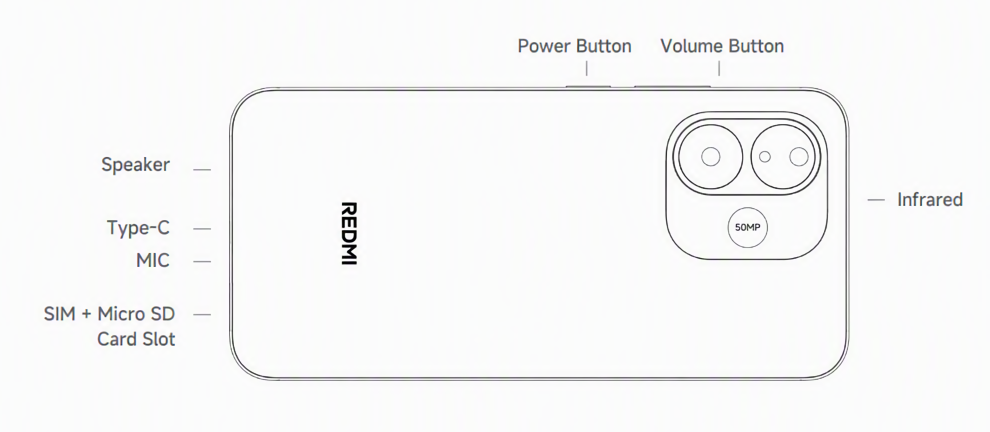
Below the main camera is an auxiliary camera with a resolution of 0.08 megapixels.
Q4: What color options are available for the REDMI Note 17?
A: The REDMI Note 17 is available in three color options, including Black, Purple, and Blue.
Note:
Available colors may vary by country or region; please refer to local official sales channels.
Q5: Where can the SN and IMEI numbers of the REDMI Note 17 be viewed?
A: The SN and IMEI of the REDMI Note 17 can be viewed in the following locations:
1. You can check the SN and the IMEI of the REDMI Note 17 on the packing box and the label on the body.
2. On the phone, enter * # 06 #, and you can check the IMEI and SN.
3. Open the [Settings] App >> [About phone] >> [Detailed info and specs] >> [Status] >> tap [Model] to check the SN; In the [Status] interface, tap [IMEI] to check the IMEI.
Q6: What are the dimensions and weight of the REDMI Note 17?
A: Here are the dimensions and weight specifications of the REDMI Note 17:
Package dimensions (H × W × T):
Without charging module: 187 mm × 96 mm × 45 mm
With charging module: 187 mm × 96 mm × 61 mm
Product dimensions (H × W × T):
169.70 mm × 79.14 mm × 8.45 mm.
Package weight:
EEA: 438 g.
EU version: 530 g.
Product weight:
224.10 g.
Note:
Data provided by internal laboratories. Industry measurement methods may vary. Actual results may differ. Products may vary by region; please refer to the actual product.
Screen Display
Q1: What is the screen size, ratio, and screen-to-body ratio of the REDMI Note 17?
A: The REDMI Note 17 has a 6.99-inch screen with a screen-to-body ratio of 92.4%.
Q2: What is the screen resolution of the REDMI Note 17?
A: Its screen resolution is 1080 × 2396 pixels, and its pixel density is 375 PPI.
Q3: What is the refresh rate of the REDMI Note 17, and how is it adjusted?
A: Here are the refresh rate specifications and adjustment method:
1. It supports two screen refresh rate options: 60 Hz and up to 120 Hz.
2. The refresh rate can be adjusted in the display settings menu on the device: [Settings] >> [Display & brightness] >> [Refresh rate] >> [Custom]. Then you can adjust it as you prefer.
3. The REDMI Note 17 also features a touch sampling rate of up to 240 Hz for responsive touch interaction.
4. It features an instantaneous touch sampling rate (Game mode) of 2160 Hz.
Q4: What is the brightness range of the REDMI Note 17 screen?
A: Here are the brightness specifications of the REDMI Note 17 screen:
It features a local peak brightness of 1800 nits, a global brightness (HBM) of 1200 nits, and a maximum manual brightness (Typ.) of 700 nits. The minimum brightness is 2 nits.
Q5: Why does the screen of the REDMI Note 17 exhibit light leakage?
A: Thank you for your support of Xiaomi products. Because the REDMI Note 17 uses an AMOLED display, slight light leakage could occur due to the characteristics of the panel and its structure. This can be more noticeable under certain viewing angles or in dark environments, especially when displaying dark or black content. This is a normal characteristic of AMOLED displays and does not affect the normal use or functionality of the phone. Xiaomi phones undergo rigorous professional inspection before leaving the factory, so you can use your device with confidence.
Q6: What to do if the touchscreen of the REDMI Note 17 is unresponsive?
A: Thank you for supporting Xiaomi products. After an update or fresh installation, the app may not have finished compiling and optimizing; as a result, you may experience slight lag during the first few uses. Once compilation and optimization are complete, the lag should improve.
If lag issues persist even after application compilation and optimization, please refer to the following steps:
1. Restart the device to reset the system.
2. Clean the screen surface to remove any dirt or moisture.
3. Remove any protective film that can interfere with touch sensitivity.
4. Check for system updates and install them if available.
If the issue persists, contact the local official after-sales service center for further assistance.
Q7: What to do if the screen brightness of the REDMI Note 17 changes automatically?
A: If the REDMI Note 17 screen brightness changes automatically, please refer to the following information:
1. The REDMI Note 17 supports an ambient light sensor that automatically adjusts screen brightness based on the surrounding lighting conditions.
2. The Auto brightness function of the REDMI Note 17 can be turned off in the display settings ([Settings] >> [Display & brightness] >> turning off [Automatic brightness]) to prevent automatic changes.
3. If the Auto brightness behavior seems erratic, the ambient light sensor of the REDMI Note 17 should be checked for obstructions such as screen protectors or dirt.
Q8. What is the function of HDR display on the REDMI Note 17?
A: The REDMI Note 17 does not support HDR display.
Q9. What to do if the screen of the REDMI Note 17 is hard to see in sunlight?
A: The REDMI Note 17 supports Sunlight mode to improve visibility outdoors. This mode can be enabled in the display settings, and the device will automatically increase screen brightness and contrast for improved visibility under bright sunlight.
Please note that the Sunlight mode requires the Automatic brightness feature to be enabled.
Q10. What dimming methods does the REDMI Note 17 support at different brightness levels?
A: The REDMI Note 17 supports DC dimming at brightness levels above 110 nits, and supports PWM dimming at lower levels (below 110 nits).
Network Issues
Q1. Does the REDMI Note 17 support Wi-Fi 6/7, and what router settings are required?
A: The REDMI Note 17 supports Wi-Fi 5 technology, including 2.4 GHz (IEEE 802.11b/g/n) and 5 GHz (IEEE 802.11a/n/ac). To use Wi-Fi with it, the router should be configured to broadcast on compatible 2.4 GHz or 5 GHz channels.
Q2. What to do if the REDMI Note 17 cannot connect to 5 GHz Wi-Fi?
A: If the REDMI Note 17 cannot connect to a 5 GHz Wi-Fi network, the following steps can be tried:
1. Ensure the router is broadcasting on a channel compatible with the device. The router settings should be checked to ensure the 5 GHz band is enabled and broadcast.
2. Verify the network password is entered correctly.
3. The REDMI Note 17 supports IEEE 802.11a/n/ac on the 5 GHz band, and the device should be placed within range of the router.
4. Restart the router and the device to refresh the connection.
Q3. How is a shared hotspot enabled on the REDMI Note 17?
A: To enable the portable hotspot on the REDMI Note 17, please open the [Settings] App >> [More connectivity options] >> [Portable hotspot] >> enable [Portable hotspot] and adjust the related settings. This allows Wi-Fi and hotspots to be turned on simultaneously, so the mobile data connection can be shared while staying connected to a Wi-Fi network.
Q4. Does the REDMI Note 17 support an Ethernet connection via an adapter?
A: The REDMI Note 17 supports an Ethernet connection via a Type-C to Ethernet adapter. The USB Type-C port of the device allows wired network connectivity through compatible adapters. Please note that this feature is subject to the specific adapter's chipset compatibility with the device's system.
Bluetooth
Q1. What Bluetooth version is supported by the REDMI Note 17?
A: The REDMI Note 17 supports Bluetooth version 5.0.
Q2. What Bluetooth codecs are supported by the REDMI Note 17?
A: The REDMI Note 17 supports the SBC, AAC, aptX, and Bluetooth HID audio codecs. The REDMI Note 17 does not support aptX HD, aptX Adaptive, LDAC, LHDC 1.0, LHDC 2.0, LHDC 3.0, LHDC 4.0, LHDC 5.0, LC3, Auracast, and MIHC codecs.
Q3. Does the REDMI Note 17 support LE Audio?
A: The REDMI Note 17 does not support LE Audio.
Q4. What to do if the REDMI Note 17 cannot find other Bluetooth devices?
A: If the REDMI Note 17 cannot find other Bluetooth devices, the following steps can be tried:
1. Ensure Bluetooth is enabled on both the device and the target device.
2. Set the target device to discoverable or pairing mode.
3. Move the two devices closer together to improve signal strength.
4. Restart Bluetooth by toggling it off and on.
5. Restart both devices to clear any temporary connection issues.
Audio and Video
Q1: What to do if there is no sound on the REDMI Note 17?
A: If there is no sound from the REDMI Note 17, the following troubleshooting steps can be taken to identify and resolve the issue:
1. Check the volume level on the device and ensure it is not set to silent.
2. Ensure Do Not Disturb mode is disabled, as this mode can suppress all audio output.
3. Verify that audio output is not routed to a connected Bluetooth device by checking the Bluetooth settings and disconnecting any paired accessories if necessary.
4. Restart the device to resolve any temporary software glitches that can be affecting the audio system.
5. Check the speaker grilles for dust or debris and clean them gently if blockage is visible.
If the issue persists after trying all the above steps, contact the local after-sales service center for further assistance.
Q2. What to do if the speaker volume on the REDMI Note 17 becomes low?
A: If the speaker volume on the REDMI Note 17 becomes low, the following troubleshooting steps can be taken:
1. Check the volume settings and increase the volume level to ensure it is not set too low for the current audio output.
2. Clean the speaker grilles gently with a soft brush or cloth to remove any dust, lint, or debris that can block sound output.
3. Remove any protective case or cover that could be covering or obstructing the speaker openings.
4. Disconnect any connected Bluetooth audio devices to verify that audio is playing through the built-in speakers and not being routed externally.
5. Restart the device to refresh the system audio processing and resolve any temporary software issues.
6. Check for system updates and install them if available, as software optimizations can improve audio performance.
7. If the issue persists after trying all the above steps, contact the local after-sales service center for further hardware diagnostics or repair assistance.
Q3. What to do if video playback stutters on the REDMI Note 17?
A: If video playback stutters on the REDMI Note 17, please refer to the following troubleshooting steps:
1. Close background applications to free up system resources and reduce CPU and memory load.
2. Clear the cached data of the video playback application being used.
3. If streaming video content, check the network connectivity and ensure a stable Wi-Fi or mobile data connection is available.
4. The REDMI Note 17 supports video formats including MP4, MKV, AVI, WEBM, 3GP, H.264, and H.265.
5. Lower the video quality settings within the playback application to reduce bandwidth and processing demands.
6. Check if there is sufficient storage space, as a lack of storage space can affect playback performance.
7. Check for system updates and application updates, as newer versions can contain performance optimizations and bug fixes.
Q4. Why is there an audio channel imbalance on the REDMI Note 17?
A: The REDMI Note 17 features a single speaker with specifications of 12 mm × 17 mm. If you notice an audio channel imbalance, please adjust the "Audio balance" setting under Accessibility. Go to [Settings] >> [Accessibility] >> [Hearing] >> [Audio balance].
If the problem persists, please check the audio hardware for potential damage.
Q5. Does the REDMI Note 17 support the volume boost function?
A: Yes, the REDMI Note 17 supports 200% volume boost. You can press and hold the volume up button to enable this feature.
* Data tested by Xiaomi Internal Labs, 200% volume boost refers to 16 levels of volume compared to 15 levels, and actual effects may vary due to software and scenarios, please refer to the actual use.
Camera Usage
Q1. Does the camera of the REDMI Note 17 support super macro mode?
A: The REDMI Note 17 does not support super macro mode.
Q2. Which camera is used for Macro mode on the REDMI Note 17?
A: The REDMI Note 17 does not support super macro mode, so no camera is designated for macro photography on the device.
Q3. What shooting modes are supported by the REDMI Note 17 camera?
A: Here are the shooting modes supported by the REDMI Note 17 camera:
Rear camera:
Portrait mode / Pro mode / Dual video / Documents (supported on 6 GB+ models) / Time-lapse / HDR / Face detection / Portrait bokeh / Voice shutter / CloudWatermark / Auto night mode / Night mode / Ultra HD / Live moments (supported on 6 GB RAM and above) / Panorama / Slow motion / Photo mode / Video mode.
Front camera:
Portrait mode / Dual video / Time-lapse / HDR / Face detection / Portrait bokeh / Voice shutter / CloudWatermark / Auto night mode / Night mode / Live moments (supported on 6 GB RAM and above).
Q4. What is the zoom range and technology of the REDMI Note 17 camera?
A: The zoom specification of the camera is 10 x digital zoom.
Q5. Does the REDMI Note 17 support Dynamic shot/Live moments and how to use them?
A: The REDMI Note 17 supports Live moments. To use this feature, please go to the Camera app. On the [Photo] screen, tap the [Live moments] icon to turn it on or off.
Q6. What is the max video recording duration of the REDMI Note 17 and why does it stop?
A: The device records video at 720P 30 fps and 1080P 30 fps in video recording mode, and the maximum video recording duration is not specified in the device specifications.
Recording could stop automatically due to insufficient storage space, overheating of the system triggering thermal protection, or low battery power reaching a critical level.
Q7. Does the REDMI Note 17 support Ultra-wide angle mode?
A: The REDMI Note 17 does not support Ultra-wide angle camera mode.
Application Usage
Q1. How to set default apps on the REDMI Note 17?
A: Please open the [Settings] App >> [Apps] >> tap the three-dot icon >> [Other settings] >> [Default apps] >> you can set the default apps.
Q2. How to enable video call beauty on the REDMI Note 17, and which apps support it?
A: To enable video call beauty on the REDMI Note 17, please refer to the following steps:
Open the [Settings] App >> [Additional settings] >> [Side toolbox] >> enable [Call toolbox] >> [Manage Beautify for video calls] >> enable [Beautify for video calls] >> you can open it from the side toolbox during video calls to use this feature.
Note:
Please refer to the actual usage for the specific third-party software supported.
Q3. Does the REDMI Note 17 support in-app call recording?
A: The REDMI Note 17 does not support in-app call recording.
Q4. Does the REDMI Note 17 have an FM radio?
A: The REDMI Note 17 does not support FM radio.
Q5. Is ARcore pre-installed on the REDMI Note 17, and what does it do?
A: The REDMI Note 17 does not support AR functionality, and ARcore is not pre-installed on it.
Q6. Can the flashlight brightness on the REDMI Note 17 be adjusted steplessly?
A: The flashlight brightness on the REDMI Note 17 cannot be adjusted steplessly.
Q7. Are the default dialer, messaging, and contacts apps on the REDMI Note 17 from Google or Xiaomi?
A: The default dialer, messaging, and contacts apps on the REDMI Note 17 are as follows:
1. The Global and EEA versions use GMS, meaning Google Dialer, Google Contacts, and Google Messages are all installed.
2. The Russian and Chinese Taiwan versions use Xiaomi Dialer, Xiaomi Contacts, and the Xiaomi Messaging App.
3. The Indonesian version uses Xiaomi Dialer, Xiaomi Contacts, Xiaomi Messaging App, and Google Messages.
4. The Turkey and Japan versions use Google Dialer, Google Contacts, and Google Messages, with the Xiaomi Messaging App also installed.
5. The Hong Kong and Thailand versions use Xiaomi Dialer, Xiaomi Contacts, and Google Messages.
System Usage
Q1. Does the REDMI Note 17 support split-screen?
A: The REDMI Note 17 does not support split-screen mode.
Q2. Does the REDMI Note 17 support floating windows?
A: The REDMI Note 17 does not support floating windows.
Q3. Why does the system occupy a large storage space on the REDMI Note 17?
A: The system occupies a large amount of storage on the REDMI Note 17 because the operating system, including Xiaomi HyperOS 3 based on Android 16, along with pre-installed applications and essential system files, all require a portion of the internal storage for proper device operation. Additionally, the REDMI Note 17 retains system cache and temporary files that accumulate over time, and these files can be cleared through the storage settings to free up space without affecting system functionality.
Q4. What voice assistant is supported by the REDMI Note 17 and how to activate it?
A: The REDMI Note 17 supports Google Assistant and Gemini. You can wake them by voice command using "Hey Google" or by pressing the power button for 0.5 seconds.
Note:
1. The availability of Gemini varies by country or region.
2. Gemini must be set as the default voice assistant on the REDMI Note 17 to be used as the primary assistant.
Q5. Why do notifications on the REDMI Note 17 stay visible for a long time?
A: If the system notifications stay on the REDMI Note 17 screen for a long time, please set it as follows:
Open the [Settings] App >> [Accessibility] >> [Physical] >> [Time to take action (Accessibility timeout)] >> set it to [Default].
Q6. Does the REDMI Note 17 support viewing step count?
A: The REDMI Note 17 does not have built-in heart rate monitoring, so it does not natively display step count information. You can use third-party fitness applications or connect the device to a compatible wearable to track step count.
Q7. What card types can the NFC on the REDMI Note 17 read and how to add cards?
A: The REDMI Note 17 supports NFC card reader and card emulation functions, allowing supported payment and transit card emulation via compatible SIM cards and carrier applications. The device supports NFC card emulation through non-eSE and HCE Type B, enabling you to add payment or transit cards by inserting a compatible SIM card into slot 1 and using the corresponding carrier application. Additionally, the REDMI Note 17 supports NFC payment through Google Wallet, where you can add Visa cards and other supported payment cards for contactless transactions. The device also supports power-off card emulation, allowing cards to be used even when the device is powered off. The availability of NFC varies by region, and Latin America does not support NFC on this device.
Note:
NFC availability may differ by region. Please refer to the support situation of local official channels.
Q8. Which Control center style does the REDMI Note 17 support, and can it be switched?
A: The REDMI Note 17 supports switching the Control center style between the Old version and the New version by going to [Settings] >> [Notifications & status bar] >> [Control center style].
For the old version, you can pull down the status bar to view toggles and notifications. And for the new version, please pull down the status bar on the left to view notifications, and pull down the status bar on the right to open the Control center.
Q9. What is the power-on sound effect set on the REDMI Note 17?
A: To set the boot audio on the REDMI Note 17, please open the [Themes] App >> [My account] >> [Ringtones] >> select a ringtone and tap [Apply] >> [Boot audio].
Q10. How are Picture-in-Picture permissions enabled for apps on the REDMI Note 17?
A: To enable picture-in-picture permission, please open the [Settings] App >> [Security & privacy] >> [More security & privacy] >> [Special permissions] >> [Picture-in-picture].
Battery and Charging
Q1. What type of battery is used in the REDMI Note 17?
A: The REDMI Note 17 uses a dual-cell lithium polymer battery with a typical capacity of 8000 mAh.
Q2. Why does the charging power of the REDMI Note 17 not reach the advertised value?
A: The actual charging power of the REDMI Note 17 can not reach the maximum advertised value because it is intelligently adjusted in real time based on several factors to ensure safe and efficient charging. These factors include the specific charger and data cable being used, the remaining battery level of the device (as the charging speed is deliberately reduced near full capacity to protect the battery), and the usage environment, such as ambient temperature conditions, which can trigger thermal regulation to safeguard battery health.
This dynamic adjustment is a normal and necessary feature that prioritizes long-term battery safety over peak charging speed, so occasional deviations from the advertised value are to be expected and do not indicate any malfunction.
Q3. What charging protocols are supported by the REDMI Note 17?
A: The charging protocols supported by the REDMI Note 17 are BC 1.2, USB PD 2.0, USB PD PPS, and QC 3.0.
Q4. Why is the charging speed of the REDMI Note 17 very slow?
A: The REDMI Note 17 charging speed can be slow for the following reasons:
1. High ambient temperature can cause the REDMI Note 17 to reduce charging speed for battery protection.
2. Use of incompatible chargers or cables will limit the charging speed of the REDMI Note 17.
3. Simultaneous heavy usage during charging on the REDMI Note 17 reduces the available charging power.
4. The REDMI Note 17 achieves a full charge in approximately 97 minutes under optimal conditions with the recommended charger.
Note:
Data provided by Xiaomi internal laboratories.
Q5. Does long-term plug-in charging damage the battery of the REDMI Note 17?
A: Long-term plug-in charging does not significantly damage the REDMI Note 17 battery because the device incorporates battery management systems that prevent overcharging. This phone is designed with a high-voltage battery, and the charging control system automatically stops charging when the battery reaches full capacity. For safety reasons, it is recommended to unplug the charger after the device is fully charged.
Q6. Can the REDMI Note 17 be used while charging?
A: The REDMI Note 17 can be used while charging, but this practice is not recommended for optimal battery health and charging efficiency. Charging speed on the REDMI Note 17 can be significantly reduced when the device is used heavily during charging to manage heat generation. The REDMI Note 17 incorporates temperature management to protect the battery during simultaneous charging and usage, but prolonged usage while charging can generate additional heat and potentially affect long-term battery performance.
For the best charging experience and battery longevity, it is recommended to allow the REDMI Note 17 to charge without active usage whenever possible.
Q7. Why does the battery drain faster on the REDMI Note 17 after a system update?
A: After a system update, the REDMI Note 17 may experience faster battery drain because background optimization processes run on the device, app recompilation is triggered, which consumes additional power, and system re-indexing, along with other background tasks, temporarily consumes more power. This increased battery drain typically stabilizes within a few charge cycles as the system completes its post-update optimization.
Q8. Does the REDMI Note 17 power on automatically when plugged in, and is there a minimum battery requirement?
A: The REDMI Note 17 does not automatically power on when the charger is plugged in. The REDMI Note 17 requires a minimum battery level to power on, and the device should be charged to a sufficient level before attempting to turn it on. If the battery is completely depleted, it takes several minutes of charging before the device can power on.
Hardware Issues
Q1. What sensors are supported by the REDMI Note 17?
A: The REDMI Note 17 supports a physical ambient light sensor and a virtual proximity sensor.
Q2. Does the REDMI Note 17 have an infrared port and can it be used as a remote?
A: The REDMI Note 17 has an infrared sensor, so it can be used as a remote control for infrared-enabled appliances.
Q3. What type of proximity sensor does the REDMI Note 17 use-physical, virtual, or ultrasonic?
A: The REDMI Note 17 uses a virtual proximity sensor.
Q4. What type of fingerprint sensor is used in the REDMI Note 17?
A: It uses an in-screen fingerprint sensor for device unlocking and authentication.
Q5. Where is the NFC sensing area located on the REDMI Note 17?
A: The exact location of the NFC sensing area is not specified in the device specifications. It should be noted that NFC availability varies by region, and Latin America does not support NFC on this device.
Q6. What is the USB Type-C specification of the REDMI Note 17 (USB 2.0, 3.0, etc.)?
A: The REDMI Note 17 uses a Type-C port with the USB 2.0 specification.
Q7. What materials are used for the back cover and frame of the REDMI Note 17?
A: Here are the materials used for the REDMI Note 17 body construction:
1. Its middle bezel is constructed from PC with 20% GF, injection-molded, and die-cast aluminum.
2. The rear shell is made of PC with 20% GF.
Q8. What type of vibration motor is supported by the REDMI Note 17?
A: The REDMI Note 17 uses a rotor motor.
Gaming Related
Q1. Does the REDMI Note 17 support Game Turbo and how is it used?
A: The REDMI Note 17 supports Game Turbo. It can be accessed by going to the Security App, then continuing to scroll down the page to find [Game Turbo]. Game Turbo optimizes system resources by prioritizing CPU and GPU performance for gaming, minimizes background activity, and provides an enhanced gaming experience with improved frame rate stability.
Q2. Does the REDMI Note 17 support Wild Boost?
A: The REDMI Note 17 does not support Wild Boost.
Q3. Is the REDMI Note 17 suitable for high-performance games?
A: The REDMI Note 17 is suitable for casual gaming, but not recommended for demanding, graphics-intensive games. The game's graphics quality cannot be set to the maximum, and there is slight stuttering.
Q4. Does the REDMI Note 17 support gamepad connectivity?
A: The REDMI Note 17 supports game controllers via Bluetooth HID connectivity. The REDMI Note 17 also supports OTG for wired controller connections through the Type-C USB port.
Q5. Which games support 120Hz high frame rate on the REDMI Note 17?
A: The REDMI Note 17 does not support 120Hz high refresh rate gaming mode.
Q6. What is the max frame rate for common games on the REDMI Note 17?
A: The REDMI Note 17 gaming performance varies by application and game optimization, and actual frame rates depend on game settings, background processes, and the specific title being played.
Q7. Does the REDMI Note 17 support Game frame insertion and Game high frame rate mode, and for which games?
A: The REDMI Note 17 does not support Game smart frame insertion or Game high frame rate mode.
SIM Card and Mobile Network
Q1. Does the REDMI Note 17 support SIM cards and voice calls?
A: The REDMI Note 17 supports dual SIM cards. In terms of network formats, it supports GSM, WCDMA, LTE FDD, and LTE TDD. For voice services, it supports VoLTE for high-quality 4G voice calls and does not support VoNR for 5G voice calls, as confirmed in the device specifications.
Q2. How are different ringtones set for two SIM cards on the REDMI Note 17?
A: To set different ringtones for two SIM cards on the REDMI Note 17, please open the [Themes] App >> [My account] >> [Ringtones] >> select a ringtone and tap [Apply] >> [Ringtone] >> select SIM 1 or SIM 2 (this requires two SIM cards to be inserted into the phone simultaneously).
Q3. Does the REDMI Note 17 support eSIM?
A: The REDMI Note 17 does not support eSIM, so this feature is not available on it.
Q4. Does the REDMI Note 17 support call recording, and where are the files saved?
A: It supports call recording, and the recording files are saved to the internal storage. Open the Phone App and tap the Home icon, then select the contact. To view the most recent call recording, simply play it. If you are viewing a previous call recording, you need to tap on the call log first, then select the recording.
Note:
1. Due to local laws and regulations, availability may vary by country and region.
2. If you delete the call history, the call recordings are also deleted.
Q5. Does the REDMI Note 17 support Xiaomi Offline Communication, and what is the range?
A: The REDMI Note 17 does not support Xiaomi Offline Communication, so it is not available on the device.
Q6. Does the REDMI Note 17 support satellite communication?
A: The REDMI Note 17 does not support satellite communication.
Q7. Does the REDMI Note 17 support call noise reduction? How to enable it, and for which scenarios?
A: The REDMI Note 17 does not support smart noise reduction for calls, so this feature is not available on it.
Accessory Usage
Q1. What type of charging cable and adapter are used with the REDMI Note 17?
A: The REDMI Note 17 comes with a -meter black USB-A to Type-C data cable, rated at 4A, and supports chargers compatible with the PD charging protocol.
Q2. Does the REDMI Note 17 come with a protective film pre-installed?
A: The REDMI Note 17 comes with a standard protective PET film pre-installed on the screen.
Q3. Does the REDMI Note 17 support OTG?
A: It supports OTG functionality, allowing external USB devices to be connected.
Q4. Can a game controller be connected to the REDMI Note 17?
A: Game controllers can be connected to the REDMI Note 17 via Bluetooth HID or an OTG wired connection. The REDMI Note 17 supports standard Bluetooth game controllers through the Bluetooth 5.0 connection.
Q5. Does the REDMI Note 17 support USB hubs?
A: It supports OTG functionality, and USB hubs can be usable through a compatible USB Type-C OTG adapter. However, full hub functionality depends on the specific adapter used and the power requirements of the connected devices.
Q6. Can a mouse or keyboard be connected to the REDMI Note 17?
A: It supports both OTG and Bluetooth HID, so a mouse or keyboard can be connected in two ways:
1. A USB mouse or keyboard can be connected via a USB OTG adapter.
2. A Bluetooth mouse or keyboard can be connected directly over Bluetooth.
Q7. What type of SD card (capacity and file format) does the REDMI Note 17 support?
A: It supports expanded storage with SD cards. An SD card with up to 2 TB of capacity can be inserted.
Does it help?
Yes
No