

REDMI 17 FAQ
Product Overview
Q1. What are the selling points of the REDMI 17?
A: For your reference, here are the selling points of the REDMI 17:
1. The REDMI 17 features a 7500 mAh large battery with 45W smart fast charging, delivering the longest battery life in its class.
2. The REDMI 17 comes with a new 6.9-inch eye-care large screen protected by Corning Gorilla Glass 7i, providing the best display experience and drop resistance in its class.
3. The REDMI 17 adopts an MDA unibody design with a dynamic breathing light effect, achieving the ultimate aesthetic design in its class.
4. The REDMI 17 delivers a practical and durable experience upgrade with 300% loud volume and integrated AI features.
Q2. What is the positioning of the REDMI 17 and who is it for?
A: Here is the positioning and target audience information for the REDMI 17:
1. The REDMI 17 is positioned as an entry-level large-screen long-battery-life smartphone.
2. The REDMI 17 is suitable for users who prioritize long battery life, large-screen media consumption, and practical durability.
3. The REDMI 17 is particularly well-suited for elderly users, commuters, and anyone requiring extended usage time between charges.
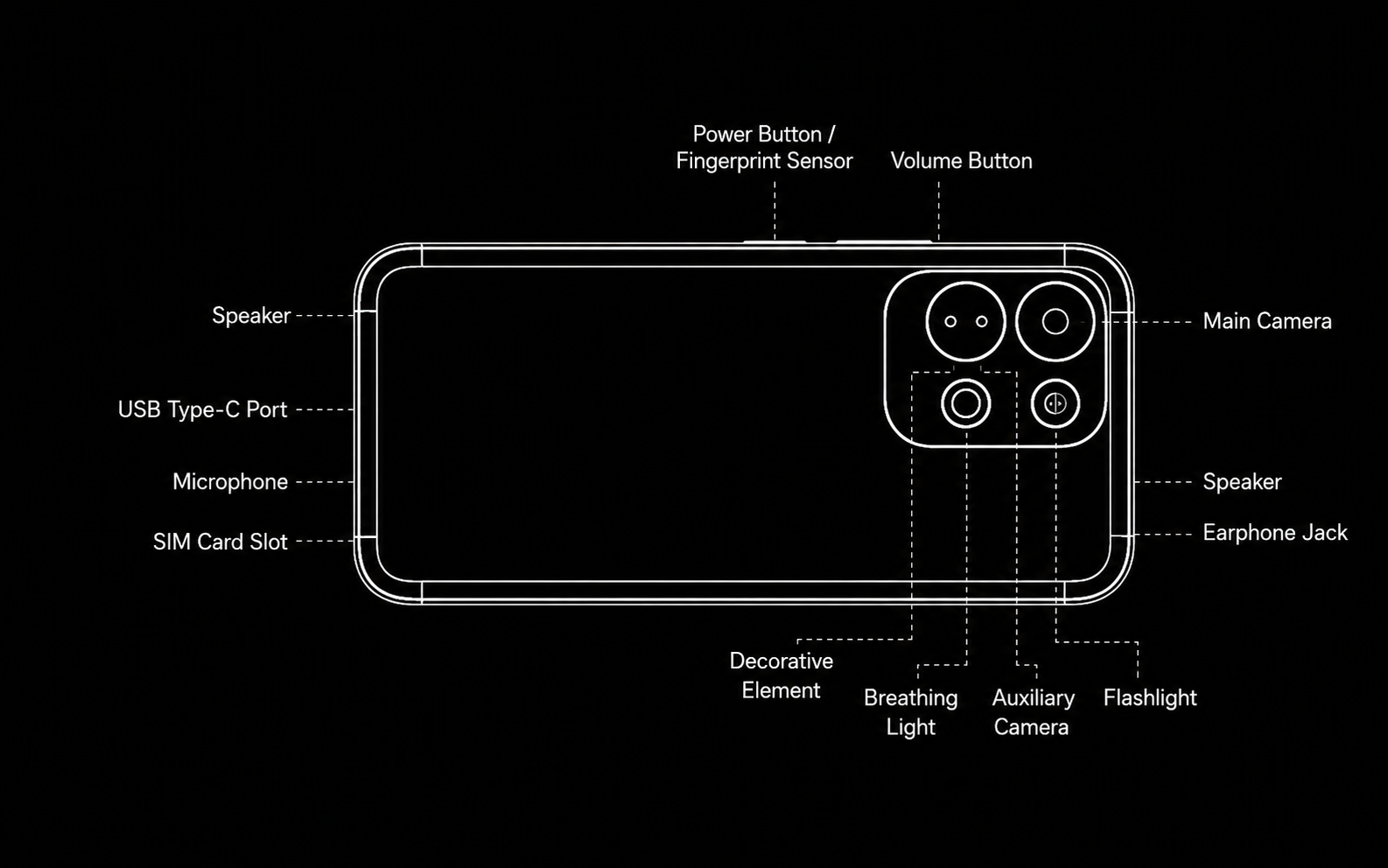
Q3. What does the exterior of the REDMI 17 look like?
A: Here are the exterior details of the REDMI 17:
Q4. What color options are available for the REDMI 17?
A: The REDMI 17 is available in the following five color options: Dark Gray, Blue, Green, White, and Orange.
Note:
Available colors may vary by country or region; please refer to local official sales channels.
Q5. Where can the SN and IMEI of the REDMI 17 be viewed?
A: The SN and IMEI of the REDMI 17 can be viewed in the following locations:
1. You can check the SN and the IMEI of the REDMI 17 on the packaging box and the label on the body.
2. On the phone, enter * #06#, and you can check the IMEI and SN.
3. Open the [Settings] App >> [About phone] >> [Detailed info and specs] >> [Status] >> tap [Model] to check the SN >> tap [IMEI] to check the IMEI.
Q6. What are the dimensions and weight of the REDMI 17?
A: Here are the dimensions and weight specifications of the REDMI 17:
1. The dimensions of the REDMI 17 are 170.12 mm in height, 78.43 mm in width, and 8.88 mm in thickness.
2. The product weight of the REDMI 17 is 232.3 g with a tolerance of ±5 g.
3. The package weight of the REDMI 17 varies by region: the global version without charger weighs 390 g ± 10 g, and the EU version with charger weighs 528 g ± 10 g.
4. The package dimensions of the REDMI 17 are 187 mm × 95 mm × 62 mm.
Note:
Data provided by internal laboratories. Industry measurement methods may differ.
Display
Q1. What are the screen size, ratio, and screen-to-body ratio of the REDMI 17?
A: Here are the display specifications of the REDMI 17:
1. The REDMI 17 features a 6.9-inch LCD flat display with a 1600 x 720 HD+ resolution.
2. The screen-to-body ratio of the REDMI 17 is 90.3%, and the display type is a flat hard screen with full lamination technology.
3. The REDMI 17 screen supports 16.7 million colors with 8-bit color depth and an NTSC 83% color gamut.
Q2. What is the screen resolution of the REDMI 17?
A: The screen resolution of the REDMI 17 is 1600 x 720 pixels, which is HD+ resolution. The REDMI 17 has a pixel density of 254 PPI.
Q3. What is the refresh rate of the REDMI 17 and how is it adjusted?
A: Here is the refresh rate information for the REDMI 17:
1. The REDMI 17 supports screen refresh rates of up to 120 Hz.
2. The refresh rate can be adjusted in the display settings of the REDMI 17.
3. The REDMI 17 also features a touch sampling rate of up to 240 Hz for responsive touch interaction.
Q4. What is the brightness range of the REDMI 17 screen?
A: Here is the brightness range information for the REDMI 17 screen:
1. The REDMI 17 screen has a manual maximum brightness of 675 nits.
2. The high-brightness mode maximum of the REDMI 17 screen is 825 nits.
3. The minimum brightness of the REDMI 17 screen is 3.5 nits.
Q5. Why does the REDMI 17 screen show light leakage?
A: The REDMI 17 uses an LCD display with full lamination technology, and light leakage is not a defect of the device. The display characteristics of the LCD panel on the REDMI 17 are within the normal industry tolerance range. If light leakage is observed, it does not affect the normal functionality or lifespan of the REDMI 17.
Q6. What to do if the REDMI 17 touchscreen is unresponsive?
A: If the REDMI 17 touchscreen is unresponsive, the following troubleshooting steps can be taken:
1. The device should be restarted first to clear any temporary software issues.
2. The screen surface of the REDMI 17 should be cleaned to remove any dirt or moisture that may affect touch sensitivity.
3. If a screen protector is applied to the REDMI 17, it should be removed to check if the protector is interfering with touch detection.
4. If the issue persists, the REDMI 17 should be checked for system updates that may address touchscreen performance.
Q7. What to do if the REDMI 17 screen brightness changes automatically?
A: If the REDMI 17 screen brightness changes automatically, the following information may help:
1. The REDMI 17 supports an ambient light sensor that automatically adjusts screen brightness based on the surrounding lighting conditions.
2. The auto-brightness function of the REDMI 17 can be turned off in the display settings to prevent automatic changes.
3. If the auto-brightness behavior seems erratic, the ambient light sensor of the REDMI 17 should be checked for obstructions such as screen protectors or dirt.
Q8. What is the function of HDR display on the REDMI 17?
A: The REDMI 17 does not support HDR display. Therefore, HDR display functionality is not available on the REDMI 17.
Q9. What to do if the REDMI 17 screen is unclear in sunlight?
A: If the REDMI 17 screen is unclear in sunlight, the following guidance is provided:
1. The REDMI 17 supports a Sunlight mode that enhances screen visibility under bright outdoor conditions.
2. The maximum brightness of the REDMI 17 screen reaches 825 nits in high-brightness mode, which helps with outdoor visibility.
Q10. What dimming methods does the REDMI 17 support?
A: The REDMI 17 uses PWM dimming as the default dimming method.
Network
Q1. Does the REDMI 17 support Wi-Fi 6/7 and what router settings are needed?
A: The REDMI 17 supports Wi-Fi 5 technology rather than Wi-Fi 6 or Wi-Fi 7.
Q2. What to do if the REDMI 17 cannot connect to 5G Wi-Fi?
A: If the REDMI 17 cannot connect to 5G Wi-Fi, the following steps can be taken:
1. The router settings should be checked to ensure the 5 GHz band is enabled and broadcast.
2. The REDMI 17 supports IEEE 802.11a/n/ac on the 5 GHz band, and the device should be placed within range of the router.
3. The REDMI 17 should be restarted and the Wi-Fi connection should be re-established.
4. The router needs to be restarted to resolve any connectivity issues with the REDMI 17.
Q3. How is the portable hotspot enabled on the REDMI 17?
A: To enable the portable hotspot on the REDMI 17, please open the [Settings] App >> [More connectivity options] >> [Portable hotspot] >> enable [Portable hotspot] and adjust the related settings.
Q4. Does the REDMI 17 support Ethernet via an adapter?
A: The REDMI 17 supports Ethernet connection via a Type-C to Ethernet adapter. The USB Type-C port of the REDMI 17 allows wired network connectivity through compatible adapters.
Bluetooth
Q1. What Bluetooth version does the REDMI 17 support?
A: The REDMI 17 supports Bluetooth version 5.4.
Q2. What Bluetooth codecs does the REDMI 17 support?
A: The REDMI 17 supports the SBC, AAC, LDAC Bluetooth audio codec. The REDMI 17 does not support aptX, aptX HD, aptX Adaptive, LC3, or LHDC codecs.
Q3. Does the REDMI 17 support LE Audio?
A: The REDMI 17 does not support LE Audio.
Q4. What to do if the REDMI 17 cannot find a device?
A: If the REDMI 17 cannot find a Bluetooth device, the following steps can be taken:
1. The Bluetooth function on the REDMI 17 should be toggled off and on again.
2. The target device should be placed in pairing mode and kept within close range of the REDMI 17.
3. The REDMI 17 should be checked to ensure it is not already connected to the maximum number of supported devices.
4. Both the REDMI 17 and the target device should be restarted to clear any Bluetooth cache issues.
Audio & Video
Q1. What to do if there is no sound on the REDMI 17?
A: If there is no sound on the REDMI 17, the following troubleshooting steps can be taken:
1. The volume level of the REDMI 17 should be checked first using the hardware volume buttons.
2. Please restart the REDMI 17 to clear any temporary audio driver issues.
3. The audio output source of the REDMI 17 should be verified to ensure it is not routed to a connected Bluetooth device.
4. The Do Not Disturb or silent mode settings on the REDMI 17 should be checked to ensure audio is not muted.
Q2. What to do if the REDMI 17 speaker volume becomes low?
A: If the REDMI 17 speaker volume becomes low, the following guidance is provided:
1. The speaker grilles of the REDMI 17 should be checked for dust or debris that may block sound output.
2. The REDMI 17 features dual speakers with 300% loud volume capability, and the volume can be increased using the hardware volume buttons.
3. The audio settings of the REDMI 17 should be checked to ensure no audio balance adjustments have reduced the output.
4. A soft brush can be used to gently clean the speaker openings of the REDMI 17.
Q3. What to do if video playback stutters on the REDMI 17?
A: If video playback stutters on the REDMI 17, the following guidance is provided:
1. The network connection should be checked for streaming content to ensure stable bandwidth.
2. The REDMI 17 supports video formats including MP4, MKV, WEBM, 3GP, VP8, VP9, MPEG-4, MPEG-2, H.263, H.264, H.265, and AV1.
3. Background applications on the REDMI 17 should be closed to free up system resources.
4. The REDMI 17 should be checked for sufficient storage space, as low storage can affect playback performance.
Q4. Why are the audio channels unbalanced on the REDMI 17?
A: The REDMI 17 does not support Dolby Audio or Dolby Atmos for audio enhancement. Audio channel balance can be adjusted in the accessibility settings of the REDMI 17. If the issue persists, the REDMI 17 audio hardware should be checked for potential damage.
Camera Usage
Q1. Does the REDMI 17 camera support macro mode and how is it used?
A: The REDMI 17 does not support a super macro mode.
Q2. Which camera is used for macro mode on the REDMI 17?
A: The REDMI 17 does not support a macro mode, so no camera is designated for macro photography on the device.
Q3. What shooting modes does the REDMI 17 camera support?
A: Here are the shooting modes supported by the REDMI 17 camera:
The rear camera of the REDMI 17 supports the following modes: 50M Ultra HD, Night mode, Filters, Beautify, Tap to take a photo, Voice shutter, Timed burst, Countdown, Document mode, Portrait mode, Pro mode, Time-lapse, Film watermark, HDR, and Dual video.
The front camera of the REDMI 17 supports the following modes: Palm shutter, Timed burst, Mirror front camera, Beautify, HDR, Countdown, Fill light, Video filters, Time-lapse, and Film watermark.
Q4. What is the zoom magnification and technology of the REDMI 17 camera?
A: Here is the zoom information for the REDMI 17 camera:
1. The main camera of the REDMI 17 supports zoom ratios of 1x to 10x in Photo mode.
2. The main camera of the REDMI 17 supports zoom ratios of 1x to 6x in Video recording mode.
3. The zoom technology of the REDMI 17 is digital zoom, as the device does not support optical zoom.
4. The front camera of the REDMI 17 does not support zoom functionality.
Q5. Does the REDMI 17 support dynamic shots and how are they used?
A: The REDMI 17 does not support dynamic shots or live moments. This feature is not available on the REDMI 17.
Q6. What is the max recording time of the REDMI 17 and why does it stop automatically?
A: The REDMI 17 supports video recording at 720P 30 fps and 1080P 30 fps in both Time-lapse mode and video recording mode. Recording on the REDMI 17 may stop automatically due to storage space limitations on the device. Recording on the REDMI 17 may also stop due to temperature protection when the device exceeds safe operating temperatures.
Q7. Does the REDMI 17 support ultra-wide-angle mode?
A: The REDMI 17 does not have a dedicated ultra-wide-angle camera.
App Usage
Q1. How to set default apps on the REDMI 17?
A: Please open the [Settings] App >> [Apps] >> tap the three-dot icon >> [Other settings] >> [Default apps] >> you can set the default apps.
Q2. How to enable video call beauty on the REDMI 17 and which apps support it?
A: To enable video call beauty on the REDMI 17, please refer to the following steps:
Open the [Settings] App >> [Additional settings] >> [Side toolbox] >> enable [Call toolbox] >> [Manage Beautify for video calls] >> enable [Beautify for video calls] >> you can open from side toolbox during video calls to use this feature.
Note:
Please refer to actual usage for the specific third-party software supported.
Q3. Does the REDMI 17 support in-app call recording?
A: The REDMI 17 does not support in-app call recording.
Q4. Does the REDMI 17 support FM radio?
A: The REDMI 17 supports FM radio, except for the Italy version, which does not support this feature. The FM radio function on the REDMI 17 requires wired earphones to be connected as an antenna.
Q5. Is ARCore pre-installed on the REDMI 17 and what does it do?
A: ARCore is not pre-installed on the REDMI 17, and the device does not support AR or VR features.
Q6. Is the REDMI 17 flashlight brightness adjustable and is it stepless?
A: The flashlight brightness on the REDMI 17 can be adjusted steplessly.
Q7. Are the default dialer, messaging, and contacts apps on the REDMI 17 from Google or Xiaomi?
A: The global version uses GMS and the Xiaomi Messaging app—meaning Google Dialer, Google Messages, and Xiaomi Messaging are all installed. The EEA version uses GMS. The Russian and Chinese Taiwan versions use Xiaomi Dialer and the Xiaomi Messaging App.
Note:
After resetting and rebooting, switching the region to Hong Kong (Chinese) might switch the service to Xiaomi CSP (Xiaomi Dialer and the Xiaomi Messaging App).
System Usage
Q1. Does the REDMI 17 support split-screen?
A: The REDMI 17 does not support split-screen mode.
Q2. Does the REDMI 17 support floating windows?
A: The REDMI 17 does not support floating windows.
Q3. Why does the system occupy a large amount of storage on the REDMI 17?
A: The system occupies a large amount of storage on the REDMI 17 because the operating system, including Xiaomi HyperOS 3 based on Android 16, along with pre-installed applications and essential system files, all require a portion of the internal storage for proper device operation. Additionally, the REDMI 17 retains system cache and temporary files that accumulate over time, and these files can be cleared through the storage settings to free up space without affecting system functionality.
Q4. What voice assistant does the REDMI 17 support and how is it activated?
A: The REDMI 17 supports Google Assistant and Gemini. You can wake them by voice command using "Hey Google" or by pressing the power button for 0.5 seconds.
Note:
1. The availability of Gemini varies by country or region.
2. Gemini must be set as the default voice assistant on the REDMI 17 to be used as the primary assistant.
Q5. Why do notifications stay on the REDMI 17 screen for a long time?
A: If the system notifications stay on the REDMI 17 screen for a long time, please set it as follows:
Open the [Settings] App >> [Accessibility] >> [Physical] >> [Time to take action (Accessibility timeout)] >> set it to [Default].
Q6. Does the REDMI 17 support step counting?
A: The REDMI 17 does not support heart rate monitoring or step counting through built-in sensors.
Q7. What card types can the REDMI 17 NFC read/write and how are cards added?
A: The REDMI 17 NFC supports card reader and card emulation functions, allowing supported payment and transit card emulation via compatible SIM cards and carrier applications. The device supports NFC card emulation through non-eSE and HCE Type B, enabling you to add payment or transit cards by inserting a compatible SIM card into slot 1 and using the corresponding carrier application. Additionally, the REDMI 17 supports NFC payment through Google Wallet, where you can add Visa cards and other supported payment cards for contactless transactions. The device also supports power-off card emulation, allowing cards to be used even when the device is powered off.
Note:
The availability of NFC features may differ by country/region.
Q8. Which control center style does the REDMI 17 support and can it be switched?
A: The REDMI 17 supports switching the Control Center style. Please open the [Settings] App >> [Notifications & status bar] >> [Control center style] >> select between [Old version] and [New version].
Q9. How to set the boot-up sound effect on the REDMI 17?
A: To set the boot audio on the REDMI 17, please open the [Theme] App >> [My account] >> [Ringtones] >> select a ringtone and tap [Apply] >> [Boot audio].
Q10. How to enable picture-in-picture permission for apps on the REDMI 17?
A: To enable picture-in-picture permission, please open the [Settings] App >> [Privacy] >> [Special permissions] >> [Picture-in-picture].
Battery & Charging
Q1. What type of battery is used in the REDMI 17?
A: The REDMI 17 uses a dual-cell lithium polymer battery. The rated capacity of the REDMI 17 battery is 7350 mAh, and the typical capacity is 7500 mAh.
Q2. Why does the REDMI 17 charging power not reach the advertised value?
A: The charging power of the REDMI 17 may not reach the advertised value due to the following factors:
1. Battery temperature affects the charging speed of the REDMI 17, as the device manages charging to prevent overheating.
2. The current battery level of the REDMI 17 influences charging speed, with slower charging near full capacity.
3. Usage during charging on the REDMI 17 reduces the net charging power available for the battery.
4. The REDMI 17 charging power is managed by the internal charging control system to ensure battery safety and lifespan.
Q3. What charging protocols does the REDMI 17 support?
A: The REDMI 17 supports PD 2.0, PD 3.0, and PPS. But it does not support QC 2.0, QC 3.0, QC 3+, QC 4.0, QC 4+, UFCS, or MI FC 2.0.
Q4. Why is the REDMI 17 charging speed very slow?
A: The REDMI 17 charging speed may be slow due to the following reasons:
1. High ambient temperature can cause the REDMI 17 to reduce charging speed for battery protection.
2. Use of incompatible chargers or cables will limit the charging speed of the REDMI 17.
3. Simultaneous heavy usage during charging on the REDMI 17 reduces the available charging power.
4. The REDMI 17 achieves a full charge in approximately 95 minutes under optimal conditions with the recommended charger.
Note:
Data provided by Xiaomi internal laboratories.
Q5. Does long-term plug-in charging damage the REDMI 17 battery?
A: Long-term plug-in charging does not significantly damage the REDMI 17 battery because the device incorporates battery management systems that prevent overcharging. The REDMI 17 is designed with a high-voltage battery supporting 4.53 V charging limit voltage, and the charging control system automatically stops charging when the battery reaches full capacity. For safety reasons, it is recommended to unplug the charger after the device is fully charged.
Q6. Can the REDMI 17 be used while charging?
A: The REDMI 17 can be used while charging, but this practice is not recommended for optimal battery health and charging efficiency. Charging speed on the REDMI 17 may be significantly reduced when the device is used heavily during charging to manage heat generation. The REDMI 17 incorporates temperature management to protect the battery during simultaneous charging and usage, but prolonged usage while charging may generate additional heat and potentially affect long-term battery performance. For the best charging experience and battery longevity, it is recommended to allow the REDMI 17 to charge without active usage whenever possible.
Q7. Why does the REDMI 17 battery drain quickly after a system upgrade?
A: Battery drain on the REDMI 17 may appear faster after a system upgrade because the device performs background optimization processes, application recompilation, and data indexing immediately following the update, all of which temporarily increase power consumption. The REDMI 17 typically returns to normal power consumption levels within 24 to 48 hours after the update as these background tasks are completed.
Q8. Does the REDMI 17 power on automatically when plugged in and is there a minimum battery level required?
A: The REDMI 17 does not automatically power on when the charger is plugged in. The REDMI 17 requires a minimum battery level to power on, and the device should be charged to a sufficient level before attempting to turn it on. If the REDMI 17 battery is completely depleted, it takes several minutes of charging before the device can power on.
Hardware
Q1. What sensors does the REDMI 17 support?
A: The REDMI 17 supports an Ambient light sensor, Accelerometer, Electronic compass, Flicker sensor, and Virtual proximity sensor.
Q2. Does the REDMI 17 support infrared and can it be used as a remote control?
A: The REDMI 17 does not support infrared and cannot be used as a remote control.
Q3. What type of proximity sensor does the REDMI 17 have?
A: The REDMI 17 uses a virtual proximity sensor implemented through the touch panel solution.
Q4. What type of fingerprint sensor does the REDMI 17 use?
A: The REDMI 17 uses a side-mounted fingerprint sensor. The REDMI 17 can store up to 5 fingerprint profiles for user authentication.
Q5. Where is the NFC sensing area on the REDMI 17?
A: The NFC sensing area on the REDMI 17 is located near the top of the device.
Q6. What is the USB Type-C specification on the REDMI 17?
A: The Type-C port on the REDMI 17 is USB 2.0 specification. The REDMI 17 supports OTG functionality through this port for connecting external devices.
Q7. What are the back cover and frame materials of the REDMI 17?
A: Here are the material specifications for the REDMI 17:
1. The back cover of the REDMI 17 is made of PC + PMMA sheet material.
2. The PU version of the REDMI 17 uses flame-retardant PC + PU + Ink for the back cover.
3. The middle frame of the REDMI 17 is made of PC with 20% glass fiber and aluminum alloy HZH5.9.
4. The lens protection glass on the REDMI 17 is CG21 material.
5. The solid buttons of the REDMI 17 are made of PC + TPU.
Q8. What type of vibration motor does the REDMI 17 support?
A: The REDMI 17 does not support a linear motor and uses a standard flat vibration motor.
Gaming
Q1. Does the REDMI 17 support Game Turbo and how is it used?
A: The REDMI 17 does not support Game Turbo. This feature is not available on the REDMI 17.
Q2. Does the REDMI 17 support Wild Boost and how is it enabled?
A: The REDMI 17 does not support Wild Boost.
Q3. Is the REDMI 17 suitable for high-performance games?
A: The REDMI 17 is suitable for casual gaming but may not be optimal for large games.
Q4. Does the REDMI 17 support game controllers?
A: The REDMI 17 supports game controllers via Bluetooth HID connectivity. The REDMI 17 also supports OTG for wired controller connections through the Type-C USB port.
Q5. Which games support 120Hz high refresh rate on the REDMI 17?
A: The REDMI 17 does not support 120Hz high refresh rate gaming mode.
Q6. What is the max frame rate for common games on the REDMI 17?
A: The REDMI 17 gaming performance varies by application and game optimization, and actual frame rates depend on game settings, background processes, and the specific title being played.
Q7. Does the REDMI 17 support frame interpolation and high-frame-rate gaming modes and for which games?
A: The REDMI 17 does not support game smart frame interpolation or game high frame rate mode.
SIM Card & Mobile Network
Q1. Does the REDMI 17 support SIM cards and calling?
A: The REDMI 17 supports SIM cards and calling with dual SIM dual standby functionality. The REDMI 17 supports 4G, 3G, and 2G mobile network types. The card slot of the REDMI 17 is a 3-in-2 hybrid SIM + microSD slot, which supports either dual nano SIM cards or one nano SIM card plus one microSD card.
Q2. How to set different ringtones for two SIM cards on the REDMI 17?
A: To set different ringtones for two SIM cards on the REDMI 17, please open the [Theme] App >> [My account] >> [Ringtones] >> select a ringtone and tap [Apply] >> [Ringtone] >> select SIM 1 or SIM 2.
Q3. Does the REDMI 17 support eSIM, how many, and how is it enabled?
A: The REDMI 17 does not support eSIM cards.
Q4. Does the REDMI 17 support call recording and where are files saved?
A: The REDMI 17 does not support call recording.
Q5. Does the REDMI 17 support Xiaomi Offline Communication and what is the range?
A: The REDMI 17 does not support Xiaomi Offline Communication.
Q6. Does the REDMI 17 support satellite communication?
A: The REDMI 17 does not support satellite communication.
Q7. Does the REDMI 17 support call noise reduction and how is it enabled?
A: The REDMI 17 doesn't support call noise reduction.
Accessories
Q1. What type of charging cable and adapter are used with the REDMI 17?
A: Here are the charging accessories used with the REDMI 17:
1. The REDMI 17 uses a USB-A to Type-C charging cable with a length of 1 meter.
2. The standard data cable of the REDMI 17 has a current rating of 4 A.
3. The standard data cable of the REDMI 17 has USB 2.0 transmission specifications.
4. The REDMI 17 standard data cable port color is warm sunshine.
5. The REDMI 17 standard package includes a charger in some regions.
Q2. Does the REDMI 17 come with a screen protector pre-installed?
A: The REDMI 17 comes with a pre-installed screen protector film on the display.
Q3. Does the REDMI 17 support OTG?
A: The REDMI 17 supports OTG functionality through the Type-C USB 2.0 port. OTG on the REDMI 17 allows connection of external devices such as USB drives, keyboards, and other compatible peripherals. To enable OTG, please open the [Settings] App >> [More connectivity options] >> [OTG].
Q4. Can a game controller be connected to the REDMI 17?
A: Game controllers can be connected to the REDMI 17 via Bluetooth HID or OTG wired connection. The REDMI 17 supports standard Bluetooth game controllers through the Bluetooth 5.4 connection.
Q5. Does the REDMI 17 support USB Hub?
A: The REDMI 17 supports USB Hub connections through the Type-C port. USB Hub functionality on the REDMI 17 allows multiple USB devices to be connected simultaneously via OTG, enabling expanded connectivity for the device.
Q6. Can a mouse or keyboard be connected to the REDMI 17?
A: A mouse and keyboard can be connected to the REDMI 17 via Bluetooth or OTG USB connection. The REDMI 17 supports standard HID input devices through both wireless and wired connections, providing flexible input options for the device.
Q7. What SD card type, capacity, and file format does the REDMI 17 support?
A: The REDMI 17 supports microSD cards with a maximum capacity of 2 TB. The recommended file format for the REDMI 17 microSD card is exFAT or FAT32 for compatibility.
Does it help?
Yes
No