

Xiaomi Electric Scooter 6 Essential FAQ
Q1: How to rebind the Xiaomi Electric Scooter 6 Essential with the Xiaomi Home App?
A: First, you need to remove the device from the Xiaomi Home App. Then, simultaneously press and hold the accelerator, the left brake lever, and the power button on the scooter for 7 seconds to restore factory settings. After this operation, you can re-bind the scooter with the Xiaomi Home App.
Note:
The brake lever must be pressed all the way down; otherwise, the factory reset may fail.
Q2: How to solve the problem of forgetting the Xiaomi Electric Scooter 6 Essential plugin password in the Xiaomi Home App?
A: The plugin password in the Xiaomi Home App needs to be set and confirmed during the process of binding the scooter to the Xiaomi Home App. The password of the plugin is set to ensure security when using the plugin.
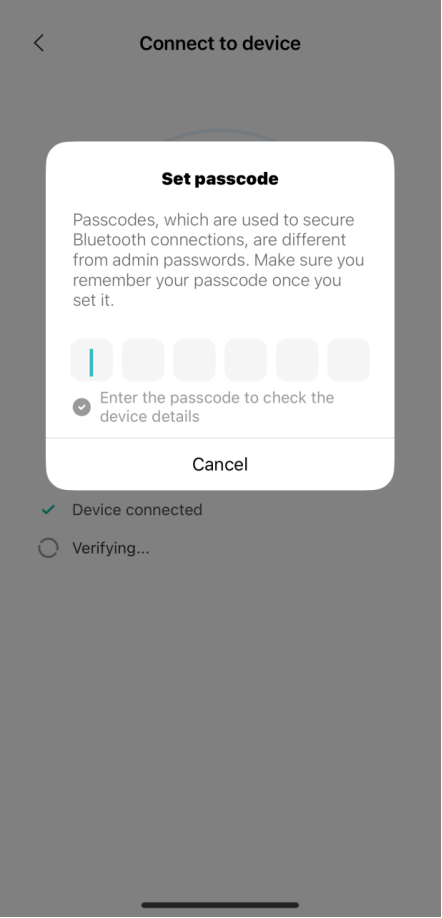
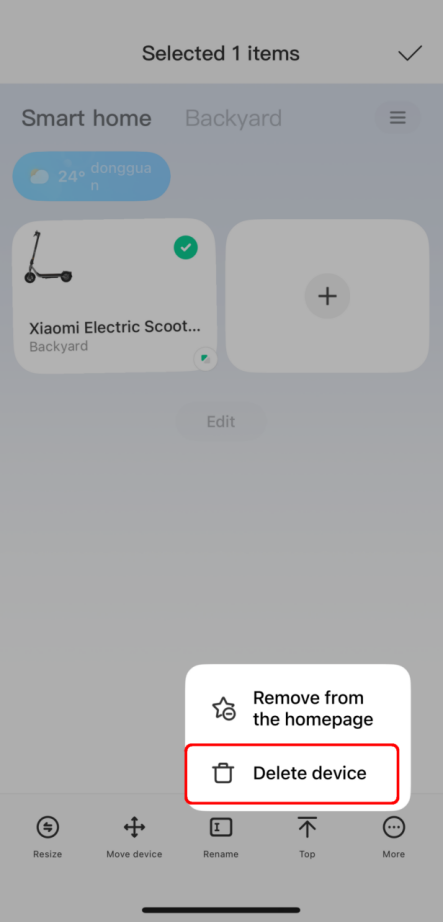
Currently, password recovery is not supported. If you forget your password, please restore the scooter to factory settings (press and hold the accelerator, the left brake lever, and the power button on the scooter simultaneously for 7 seconds), and press and hold the device card on the homepage of the Xiaomi Home App to delete the scooter, and then continue to use it after rebinding.
Q3: Why does the brightness of the Xiaomi Electric Scooter 6 Essential control panel change?
A: When the headlight is turned on, the control panel will be dimmed. When the headlight is turned off, the control panel will regain its brightness.
Q4: How to find the QR code for binding the Xiaomi Electric Scooter 6 Essential?
A: To find the QR code for binding the scooter, please refer to the following methods:
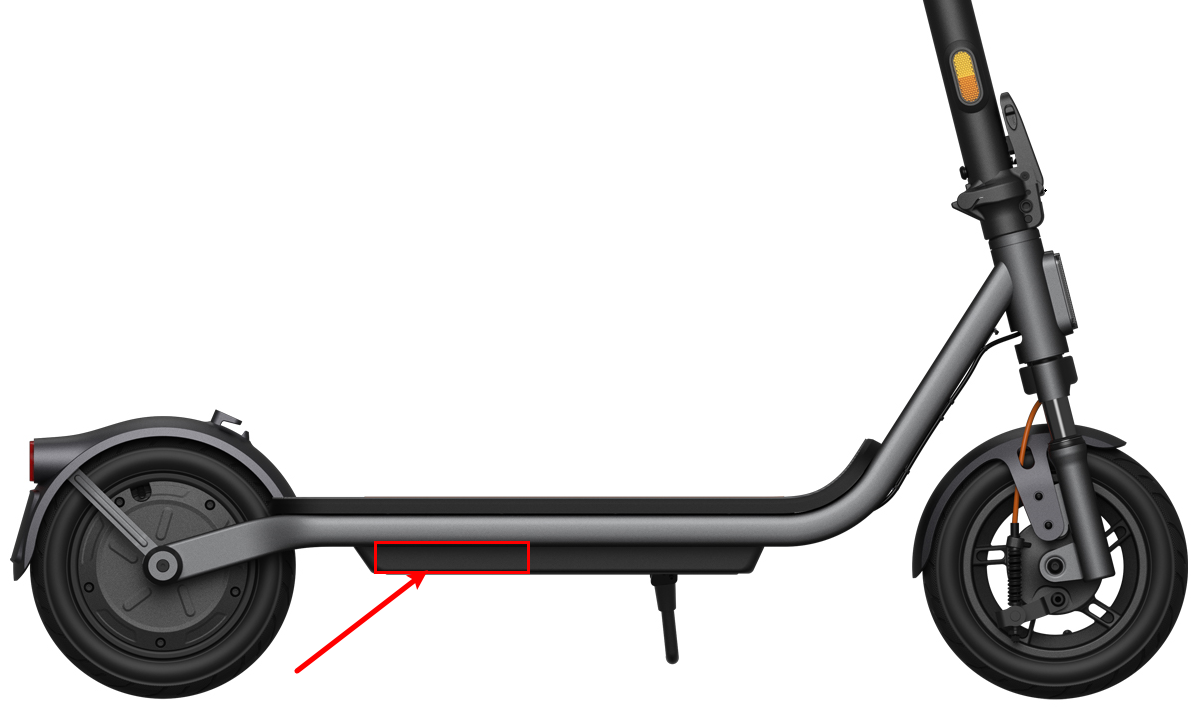
1. If the scooter has not yet been bound with the Xiaomi Home App, you can find the QR code and SN information on the sticker on the dashboard cover and in the battery compartment area on the lower right side of the deck.
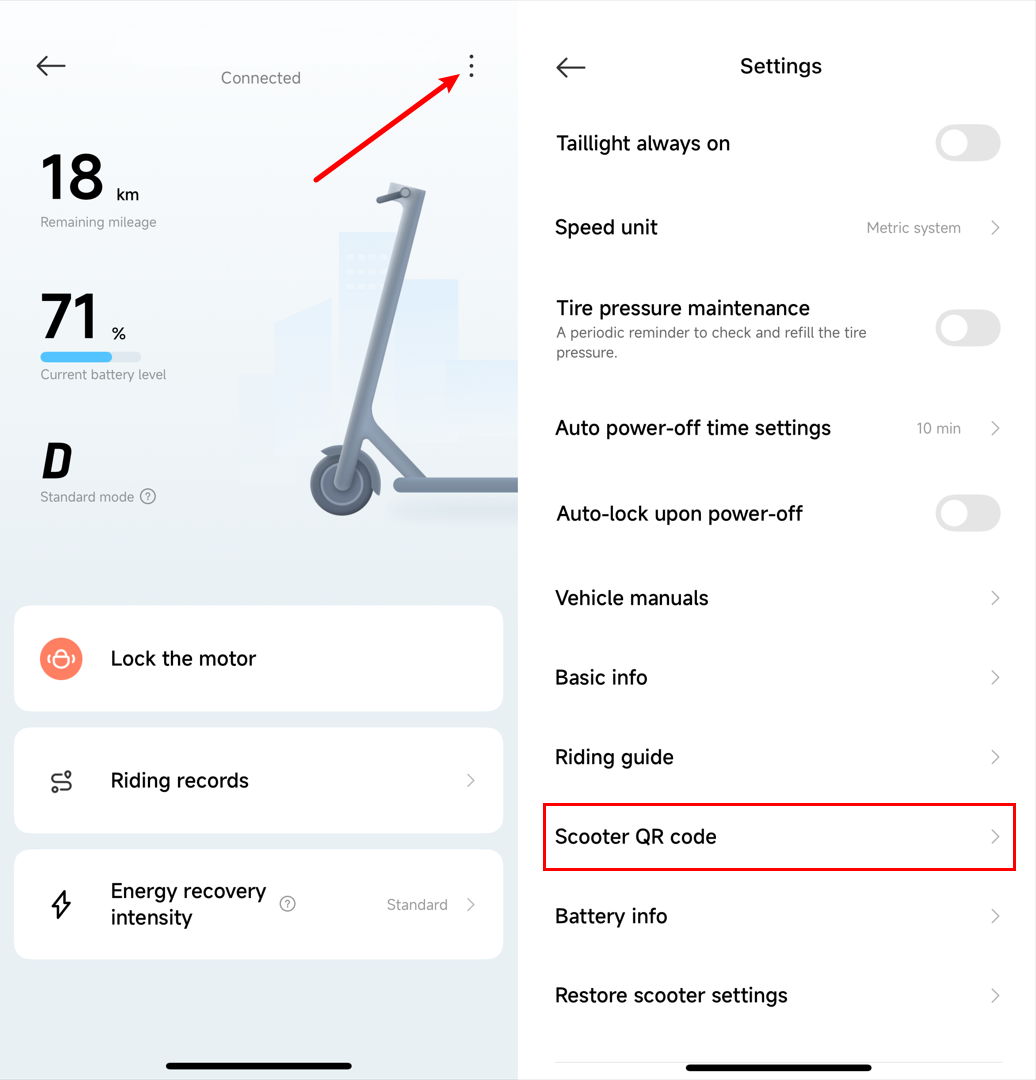
2. If the scooter is already bound with the Xiaomi Home App, you can open the Xiaomi Home App >> select the device card >> tap the three-dot icon >> tap [Scooter QR code].
Q5: Can the Xiaomi Electric Scooter 6 Essential be ridden on rainy and snowy days?
A: Riding a scooter in rainy or snowy weather is not recommended. Although the Xiaomi Electric Scooter 6 Essential has an IPX4 waterproof rating, it cannot withstand prolonged exposure to rain or snow. On slippery roads and with poor visibility, the risk of accidents increases. Therefore, for personal safety reasons, outdoor riding in inclement weather is not advised.
Q6: What is the applicable temperature range for the Xiaomi Electric Scooter 6 Essential?
A: The operating temperature range for the Xiaomi Electric Scooter 6 Essential is as follows:
1. When the battery temperature is ≤ -17 ℃, the battery is in a low-temperature automatic protection state, and the scooter will automatically shut down.
2. When the battery temperature is < 3 ℃, charging is not possible, and a low-temperature charging abnormality will be indicated, with the thermoControl panel icon flashing.
3. When the battery temperature is between 3 ℃ and 47 ℃, normal charging and riding are possible.
4. When the battery temperature is > 47 ℃, charging is not possible, and a high-temperature charging abnormality will be indicated, with the thermoControl panel icon flashing.
5. When the battery temperature is between 55 ℃ and 65 ℃, charging is not possible, and a high-temperature charging abnormality will be indicated, with the thermoControl panel icon flashing. The scooter can be ridden, but the power will be reduced, and a high-temperature discharge abnormality will be indicated, with the thermoControl panel icon flashing.
6. When the battery temperature is ≥ 65 ℃, the battery is in a high-temperature automatic protection state. It will automatically shut down to protect the scooter and your personal safety and property.
Note:
Data tested by Internal Labs, actual results may vary depending on environmental conditions.
Q7: What is the self-discharge rate evolution of the Xiaomi Electric Scooter 6 Essential?
A: For your reference, here is the information about the evolution of the self-discharge rate:
1. Self-discharge: This is an inherent characteristic of all batteries. Even when the battery is stored or not in use and not connected to an external circuit, the battery will spontaneously lose charge internally.
2. Self-discharge rate: This is an important indicator for measuring the rate of charge loss due to self-discharge. It is usually expressed as the percentage of charge reduction per unit time (e.g., %/month). It reflects the "self-loss" characteristic of the battery and is one of the key parameters for evaluating battery performance.
3. Evolution of self-discharge rate: This refers to the systematic dynamic changes in the battery's self-discharge rate throughout its entire lifespan, influenced by factors such as usage time, number of cycles, environmental conditions (such as temperature, humidity, and depth of charge/discharge), and the degree of internal material aging.
4. The initial self-discharge rate of the battery pack is 1.2% per month under normal temperature and half-charged conditions. With use, the self-discharge rate increases by approximately 1%- 5% per month for every 100 charge-discharge cycles or every six months (whichever comes first).
Q8: What is the normal temperature range for the motor of the Xiaomi Electric Scooter 6 Essential? What should be done if the temperature exceeds the normal range?
A: When the motor is operating normally, the maximum internal temperature will not exceed 130 ℃. Temperatures within 130 ℃ are considered normal for the motor and will not cause damage to the scooter or pose any safety risks. When the internal temperature of the motor approaches 130 ℃, the scooter may experience slower acceleration or even become unrideable due to safety protection mechanisms. If this occurs, please turn off the scooter's power, place the scooter in a well-ventilated area, and wait for the temperature to drop to the normal range before riding again. If the problem persists, please contact the local after-sales service.
Q9: How to switch riding modes on the Xiaomi Electric Scooter 6 Essential?
A: Double-tap the power button to switch between different riding modes. Pedestrian mode has a maximum speed of 6 km/h, Standard (D) mode has a maximum speed of 15 km/h, and Sport (S) mode has a maximum speed of 25 km/h. Please do not switch modes while riding.
Note:
Depending on the regulations of different countries, the maximum speed in Sport (S) mode may vary depending on the region. Please refer to local laws and regulations for specific details.
Q10: How to use the motor lock function on the Xiaomi Electric Scooter 6 Essential?
A: After connecting the scooter to the Xiaomi Home App, tap [Lock the motor] on the homepage, then select [OK] in the pop-up window. The motor will then be locked. At this point, the motor lock function on the homepage will turn blue, and the mode display will be replaced with a "lock" icon. To unlock, simply tap [Unlock the motor].
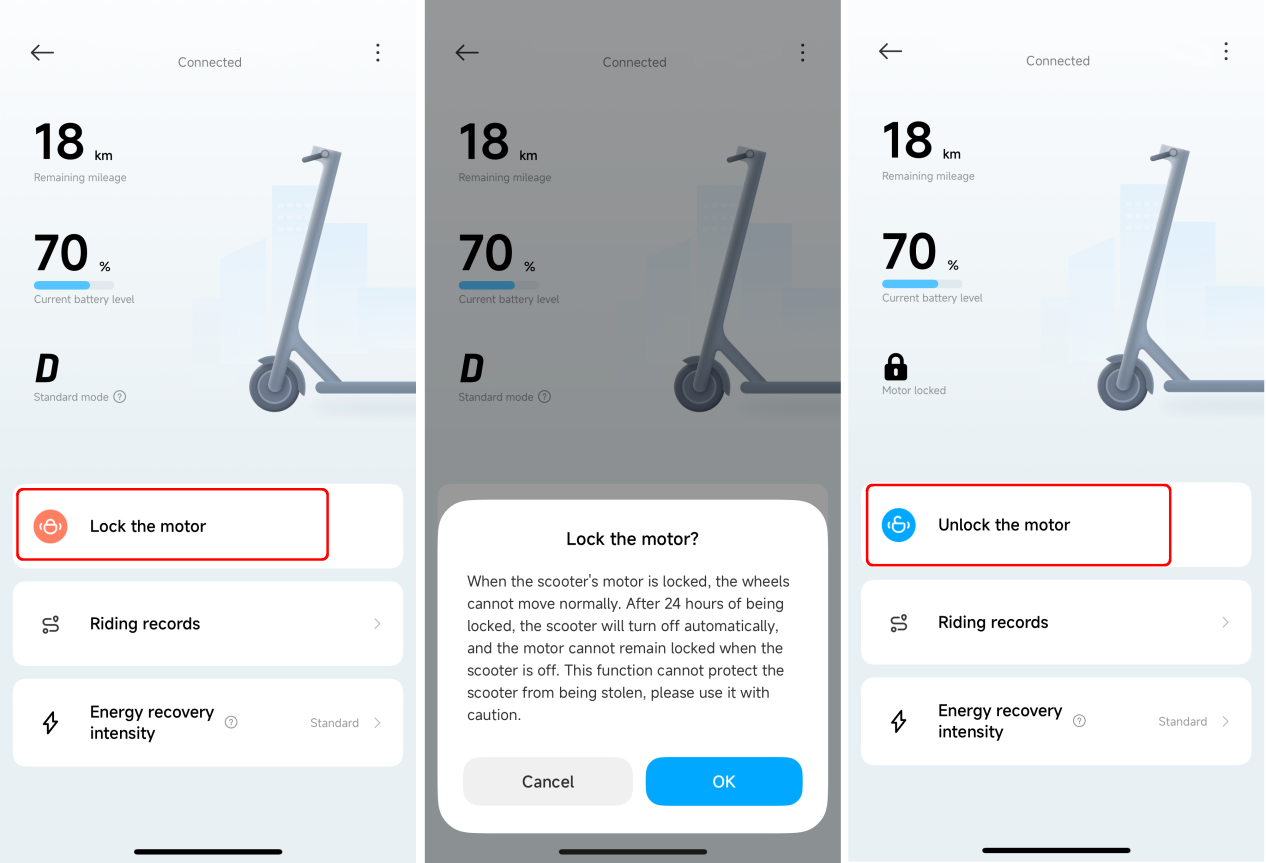
After tapping [Lock the motor] in the Xiaomi Home App, the scooter enters a motor lock state and will automatically shut down after 24 hours. It will remain in the motor locked state even after being turned on again. If the scooter is pushed while in the motor locked state, the control panel will emit an alarm sound, and the scooter's buttons will be unresponsive. This function does not provide anti-theft protection; please keep your scooter safe. Using the motor lock function consumes the electric scooter's battery power; please use this function judiciously.
Q11: What is energy recovery on the Xiaomi Electric Scooter 6 Essential?
A: During driving, energy recovery is activated when braking or coasting. Part of kinetic energy will be converted into electrical energy for storage and reuse. Energy recovery increases driving range and also provides a braking effect. When using it for the first time, it is recommended to set the level to "low".
Q12: How to set the energy recovery intensity on the Xiaomi Electric Scooter 6 Essential?
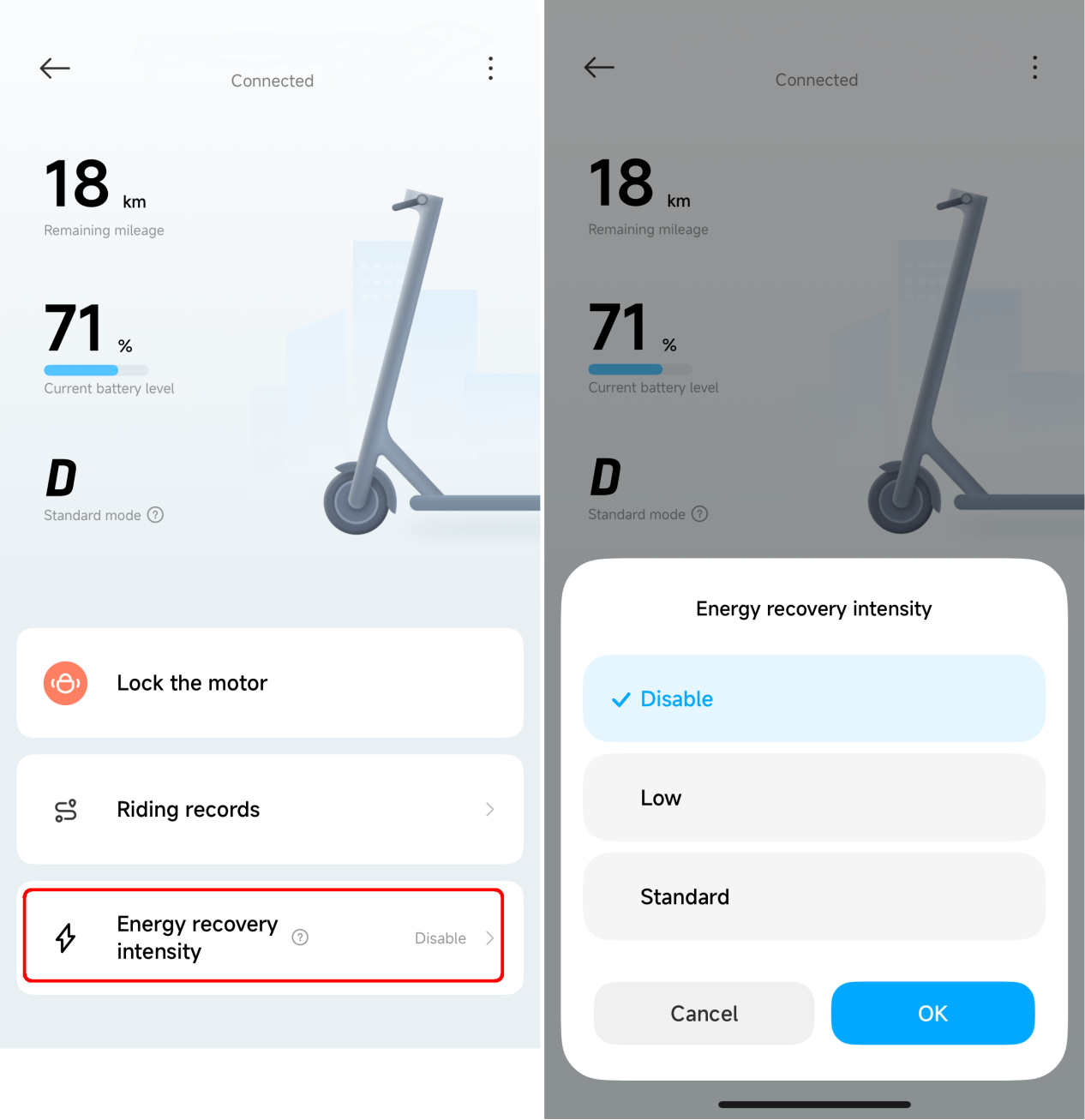
A: After connecting the scooter to the Xiaomi Home App, select [Energy recovery intensity] on the homepage to access the secondary page, and then select the desired energy recovery level on the pop-up page. This function is disabled by default.
Q13: Why does the red wrench icon appear on the control panel of the Xiaomi Electric Scooter 6 Essential?
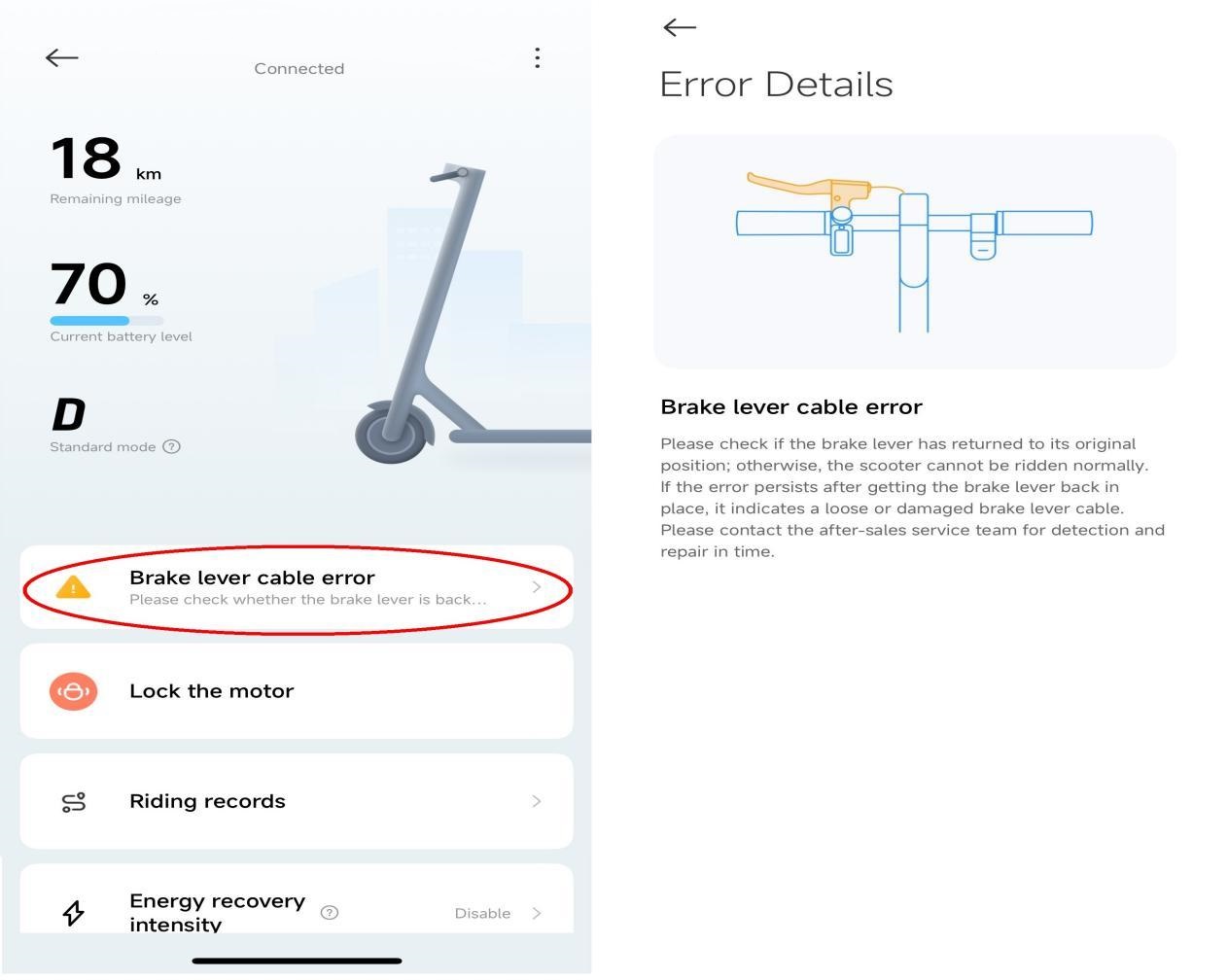
A: When the scooter malfunctions, a flashing red wrench icon will appear on the scooter's control panel, and the speedoControl panel will display flashing red numbers (error code), accompanied by a "beep-beep-beep" sound. If connected to the Xiaomi Home App, the error information will also appear on the scooter's homepage. Tapping on this information will display a detailed description of the fault, as shown in the image below.
Q14: What to do if the Xiaomi Electric Scooter 6 Essential cannot start?
A: If the scooter doesn't start, please refer to the following methods:
If the scooter doesn't turn on, first plug it in and charge the battery for at least 30 minutes, then try turning it on again.
If the scooter turns on but won't accelerate, please refer to the following methods:
1. Check if a red flashing wrench icon appears on the display, and if red flashing numbers appear on the speedometer. If so, please contact the after-sales service team. If not, try releasing the accelerator, coasting until the speed reaches ≥ 5 km/h, and then press the accelerator again.
2. After turning off the scooter, push it forward. If you feel significant resistance to the rear wheel, there may be a motor problem. Please contact the local after-sales service team.
3. If the above solutions do not resolve the issue, it may be due to a controller malfunction, severe battery over-discharge, or other malfunctions. Please contact the local after-sales service team.
Q15: What type of battery does the Xiaomi Electric Scooter 6 Essential use?
A: The battery type used in the Xiaomi Electric Scooter 6 Essential is a lithium-ion battery.
Q16: How to maintain the battery of the Xiaomi Electric Scooter 6 Essential?
A: To maintain the battery of the Xiaomi Electric Scooter 6 Essential, please refer to the following methods:
1. In daily use, try to avoid completely draining the battery before recharging; charge it whenever possible to significantly extend battery life.
2. The battery pack performs best and provides the longest range at normal temperatures. Battery life and performance will decrease when used in environments below 0 °C.
3. If the scooter will not be used for more than 30 days, please charge the battery to approximately 80% and store it in a cool and dry place. It is recommended to fully charge the battery every 1-2 months to extend its lifespan.
4. Failure to charge the battery promptly may lead to over-discharge and damage, rendering it unable to be charged. This type of damage is not self-repairable and is not covered under warranty. Please contact the local after-sales service for assistance.
Q17: What to do if the Xiaomi Electric Scooter 6 Essential cannot be charged?
A: If the Xiaomi Electric Scooter 6 Essential cannot be charged, please refer to the following methods:
1. With the charger disconnected from the scooter, plug the charger into a power outlet. If the charger indicator does not turn on or turns red (under normal circumstances, the indicator should be green), it indicates that the charger is faulty and needs to be replaced. Please contact the local after-sales service.
2. The scooter may have been unused or uncharged for a long time, resulting in excessive battery discharge. Connect the charger to the scooter and try to activate the battery. If the battery cannot be activated, it indicates that the battery has undergone severe over-discharge. Please contact the local after-sales service.
3. If the battery pack temperature is higher than 47 ℃, the high-temperature charging protection will be triggered, and charging will be impossible. Wait until the temperature drops below 42 ℃ before attempting to charge again.
4. If the battery pack temperature is lower than 3 ℃, the low-temperature charging protection will be triggered, and charging will be impossible. Wait until the temperature rises above 8 ℃ before attempting to charge again.
Note:
Data tested by Internal Labs, actual results may vary depending on environmental conditions.
Q18: Are the actual remaining range and the estimated range the same for the Xiaomi Electric Scooter 6 Essential?
A: The estimated range is calculated based on the scooter's past riding habits, while the actual range is affected by factors such as ambient temperature, wind speed, road conditions, riding speed, and rider weight. To ensure a good riding experience, please assess the range based on actual conditions to avoid running out of battery power and affecting normal use.
Q19: What to do if the Bluetooth signal of the Xiaomi Electric Scooter 6 Essential cannot be found?
A: If the Bluetooth signal of the Xiaomi Electric Scooter 6 Essential cannot be found, you can try clearing the Xiaomi Home App cache, then restarting the phone and searching for the connection again to resolve the issue.
Q20: What are the error codes and troubleshooting solutions for the Xiaomi Electric Scooter 6 Essential?
A: The error codes, corresponding meanings, and troubleshooting solutions for the Xiaomi Electric Scooter 6 Essential are as follows:
1. Fault Code 10
Fault category: Controller.
Fault code definition: Control panel and controller communication failure.
Fault code triggering scenarios: Damaged communication lines, water ingress, and poor contact with the main control wiring harness.
Solution:
(1) Check if the control panel communication cable is damaged, or replace it if necessary.
(2) If the control panel communication circuit is damaged, replace the control panel.
(3) If the communication circuit between the controller and the control panel is damaged, replace the controller.
Xiaomi Home App error title display: Control panel communication failure.
Xiaomi Home App subtitle text: Please contact the after-sales service promptly for inspection and repair.
Xiaomi Home App prompt: A control panel communication fault prevents normal riding; please contact after-sales service promptly for inspection and repair.
Control panel fault display method: Error icon, error code, and sound.
Riding availability: No.
2. Fault Code 11
Fault category: Controller.
Fault code definition: Controller overcurrent protection.
Fault code triggering scenarios: Controller ADC sampling problem, hardware issue.
Solution:
(1) Check if the controller has been exposed to water; if so, replace the controller.
(2) Check if the controller’s motor wiring harness is damaged; if so, replace the wiring harness.
(3) Check if the controller’s current sampling circuit is damaged; if so, replace the controller.
Xiaomi Home App error title display: Controller overload.
Xiaomi Home App subtitle text: Please use only after the error indicator disappears.
Xiaomi Home App prompt: Controller overload will temporarily affect normal riding; please use only after the error indicator disappears.
Control panel fault display method: Error icon, error code, and sound.
Riding availability: No.
3. Fault Code 12
Fault category: Controller.
Fault code definition: Controller current sampling fault.
Fault code triggering scenarios: Controller ADC sampling problem, hardware issue.
Solution: The controller hardware is damaged; please replace the controller.
Xiaomi Home App error title display: Controller fault.
Xiaomi Home App subtitle text: Please contact the after-sales service promptly for inspection and repair.
Xiaomi Home App prompt: A controller malfunction will prevent normal riding; please contact the after-sales service promptly for inspection and repair.
Control panel fault display method: Error icon, error code, and sound.
Riding availability: No.
4. Fault Code 14
Fault category: Accelerator.
Fault code definition: Accelerator malfunction/The accelerator does not return to its original position upon startup.
Fault code triggering scenarios: Accelerator stuck due to the grips. The accelerator signal cable disconnected as a result of disassembly or impact to the front assembly. Device powered on while the accelerator was pressed.
Solution:
(1) Check if the accelerator is stuck; it needs to be reset.
(2) Check if the accelerator is damaged; it needs to be replaced.
(3) Check if the wiring harness is loose or damaged; replace the wiring harness or component.
(4) The control panel cluster’s accelerator input circuit is damaged; replace the control panel cluster.
Xiaomi Home App error title display: Accelerator wiring harness fault.
Xiaomi Home App subtitle text: Check if the accelerator has returned to its neutral position.
Xiaomi Home App prompt: Please ensure the accelerator returns to its neutral position; otherwise, the scooter cannot be ridden properly. If the fault persists after the accelerator returns to neutral, the accelerator wiring harness may be loose or damaged; please contact the after-sales service promptly for inspection and repair.
Control panel fault display method: Error icon, error code, and sound.
Riding availability: No.
5. Fault Code 15
Fault category: Brake lever.
Fault code definition: Brake lever malfunction; the brake lever does not return to its original position when the machine is turned on.
Fault code triggering scenarios: The brake sensor wire broke due to the removal and reinstallation of the front connector, causing you to press the brake pedal while turning on the device.
Solution:
(1) Check if the left brake lever is stuck; it needs to be reset.
(2) Check if the left brake lever is damaged; it needs to be replaced.
(3) Check if the wiring harness is loose or damaged; replace the wiring harness or component.
(4) The control panel cluster brake lever data acquisition circuit is damaged; replace the control panel cluster.
Xiaomi Home App error title display: Brake lever wiring harness fault.
Xiaomi Home App subtitle text: Check if the brake lever has returned to its original position.
Xiaomi Home App prompt: Ensure the brake lever has returned to its original position; otherwise, the scooter cannot be ridden normally. If the fault persists after the lever has returned to position, the wiring harness is likely loose or damaged; please contact the after-sales service promptly for inspection and repair.
Control panel fault display method: Error icon, error code, and sound.
Riding availability: No.
6. Fault Code 18
Fault category: Motor.
Fault code definition: Motor Hall fault.
Fault code triggering scenarios: The connection between the Hall sensor and the controller on the motor is loose, or the Hall device is damaged.
Solution:
(1) Motor Hall sensor wire damaged; replace the wiring harness or the motor.
(2) Motor Hall sensor damaged; replace the motor Hall sensor board or the motor.
(3) Controller Hall sensor acquisition circuit damaged or terminals damaged; replace the controller.
Xiaomi Home App error title display: Motor fault.
Xiaomi Home App subtitle text: Please contact the after-sales service promptly for inspection and repair.
Xiaomi Home App prompt: A motor fault prevents normal riding; please contact the after-sales service promptly for inspection and repair.
Control panel fault display method: Error icon, error code, and sound.
Riding availability: No.
7. Fault Code 21
Fault category: Controller.
Fault code definition: Controller and battery communication fault.
Fault code triggering scenarios: After a battery firmware upgrade, or when you use a third-party battery, flash the third-party battery firmware.
Solution:
(1) Damaged battery communication harness: Replace the harness or the battery.
(2) Damaged controller battery communication circuit, or terminals: Replace the controller.
(3) Damaged battery communication circuit: Replace the battery BMS board or the battery.
(4) Replaced with a different model battery or a third-party battery: Replace with the same model battery.
Xiaomi Home App error title display: Battery fault.
Xiaomi Home App subtitle text: Please contact the after-sales service promptly for inspection and repair.
Xiaomi Home App prompt: A battery pack fault will prevent normal riding; please contact the after-sales service promptly for inspection and repair.
Control panel fault display method: Error icon, error code, and sound.
Riding availability: No.
8. Fault Code 28
Fault category: Controller.
Fault code definition: Controller MOS high bridge fault.
Fault code triggering scenarios: Controller hardware short circuit.
Solution: The controller hardware is damaged; please replace the controller.
Xiaomi Home App error title display: Controller fault.
Xiaomi Home App subtitle text: Please contact the after-sales service promptly for inspection and repair.
Xiaomi Home App prompt: A controller malfunction will prevent normal riding; please contact the after-sales service promptly for inspection and repair.
Control panel fault display method: Error icon, error code, and sound.
Riding availability: No.
9. Fault Code 29
Fault category: Controller.
Fault code definition: Controller MOS lower bridge fault.
Fault code triggering scenarios: Controller hardware short circuit.
Solution: The controller hardware is damaged; please replace the controller.
Xiaomi Home App error title display: Controller fault.
Xiaomi Home App subtitle text: Please contact the after-sales service promptly for inspection and repair.
Xiaomi Home App prompt: A controller malfunction will prevent normal riding; please contact the after-sales service promptly for inspection and repair.
Control panel fault display method: Error icon, error code, and sound.
Riding availability: No.
10. Fault Code 39
Fault category: Battery pack.
Fault code definition: Battery NTC short circuit/open circuit.
Fault code triggering scenarios: Battery pack hardware issue.
Solution: Battery pack hardware damage; replace the battery pack BMS or the battery pack.
Xiaomi Home App error title display: Battery fault.
Xiaomi Home App subtitle text: Please contact the after-sales service promptly for inspection and repair.
Xiaomi Home App prompt: A battery pack fault will prevent normal riding; please contact the after-sales service promptly for inspection and repair.
Control panel fault display method: Error icon, error code, and sound.
Riding availability: No.
11. Fault Code 35
Fault category: Control panel.
Fault code definition: The control panel did not write the SN.
Fault code triggering scenarios: In after-sales scenarios, the newly replaced control panel did not have its serial number (SN) written into it.
Solution: /
Xiaomi Home App error title display: Communication module fault.
Xiaomi Home App subtitle text: Please check the device SN.
Xiaomi Home App prompt: No SN code found in the device; please use the host computer to operate.
Control panel fault display method: Error icon, error code, and sound.
Riding availability: No.
12. Fault Code 36
Fault category: Control panel.
Fault code definition: Control panel and controller authentication fault.
Fault code triggering scenarios: In after-sales scenarios, the original control panel or controller was not unbound after the new control panel or controller was replaced.
Solution: /
Xiaomi Home App error title display: Communication security authentication fault.
Xiaomi Home App subtitle text: Please check the binding between the control panel and the controller.
Xiaomi Home App prompt: The control panel and controller are not bound; please use the host computer to perform the binding.
Control panel fault display method: Error icon, error code, and sound.
Riding availability: No.
13. Fault Code 40
Fault category: Controller.
Fault code definition: Controller temperature sensor fault.
Fault code triggering scenarios: Controller hardware issue.
Solution: The controller’s temperature acquisition circuit is damaged; please replace the controller.
Xiaomi Home App error title display: Controller fault.
Xiaomi Home App subtitle text: Please contact the after-sales service promptly for inspection and repair.
Xiaomi Home App prompt: A controller malfunction will prevent normal riding; please contact the after-sales service promptly for inspection and repair.
Control panel fault display method: Error icon, error code, and sound.
Riding availability: No.
14. Fault Code 45
Fault category: Controller.
Fault code definition: Controller temperature is too high.
Fault code triggering scenarios: Excessive load, continuous hill climbing, excessively high ambient temperature.
Solution:
(1) Placement to recovery.
(2) If recovery is not possible, the controller's temperature sensor or acquisition circuit is damaged; please replace the controller.
Xiaomi Home App error title display: Controller temperature is too high.
Xiaomi Home App subtitle text: Please use the scooter after it has cooled down and the overheat indicator has disappeared.
Xiaomi Home App prompt: The controller temperature is too high, which will temporarily affect normal riding; please use the scooter after it has cooled down and the overheat indicator has disappeared.
Control panel fault display method: Temperature icon.
Riding availability: Yes.
Note:
Linear derating between 80 °C and 95 °C; drive cutoff and fault reporting above 95 °C.
Does it help?
Yes
No