

What to do if the App lock password has been forgotten on the Redmi Note 9 Pro?
If you forget the password for App Lock on your Redmi Note 9 Pro, there are several general steps you can take to troubleshoot and resolve the issue:
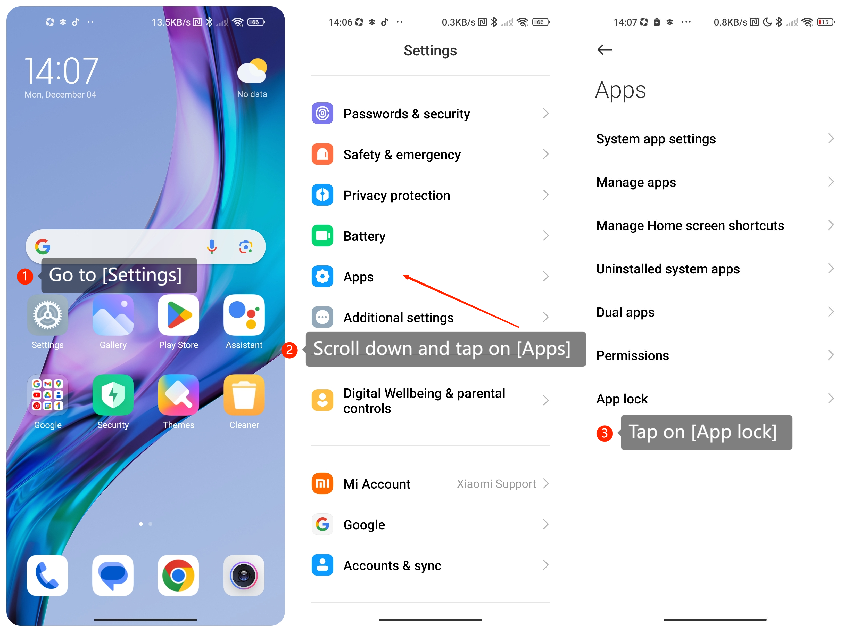
1. Go to [Settings];
2. Scroll down and tap on [Apps];
3. Tap on [App lock] in the menu;
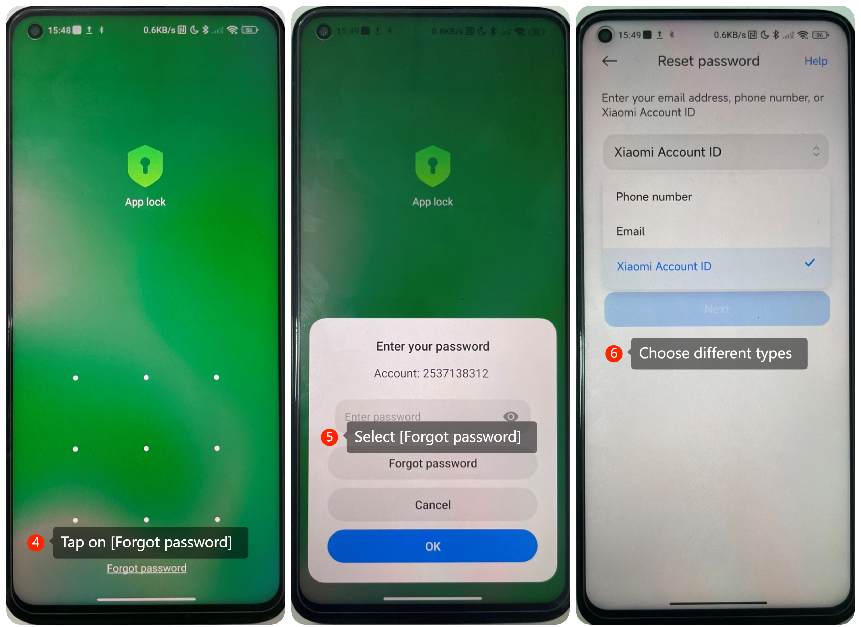
4. Tap on [Forgot password] at the bottom of the screen;
5. Select [Forgot password];
6. Tap this option to choose different types of identity verification methods, such as Email, Phone number, or Xiaomi Account ID;
7. Follow the on-screen instructions to reset the password.
1. Go to [Settings];
2. Scroll down and tap on [Apps];
3. Tap on [App lock] in the menu;
4. Tap on [Forgot password] at the bottom of the screen;
5. Select [Forgot password];
6. Tap this option to choose different types of identity verification methods, such as Email, Phone number, or Xiaomi Account ID;
7. Follow the on-screen instructions to reset the password.
Does it help?
Yes
No