

Mijia Vacuum Cleaner 4 Pro FAQ
Basic Information
Q1: What are the selling points of the Mijia Vacuum Cleaner 4 Pro?
A: For your reference, here are the selling points of the Mijia Vacuum Cleaner 4 Pro:
1. The vacuum cleaner delivers stronger cleaning performance with 280 AW hurricane suction power and up to 90 minutes of long-lasting runtime with a removable battery.
2. The vacuum cleaner enables more thorough and efficient cleaning with 180° blue light dust detection for blind-spot-free coverage, 0 mm edge cleaning, and intelligent dust sensing.
3. The vacuum cleaner provides multi-scenario cleaning coverage with 1+6 accessories, including an all-flooring dust-revealing brush bar, anti-tangle mini electric brush, 2-in-1 crevice brush, bendable tube, pet hair brush, extension hose, and sofa brush, enabling floor and multi-surface cleaning in one step.
Q2: What is the model of the Mijia Vacuum Cleaner 4 Pro?
A: The model of the Mijia Vacuum Cleaner 4 Pro is F204.
Q3: How many modes does the Mijia Vacuum Cleaner 4 Pro have, and what is the power of each mode?
A: The Mijia Vacuum Cleaner 4 Pro offers three power modes: Eco mode, Auto mode (default), and Turbo mode.
The motor power varies depending on the usage configuration:
Main unit only or with a 2-in-1 crevice brush:
1. Eco mode: 60 ± 5% W
2. Auto mode: 120 ± 5% W – 220 ± 5% W (stepped adjustment based on dust level: 120 ± 5% W-170 ± 5% W-220 ± 5% W)
3. Turbo mode: 800 ± 5% W (constant power for the first 5 minutes; then linearly reduces within 30 seconds; after power reduction, output stabilizes at 350 ± 5% W)
With all-flooring dust-revealing brush bar / mini electric brush:
1. Eco mode: 70 ± 5% W (constant power for the first 30 minutes; then linearly reduces within 1 minute; after reduction, output stabilizes at 60 ± 5% W)
2. Auto mode: 120 ±5% W – 220 ±5% W (stepped adjustment based on dust level: 120 ± 5% W-170 ± 5% W-220 ± 5% W)
3. Turbo mode: 400 ± 5% W
Q4: What are the functions of the buttons on the Mijia Vacuum Cleaner 4 Pro?
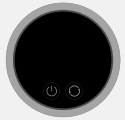
A: On the display of the Mijia Vacuum Cleaner 4 Pro, there are two buttons. When the device is in use, the left button serves as the power button, and the right button serves as the mode switch button.
Press the power button to turn the vacuum cleaner on or off. Press the mode switch button to switch between power modes. Press and hold the mode switch button for 3 seconds to access the language selection function.
Q5: What is the voltage of the Mijia Vacuum Cleaner 4 Pro?
A: The rated voltage of the Mijia Vacuum Cleaner 4 Pro is 25.9 V.
Q6: What is the air wattage of the Mijia Vacuum Cleaner 4 Pro?
A: When the Mijia Vacuum Cleaner 4 Pro is used with the 2-in-1 crevice brush, the air wattage is as follows:
1. Eco mode: ≥ 15 AW.
2. Auto mode: 30-90 AW.
3. Turbo mode: ≥ 280 AW.
Q7: What is the rated power of the Mijia Vacuum Cleaner 4 Pro?
A: The rated power specifications of the Mijia Vacuum Cleaner 4 Pro are as follows:
1. With 2-in-1 crevice brush: 800 ± 5% W.
2. With all-flooring dust-revealing brush bar: 390 ± 5% W (350 W main unit + 40 W all-flooring dust-revealing brush bar).
3. No-load condition: 370 ± 10% W (350 W main unit + 20 W all-flooring dust-revealing brush bar).
Q8: What do the indicators on the Mijia Vacuum Cleaner 4 Pro mean?
A: The indicator meanings of the Mijia Vacuum Cleaner 4 Pro are as follows:
Power on:
Operation method: Press / press and hold the power button.
Display details: Startup logo animation (total duration: 1.2s). The device enters Auto mode by default and starts operating.

Mode switch:
Operation method: Press the mode switch button.
Display details:
1. Mode switching: Auto – Turbo – Eco.
2. Transition effect: in-place animation transition.
Note:
Only Auto mode supports dirt detection. The Auto mode animation color (Orange – Yellow – Blue) changes in real time based on dirt level.
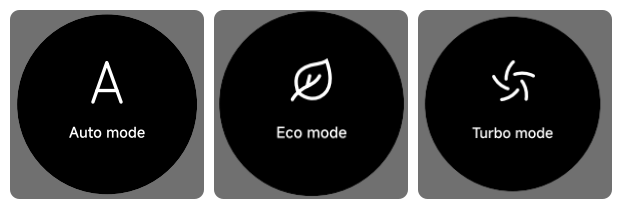
Battery (during operation):
Operation method: Main unit floor cleaning / standby.
Display details:
1. Battery > 5%: Battery icon is displayed in white with remaining power.
2. 0% < Battery ≤ 5%: During operation or after low-battery shutdown and restart:
(1). A "Low Battery" warning illustration flashes in the center 3 times (2s).
(2). After 2s, the device returns to the normal working page; the battery icon turns in red until fully charged.
3. Battery depleted (0%): During operation or after complete shutdown due to an empty battery, a "Battery Empty" warning illustration flashes 3 times (2s).
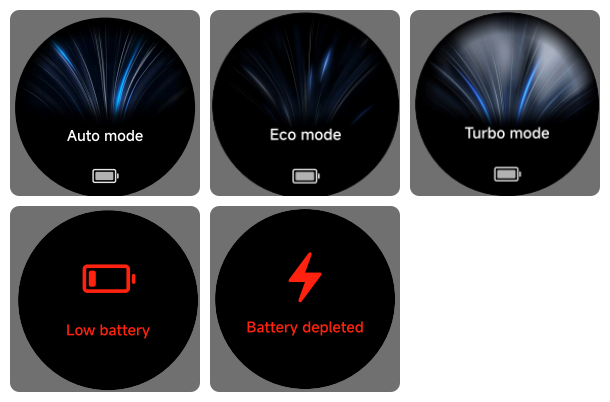
Language switch:
Operation method: Press and hold the mode switch button for 3 seconds to enter the language settings page. Press the mode switch button to switch languages. Press and hold for 3 seconds again or wait 5 seconds with no operation to confirm the current language.
Supported languages: English, Latin Spanish, Spanish, German, French, Italian, Russian, Polish, Dutch, Turkish, Brazilian Portuguese, Arabic, Traditional Chinese (Hong Kong).
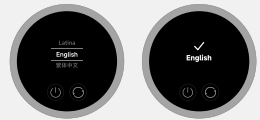
Battery (Charging):
Operation method: Main unit connected to power adapter (charging).
Display details:
1. Charging: Green breathing lightning icon (breathing effect) + battery percentage + battery ring display. The screen stays on for 60s, then turns off. Press any button to wake the screen, and the 60s timer restarts after waking.
2. Fully charged / placed on charging dock when fully charged: The screen stays on with 100% battery, green lightning icon, and fully green battery ring. If there is no operation for 20s, the screen turns off and the ring light also turns off.
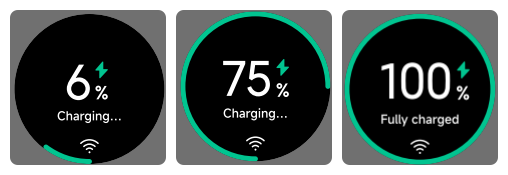
Power off:
Operation method & display details:
1. Press the power button: The motor stops. The screen turns off after 10s (keeping mode memory before screen-off). After screen-off, the device enters standby and fully powers off after 10 minutes.
2. Press and hold the power button: Forced shutdown. The motor stops immediately, the screen turns off immediately, and the device powers off completely.
Q9: What filtration system does the Mijia Vacuum Cleaner 4 Pro use?
A: The Mijia Vacuum Cleaner 4 Pro adopts a multi-stage filtration system, including a single-cone cyclone separator and an H14-grade HEPA exhaust filter.
After entering through the suction inlet, dust and debris pass sequentially through a metal mesh filter, a cyclonic cone separator, a filter foam, a filter cartridge, and a motor filter foam, effectively capturing dirt while releasing clean air.
Q10: What environments is the Mijia Vacuum Cleaner 4 Pro suitable for?
A: The Mijia Vacuum Cleaner 4 Pro, when used with different brush heads, is suitable for hard floors, short-pile carpets, crevices, corners, and low-clearance spaces. It is recommended for indoor household use only. It should not be used outdoors, in industrial or commercial environments, in humid areas, near heat sources, in flammable or explosive locations, under direct sunlight, or on unstable surfaces.
Q11: Does the Mijia Vacuum Cleaner 4 Pro support both dry and wet debris?
A: No, the Mijia Vacuum Cleaner 4 Pro is a dry vacuum cleaner only and cannot be used to pick up liquids. Using it to vacuum liquids can cause damage to the device.
If liquid is accidentally sucked in, immediately stop the device, remove the filter, pre-filter, and post-filter, and place the main unit and components in a cool, ventilated area to dry. After fully drying, reassemble and test the device again.
Q12: What types of waste can the Mijia Vacuum Cleaner 4 Pro clean?
A: The Mijia Vacuum Cleaner 4 Pro is designed for daily dry cleaning in the home and can handle the following types of debris:
1. Floor dust and hair: light dust on floors and carpets, pet hair, dandruff, etc.
2. Small particles: breadcrumbs, rice grains, sand, cat litter granules, etc.
3. Crevice dust: window tracks, sliding door rails, corners, keyboard gaps, etc. (When used with the 2-in-1 crevice brush)
4. Elevated dust: ceilings, air conditioner vents, curtain rails, etc. (When used with extension rod and brush head.)
The following types of waste should not be cleaned:
1. Liquids or wet waste: water, beverages, oil stains, etc. (This is a dry vacuum cleaner. Liquids could damage the motor.)
2. Fine powders: gypsum dust, cement dust, fireplace ash, printer toner (These can clog the filter and damage the motor.)
3. Sharp or hard objects: glass shards, nails, screws, coins (These can damage the brush head or dust compartment.)
4. Burning materials: matches, cigarette butts, ash (fire risk)
5. Sticky or staining substances: shoe polish, paint, pigments (These can adhere inside the airflow path and be difficult to clean.)
6. Toxic or corrosive chemicals: gasoline, bleach, ammonia, etc.
7. Large or clumped debris: large clumps of cat litter, wet tissues, paper balls, etc. (These can block the airflow channel.)
Q13: Can the Mijia Vacuum Cleaner 4 Pro be used to clean larger debris?
A: Yes, the Mijia Vacuum Cleaner 4 Pro can clean larger debris, but please note that if the particles are too large, they can get stuck in the extension rod or at the brush head inlet and cause a blockage. In such cases, you need to remove the blockage manually to avoid damaging the device.
Q14: What does the MAX mark on the dust compartment of the Mijia Vacuum Cleaner 4 Pro mean?
A: The “MAX” mark on the Mijia Vacuum Cleaner 4 Pro dust compartment indicates the internal dust level line. It is not the absolute maximum capacity of the dust compartment, but continuing to use the vacuum cleaner after dust exceeds the MAX line could lead to reduced suction power, filter blockage, or even motor damage. When the collected dust reaches the MAX mark, please empty the dust compartment promptly.
Q15: What are the three holes in the dust compartment suction port on the main unit of the Mijia Vacuum Cleaner 4 Pro for?
A: The three holes in the dust compartment suction port on the main unit of the Mijia Vacuum Cleaner 4 Pro are power pins for the all-flooring dust-revealing brush bar. They are used to supply power to the brush bar.
Q16: Why does the Mijia Vacuum Cleaner 4 Pro have an odor after unboxing?
A: During the manufacturing process, the Mijia Vacuum Cleaner 4 Pro uses injection-molded plastic parts, rubber components, and other materials. In addition, moisture-proof packaging materials are used inside the packaging box. These materials can produce a certain odor when the product is first opened. This is normal, and the smell will gradually disappear after a period of normal use.
Q17: Is it normal for vertical lines to appear on certain parts of the Mijia Vacuum Cleaner 4 Pro?
A: The vertical lines on certain parts of the Mijia Vacuum Cleaner 4 Pro are not cracks or defects. They are seam lines formed during the manufacturing process and are normal marks of production. They do not affect the normal use of the product.
Q18: What is the noise level of the Mijia Vacuum Cleaner 4 Pro?
A: The noise level of the Mijia Vacuum Cleaner 4 Pro differs in different modes and with different brushes:
Main unit: Eco mode: ≤ 74 dB(A), Auto mode: ≤ 78 dB(A), Turbo mode: ≤ 86 dB(A).
All-flooring Dust revealing Brush Bar/Mini Electric Brush: Eco mode: ≤ 82 dB(A), Auto mode: ≤ 82 dB(A), Turbo mode: ≤ 86 dB(A).
Product Appearance
Q1: What are the size and weight of the Mijia Vacuum Cleaner 4 Pro?
A: The dimensions of the Mijia Vacuum Cleaner 4 Pro are as follows:
1. Whole unit (main unit + battery + extension rod + all-flooring dust-revealing brush bar): 1265 mm × 260 mm × 262 mm.
2. Main unit: 380 mm × 100 mm × 262 mm.
The weights of the Mijia Vacuum Cleaner 4 Pro are as follows:
1. Whole unit (main unit + battery + extension rod + all-flooring dust-revealing brush bar): 3.2 kg
2. Main unit (including battery): 2.15 kg
3. Battery: 0.74 kg
4. All-flooring dust-revealing brush bar: 0.83 kg
5. Mini electric brush: 0.39 kg
6. 2-in-1 crevice brush: 0.11 kg
7. Sofa brush: 0.09 kg
8. Pet hair brush: 0.22 kg
9. Extension rod: 0.27 kg
10. Extension hose: 0.21 kg
11. Charging dock wall mount: 0.27 kg
12. Plug holder clip: 0.02 kg
13. Power adapter: 0.13 kg
14. Bendable tube: 0.18 kg
15. Packaging weight: gross weight: 7.5 kg, net weight: 4.84 kg
Q2: What components are included with the Mijia Vacuum Cleaner 4 Pro?
A: The accessories of the Mijia Vacuum Cleaner 4 Pro includes main unit, battery, extension rod, all-floor dust-revealing brush bar, mini electric brush, 2-in-1 crevice brush, sofa brush, bendable tube, pet hair brush, extension hose, charging dock wall mount, power adapter, wall mount kit (including plug holder clip × 1, wall plugs × 2, pointed screws × 2), user manual, and illustrated guide.
Q3: What is the capacity of the dust compartment of the Mijia Vacuum Cleaner 4 Pro?
A: The dust compartment capacity of the Mijia Vacuum Cleaner 4 Pro includes two specifications: Maximum inhalable capacity ≥ 0.5 L and effective capacity ≥ 0.35 L.
Q4: Does the Mijia Vacuum Cleaner 4 Pro have a display screen?
A: The Mijia Vacuum Cleaner 4 Pro supports an LCD display.
Q5: What material is the display screen on the Mijia Vacuum Cleaner 4 Pro made of?
A: The display of the Mijia Vacuum Cleaner 4 Pro is made of glass.
Brush Information
Q1: What brush heads does the Mijia Vacuum Cleaner 4 Pro use?
A: The Mijia Vacuum Cleaner 4 Pro has an all-flooring dust-revealing brush bar, mini electric brush, 2-in-1 crevice brush, pet hair brush, and sofa brush.
Q2: What are the rated voltage and power of the all-flooring dust-revealing brush bar of the Mijia Vacuum Cleaner 4 Pro?
A: The all-flooring dust-revealing brush bar of the Mijia Vacuum Cleaner 4 Pro has a rated voltage of 25.2 V and a rated power of 40 W.
Q3: What are the rated voltage and power of the mini electric brush of the Mijia Vacuum Cleaner 4 Pro?
A: The mini electric brush of the Mijia Vacuum Cleaner 4 Pro has a rated voltage of 25.2 V and a rated power of 20 W.
Q4: What to do if the 2-in-1 crevice brush of the Mijia Vacuum Cleaner 4 Pro becomes deformed?
A: The bristles of the 2-in-1 crevice brush on the Mijia Vacuum Cleaner 4 Pro are made of a special material with good self-recovery properties. If they become bent due to normal use or storage, they will return to normal after being left to rest for a period of time, or they can be restored by combing with warm water. If the bristles are severely deformed due to exposure to chemical solvents, high-temperature baking, washing and scrubbing, or long-term aging, please contact the after-sales service center.
Q5: What should be noted when using a pet hair brush with the Mijia Vacuum Cleaner 4 Pro?
A: When using the pet hair brush of the Mijia Vacuum Cleaner 4 Pro, it is recommended to gently groom and clean along the direction of the pet’s fur. If your pet shows signs of distress or resistance, stop using it immediately. During use, ensure proper supervision by adults and keep children and pets safe to avoid any hazards. Do not use the brush on wet pet fur, as this can damage the device.
Q6: Why is there significant resistance when using the Mijia Vacuum Cleaner 4 Pro's mini electric brush?
A: This is normal. The mini electric brush of the Mijia Vacuum Cleaner 4 Pro is typically equipped with a powerful roller brush and a beating mechanism. It needs to maintain close contact with mattresses and carpets to effectively remove deep-seated dust and mites, so pushing and pulling can feel more resistant than with a standard floor brush. As long as the suction power is stable and the roller brush is rotating normally, there is no cause for concern.
Q7: Does the Mijia Vacuum Cleaner 4 Pro come with a dedicated accessory storage bag?
A: No, the charging dock wall mount of the Mijia Vacuum Cleaner 4 Pro can meet the storage needs of the accessories.
Q8: Is it normal for the all-flooring dust-revealing brush bar indicator on the Mijia Vacuum Cleaner 4 Pro to stay on?
A: Yes. The blue dust indicator on the all-flooring dust-revealing brush bar of the Mijia Vacuum Cleaner 4 Pro is designed to turn on automatically during use and cannot be turned off manually. It helps you see dust more clearly during cleaning and improves cleaning effectiveness.
Q9: Why can't the Mijia Vacuum Cleaner 4 Pro completely remove dust along the edges?
A: This is a common physical limitation of vacuum cleaners and is not a product defect. The all-flooring dust-revealing brush bar of the Mijia Vacuum Cleaner 4 Pro could not fully fit against walls or the bottoms of furniture, leaving some blind spots. In addition, suction is strongest at the center of the inlet while airflow is weaker at the edges, so dust can remain in corners. To improve cleaning results, try cleaning from multiple angles or use the 2-in-1 crevice brush for more precise edge and gap cleaning.
Q10: Is the Mijia Vacuum Cleaner 4 Pro suitable for cleaning under beds?
A: Yes. With the extension rod and all-flooring dust-revealing brush bar combined, the Mijia Vacuum Cleaner 4 Pro can reach under beds, sofas, and other low spaces for cleaning. If there are thresholds or beams under the bed, take care to avoid collisions when moving it. The minimum usable clearance is about 10–13 cm. If the space is too low, the all-flooring dust-revealing brush bar can not fully fit underneath, in which case the 2-in-1 crevice brush can be used for basic cleaning.
Product Installation
Q1: How to install the charging dock wall mount of the Mijia Vacuum Cleaner 4 Pro?
A: Choose a cool and dry place with an electrical outlet nearby. Before installing, make sure that there are no wires or pipelines in the wall directly behind where the mount will be installed. The distance between the bottom of the wall mount and the ground is recommended to be 115 cm.
To install the wall storage mount of the Mijia Vacuum Cleaner 4 Pro, please refer to the following steps:
1. Hold the charging dock wall mount in the pre-installation position and make marks on the wall according to the holes on the mount.
2. Use a drill with a 5 mm drill bit to drill a hole approx. 30 mm deep in each marked position, then insert a wall plug into each hole.
3. Align the screw holes on the wall mount with the holes on the wall, and then use the included screws to secure the wall mount to the wall.
Q2: How to assemble and disassemble the accessories of the Mijia Vacuum Cleaner 4 Pro?
A: The main unit and accessories of the Mijia Vacuum Cleaner 4 Pro use a “push-and-click” connection method. Follow the steps below:
1. Installing the extension hose, extension rod, and bendable tube: Align the front end of the main unit with the rear end of the extension rod, then insert firmly until a “click” sound is heard, indicating it is securely locked.
2. Installing the brush heads: Align the front end of the main unit or the extension rod of the main unit with the brush head interface, then insert firmly until a “click” sound is heard to confirm it is locked.
3. Removal method: When detaching, press the release button on the interface while pulling firmly to separate the components.
Note:
The extension hose cannot be used with the all-floor dust-revealing brush bar or the mini electric brush.
Q3: Why is the all-flooring dust-revealing brush bar of the Mijia Vacuum Cleaner 4 Pro tilted when placed on the charging dock wall mount?
A: Since the all-flooring dust-revealing brush bar of the Mijia Vacuum Cleaner 4 Pro contains a built-in motor and the motor is not positioned at the exact center of the brush head, the weight distribution is uneven. As a result, the floor brush can tilt when hung vertically. This is normal and does not affect normal use or storage.
Q4: Can the Mijia Vacuum Cleaner 4 Pro be used without installing the filter?
A: No. If the filter is not installed in the Mijia Vacuum Cleaner 4 Pro, dust and debris can enter the motor without the filter installed, which can damage critical internal components.
Does it help?
Yes
No