

Mijia Vacuum Cleaner 4 FAQ
Basic Information
Q1: What are the selling points of the Mijia Vacuum Cleaner 4?
A: For your reference, here are the selling points of the Mijia Vacuum Cleaner 4:
1. It delivers 230 AW suction power for deep cleaning and provides up to 90 minutes of runtime with a removable battery.
2. It features 180° blue-light dust detection, 0 mm edge cleaning, and intelligent dust sensing for more efficient and complete cleaning.
3. It comes with 1+3 cleaning attachments, including All-flooring Dust-revealing Brush Bar + Mini Electric Brush, 2-in-1 Crevice Brush, and Bendable Tube, enabling multi-surface cleaning in one step.
Q2: What is the model of the Mijia Vacuum Cleaner 4?
A: The model of the Mijia Vacuum Cleaner 4 is F203.
Q3: How many modes does the Mijia Vacuum Cleaner 4 have, and what is the power of each mode?
A: The Mijia Vacuum Cleaner 4 has three modes: Eco mode, Smart mode (default), and Turbo mode.
Please refer to the power information for each mode below:
Vacuum cleaner or when it is connected to the 2-in-1 Crevice Brush:
1. Eco mode: Operates at 70 ± 5 W for 5 minutes, then drops to 40 ± 5 W within 30 seconds, and further decreases to 35 ± 5 W within another 30 seconds.
2. Smart mode: Automatically adjusts between 100 ± 5% W and 200 ± 5% W based on the amount of dust detected, with power levels changing in stages from 100 ± 5% W to 150 ± 5% W and up to 200 ± 5% W.
3. Turbo mode: Operates at 535 ± 5% W for the first 3 minutes and 30 seconds at constant power, then linearly reduces power within 30 seconds. After stepping down, the power stabilizes at 220 ± 5% W. Under the 10-hole test standard, it achieves up to 230 AW suction power.
When the vacuum cleaner is connected to the All-flooring Dust-revealing Brush Bar or Mini Electric Brush:
1. Eco mode: Operates at 70 ± 5 W for 20 minutes, then drops to 40 ± 5 W within 1 minute.
2. Smart mode: Automatically adjusts between 100 ± 5% W and 200 ± 5% W based on the amount of dust detected, with power levels changing in stages from 100 ± 5% W to 150 ± 5% W and up to 200 ± 5% W.
3. Turbo mode: Operates at 350 ± 5% W for 2.5 minutes, then decreases to 250 ± 5% W within 1 minute.
Q4: What are the functions of the buttons on the Mijia Vacuum Cleaner 4?
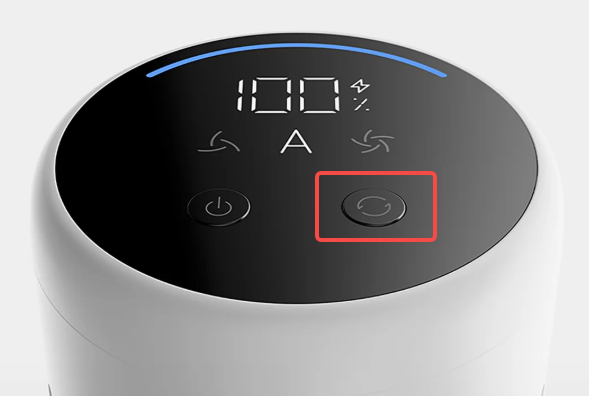
A: On the display of the Mijia Vacuum Cleaner 4, there are two buttons. When the device is in use, the left button serves as the power button, and the right button serves as the mode switch button.
Press the power button to turn the vacuum cleaner on or off. Press the mode switch button to switch between modes.
Q5: What is the voltage of the Mijia Vacuum Cleaner 4?
A: The rated voltage of the Mijia Vacuum Cleaner 4 is 29.6 V.
Q6: What is the air wattage of the Mijia Vacuum Cleaner 4?
A: When the Mijia Vacuum Cleaner 4 is used with the 2-in-1 crevice brush, the air wattage is as follows:
1. Eco mode: ≥ 15 AW.
2. Smart mode: 30-90 AW.
3. Turbo mode: ≥ 230 AW.
Q7: What is the rated power of the Mijia Vacuum Cleaner 4?
A: The rated power specifications of the Mijia Vacuum Cleaner 4 are as follows:
1. When the vacuum cleaner is connected to the 2-in-1 Crevice Brush: 600 ± 5% W (under the 10-hole load test: 660 ± 5% W; no-load condition: 540 ± 10 W).
2. When the vacuum cleaner is connected to the All-flooring Dust-revealing Brush Bar: 390 ± 5% W (350 W main unit + 40 W All-flooring Dust-revealing Brush Bar); no-load condition: 370 ± 10 W (350 W main unit + 20 W All-flooring Dust-revealing Brush Bar).
Q8: What do the indicators on the Mijia Vacuum Cleaner 4 mean?
A: The indicator meanings of the Mijia Vacuum Cleaner 4 are as follows:
Feature overview | The display screen shows | Operation method | Icon display |
Power on | 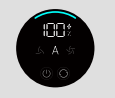 | Press or press and hold the power button to turn on | Displays the battery percentage and the Smart mode (A) icon remains fully lit, while icons for other modes are dimly lit. If powered on quickly within 10 seconds, the device operates in the last used mode; otherwise, it starts in Smart mode. |
Mode switching | 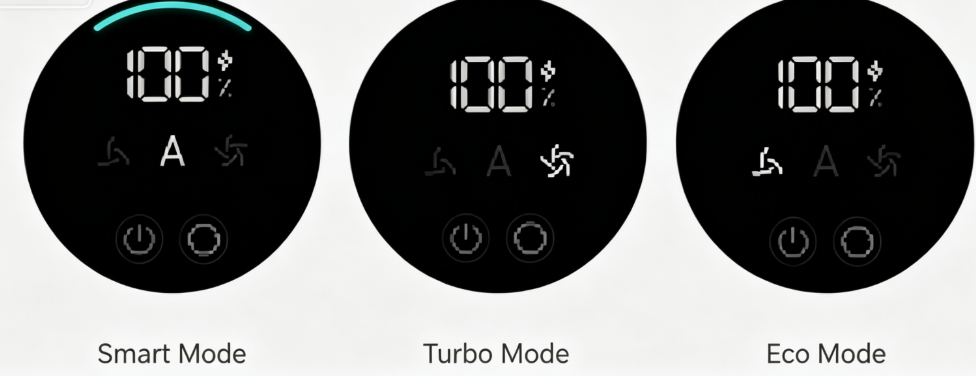 | Press the mode switch button: Smart mode (default) - Turbo mode - Eco mode | Smart mode: Displays the battery percentage and the Smart mode (A) icon. The dust-ring indicator is illuminated. Turbo mode: Displays the battery percentage, shows a five-bar airflow setting, and the dirt indicator ring disappears. Eco mode: Displays the battery percentage, the speed setting shows three airflow bars, and the dirt indicator ring disappears. |
Discharging (in operation) | 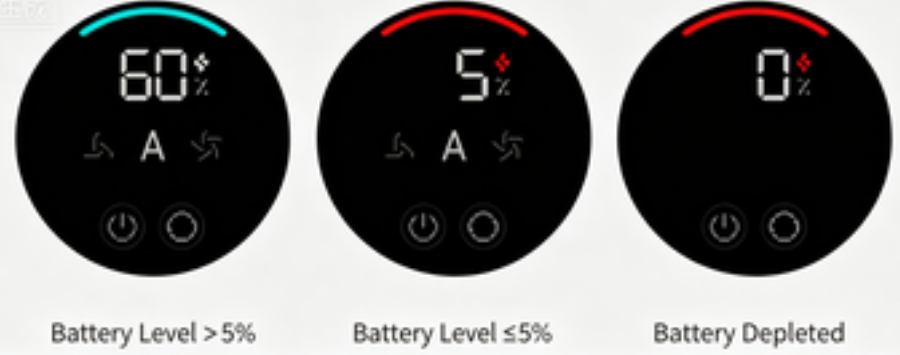 | Discharge during operation/standby | 1. Discharging (including when the screen is on): The screen displays the current battery level. 2. Battery level > 5%: The lightning icon remains solid white; the battery percentage and mode status are displayed normally. 3. Battery level ≤ 5%: The lightning icon remains solid red; the battery percentage and mode status are displayed normally. 4. Battery depleted (0%): Mode status is not displayed; the lightning icon flashes red for 6 seconds before the screen turns off and the device shuts down. * When the battery level is ≤ 5%, the light ring remains solid red. |
Charging | 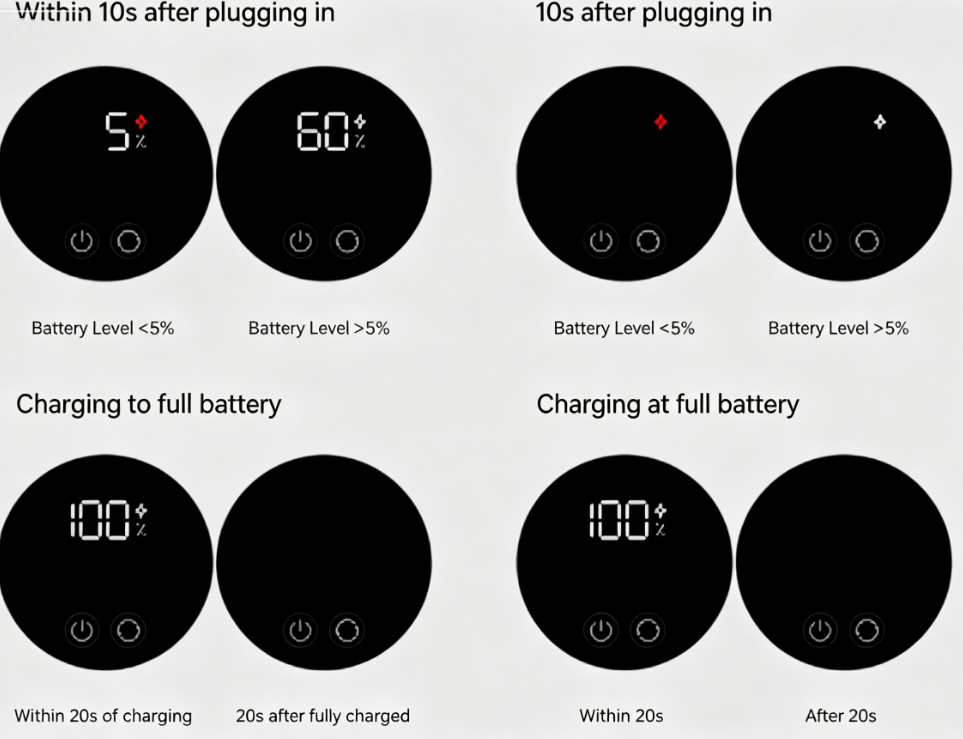 | Connect the power supply | 1. When connected to charging: Within 10 seconds of connection, the battery level is displayed while the mode setting is hidden, and the lightning icon pulses; after 10 seconds, only the pulsing lightning icon remains visible. 2. When the battery level is ≤5%, the lightning icon pulses in red. 3. When the battery level is >5%, the lightning icon pulses in white; 20 seconds after reaching full charge, the lightning icon turns off. 4. Upon reaching full charge, both the battery level value and the lightning icon remain steadily lit for 20 seconds before the screen turns off. 5. When charging a fully charged device, both the battery level value and the lightning icon remain steadily lit for 20 seconds before the screen turns off. |
Power off |  | Press the power button to power off Press and hold the power button to force a shutdown | Upon pressing the power button, the motor stops immediately; the screen turns off after 10 seconds, entering standby mode, and the device shuts down after 30 seconds of standby (standby duration: 30s). |
Q9: What filtration system does the Mijia Vacuum Cleaner 4 use?
A: The Mijia Vacuum Cleaner 4 features a multi-stage filtration system with a single-cone cyclone design and an H13-grade outlet HEPA filter.
After dust and debris enter through the suction port, they pass through a metal filter, a cyclone cone filter, a pre-filter, a post filter, and a motor filter. This multi-stage process ensures that dust is effectively captured while clean air is released.
Q10: What environments is the Mijia Vacuum Cleaner 4 suitable for?
A: The Mijia Vacuum Cleaner 4, when used with different brush heads, is suitable for hard floors, short-pile carpets, crevices, corners, and low-clearance spaces. It is recommended for indoor household use only. It should not be used outdoors, in industrial or commercial environments, in humid areas, near heat sources, in flammable or explosive locations, under direct sunlight, or on unstable surfaces.
Q11: Does the Mijia Vacuum Cleaner 4 support both dry and wet debris?
A: No, the Mijia Vacuum Cleaner 4 is a dry vacuum cleaner only and cannot be used to pick up liquids. Using it to vacuum liquids can cause damage to the device.
If liquid is accidentally sucked in, immediately stop the device, remove the filter, pre-filter, and post-filter, and place the main unit and components in a cool, ventilated area to dry. After fully drying, reassemble and test the device again.
Q12: What types of waste can the Mijia Vacuum Cleaner 4 clean?
A: The Mijia Vacuum Cleaner 4 is designed for daily dry cleaning in the home and can handle the following types of debris:
1. Floor dust and hair: light dust on floors and carpets, pet hair, dandruff, etc.
2. Small particles: breadcrumbs, rice grains, sand, cat litter granules, etc.
3. Crevice dust: window tracks, sliding door rails, corners, keyboard gaps, etc. (When used with the 2-in-1 crevice brush)
4. Elevated dust: ceilings, air conditioner vents, curtain rails, etc. (When used with extension rod and brush head.)
The following types of waste should not be cleaned:
1. Liquids or wet waste: water, beverages, oil stains, etc. (This is a dry vacuum cleaner. Liquids could damage the motor.)
2. Fine powders: gypsum dust, cement dust, fireplace ash, printer toner (These can clog the filter and damage the motor.)
3. Sharp or hard objects: glass shards, nails, screws, coins (These can damage the brush head or dust container.)
4. Burning materials: matches, cigarette butts, ash (fire risk)
5. Sticky or staining substances: shoe polish, paint, pigments (These can adhere inside the airflow path and be difficult to clean.)
6. Toxic or corrosive chemicals: gasoline, bleach, ammonia, etc.
7. Large or clumped debris: large clumps of cat litter, wet tissues, paper balls, etc. (These can block the airflow channel.)
Q13: Can the Mijia Vacuum Cleaner 4 be used to clean larger debris?
A: Yes, the Mijia Vacuum Cleaner 4 can clean larger debris, but please note that if the particles are too large, they could get stuck in the extension rod or at the brush head inlet and cause a blockage. In such cases, you need to remove the blockage manually to avoid damaging the device.
Q14: What does the MAX mark on the dust compartment of the Mijia Vacuum Cleaner 4 mean?
A: The “MAX” mark on the Mijia Vacuum Cleaner 4 dust compartment indicates the internal dust level line. It is not the absolute maximum capacity of the dust compartment, but continuing to use the vacuum cleaner after dust exceeds the MAX line could lead to reduced suction power, filter blockage, or even motor damage. When the collected dust reaches the MAX mark, please empty the dust compartment promptly.
Q15: What are the three holes in the dust compartment suction port on the main unit of the Mijia Vacuum Cleaner 4 for?
A: The three holes in the dust compartment suction port on the main unit of the Mijia Vacuum Cleaner 4 are power pins for the All-flooring Dust-revealing Brush Bar. They are used to supply power to the brush bar.
Q16: Why does the Mijia Vacuum Cleaner 4 have an odor after unboxing?
A: During the manufacturing process, the Mijia Vacuum Cleaner 4 uses injection-molded plastic parts, rubber components, and other materials. In addition, moisture-proof packaging materials are used inside the packaging box. These materials can produce a certain odor when the product is first opened. This is normal, and the smell will gradually disappear after a period of normal use.
Q17: Is it normal for vertical lines to appear on certain parts of the Mijia Vacuum Cleaner 4?
A: The vertical lines on certain parts of the Mijia Vacuum Cleaner 4 are not cracks or defects. They are seam lines formed during the manufacturing process and are normal production marks. They do not affect the normal use of the product.
Q18: What is the noise level of the Mijia Vacuum Cleaner 4?
A: The noise level of the Mijia Vacuum Cleaner 4 differs in different modes and with different brushes:
Main unit: Eco mode: ≤ 74 dB(A), Auto mode: ≤ 78 dB(A), Turbo mode: ≤ 86 dB(A).
All-flooring Dust revealing Brush Bar/Mini Electric Brush: Eco mode: ≤ 82 dB(A), Auto mode: ≤ 82 dB(A), Turbo mode: ≤ 86 dB(A).
Product Appearance
Q1: What is the size and weight of the Mijia Vacuum Cleaner 4?
A: The dimensions of the Mijia Vacuum Cleaner 4 are as follows:
1. Vacuum Cleaner: 380 mm × 100 mm × 262 mm.
2. Vacuum Cleaner + Battery + Extension Rod + All-flooring Dust-revealing Brush Bar: 1265 mm × 260 mm × 262 mm.
The weights of the Mijia Vacuum Cleaner 4 are as follows:
1. Whole unit (Main unit + Extension Rod + All-flooring Dust-revealing Brush Bar): 3.13 kg.
2. Main unit (including battery): 1.96 kg.
3. Battery: 0.62 kg.
4. Extension Rod: 0.27 kg.
5. All-flooring Dust-revealing Brush Bar: 0.83 kg.
6. Mini Electric Brush: 0.39 kg.
7. 2-in-1 Crevice Brush: 0.11 kg.
8. Charging Dock Wall Mount: 0.27 kg.
9. Plug holder clip: 0.02 kg.
10. Power Supply: 0.13 kg.
11. Bendable Tube: 0.18 kg.
The weights of the packaging are as follows:
1. Gross weight: 6.36 kg.
2. Net weight: 4.14 kg.
Q2: What components are included with the Mijia Vacuum Cleaner 4?
A: The accessories of the Mijia Vacuum Cleaner 4 include a Vacuum Cleaner, a Battery, an Extension Rod, an All-flooring Dust-revealing Brush Bar, a Mini Electric Brush, a 2-in-1 Crevice Brush, a Charging Dock Wall Mount, a Power Supply, a Wall Mount Kit (including plug holder clip × 1, wall plug × 2, pointed screw × 2), user manual, illustrated guide, and a Bendable Tube.
Q3: What is the capacity of the dust compartment of the Mijia Vacuum Cleaner 4?
A: The Mijia Vacuum Cleaner 4 features a dust compartment with a maximum intake capacity of ≥ 0.5 L and an effective usable capacity of ≥ 0.35 L.
Q4: Does the Mijia Vacuum Cleaner 4 have a display screen?
A: The Mijia Vacuum Cleaner 4 supports an LED display.
Q5: What material is the display screen on the Mijia Vacuum Cleaner 4 made of?
A: The display screen on the Mijia Vacuum Cleaner 4 is made of glass.
Brush Information
Q1: What brush heads does the Mijia Vacuum Cleaner 4 use?
A: The Mijia Vacuum Cleaner 4 has an All-flooring Dust-revealing Brush Bar, a Mini Electric Brush, and a 2-in-1 Crevice Brush.
Q2: What are the rated voltage and power of the All-flooring Dust-revealing Brush Bar of the Mijia Vacuum Cleaner 4?
A: The All-flooring Dust-revealing Brush Bar of the Mijia Vacuum Cleaner 4 has a rated voltage of 25.2 V and a rated power of 40 W.
Q3: What are the rated voltage and power of the Mini Electric Brush of the Mijia Vacuum Cleaner 4?
A: The Mini Electric Brush of the Mijia Vacuum Cleaner 4 has a rated voltage of 25.2 V and a rated power of 20 W.
Q4: What to do if the 2-in-1 Crevice Brush of the Mijia Vacuum Cleaner 4 becomes deformed?
A: The bristles of the 2-in-1 Crevice Brush on the Mijia Vacuum Cleaner 4 are made of a special material with good self-recovery properties. If they become bent due to normal use or storage, they will return to normal after being left to rest for a period of time, or they can be restored by combing with warm water. If the bristles are severely deformed due to exposure to chemical solvents, high-temperature baking, washing and scrubbing, or long-term aging, please contact the after-sales service center.
Q5: What should be noted when using a pet brush with the Mijia Vacuum Cleaner 4?
A: The Mijia Vacuum Cleaner 4 has no pet brush.
Q6: Why is there significant resistance when using the Mijia Vacuum Cleaner 4's Mini Electric Brush?
A: This is normal. The Mini Electric Brush of the Mijia Vacuum Cleaner 4 is typically equipped with a powerful roller brush and a beating mechanism. It needs to maintain close contact with mattresses and carpets to effectively remove deep-seated dust and mites, so pushing and pulling can feel more resistant than with a standard floor brush. As long as the suction power is stable and the roller brush is rotating normally, there is no cause for concern.
Q7: Does the Mijia Vacuum Cleaner 4 come with a dedicated accessory storage bag?
A: No. The Mijia Vacuum Cleaner 4 does not come with a dedicated accessory storage bag. However, the Charging Dock Wall Mount of the Mijia Vacuum Cleaner 4 can meet the storage needs of the accessories.
Q8: Is it normal for the All-flooring Dust-revealing Brush Bar headlight on the Mijia Vacuum Cleaner 4 to stay on?
A: Yes. The All-flooring Dust-revealing Brush Bar headlight on the Mijia Vacuum Cleaner 4 is designed to turn on automatically during use and cannot be turned off manually. It helps you see dust more clearly during cleaning and improves cleaning effectiveness.
Q9: Why can’t the Mijia Vacuum Cleaner 4 completely remove dust along the edges?
A: This is a common physical limitation of vacuum cleaners and is not a product defect. The All-flooring Dust-revealing Brush Bar of the Mijia Vacuum Cleaner 4 could not fully fit against walls or the bottoms of furniture, leaving some blind spots. In addition, suction is strongest at the center of the inlet while airflow is weaker at the edges, so dust can remain in corners. To improve cleaning results, try cleaning from multiple angles or use the 2-in-1 Crevice Brush for more precise cleaning of edges and gaps.
Q10: Is the Mijia Vacuum Cleaner 4 suitable for cleaning under beds?
A: Yes. With the Extension Rod and All-flooring Dust-revealing Brush Bar combined, the Mijia Vacuum Cleaner 4 can reach under beds, sofas, and other low spaces for cleaning. If there are thresholds or beams under the bed, take care to avoid collisions when moving it. The minimum usable clearance is about 10–13 cm. If the space is too low, the floor brush can not fully fit underneath, in which case the 2-in-1 Crevice Brush can be used for basic cleaning.
Product Installation
Q1: How to install the charging dock wall mount of the Mijia Vacuum Cleaner 4?
A: Choose a cool and dry place with an electrical outlet nearby. Before installing, make sure that there are no wires or pipelines in the wall directly behind where the mount will be installed. The distance between the bottom of the charging dock wall mount and the ground is recommended to be 115 cm.
To install the charging dock wall mount of the Mijia Vacuum Cleaner 4, please refer to the following steps:
1. Hold the charging dock wall mount in the pre-installation position and make marks on the wall according to the holes on the mount.
2. Use a drill with a 5 mm drill bit to drill a hole approx. 30 mm deep in each marked position, then insert a wall plug into each hole.
3. Align the screw holes on the charging dock wall mount with the holes on the wall, and then use the included screws to secure the charging dock wall mount to the wall.
Q2: How to assemble and disassemble the accessories of the Mijia Vacuum Cleaner 4?
A: The main unit and accessories of the Mijia Vacuum Cleaner 4 use a “push-and-click” connection method. Follow the steps below:
1. Installing the extension rod and bendable tube: Align the front of the main unit with the end of the extension rod and firmly insert it until you hear a “click,” indicating it is locked in place.
2. Installing the brush head: Align the front of the extension rod with the inlet of the brush head, then insert it firmly until you hear a "click" indicating it is locked in place.
3. Disassembly method: When detaching, press the release button at the connection point and pull firmly to detach.
Q3: Why is the All-flooring Dust-revealing Brush Bar of the Mijia Vacuum Cleaner 4 tilted when placed on a charging dock wall mount?
A: Since the All-flooring Dust-revealing Brush Bar of the Mijia Vacuum Cleaner 4 contains a built-in motor and the motor is not positioned at the exact center of the brush head, the weight distribution is uneven. As a result, the floor brush could tilt when hung vertically. This is normal and does not affect normal use or storage.
Q4: Can the Mijia Vacuum Cleaner 4 be used without installing the filter?
A: No. If the filter is not installed in the Mijia Vacuum Cleaner 4, dust and debris could enter the motor, which can damage critical internal components.
Product Use
Q1: What precautions should I follow when using the Mijia Vacuum Cleaner 4?
A: When using the Mijia Vacuum Cleaner 4, please follow the safety precautions as mentioned below:
Usage Environment and Conditions
1. This product is intended for indoor household use only; do not use it outdoors, in industrial, or commercial environments.
2. Do not charge or store the unit near heat sources (such as radiators) or in humid areas (such as kitchens or bathrooms).
3. Charge the unit within an ambient temperature range of 5°C to 35°C; charging outside this range may damage the battery.
4. Do not place the product on unstable surfaces like chairs or dining tables to prevent it from falling and sustaining damage.
Electrical Safety
1. Do not touch the plug or any live electrical parts with wet hands.
2. Use only officially recommended replacement parts and the original power adapter.
3. Inspect the power adapter for damage before use; do not use it if it is damaged.
4. Do not pull on the power cord when unplugging the adapter.
5. Do not use the product near flammable or explosive materials.
Operational Precautions
1. Always turn off the unit and unplug the power adapter before installation, disassembly, cleaning, or maintenance.
2. Do not block the air intake or exhaust vents to prevent overheating and damage.
3. Do not place any objects near the suction inlet.
4. Do not use the product if the accessories are damaged or not installed correctly.
5. Ensure the unit is turned off when lifting or moving it.
6. Keep moving parts, such as the brush head, away from people and pets during use.
Prohibited Items for Vacuuming
1. Liquids or wet debris
2. Fine dust, such as drywall dust or fireplace ash
3. Smoldering or burning objects (e.g., hot coals, cigarette butts, matches)
4. Sharp or hard objects (e.g., glass, nails, screws, coins)
5. Highly greasy, sticky, or staining substances (e.g., shoe polish, paint, pigments)
6. Flammable or explosive liquids (e.g., gasoline) or toxic chemicals (e.g., bleach, ammonia, drain cleaner)
7. Toner or powder from laser printers or photocopiers.
Handling Abnormalities
1. If abnormal noise, odor, excessive heat, or a malfunction occurs, stop using the product immediately, turn it off, and disconnect the power.
2. Repairs must be performed only by official after-sales service personnel. Battery and Charging
3. Fully insert the adapter plug into the power outlet when charging.
4. Do not use the appliance if the suction inlet is blocked; promptly clear away dust, lint, hair, and other debris.
Children and Special Groups
1. Supervise children to ensure they do not play with the appliance.
2. Individuals with reduced physical, sensory, or mental capabilities, or those lacking experience and knowledge (including children), must be supervised or instructed by someone responsible for their safety when using this product.
Other Prohibitions
1. Do not immerse the product or its accessories in water or other liquids for cleaning.
2. Ensure all parts are completely dry after cleaning or maintenance before reassembling and using the appliance.
3. Do not apply any scented products to the filter foam or filter cartridge, as this may cause a fire.
Q2: How to choose the right power mode for the Mijia Vacuum Cleaner 4?
A: The Mijia Vacuum Cleaner 4 offers three power modes – Eco, Smart, and Turbo – each suited to different cleaning tasks. The default mode is Smart, which automatically adjusts suction based on detected dust levels.
For routine cleaning of hard floors and light dust, Eco mode provides sufficient suction while offering the longest runtime, making it ideal for whole‑room cleaning.
For mixed surfaces, pet hair, or general debris, Smart mode gives you a good balance between cleaning performance and battery life by adjusting suction automatically.
Turbo mode is best for stubborn stains, deep‑pile carpets, or large debris, but it should be used sparingly for short, intensive sessions because it consumes more power and significantly reduces battery endurance.
Q3: Does the Mijia Vacuum Cleaner 4 have a blockage protection feature?
A: Yes, the Mijia Vacuum Cleaner 4 is equipped with a blockage protection feature. If the air duct, filter, or brush head becomes obstructed, the vacuum will automatically stop and display a corresponding blockage icon on the screen.
When this happens, you should switch off the vacuum and clear the blockage by cleaning the dust compartment, filters, extension rod, or brush heads before restarting.
Q4: Why does the Mijia Vacuum Cleaner 4 seem to have weak suction when first turned on?
A: The Mijia Vacuum Cleaner 4 may seem to have weak suction when first turned on because it starts in Smart mode, where suction power is automatically adjusted according to the amount of dust detected. If the air duct is relatively clean, the vacuum may initially run at a lower power setting for a few seconds.
As it encounters more dust during cleaning, suction increases automatically. If you need stronger suction immediately, you can manually switch to Turbo mode by pressing the mode switch button.
Q5: What to do if dust falls out of the Mijia Vacuum Cleaner 4 after it stops?
A: If dust falls out of the Mijia Vacuum Cleaner 4 after it stops, you should first check whether the HEPA filter, pre‑filter, or their seals are damaged or incorrectly installed, and also ensure that all connections between the main unit, extension rod, and brush heads are tight and secure.
In some cases, dust may simply have not yet reached the dust compartment. We suggest letting the vacuum run for a few extra seconds after cleaning to help draw any remaining debris into the dust bin.
Q6: Is vibration at the connection points of the Mijia Vacuum Cleaner 4 normal?
A: Some vibration at the connection points of the Mijia Vacuum Cleaner 4 is normal because small gaps are intentionally left to facilitate easy assembly and disassembly. If you hear a click when connecting and the parts are locked in place, the vibration is normal and does not affect performance.
However, if the vibration seems excessive or the parts feel loose, you should recheck the connections to ensure they are properly secured.
Q7: Is the vibration inside the main unit of the Mijia Vacuum Cleaner 4 normal?
A: Vibration coming from inside the main unit of the Mijia Vacuum Cleaner 4 is not normal. If you experience this issue, you should stop using the vacuum immediately and contact Xiaomi's after‑sales service for a thorough inspection.
Q8: What to do if the suction power of the Mijia Vacuum Cleaner 4 decreases?
A: If the suction power of the Mijia Vacuum Cleaner 4 decreases, please follow these troubleshooting steps:
1. In Smart mode, the main unit adjusts suction power based on the level of dirt detected by the sensor; a reduction in suction as the environment becomes cleaner is normal and serves to prevent unnecessary battery drain.
2. To extend runtime while still meeting usage needs, the machine is designed to automatically reduce power; if you notice the airflow weakening after a period of operation but remaining steady, this does not affect normal use.
3. Check if the dust and debris in the dust cup have reached the "MAX" line; please empty it promptly.
4. Check the brush head and connecting rod for blockages, and inspect the filter cartridge and filter foam for caked-on dirt; please clean them promptly. If the filter cartridge and foam are heavily soiled, rinse them with clean water and allow them to dry completely.
5. Suction power decreases when the battery is low; check if the first indicator light is flashing red continuously, and please fully charge the device before use.
Q9: What to do if the Mijia Vacuum Cleaner 4 is too noisy?
A: If the Mijia Vacuum Cleaner 4 is too noisy or produces unusual sounds, please check the following possible causes and take the corresponding actions:
1. There may be tangled hair or debris in the roller brush, brush heads, or extension rod – you should inspect and clean them thoroughly.
2. The filters may be clogged – you should inspect the filter, pre‑filter, and HEPA filter and wash them if heavily soiled, ensuring they are completely dry before reinstalling.
3. The pre‑filter may be missing – you should remove the cyclone cone and verify that the pre‑filter is correctly installed.
4. The connections may be loose – you should make sure the main unit, extension rod, and brush heads are securely connected, as loose parts can cause rattling or resonance.
If the noise continues after these checks, please contact after‑sales service for further diagnosis.
Q10: What to do if the Mijia Vacuum Cleaner 4 overheats during use?
A: It is normal for the motor to generate heat during operation, especially in Turbo mode. However, if the Mijia Vacuum Cleaner 4 becomes uncomfortably hot, it may indicate that the filters are clogged, the dust compartment is full, or the ambient temperature is too high.
You should stop using the vacuum, allow it to cool down, and clean the filters and dust compartment thoroughly. Always operate the vacuum in a room‑temperature environment. If overheating recurs, please contact support for assistance.
Q11: What to do if the Mijia Vacuum Cleaner 4 does not pick up all the debris?
A: If the Mijia Vacuum Cleaner 4 does not pick up all the debris, you should first check whether the debris is stuck to the surface due to moisture or grease. Try adjusting the cleaning angle, making multiple passes, or switching to Turbo mode for stronger suction.
If the problem persists, inspect the brush heads and air duct for blockages and clean them as needed.
Q12: Why does the Mijia Vacuum Cleaner 4 make a louder noise after being turned off?
A: The Mijia Vacuum Cleaner 4 may make a louder noise after being turned off because it continues to run briefly after shut‑off to ensure that any residual debris in the brush head or extension rod is drawn into the dust compartment.
Since the brush bar stops and the main motor runs alone, the sound may seem more prominent, but this is a normal design feature and not a fault.
Q13: What to do if the All-flooring Dust-revealing Brush Bar of the Mijia Vacuum Cleaner 4 is difficult to control?
A: If the all‑flooring brush bar of the Mijia Vacuum Cleaner 4 feels hard to push or manoeuvre, you should check whether the floor surface is wet or slippery, and also inspect the small wheels on the brush bar for tangled hair or sticky residue.
Cleaning the wheels and removing any debris should restore smooth operation. Ensure the wheels are correctly installed if they were previously removed.
Q14: Can the Mijia Vacuum Cleaner 4 be stored in a car?
A: Storing the Mijia Vacuum Cleaner 4 in a car is not recommended, especially during summer or hot weather, because high temperatures inside a parked vehicle can damage the battery and other components. Always store the vacuum in a cool, dry place indoors.
Q15: Can the Mijia Vacuum Cleaner 4 be leaned against a wall during or after use?
A: It is not recommended to lean the Mijia Vacuum Cleaner 4 against a wall during or after use, as it may tip over and damage the device or injure nearby people.
If you need to pause during cleaning, turn off the vacuum and place it flat on the floor. After use, you should clean it and store it securely on the charging dock wall mount.
Q16: Can the Mijia Vacuum Cleaner 4 switch between different power frequencies?
A: Yes, the Mijia Vacuum Cleaner 4 can switch between 50Hz and 60Hz when using the original adapter.
Battery and Endurance
Q1: What is the battery capacity of the Mijia Vacuum Cleaner 4?
A: The battery of the Mijia Vacuum Cleaner 4 has a rated capacity of 2250 mAh and a nominal capacity of 2600 mAh.
Q2: What are the rated input specifications of the power adapter for the Mijia Vacuum Cleaner 4?
A: The Mijia Vacuum Cleaner 4 has a rated input of 100‑240 V~ at 50/60 Hz with a current of 1.0 A.
Q3: What are the rated output specifications of the power adapter for the Mijia Vacuum Cleaner 4?
A: The rated output of the power adapter for the Mijia Vacuum Cleaner 4 is 34.5 V with a current of 1.0 A. Please use the original adapter to ensure correct charging voltage and current for the battery.
Q4: What is the battery endurance of the Mijia Vacuum Cleaner 4 in different modes?
A: The battery endurance of the Mijia Vacuum Cleaner 4 varies depending on the mode and the attached accessory.
With the main unit only, Eco mode provides at least 90 minutes, Smart mode lasts between 18 and 37 minutes depending on dust levels, and Turbo mode offers at least 8 minutes.
With the All‑flooring dust‑revealing brush bar attached, Eco mode provides at least 55 minutes, Smart mode lasts between 17 and 32 minutes, and Turbo mode offers at least 12 minutes.
Please note that actual endurance may vary with usage conditions.
Q5: What are the precautions when charging the Mijia Vacuum Cleaner 4?
A: When charging the Mijia Vacuum Cleaner 4, please follow several precautions to ensure safe and efficient charging.
1. Charge the vacuum only in a room‑temperature environment between 5 °C and 35 °C. Temperatures that are too low or too high will trigger battery protection, preventing normal charging or causing charging to be abnormally slow. Do not charge or store the device in hot or humid locations, such as bathrooms, near radiators, or on windowsills exposed to direct sunlight.
2. Please use only the original power adapter; otherwise, the device may fail to charge properly or even sustain damage. If the device has just been used in Turbo mode, it is recommended to let it cool down for 60 minutes before charging to protect the battery. The indicator light turns off when charging is complete; while the battery features overcharge protection, it is advisable to unplug the device promptly after charging rather than keeping it connected to the power source.
3. If the vacuum cleaner will not be used for more than one month, fully charge it and store it in a cool, dry place. Recharge it at least once every three months to prevent battery damage caused by excessive discharge.
Q6: Can the Mijia Vacuum Cleaner 4 remain connected to the power adapter when not in use?
A: It is not recommended to keep the device plugged in continuously. Although the Mijia Vacuum Cleaner 4 uses a lithium battery and features overcharge protection—automatically cutting off power once fully charged—keeping it connected to the power supply for extended periods may still affect battery lifespan.
If the device will not be used for a long time (more than one month), it is recommended to fully charge it, unplug the adapter, and recharge it every three months to prevent damage caused by excessive battery discharge.
Q7: Should I fully charge the Mijia Vacuum Cleaner 4 before first use?
A: Yes, before using the Mijia Vacuum Cleaner 4 for the first time, please charge it fully. The initial charging time is approximately 4 hours. A full charge ensures optimal battery performance and longevity from the start.
Q8: Can the Mijia Vacuum Cleaner 4 be used while charging?
A: No, the Mijia Vacuum Cleaner 4 cannot be operated while it is charging. The vacuum must be disconnected from the adapter before use.
Q9: Does the Mijia Vacuum Cleaner 4 support car charging?
A: No, the Mijia Vacuum Cleaner 4 does not support car charging. Please use the provided adapter with a standard household power outlet.
Q10: Does the Mijia Vacuum Cleaner 4 support battery replacement?
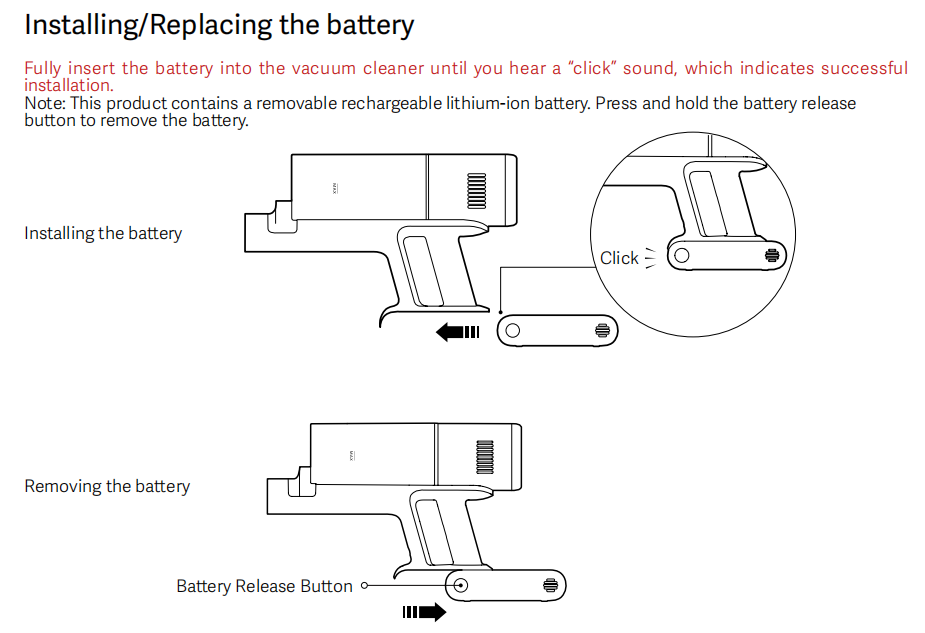
A: Yes, the battery of the Mijia Vacuum Cleaner 4 is removable and replaceable. To replace it, please press the battery release button located at the base of the handle, slide the old battery out, and slide a new original battery in along the guide rail until it clicks securely.
Please use genuine Xiaomi batteries to ensure compatibility and safety.
Note:
This product contains a removable rechargeable lithium-ion battery. Press and hold the battery release button to remove the battery.
Q11: Why does the screen on the Mijia Vacuum Cleaner 4 turn off after charging?
A: The screen on the Mijia Vacuum Cleaner 4 turns off after charging because the vacuum features overcharge protection. Once the battery is fully charged, the indicators turn off after a short period to conserve energy. This is normal behaviour.
Q12: What to do if the Mijia Vacuum Cleaner 4 takes a long time to charge?
A: The battery of the Mijia Vacuum Cleaner 4 has undergone rigorous quality testing, ensuring reliable longevity under normal use. If you experience issues such as an inability to charge due to a device defect, or if the device seems to take a long time to charge without ever reaching full capacity, please refer to the following potential causes and solutions:
1. If the ambient temperature is too high or too low, the battery's protection mechanism may slow down or halt charging; please charge the vacuum cleaner in a standard room-temperature environment.
2. Using a non-original adapter can cause charging issues; please switch to the original adapter.
3. The charging port may be dirty or loose; please clean the port and ensure the charging cable is securely plugged in before trying again. Use a dry cloth or tissue to wipe away dirt—do not use sharp tools.
4. Check if the filter element, filter foam, and dust cup are heavily soiled. The device will automatically stop working if the clogging protection feature is triggered; simply clean these components and restart the device to resume normal operation.
Q13: What to do if the battery life of the Mijia Vacuum Cleaner 4 is shorter than expected?
A: The battery of the Mijia Vacuum Cleaner 4 has undergone rigorous quality testing, ensuring reliable battery life under normal use; there will be no significant discrepancy between actual runtime and the advertised duration due to product quality issues. If the runtime seems short, consider the following possible causes and solutions:
1. The vacuum offers different runtimes depending on the configuration and power mode. Please check the selected mode; Turbo mode provides the most powerful cleaning performance but results in a shorter runtime.
2. Without attachments, the runtime in Turbo mode is shorter than in ECO mode. Attaching the motorized brush will also reduce runtime; please select the appropriate mode and attachments based on your cleaning needs.
3. The unit may have been used before being fully charged. The vacuum requires approximately 4 hours to charge; please ensure it is charged for the full duration.
4. Check the brush head and extension rod for debris or blockages, and inspect the filter cartridge and filter foam for dirt buildup or clogging. Clean them promptly; if the filter components are heavily soiled, rinse them with clean water and allow them to dry completely.
Q14: What to do if the screen does not light up when charging the Mijia Vacuum Cleaner 4?
A: If the screen does not light up when charging the Mijia Vacuum Cleaner 4, please check that the adapter is securely plugged in and the power outlet is live; unplug and replug the adapter, then observe whether the indicator light turns on. Please ensure you are using the original adapter. If these steps do not resolve the issue, please contact after-sales support.
Q15: Should I charge the Mijia Vacuum Cleaner 4 if it is not used for a long time?
A: Yes, even when the Mijia Vacuum Cleaner 4 is not used, the battery will slowly lose charge over time. We recommend charging the vacuum fully, unplugging the adapter, and storing it in a cool, dry place.
To prevent the battery from over‑discharging, you should recharge it at least once every three months.
Smart Control
Q1: Does the Mijia Vacuum Cleaner 4 support connection to the Xiaomi Home App?
A: No, the Mijia Vacuum Cleaner 4 does not support the Xiaomi Home App or any other smart‑control features. All operations are performed directly on the device using the physical buttons.
Q2: What do the error icons on the display of the Mijia Vacuum Cleaner 4 mean?
A: The display of the Mijia Vacuum Cleaner 4 may show fault icons to help you diagnose issues, and each icon indicates a specific problem.
1. If the air duct blockage icon appears, the air duct is blocked. Please check and clean the dust compartment, filter, pre‑filter, HEPA filter, extension rod, or brush head.
2. If the roller brush tangle icon appears, the roller brush is tangled with hair or fibres, and please check and clean the brush head.
3. If the filter or pre‑filter not installed icon appears, the pre‑filter or HEPA filter is not properly seated, and please check and reinstall it firmly.
4. If any of the error codes E0, E1, E2, E3, or E4 appear, this indicates a critical component failure – please stop using the vacuum and contact after‑sales service immediately.
Fault icon | Corresponding issue | Solution |
 | Air duct blockage | Check and clean the dust cup, filter, filter element, connecting rod, or brush head |
 | Brush roll entanglement | Check and clean the brush head |
 | The filter pad or filter cartridge is not properly installed | Inspect and install in place |
E0 / E1 / E2 / E3 / E4 | Critical component failure | For other issues, please contact the after-sales service |
Q3: Why does the display of the Mijia Vacuum Cleaner 4 show an error code?
A: The display of the Mijia Vacuum Cleaner 4 shows an error code such as E0, E1, E2, E3, or E4 to indicate a serious internal fault. This may be caused by exposure to liquid, moisture, or other severe conditions. Please confirm whether there has been any exposure to water or liquid, or if any damp debris has been vacuumed up.
Please turn off the vacuum and unplug it. If the error persists after a reset, please contact Xiaomi after‑sales service for a professional diagnosis.
Q4: How does the dirt sensor on the Mijia Vacuum Cleaner 4 work?
A: The dirt sensors are located on both sides of the Mijia Vacuum Cleaner 4's air duct. They operate on the principle that when the vacuum inhales dust or other particulate matter, the particles pass through the light path, blocking or scattering some of the light and causing a change in light intensity at the receiver.
The circuitry converts this change into an electrical signal, allowing the vacuum's chip to determine the dust concentration level and automatically adjust the suction power accordingly.
Other Functions
Q1: Does the Mijia Vacuum Cleaner 4 have an electronic self‑locking mode?
A: No, the Mijia Vacuum Cleaner 4 does not have an electronic self‑locking or continuous‑run mode. You must press the power button to start operation and release it, or press it again to stop.
Q2: What to do if the Mijia Vacuum Cleaner 4 does not start?
A: If the Mijia Vacuum Cleaner 4 does not respond when you press the power button, please check the following possible causes and take the corresponding actions:
1. The battery may be low. Please charge it fully before use.
2. The vacuum may have started briefly and then stopped with a blockage or tangle icom. Please clean the dust compartment, filters, and brush heads before retrying.
3. The battery may be overheated, especially after prolonged Turbo use. Allow the vacuum to cool down before attempting to start again.
4. Incorrect startup procedures can also prevent the device from turning on. Please briefly press the power trigger to attempt startup; do not press the trigger rapidly in quick succession.
If none of these steps resolves the issue, please contact the local official after‑sales service center for further support.
Q3: Why does the Mijia Vacuum Cleaner 4 emit an odour from the exhaust?
A: The Mijia Vacuum Cleaner 4 may emit an odour from the exhaust for several reasons. Please check the following possible causes and take the corresponding actions:
1. If you notice a damp or musty smell, it usually means that the filter, pre‑filter, or HEPA filter has become damp or has developed mould. In this case, you should clean and dry them completely before reuse, and also empty the dust compartment and wipe it clean if any waste has decomposed inside.
2. If the odour is chemical or perfume‑like, it is likely because the vacuum has sucked in scented substances such as air fresheners or cleaning agents during operation. You should wash the filters and dust compartment thoroughly and allow them to dry completely, and you should never apply any scented products to the filters, as they may be flammable.
3. If you detect a burning smell, stop using the vacuum immediately and check that all filters are correctly installed. Improper installation can allow fine combustible debris such as hair and dust to enter the motor and become scorched during high‑speed operation. If the burning odour persists after checking the filters, please contact Xiaomi after‑sales service for inspection and assistance.
Note:
A slight plastic or rubber smell is normal when the vacuum is first used, as the injection‑moulded parts and the moisture‑proof paper inserts inside the packaging may naturally release a temporary odour that will dissipate after a short period of regular use.
Cleaning and Maintenance
Q1: What are the precautions for daily cleaning and maintenance of the Mijia Vacuum Cleaner 4?
A: During daily cleaning and maintenance of the Mijia Vacuum Cleaner 4, please follow several important guidelines to avoid damage and ensure safe operation:
Do not wash the main unit of the vacuum cleaner with water – only wipe it with a soft, dry cloth. After washing filter components, you must allow them to dry completely for at least 24 hours before reinstalling.
Do not submerge motor‑containing parts, such as the all‑flooring brush bar and mini electric brush, in water because they have built‑in motors. You should avoid using sharp tools to scrape the dust compartment or filters, as this may cause damage.
Replace the pre‑filter every 3 to 6 months, and the HEPA filter every 6 to 12 months, depending on usage.
For long‑term storage, charge the battery fully, unplug the adapter, and store the vacuum in a cool, dry location, recharging the battery every 3 months to maintain its health.
Q2: How to clean the main unit of the Mijia Vacuum Cleaner 4?
A: To clean the main unit of the Mijia Vacuum Cleaner 4, simply wipe its surface – including the handle, buttons, and display – with a soft, dry cloth. Do not use water or wet cloths near the air inlet or outlet. Always turn off and unplug the vacuum before cleaning.
Q3: How to empty the dust compartment of the Mijia Vacuum Cleaner 4?
A: To empty the dust compartment of the Mijia Vacuum Cleaner 4, press the release button to remove the assembly, take out the filter, and empty the contents over a trash bin.
For a deeper clean, the dust cup can be rinsed, but again, ensure it is thoroughly dried before reinstallation.
Q4: How to clean the dust compartment of the Mijia Vacuum Cleaner 4?
A: To clean the dust compartment of the Mijia Vacuum Cleaner 4, you can use a dry cloth or paper towel to wipe out any debris stuck inside. The dust cup can be rinsed with water, but it must be completely dry before reassembly.
Avoid using sharp tools to scrape the interior, as this may damage the surface.
Q5: How to clean the filter of the Mijia Vacuum Cleaner 4?
A: To clean the filter of the Mijia Vacuum Cleaner 4, please first remove the dust compartment, twist the filter assembly counter‑clockwise to detach it, take out the pre‑filter from the filter assembly, and remove the HEPA filter from inside the main unit.
Rinse all these parts under running water without soaking them. Gently tap to dislodge stubborn dirt. Allow all parts to dry completely in a well‑ventilated area for at least 24 hours before reinstalling.
Note:
The filter and filter cotton should only be rinsed; do not soak or scrub them.
Q6: How to reassemble the filter components after cleaning the Mijia Vacuum Cleaner 4?
A: To reassemble the filter components after cleaning the Mijia Vacuum Cleaner 4, once all parts are dry, you should insert the pre‑filter into the filter assembly and press it down firmly.
Place the assembly back into the dust compartment and align the slots. Turn it clockwise until it locks securely. Insert the HEPA filter back into the main unit, then attach the complete dust compartment assembly to the main unit until you hear a click confirming it is in place.
Q7: How to clean the All-flooring Dust-revealing Brush Bar of the Mijia Vacuum Cleaner 4?
A: To clean the All-flooring Dust-revealing Brush Bar of the Mijia Vacuum Cleaner 4, please remove the roller brush from the floor brush head. Place the floor brush upside down, press the roller brush release button to unlock the latch, and remove the roller brush.
Please note the following when cleaning:
1. To clean the brush roll, use scissors to cut away any tangled hair and remove it; if the brush roll is heavily soiled, it can be rinsed with water, but it must be placed upright to air-dry for at least 24 hours.
2. Clean the small wheels on the floor brush, remove them, and clear away any hair or debris from the wheels and axles.
3. Clean the housing only by wiping it with a dry cloth or paper towel, focusing on the light area, the interior of the suction inlet, and the exterior of the casing; do not rinse or submerge it in water, as the floor brush contains a built-in motor that could be damaged by water ingress.
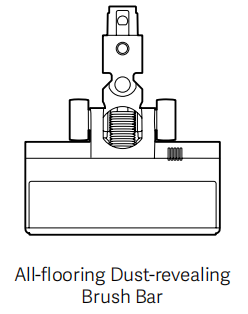
If you still have questions, please refer to the detailed diagrams in the manual or scan the QR code on the unit.
Q8: How to clean the Mini Electric Brush of the Mijia Vacuum Cleaner 4?
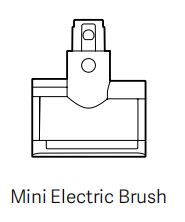
A: To clean the Mini Electric Brush of the Mijia Vacuum Cleaner 4, please remove the roller brush from the unit by opening the cover (press the "PUSH" button) and clear away any hair. The roller brush is washable and can be air-dried. Wipe the housing with a dry cloth.
Do not wash the Mini Electric Brush unit itself with water.
Q9: How to clean the dust sensor of the Mijia Vacuum Cleaner 4?
A: To clean the dust sensor of the Mijia Vacuum Cleaner 4, use a wrung‑out, damp cloth or a wet wipe placed on a suitable tool to gently wipe the dust sensor surfaces on both sides of the air inlet.
Regular cleaning of the sensor ensures accurate dust detection and consistent Smart‑mode performance.
Q10: How to clean the 2‑in‑1 crevice brush assembly of the Mijia Vacuum Cleaner 4?
A: To clean the 2‑in‑1 crevice brush assembly of the Mijia Vacuum Cleaner 4, do not clean the brush while it is attached to the main unit. Remove accumulated dust and hair from the brush using your hands or a small comb; if it is heavily soiled, the brush section may be rinsed with water—shake off excess moisture and allow it to air-dry completely.
The entire unit may be lightly washed with water but must be thoroughly dried before use; do not use hot water or corrosive cleaning agents.
Q11: Which parts of the Mijia Vacuum Cleaner 4 can be washed with water?
A: The filter, pre‑filter, HEPA filter, roller brush, and 2‑in‑1 crevice brush of the Mijia Vacuum Cleaner 4 can be rinsed with water.
For other components, clean with a dry cloth or wipe with a damp cloth and dry immediately. Do not wash any parts containing motors—such as the floor brush and the main unit—with water.
Do not rinse the dust cup with water. Please note that "washing" here refers to rinsing; do not soak the parts in water for extended periods, and do not use chemical agents such as cleaning solutions.
Q12: Can I use cleaning agents or disinfectants for daily cleaning of the Mijia Vacuum Cleaner 4?
A: No, please do not use any cleaning agents, disinfectants, or detergents for cleaning the Mijia Vacuum Cleaner 4 or its components. These products may contain chemicals that could damage the materials, reduce filtration efficiency, or leave residues that affect performance.
For routine maintenance, simply use water for rinsing and a dry or slightly damp cloth for wiping surfaces.
Does it help?
Yes
No